Interaction Systems
This page documents systems for user interaction with 3D scenes in Three.js, including raycasting for object picking and skeletal animation for character rigs. These systems enable applications to respond to user input and create dynamic, animated content.
For information about the scene graph, see Scene Graph & Object3D. For math primitives, see Math Primitives. For animation systems, see Skeletal Animation & Skinning.
Overview
Interaction systems in Three.js enable two primary forms of user engagement with 3D content:
Interaction System Architecture:

| System | Purpose | Key Classes |
|---|---|---|
| Raycasting | Cast rays to find intersections with 3D objects for picking, collision detection | Raycaster, Ray |
| Skeletal Animation | Animate meshes with hierarchical bone structures for character rigs | SkinnedMesh, Skeleton, Bone |
Controls Base Class
The Controls class in src/extras/Controls.js provides the foundation for all control implementations. It extends EventDispatcher and defines the common interface and lifecycle management.
Class Structure

Constructor signature:
constructor(object, domElement = null)Key properties:
| Property | Type | Purpose | Default |
|---|---|---|---|
object | Object3D | The camera or object being controlled | Required parameter |
keys | Object | Keyboard key mappings | {} |
| mouseButtons | Object | Mouse button action mappings | {LEFT: null, MIDDLE: null, RIGHT: null} |
| touches | Object | Touch gesture mappings | {ONE: null, TWO: null} | | state | number | Current interaction state | -1 | | domElement | HTMLElement | Element for event listeners | null | | enabled | boolean | Whether controls respond to input | true |
Lifecycle Methods
The base class provides connection lifecycle management:
connect(element)
Attaches event listeners to the DOM element. Implementations override this to register specific event handlers:
connect(element) {
  super.connect(element); // Store domElement reference

  // Add implementation-specific listeners
  this.domElement.addEventListener('pointerdown', this._onPointerDown);
  this.domElement.addEventListener('wheel', this._onMouseWheel);
  // etc.
}disconnect()
Removes event listeners. Must be implemented by subclasses to clean up their specific listeners:
disconnect() {
  // Remove all event listeners
  this.domElement.removeEventListener('pointerdown', this._onPointerDown);
  // etc.
}dispose()
Complete cleanup, typically calls disconnect():
dispose() {
  this.disconnect();
}Event Handling Pattern
Controls dispatch three standard events through the EventDispatcher interface:
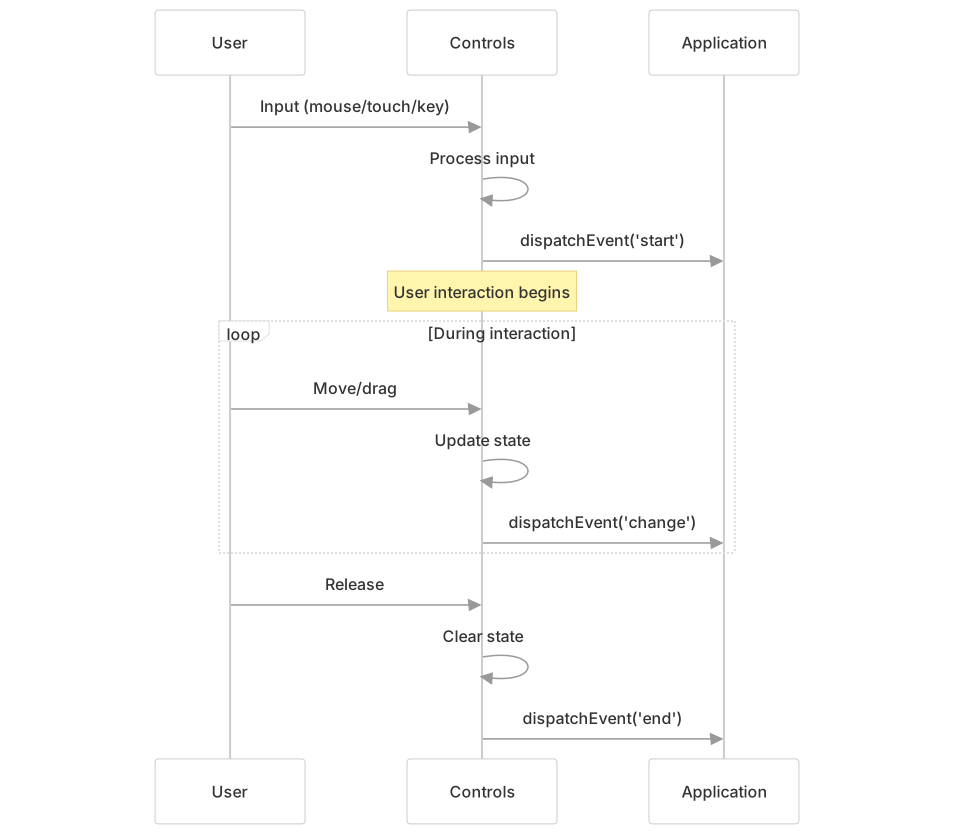
Standard events:
| Event | When Dispatched | Common Use |
|---|---|---|
| change | Camera/object has been transformed | Trigger re-render |
| start | User interaction begins | Disable auto-features |
| end | User interaction ends | Re-enable auto-features |
Example usage pattern:
// Defined as constants in implementations
const _changeEvent = { type: 'change' };
const _startEvent = { type: 'start' };
const _endEvent = { type: 'end' };

// Dispatched during interaction
this.dispatchEvent(_changeEvent);examples/jsm/controls/OrbitControls.js20-36
State Management Pattern
Controls use a numeric state property to track the current interaction mode. Each implementation defines its own state constants:
OrbitControls states:
const _STATE = {
  NONE: -1,
  ROTATE: 0,
  DOLLY: 1,
  PAN: 2,
  TOUCH_ROTATE: 3,
  TOUCH_PAN: 4,
  TOUCH_DOLLY_PAN: 5,
  TOUCH_DOLLY_ROTATE: 6
};examples/jsm/controls/OrbitControls.js45-54
TransformControls states:
const STATE = {
  NONE: -1,
  PAN: 0,
  ROTATE: 1
};examples/jsm/controls/DragControls.js28-32
State transitions occur based on input events:

Input Configuration
The base class provides properties for configuring input mappings, which implementations use to determine actions:
Mouse Button Mapping
Uses MOUSE constants from three:
import { MOUSE } from 'three';

// Default OrbitControls mapping
this.mouseButtons = {
  LEFT: MOUSE.ROTATE,    // Value: 0
  MIDDLE: MOUSE.DOLLY,   // Value: 1
  RIGHT: MOUSE.PAN       // Value: 2
};examples/jsm/controls/OrbitControls.js358
Touch Gesture Mapping
Uses TOUCH constants:
import { TOUCH } from 'three';

// Default OrbitControls mapping
this.touches = {
  ONE: TOUCH.ROTATE,      // Single finger
  TWO: TOUCH.DOLLY_PAN    // Two finger pinch/pan
};examples/jsm/controls/OrbitControls.js371
Keyboard Mapping
Implementations define key mappings as needed:
// OrbitControls keyboard panning
this.keys = {
  LEFT: 'ArrowLeft',
  UP: 'ArrowUp',
  RIGHT: 'ArrowRight',
  BOTTOM: 'ArrowDown'
};examples/jsm/controls/OrbitControls.js344
Camera Controls
Camera controls are implementations of the Controls base class that manipulate camera position and orientation. They share common patterns while providing different interaction models.
Common Camera Control Patterns
All camera controls follow these architectural patterns:

OrbitControls
OrbitControls maintains the camera orbiting around a target point while keeping the "up" direction constant (typically +Y). This is the most commonly used camera control.
Key properties:
| Property | Type | Purpose | Default |
|---|---|---|---|
| target | Vector3 | Focus point camera orbits around | (0,0,0) |
| minDistance/maxDistance | number | Distance constraints (perspective) | 0/Infinity |
| minPolarAngle/maxPolarAngle | number | Vertical orbit limits (radians) | 0/π |
| minAzimuthAngle/maxAzimuthAngle | number | Horizontal orbit limits | -∞/∞ |
| enableDamping | boolean | Inertial smoothing | false |
| dampingFactor | number | Damping strength | 0.05 |
| zoomSpeed | number | Zoom sensitivity | 1.0 |
| rotateSpeed | number | Rotation sensitivity | 1.0 |
| panSpeed | number | Pan sensitivity | 1.0 |
| autoRotate | boolean | Automatic rotation | false |
examples/jsm/controls/OrbitControls.js102-344
Interaction modes:

Update algorithm:
The update() method must be called each frame when damping or auto-rotation is enabled examples/jsm/controls/OrbitControls.js548-641:
- Apply auto-rotation if enabled
- Apply damping to spherical delta (if enabled)
- Update spherical coordinates from deltas
- Clamp polar and azimuth angles to limits
- Clamp target radius
- Convert spherical to Cartesian
- Apply quaternion transforms
- Update camera position and lookAt
Sources: examples/jsm/controls/OrbitControls.js88-641
TrackballControls
TrackballControls provides free-form rotation without maintaining an up vector. Unlike OrbitControls, it allows the camera to rotate in any direction including upside-down.
Key differences from OrbitControls:
- No up vector constraint - can rotate to any orientation
- Uses screen-space rotation calculations
- Different damping behavior
- Simpler state machine examples/jsm/controls/TrackballControls.js35
Properties:
| Property | Type | Purpose | Default |
|---|---|---|---|
| rotateSpeed | number | Rotation sensitivity | 1.0 |
| zoomSpeed | number | Zoom sensitivity | 1.2 |
| panSpeed | number | Pan sensitivity | 0.3 |
| noRotate | boolean | Disable rotation | false |
| noZoom | boolean | Disable zoom | false |
| noPan | boolean | Disable pan | false |
| staticMoving | boolean | No damping | false |
| dynamicDampingFactor | number | Damping strength | 0.2 |
examples/jsm/controls/TrackballControls.js48-120
Coordinate System Representations
Camera controls use different coordinate representations optimized for their interaction models:
Spherical Coordinates (OrbitControls)
OrbitControls uses Spherical coordinates to maintain orbit behavior:
import { Spherical } from 'three';

// Internal state
this._spherical = new Spherical();        // Current position
this._sphericalDelta = new Spherical(); // Accumulated changesexamples/jsm/controls/OrbitControls.js408-409
The Spherical class stores position as (radius, phi, theta):
radius- distance from targetphi- vertical angle from Y-axis (polar angle)theta- horizontal angle around Y-axis (azimuthal angle)
Update algorithm converts between Cartesian and spherical:
// Cartesian to spherical
_spherical.setFromVector3(offsetVector);

// Apply constraints
_spherical.phi = clamp(phi, minPolarAngle, maxPolarAngle);
_spherical.theta = clamp(theta, minAzimuthAngle, maxAzimuthAngle);

// Spherical to Cartesian
position.setFromSpherical(_spherical);examples/jsm/controls/OrbitControls.js597-690
Quaternion-Based (TrackballControls, FlyControls)
Other controls use quaternions for free rotation without gimbal lock:
import { Quaternion } from 'three';

// TrackballControls rotation
_quaternion.setFromAxisAngle(axis, angle);
this.object.up.applyQuaternion(_quaternion);examples/jsm/controls/TrackballControls.js449-490
Object Manipulation Controls
Object manipulation controls enable direct transformation of scene objects through user input, providing gizmo-based interfaces similar to 3D modeling tools.
Raycasting Integration
Many controls use raycasting for object picking and interaction plane calculation:

TransformControls raycasting:
// Shared raycaster for all TransformControls instances
const _raycaster = new Raycaster();

// Pick gizmo on pointer down
_raycaster.setFromCamera(pointer, this.camera);
const intersect = intersectObjectWithRay(this._gizmo.picker[this.mode], _raycaster);
if (intersect) {
  this.axis = intersect.object.name; // X, Y, Z, XY, etc
}examples/jsm/controls/TransformControls.js24 examples/jsm/controls/TransformControls.js403-419
DragControls raycasting:
// Per-instance raycaster
this.raycaster = new Raycaster();

// Pick draggable objects
raycaster.setFromCamera(pointer, camera);
raycaster.intersectObjects(this.objects, this.recursive, intersections);examples/jsm/controls/DragControls.js108 examples/jsm/controls/DragControls.js240-283
Object Manipulation Controls
Object manipulation controls transform scene objects rather than the camera. They use the same Controls base class but manipulate object.position, object.quaternion, and object.scale directly.
TransformControls
TransformControls provides DCC-style gizmos for translate/rotate/scale operations:

Property-based configuration using defineProperty:
function defineProperty(propName, defaultValue) {
  let propValue = defaultValue;

  Object.defineProperty(scope, propName, {
    get: () => propValue,
    set: (value) => {
      if (propValue !== value) {
        propValue = value;
        plane[propName] = value;  // Pass to plane
        gizmo[propName] = value;  // Pass to gizmo
        scope.dispatchEvent({ type: propName + '-changed', value });
      }
    }
  });
}examples/jsm/controls/TransformControls.js103-136
This pattern ensures mode/axis/space changes propagate to all components and emit change events.
Transform modes and space:
| Property | Values | Purpose |
|---|---|---|
| mode | 'translate', 'rotate', 'scale' | Type of transformation |
| space | 'world', 'local' | Coordinate space (forced to 'local' for scale mode) |
| axis | 'X', 'Y', 'Z', 'XY', 'YZ', 'XZ', 'XYZ', 'E' | Active transform axis |
examples/jsm/controls/TransformControls.js142-206
Snapping configuration:
| Property | Type | Purpose |
|---|---|---|
| translationSnap | number | World units per snap |
| rotationSnap | number | Radians per snap |
| scaleSnap | number | Scale factor per snap |
examples/jsm/controls/TransformControls.js174-197
Interaction plane calculation:
When dragging, TransformControls calculates an interaction plane for precise movement:
// Set plane perpendicular to camera, at object position
_plane.setFromNormalAndCoplanarPoint(
  camera.getWorldDirection(_plane.normal),
  worldPosition
);

// Intersect pointer ray with plane
_raycaster.ray.intersectPlane(_plane, pointEnd);

// Calculate offset and apply to object
const offset = pointEnd.sub(pointStart);
object.position.add(offset);examples/jsm/controls/TransformControls.js423-509
DragControls
DragControls enables dragging objects in the scene by clicking and moving the mouse. Objects move parallel to the camera's view plane.
Constructor:
const dragControls = new DragControls(
  objects,      // Array of draggable objects
  camera,       // Camera for raycasting
  domElement    // DOM element for events
);examples/jsm/controls/DragControls.js70-80
Interaction algorithm:
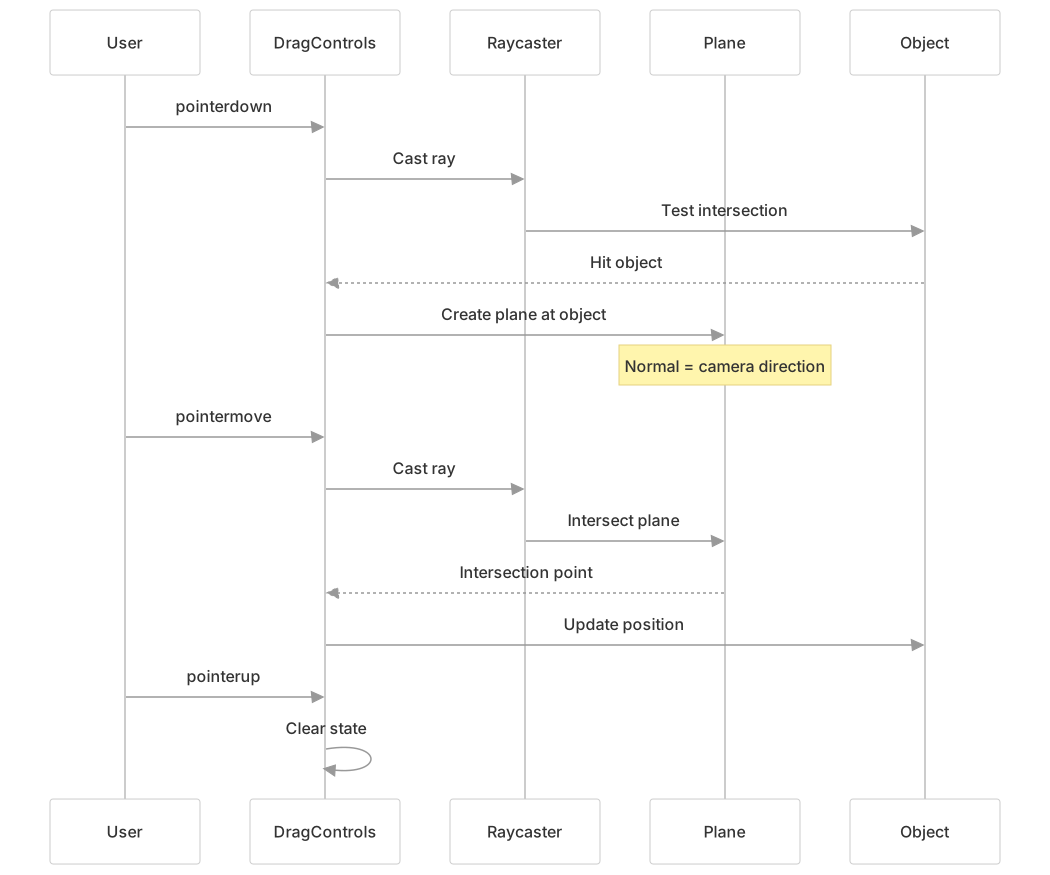
Key features:
- Uses
Raycasterfor object picking examples/jsm/controls/DragControls.js93-100 - Creates a
Planeperpendicular to camera for drag surface examples/jsm/controls/DragControls.js140-150 - Emits events:
dragstart,drag,dragend,hoveron,hoveroff - Can enable/disable individual object dragging via
object.userData
Events:
dragControls.addEventListener('dragstart', (event) => {
  event.object; // The dragged object
});

dragControls.addEventListener('drag', (event) => {
  event.object; // The dragged object
});

dragControls.addEventListener('dragend', (event) => {
  event.object; // The dragged object
});examples/jsm/controls/DragControls.js15-40
DragControls State Machine
DragControls uses a simpler state machine for pan and rotate operations:

Drag interaction:
// On pointer down - raycast to find object
raycaster.intersectObjects(this.objects, this.recursive, intersections);
if (intersections.length > 0) {
  _selected = intersections[0].object;

  // Create plane at object, perpendicular to camera
  _plane.setFromNormalAndCoplanarPoint(
    camera.getWorldDirection(_plane.normal),
    _worldPosition.setFromMatrixPosition(_selected.matrixWorld)
  );
}

// On pointer move - intersect plane and move object
raycaster.ray.intersectPlane(_plane, _intersection);
_selected.position.copy(_intersection.sub(_offset));examples/jsm/controls/DragControls.js239-325
Integration Patterns
Multi-Control Coordination
Controls often need to be used together. Common patterns for coordination:
Disabling conflicting controls
// TransformControls should disable OrbitControls during drag
transformControls.addEventListener('dragging-changed', (event) => {
  orbitControls.enabled = !event.value;
});examples/misc_controls_transform.html81-85
Keyboard mode switching
window.addEventListener('keydown', (event) => {
  switch (event.key) {
    case 'w': transformControls.setMode('translate'); break;
    case 'e': transformControls.setMode('rotate'); break;
    case 'r': transformControls.setMode('scale'); break;
    case 'q':
      const newSpace = transformControls.space === 'local' ? 'world' : 'local';
      transformControls.setSpace(newSpace);
      break;
  }
});examples/misc_controls_transform.html97-103
Helper visibility management
// Add TransformControls helper to scene
const helper = transformControls.getHelper();
scene.add(helper);

// Helper visibility is controlled by attach/detach
transformControls.attach(selectedObject);  // Shows helper
transformControls.detach(); // Hides helperexamples/misc_controls_transform.html90-93
Math Primitive Dependencies
Controls rely on math primitives from src/math/:

Key usage patterns:
| Control | Math Primitive | Usage |
|---|---|---|
| OrbitControls | Spherical | Camera position in polar coordinates examples/jsm/controls/OrbitControls.js408 |
| OrbitControls | Quaternion | Transform between camera-up and world-up examples/jsm/controls/OrbitControls.js404-405 |
| TransformControls | Plane | Interaction surface for dragging examples/jsm/controls/TransformControls.js96 |
| TransformControls | Raycaster | Gizmo handle picking examples/jsm/controls/TransformControls.js24 |
| DragControls | Plane | Drag surface parallel to camera examples/jsm/controls/DragControls.js12 |
| All controls | Vector2 | Pointer position tracking examples/jsm/controls/OrbitControls.js414-424 |
| All controls | Vector3 | 3D positions and offsets examples/jsm/controls/OrbitControls.js108 |
Common Usage Patterns
Mouse Picking with Raycaster
const raycaster = new Raycaster();
const mouse = new Vector2();

function onMouseClick(event) {
  // Convert screen to NDC (-1 to +1)
  mouse.x = (event.clientX / window.innerWidth) * 2 - 1;
  mouse.y = -(event.clientY / window.innerHeight) * 2 + 1;

  // Update raycaster
  raycaster.setFromCamera(mouse, camera);

  // Test intersections
  const intersects = raycaster.intersectObjects(scene.children, true);

  if (intersects.length > 0) {
    const picked = intersects[0];
    console.log('Hit:', picked.object);
    console.log('Point:', picked.point);
    console.log('Distance:', picked.distance);
  }
}OrbitControls Setup
const controls = new OrbitControls(camera, renderer.domElement);

// Configure behavior
controls.enableDamping = true;
controls.dampingFactor = 0.05;
controls.minDistance = 5;
controls.maxDistance = 100;
controls.maxPolarAngle = Math.PI / 2;

// In animation loop
function animate() {
  controls.update(); // Required when damping enabled
  renderer.render(scene, camera);
}TransformControls Integration
const transformControls = new TransformControls(camera, renderer.domElement);
scene.add(transformControls);

// Attach to object
transformControls.attach(selectedObject);

// Disable orbit controls during transformation
transformControls.addEventListener('dragging-changed', (event) => {
  orbitControls.enabled = !event.value;
});

// Keyboard shortcuts
window.addEventListener('keydown', (event) => {
  switch (event.key) {
    case 'w': transformControls.setMode('translate'); break;
    case 'e': transformControls.setMode('rotate'); break;
    case 'r': transformControls.setMode('scale'); break;
  }
});