Shapefile Support
shapefile 模块提供对 ESRI Shapefile 格式的全面支持,这是最广泛使用的地理空间矢量数据格式之一。本文档解释了 shapefile 模块在 GeoTools 中的工作原理,包括其组件、使用模式和高级功能。
Shapefile 格式概述
shapefile 实际上是一组文件的集合,它们共同存储几何图形和属性数据。每个 shapefile 至少由三个强制性文件组成,这些文件具有相同的基本名称但扩展名不同:
| 扩展名 | 描述 | 必需 |
|---|---|---|
| .shp | 包含几何数据 | 是 |
| .shx | 包含几何位置信息的索引文件 | 是 |
| .dbf | 包含属性数据的 dBASE 文件 | 是 |
| .prj | 以 WKT 格式的投影定义文件 | 否(推荐) |
| .qix | 用于更快查询的可选空间索引 | 否 |
| .fix | 可选的要素 ID 索引 | 否 |
| .cpg | 可选的字符编码信息 | 否 |

核心架构
shapefile 模块围绕几个关键类构建,这些类协同工作以提供对 shapefile 数据的访问:

主要组件
ShapefileDataStore: 提供对 shapefile 数据访问的中心类。它是专门为 shapefile 实现的 GeoTools DataStore 接口。
ShapefileDataStoreFactory: 从参数创建 ShapefileDataStore 实例。
ShpFiles: 管理对构成 shapefile 的各种文件的访问。
ShapefileSetManager: 处理打开各种文件读取器/写入器。
IndexManager: 管理空间和要素 ID 索引。
ShapefileFeatureSource: 提供对 shapefile 中要素的读取访问。
ShapefileFeatureStore: 提供对 shapefile 中要素的读写访问。
ShapefileFeatureReader: 从 shapefile 读取要素。
ShapefileFeatureWriter: 向 shapefile 写入要素。
读取 Shapefiles
从 shapefiles 读取涉及几个组件协同工作以提取几何图形和属性数据:
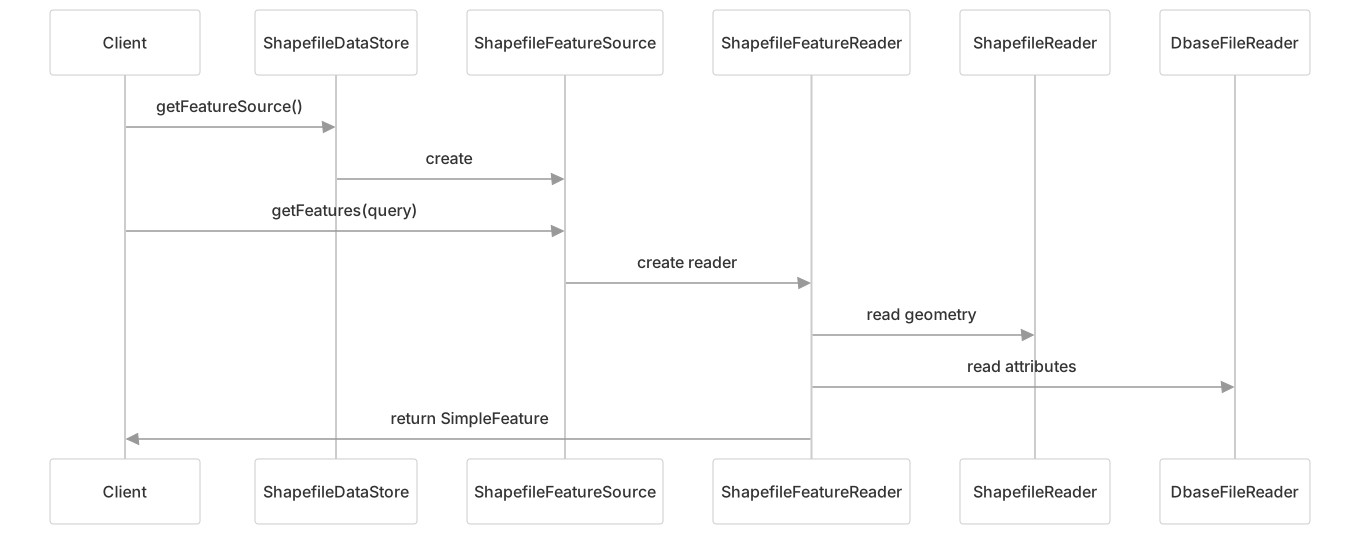
读取过程协调几种文件类型:
.shp文件提供几何数据.shx文件索引几何记录.dbf文件提供属性数据.prj文件(如果存在)提供坐标参考系统
示例代码
// 创建 ShapefileDataStore
File file = new File("states.shp");
Map<String, Object> params = new HashMap<>();
params.put(ShapefileDataStoreFactory.URLP.key, file.toURI().toURL());
ShapefileDataStore dataStore = (ShapefileDataStore) new ShapefileDataStoreFactory().createDataStore(params);

// 获取要素源和要素
String typeName = dataStore.getTypeNames()[0];
SimpleFeatureSource source = dataStore.getFeatureSource(typeName);
SimpleFeatureCollection features = source.getFeatures();

// 遍历要素
try (SimpleFeatureIterator iterator = features.features()) {
    while (iterator.hasNext()) {
        SimpleFeature feature = iterator.next();
        // 处理要素...
    }
}写入 Shapefiles
创建和写入 shapefiles 涉及一组类似的组件:
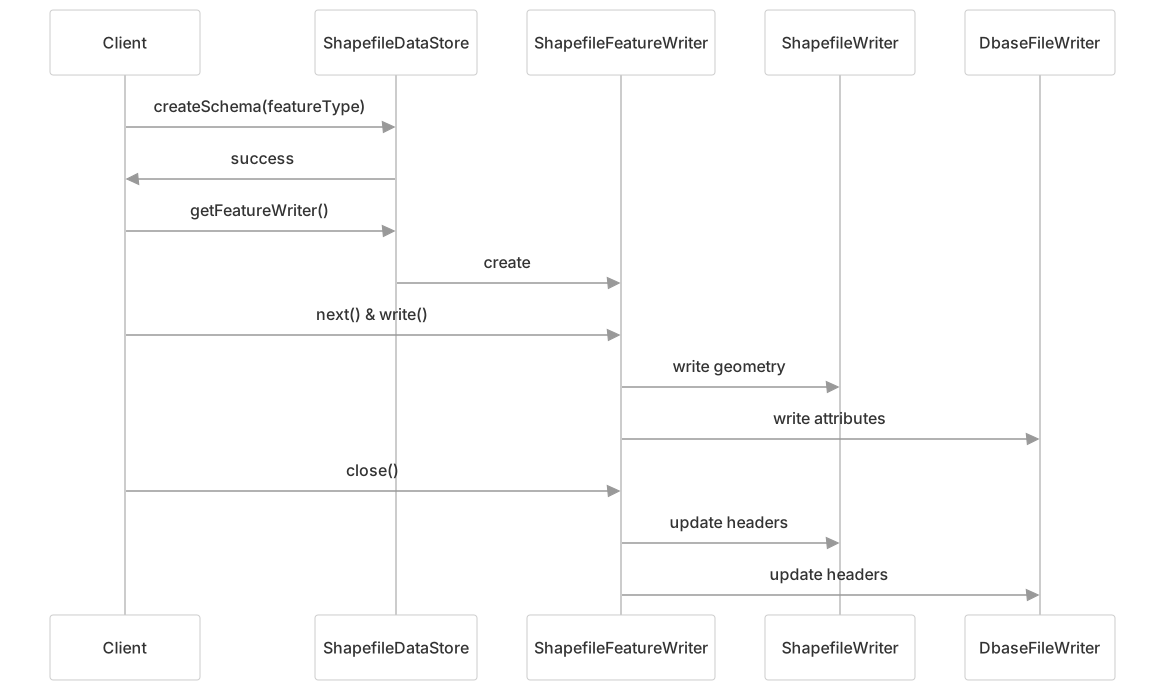
写入过程创建或更新几个文件:
.shp文件存储几何数据.shx文件存储几何记录的索引.dbf文件存储属性数据.prj文件存储坐标参考系统
示例代码
// 创建新的 shapefile
File file = new File("output.shp");
ShapefileDataStore store = new ShapefileDataStore(file.toURI().toURL());

// 定义要素类型
SimpleFeatureTypeBuilder builder = new SimpleFeatureTypeBuilder();
builder.setName("Location");
builder.setCRS(DefaultGeographicCRS.WGS84);
builder.add("the_geom", Point.class);
builder.add("name", String.class);
builder.add("count", Integer.class);
SimpleFeatureType featureType = builder.buildFeatureType();

// 创建模式(创建空 shapefile)
store.createSchema(featureType);

// 获取要素写入器
FeatureWriter<SimpleFeatureType, SimpleFeature> writer =
    store.getFeatureWriterAppend(store.getTypeNames()[0], Transaction.AUTO_COMMIT);

// 写入要素
SimpleFeature feature = writer.next();
feature.setAttribute("the_geom", point);
feature.setAttribute("name", "Test Point");
feature.setAttribute("count", 1);
writer.write();
writer.close();Shapefile 和 DBF 文件限制
shapefiles 具有模块解决的固有限制:
文件大小限制:
- SHP 文件:限制为 2GB(由于 32 位偏移量)
- DBF 文件:限制为 4GB(尽管许多系统只能处理 2GB)
字段名限制:
- DBF 中限制为 10 个字符
- 重复名称通过附加数字处理
属性类型限制:
- 仅支持基本类型:String、Number、Date、Boolean
- 字符串字段限制为 254 个字符
几何类型限制:
- shapefile 只能包含一种类型的几何图形
- 多几何图形支持因类型而异
ShapefileDumper
ShapefileDumper 工具通过将数据分割成多个文件来帮助克服 shapefile 限制:

主要功能:
- 通过创建单独的 shapefiles 来处理不同的几何类型
- 将大型数据集分割成具有顺序命名的多个文件
- 通过配置控制 shapefile 大小限制
- 为 DBF 文件设置字符编码
配置选项
模块提供几个配置选项:
编码支持
DBF 文件的字符编码:
// 创建数据存储时设置字符集
params.put(ShapefileDataStoreFactory.DBFCHARSET.key, Charset.forName("UTF-8"));

// 或创建后设置
shapefileDataStore.setCharset(Charset.forName("UTF-8"));

// 从 CPG 文件启用自动检测
shapefileDataStore.setTryCPGFile(true);索引
控制空间和要素 ID 索引:
// 创建数据存储时
params.put(ShapefileDataStoreFactory.CREATE_SPATIAL_INDEX.key, Boolean.TRUE);
params.put(ShapefileDataStoreFactory.ENABLE_SPATIAL_INDEX.key, Boolean.TRUE);

// 创建后
shapefileDataStore.setIndexed(true);          // 使用现有索引
shapefileDataStore.setIndexCreationEnabled(true);  // 如果缺少则创建
shapefileDataStore.setFidIndexed(true); // 使用 FID 索引内存映射
通过内存映射增强性能:
// 创建数据存储时
params.put(ShapefileDataStoreFactory.MEMORY_MAPPED.key, Boolean.TRUE);
params.put(ShapefileDataStoreFactory.CACHE_MEMORY_MAPS.key, Boolean.TRUE);

// 创建后
shapefileDataStore.setMemoryMapped(true);
shapefileDataStore.setBufferCachingEnabled(true);读取和写入过程流程
shapefile 模块协调跨多个文件的读取和写入:

技术细节
几何类型映射
Shapefile 和 JTS 几何类型映射:
| Shapefile 类型 | JTS 几何类型 |
|---|---|
| POINT | Point |
| MULTIPOINT | MultiPoint |
| ARC (POLYLINE) | LineString, MultiLineString |
| POLYGON | Polygon, MultiPolygon |
DBF 属性类型
支持的 DBF 属性类型及其映射:
| DBF 类型 | 描述 | Java 类型 |
|---|---|---|
| C | 字符 | String |
| N | 数字 | Integer、Long 或 Double |
| F | 浮点 | Double |
| L | 逻辑 | Boolean |
| D | 日期 | Date |
| @ | 时间戳 | Timestamp |
与 GeoTools 集成
shapefile 模块与更广泛的 GeoTools 生态系统集成:
- 实现 DataStore API 以一致地访问不同的数据源
- 使用 JTS(Java Topology Suite)进行几何表示
- 支持 GeoTools 的 CRS(坐标参考系统)框架
- 使用 GeoTools Filter API 进行筛选和查询
性能考虑
为了使用 shapefiles 获得最佳性能:
- 使用空间索引: 启用 QIX 索引以加快空间查询
- 使用 FID 索引: 启用 FIX 索引以加快要素 ID 查找
- 内存映射: 当有足够内存可用时,对大文件启用
- 缓冲区缓存: 缓存缓冲区以减少 I/O 操作
- 字符集处理: 仅在需要时指定非默认字符集