Shapefile Support
The shapefile module provides comprehensive support for the ESRI Shapefile format, one of the most widely used geospatial vector data formats. This document explains how the shapefile module works in GeoTools, including its components, usage patterns, and advanced features.
Shapefile Format Overview
A shapefile is actually a collection of files that together store geometric shapes and attribute data. Each shapefile consists of at least three mandatory files with the same basename but different extensions:
| Extension | Description | Required |
|---|---|---|
| .shp | Contains the geometry data | Yes |
| .shx | Index file with positional information for the geometry | Yes |
| .dbf | dBASE file containing attribute data | Yes |
| .prj | Projection definition file in WKT format | No (recommended) |
| .qix | Optional spatial index for faster queries | No |
| .fix | Optional feature ID index | No |
| .cpg | Optional character encoding information | No |

Core Architecture
The shapefile module is built around several key classes that work together to provide access to shapefile data:

Main Components
ShapefileDataStore: The central class that provides access to the shapefile data. It's an implementation of the GeoTools DataStore interface specifically for shapefiles.
ShapefileDataStoreFactory: Creates instances of ShapefileDataStore from parameters.
ShpFiles: Manages access to the various files that make up a shapefile.
ShapefileSetManager: Handles opening the various file readers/writers.
IndexManager: Manages the spatial and feature ID indexes.
ShapefileFeatureSource: Provides read access to features in the shapefile.
ShapefileFeatureStore: Provides read-write access to features in the shapefile.
ShapefileFeatureReader: Reads features from a shapefile.
ShapefileFeatureWriter: Writes features to a shapefile.
Reading Shapefiles
Reading from shapefiles involves several components working together to extract geometry and attribute data:
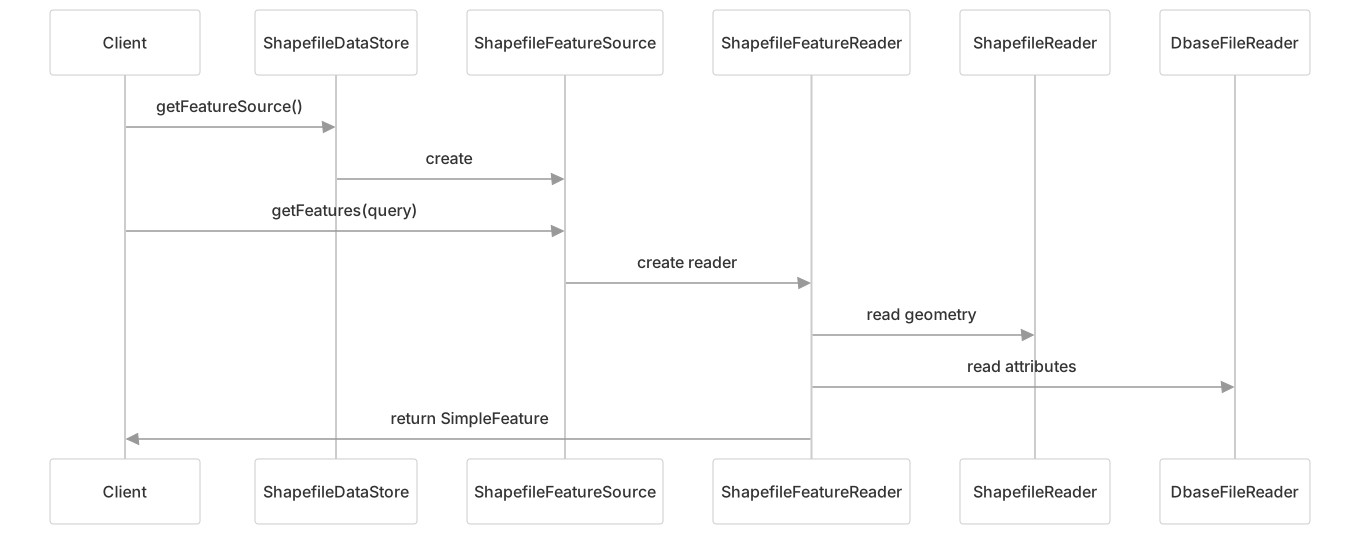
The read process coordinates several file types:
- The
.shpfile provides the geometry data - The
.shxfile indexes the geometry records - The
.dbffile provides attribute data - The
.prjfile (if present) provides the coordinate reference system
Sample Code
// Create a ShapefileDataStore
File file = new File("states.shp");
Map<String, Object> params = new HashMap<>();
params.put(ShapefileDataStoreFactory.URLP.key, file.toURI().toURL());
ShapefileDataStore dataStore = (ShapefileDataStore) new ShapefileDataStoreFactory().createDataStore(params);

// Get the feature source and features
String typeName = dataStore.getTypeNames()[0];
SimpleFeatureSource source = dataStore.getFeatureSource(typeName);
SimpleFeatureCollection features = source.getFeatures();

// Iterate through the features
try (SimpleFeatureIterator iterator = features.features()) {
    while (iterator.hasNext()) {
        SimpleFeature feature = iterator.next();
        // Process feature...
    }
}Writing Shapefiles
Creating and writing to shapefiles involves a similar set of components:
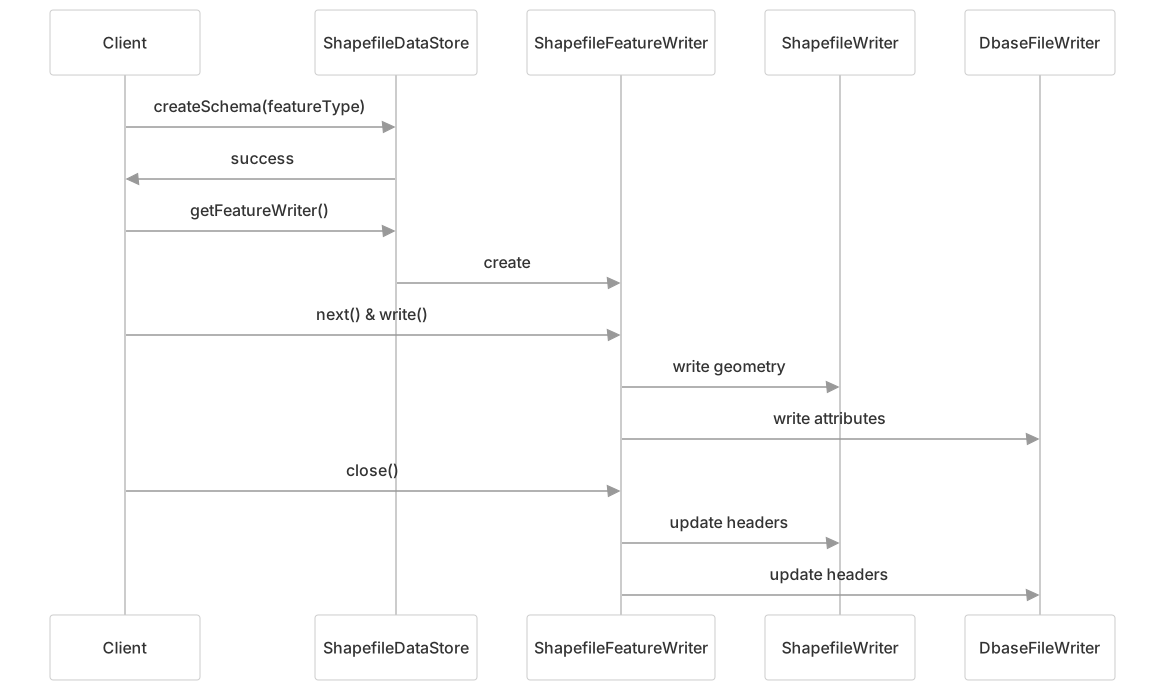
The write process creates or updates several files:
- The
.shpfile stores the geometry data - The
.shxfile stores the index to the geometry records - The
.dbffile stores the attribute data - The
.prjfile stores the coordinate reference system
Sample Code
// Creating a new shapefile
File file = new File("output.shp");
ShapefileDataStore store = new ShapefileDataStore(file.toURI().toURL());

// Define the feature type
SimpleFeatureTypeBuilder builder = new SimpleFeatureTypeBuilder();
builder.setName("Location");
builder.setCRS(DefaultGeographicCRS.WGS84);
builder.add("the_geom", Point.class);
builder.add("name", String.class);
builder.add("count", Integer.class);
SimpleFeatureType featureType = builder.buildFeatureType();

// Create the schema (creates the empty shapefile)
store.createSchema(featureType);

// Get a feature writer
FeatureWriter<SimpleFeatureType, SimpleFeature> writer =
    store.getFeatureWriterAppend(store.getTypeNames()[0], Transaction.AUTO_COMMIT);

// Write features
SimpleFeature feature = writer.next();
feature.setAttribute("the_geom", point);
feature.setAttribute("name", "Test Point");
feature.setAttribute("count", 1);
writer.write();
writer.close();Shapefile and DBF File Limitations
Shapefiles have inherent limitations that the module addresses:
File Size Limits:
- SHP files: Limited to 2GB (due to 32-bit offsets)
- DBF files: Limited to 4GB (though many systems can only handle 2GB)
Field Name Restrictions:
- Limited to 10 characters in DBF
- Duplicate names are handled by appending numbers
Attribute Type Restrictions:
- Only supports basic types: String, Number, Date, Boolean
- String fields limited to 254 characters
Geometry Type Restrictions:
- A shapefile can only contain one type of geometry
- Multi-geometry support varies by type
ShapefileDumper
The ShapefileDumper utility helps overcome shapefile limitations by splitting data into multiple files:

Key features:
- Handles different geometry types by creating separate shapefiles
- Splits large datasets into multiple files with sequential naming
- Controls shapefile size limits through configuration
- Sets character encoding for DBF files
Configuration Options
The module offers several configuration options:
Encoding Support
Character encoding for DBF files:
// Setting the charset when creating the datastore
params.put(ShapefileDataStoreFactory.DBFCHARSET.key, Charset.forName("UTF-8"));

// Or after creation
shapefileDataStore.setCharset(Charset.forName("UTF-8"));

// Enable automatic detection from CPG file
shapefileDataStore.setTryCPGFile(true);Indexing
Control spatial and feature ID indexing:
// When creating the datastore
params.put(ShapefileDataStoreFactory.CREATE_SPATIAL_INDEX.key, Boolean.TRUE);
params.put(ShapefileDataStoreFactory.ENABLE_SPATIAL_INDEX.key, Boolean.TRUE);

// After creation
shapefileDataStore.setIndexed(true);          // Use existing index
shapefileDataStore.setIndexCreationEnabled(true);  // Create if missing
shapefileDataStore.setFidIndexed(true); // Use FID indexingMemory Mapping
Enhance performance with memory mapping:
// When creating the datastore
params.put(ShapefileDataStoreFactory.MEMORY_MAPPED.key, Boolean.TRUE);
params.put(ShapefileDataStoreFactory.CACHE_MEMORY_MAPS.key, Boolean.TRUE);

// After creation
shapefileDataStore.setMemoryMapped(true);
shapefileDataStore.setBufferCachingEnabled(true);Reading and Writing Process Flow
The shapefile module coordinates reading and writing across multiple files:

Technical Details
Geometry Type Mapping
Shapefile and JTS geometry type mapping:
| Shapefile Type | JTS Geometry Types |
|---|---|
| POINT | Point |
| MULTIPOINT | MultiPoint |
| ARC (POLYLINE) | LineString, MultiLineString |
| POLYGON | Polygon, MultiPolygon |
DBF Attribute Types
Supported DBF attribute types and their mappings:
| DBF Type | Description | Java Type |
|---|---|---|
| C | Character | String |
| N | Numeric | Integer, Long, or Double |
| F | Float | Double |
| L | Logical | Boolean |
| D | Date | Date |
| @ | Timestamp | Timestamp |
Integration with GeoTools
The shapefile module integrates with the wider GeoTools ecosystem:
- Implements the DataStore API for consistent access to different data sources
- Uses JTS (Java Topology Suite) for geometry representation
- Supports GeoTools' CRS (Coordinate Reference System) framework
- Enables filtering and querying using GeoTools Filter API
Performance Considerations
For optimal performance with shapefiles:
- Use spatial indexing: Enable QIX indexing for faster spatial queries
- Use FID indexing: Enable FIX indexing for faster feature ID lookups
- Memory mapping: Enable for larger files when sufficient memory is available
- Buffer caching: Cache buffers to reduce I/O operations
- Charset handling: Only specify non-default character sets when needed