JDBC Data Stores
Relevant source files
Introduction
JDBC Data Stores provide a framework for accessing geospatial data stored in relational databases through the JDBC API. These data stores form a bridge between the GeoTools Feature API and various database systems, allowing applications to work with spatial data without needing to understand the specific SQL dialect or spatial extensions of each database.
This page covers the architecture and functionality of JDBC Data Stores in GeoTools, focusing on how they connect to databases, handle spatial data types, and provide feature-level access to database tables. For information about specific file formats, see Format Support.
Architecture
The JDBC Data Store architecture follows a modular design that enables connection to different database systems through a common API. The core components include:

The central class JDBCDataStore implements the DataStore interface for JDBC sources. It delegates database-specific operations to an appropriate SQLDialect implementation. Feature access is provided through JDBCFeatureSource (read-only) and JDBCFeatureStore (read-write) classes.
SQL Dialects
The SQL dialect system is a key abstraction that allows JDBC Data Stores to work with different database systems. Each dialect implementation handles the specific SQL syntax and capabilities of its target database, particularly for spatial operations.

Each dialect is responsible for:
- Translating geometry objects between the database and JTS
- Mapping SQL types to Java types
- Converting GeoTools filters to SQL WHERE clauses
- Handling database-specific spatial functions
Type Mapping
JDBC Data Stores provide a type mapping system that converts between SQL data types and Java objects. The SQL dialect determines how these mappings are handled, defining standard mappings and any database-specific types.
Standard type mappings defined in the base SQLDialect class include:
| SQL Type | Java Type |
|---|---|
| VARCHAR, CHAR, LONGVARCHAR | String |
| BIT, BOOLEAN | Boolean |
| SMALLINT, TINYINT | Short |
| INTEGER | Integer |
| BIGINT | Long |
| REAL | Float |
| DOUBLE, FLOAT | Double |
| DECIMAL, NUMERIC | BigDecimal |
| DATE | java.sql.Date |
| TIME | java.sql.Time |
| TIMESTAMP | java.sql.Timestamp |
| BLOB, BINARY | byte[] |
Each dialect can extend these mappings with database-specific types:
- PostGIS maps
geometryandgeographycolumns to JTS geometry types - Oracle maps
SDO_GEOMETRYcolumns to JTS geometry types - PostgreSQL/PostGIS supports JSON and JSONB column types
Feature Access
JDBC Data Stores provide a Feature-based API for accessing data in relational databases. The process flow for reading features typically includes:
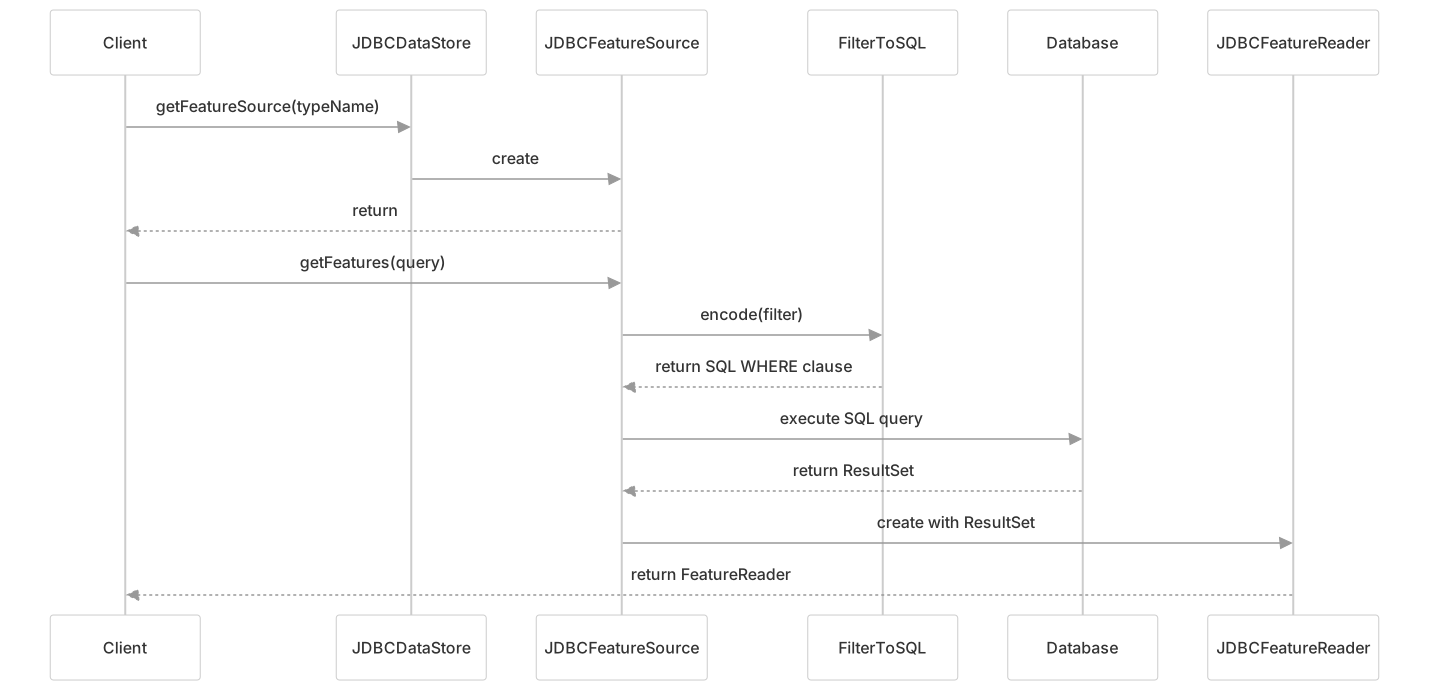
When writing features, the process uses JDBCFeatureStore methods like addFeatures(), modifyFeatures(), and removeFeatures().
Feature types (schemas) are built from database metadata, with geometry columns detected and configured with the appropriate coordinate reference system information from the database.
Filter Translation
One of the key capabilities of JDBC Data Stores is converting GeoTools filters into SQL WHERE clauses. This allows applications to use the standard GeoTools Filter API while taking advantage of database-specific indexing and optimization.
The filter translation process is handled by the FilterToSQL class and its database-specific subclasses. These classes implement the visitor pattern to convert different filter types into appropriate SQL syntax.

Supported filter types include:
- Comparison filters (equals, greater than, etc.)
- Logical filters (AND, OR, NOT)
- Spatial filters (BBOX, Intersects, Contains, etc.)
- Property existence filters (PropertyIsNull)
- String matching filters (PropertyIsLike)
- Temporal filters (Before, After, During)
For spatial filters, each dialect converts to the appropriate database-specific functions:
- PostGIS:
ST_Intersects,ST_Contains, etc. - Oracle:
SDO_RELATEwith the appropriate mask
Advanced Features
Primary Keys and Foreign Keys
JDBC Data Stores handle primary keys to enable feature identification and editing. Primary keys are detected automatically from database metadata or can be configured manually. The PrimaryKeyFinder interface provides strategies for identifying primary keys, with implementations for metadata and heuristic-based approaches.
By default, primary key columns are not exposed in the feature type, but this can be changed using the setExposePrimaryKeyColumns(true) method.
Virtual Tables
JDBC Data Stores support virtual tables, which are SQL views defined within the data store rather than in the database. Virtual tables allow for complex queries or joins to be encapsulated as a single feature type.
VirtualTable vt = new VirtualTable("view_name", "SELECT * FROM base_table WHERE condition");
dataStore.createVirtualTable(vt);Batch Operations
For better performance when inserting many features, JDBC Data Stores support batch operations. The batch size can be configured using the setBatchInsertSize(int) method.
Transactions
Transactions are handled through the GeoTools Transaction API, with JDBC transactions managing the database connections. This allows for atomic operations and isolation between different transaction contexts.
Aggregation Functions
Database-side aggregation is supported through the visitor pattern. Visitors like SumVisitor, CountVisitor, MaxVisitor, etc., are translated to SQL aggregate functions when possible:
| Visitor | SQL Function |
|---|---|
| CountVisitor | COUNT |
| SumVisitor | SUM |
| MinVisitor | MIN |
| MaxVisitor | MAX |
| AverageVisitor | AVG |
| StandardDeviationVisitor | STDDEV_POP |
| UniqueVisitor | DISTINCT |
Database-Specific Implementations
PostGIS
The PostGIS JDBC Data Store provides access to spatial data in PostgreSQL databases with the PostGIS extension. It supports:
- All standard PostGIS geometry types
- Curved geometries (CircularString, CompoundCurve)
- Geography type (geodetic coordinates)
- Spatial indexing with the PostgreSQL/PostGIS && operator
- JSON and JSONB column types
- Advanced PostGIS-specific functions
Oracle Spatial
The Oracle JDBC Data Store provides access to spatial data in Oracle databases using Oracle Spatial. It supports:
- Oracle SDO_GEOMETRY type
- Geodetic geometries (geodetic coordinate systems)
- Spatial indexing with SDO_FILTER and SDO_RELATE
- SDO_NN (nearest neighbor) queries
- JSON column types
Configuration
JDBC Data Stores are typically configured with a connection to a database and the appropriate dialect. The basic configuration parameters include:
| Parameter | Description |
|---|---|
| dataSource | JDBC DataSource for database connections |
| dialect | SQLDialect implementation for the database |
| databaseSchema | Schema name to restrict tables |
| fetchSize | Number of rows to fetch in each database query |
| exposePrimaryKeyColumns | Whether to include primary key columns in feature types |
Example configuration:
DataSource dataSource = DataSourceUtil.setupDataSource(
    "jdbc:postgresql://localhost/database", "org.postgresql.Driver",
    "username", "password");

JDBCDataStore dataStore = new JDBCDataStore();
dataStore.setDataSource(dataSource);
dataStore.setSQLDialect(new PostGISDialect(dataStore));
dataStore.setDatabaseSchema("public");
dataStore.setFetchSize(1000);Performance Considerations
Several configuration options affect JDBC Data Store performance:
Fetch Size: Controls how many rows are retrieved in each database round-trip. Default is 1000.
dataStore.setFetchSize(2000);Batch Insert Size: Controls how many features are inserted in a single batch operation. Default is 1.
dataStore.setBatchInsertSize(100);Connection Pooling: JDBC Data Stores benefit from connection pooling, typically provided by the DataSource implementation.
Spatial Indexes: Ensure database tables have appropriate spatial indexes for optimal performance with spatial queries.
Loose BBOX: Some dialects support a "loose BBOX" mode that uses just the spatial index for BBOX queries, improving performance.
((PostGISDialect)dataStore.getSQLDialect()).setLooseBBOXEnabled(true);
Creating Custom Dialects
To support a new database system, developers can create a custom SQL dialect by extending BasicSQLDialect or PreparedStatementSQLDialect. The key methods to implement include:
encodeGeometryColumn()- Encode geometry columns in SQLdecodeGeometryValue()- Convert database geometry to JTSencodeGeometryValue()- Convert JTS geometry to database formatregisterSqlTypeToClassMappings()- Define SQL to Java type mappingscreateFilterToSQL()- Create a customized filter-to-SQL converter
The dialect must also handle primary key detection and any database-specific spatial operations.
Testing JDBC Implementations
GeoTools provides a framework for testing JDBC Data Store implementations with both offline unit tests and online integration tests that connect to actual databases.
Online tests use fixture files in the user's ~/.geotools directory to specify connection parameters. These tests are skipped during normal builds but can be executed against specific databases for integration testing.
The test framework includes:
JDBCTestSetupfor configuring test databasesJDBCTestSupportas a base class for test casesOnlineTestCasefor managing database connections in tests
Summary
JDBC Data Stores provide a powerful and flexible way to access spatial data in relational databases. By abstracting database-specific details behind a common API, they allow GeoTools applications to work with different database systems using the same code. The dialect system enables support for database-specific spatial operations, while the type mapping system handles conversion between SQL and Java types.
This architecture makes JDBC Data Stores a fundamental component for GeoTools applications that need to access geospatial data stored in enterprise database systems like PostgreSQL/PostGIS, Oracle Spatial, and others.