GeoTIFF Support
GeoTIFF is a widely adopted format for storing georeferenced raster data that embeds geospatial metadata directly within a TIFF file. This page documents the GeoTools implementation for reading and writing GeoTIFF files, available through the gt-geotiff module.
Architecture Overview
The GeoTIFF implementation in GeoTools builds on the Java ImageIO library for basic TIFF handling, while adding support for geospatial metadata interpretation. The module is designed to integrate with the broader GeoTools coverage API.

Reading GeoTIFF Files
The GeoTiffReader class is responsible for reading GeoTIFF files and converting them into GridCoverage2D objects. The reader automatically interprets GeoTIFF metadata, including coordinate reference systems, transformation parameters, and NoData values.
Basic Usage
// Create a reader through the format factory
File file = new File("example.tif");
GeoTiffFormat format = new GeoTiffFormat();
GeoTiffReader reader = format.getReader(file);

// Read the coverage
GridCoverage2D coverage = reader.read(null);

// Always dispose the reader when done
reader.dispose();Reading Process
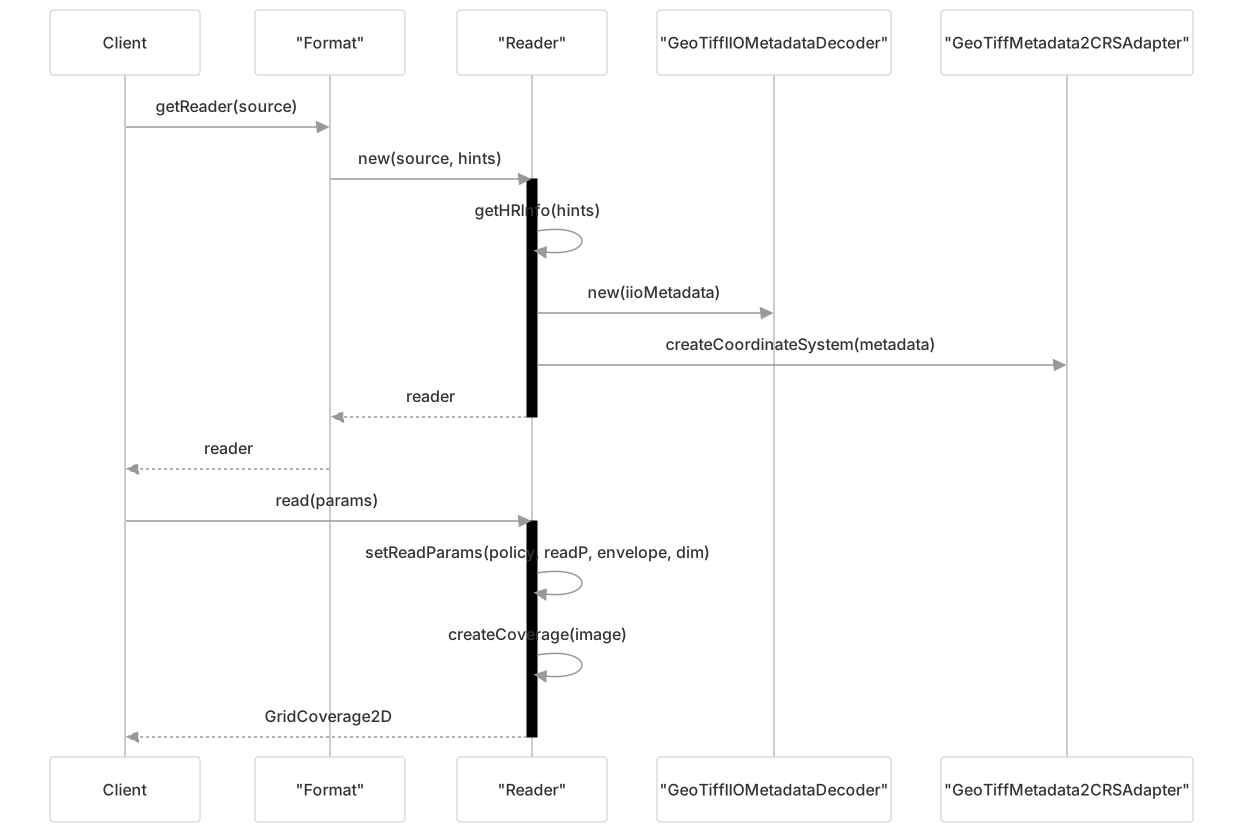
Reading Parameters
You can control the reading process by providing parameters:
// Define a subset of data to read (reduced resolution)
final ParameterValue<GridGeometry2D> gg = AbstractGridFormat.READ_GRIDGEOMETRY2D.createValue();
final GeneralBounds envelope = reader.getOriginalEnvelope();
final Dimension dim = new Dimension();
dim.setSize(reader.getOriginalGridRange().getSpan(0) / 4,
            reader.getOriginalGridRange().getSpan(1) / 4);
final Rectangle rasterArea = ((GridEnvelope2D) reader.getOriginalGridRange());
rasterArea.setSize(dim);
final GridEnvelope2D range = new GridEnvelope2D(rasterArea);
gg.setValue(new GridGeometry2D(range, envelope));

// Apply overview policy
final ParameterValue<OverviewPolicy> policy = AbstractGridFormat.OVERVIEW_POLICY.createValue();
policy.setValue(OverviewPolicy.NEAREST);

// Read with parameters
GridCoverage2D coverage = reader.read(new GeneralParameterValue[]{gg, policy});Writing GeoTIFF Files
The GeoTiffWriter class is responsible for writing GridCoverage2D objects to GeoTIFF files, preserving the coordinate reference system and other spatial metadata.
Basic Usage
// Create a writer through the format factory
File outputFile = new File("output.tif");
GeoTiffFormat format = new GeoTiffFormat();
GeoTiffWriter writer = format.getWriter(outputFile);

// Write the coverage
writer.write(coverage, null);

// Always dispose the writer when done
writer.dispose();Writing Process
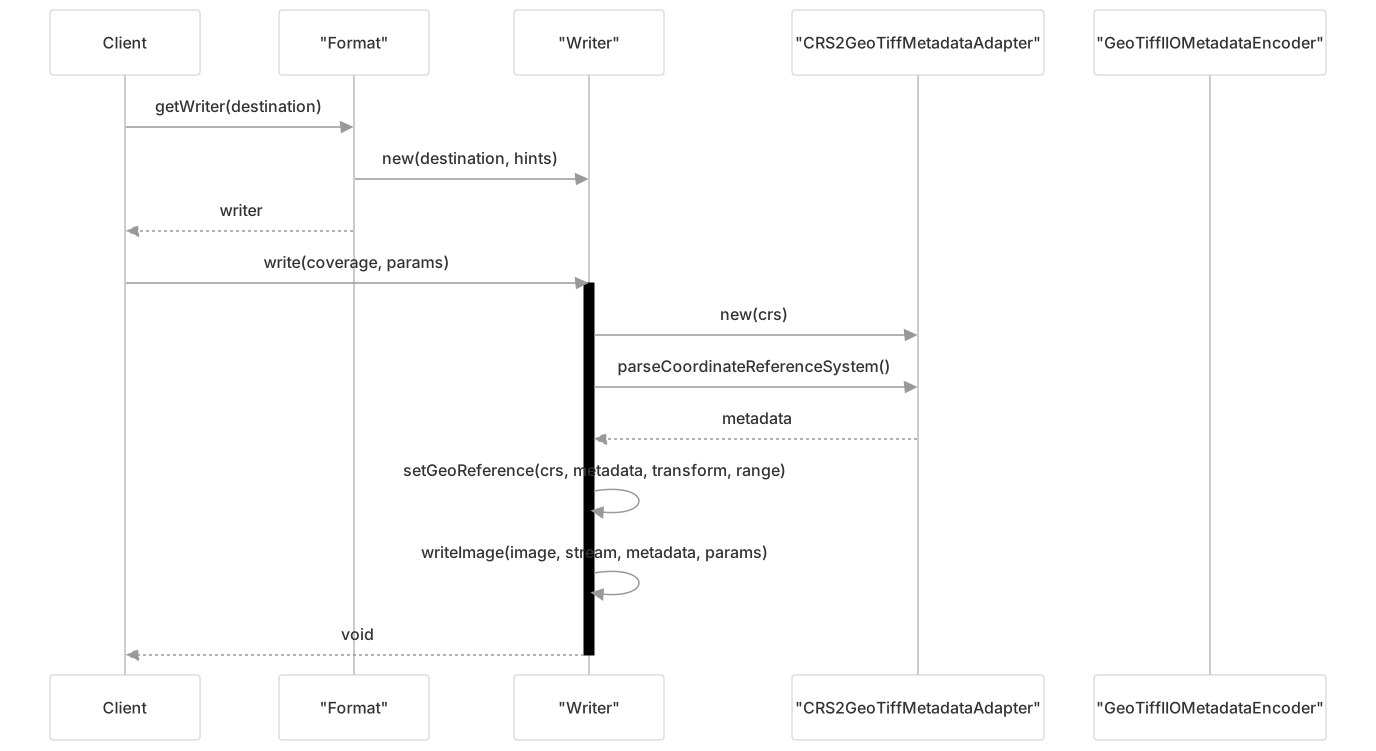
Writing Parameters
You can control the writing process by providing parameters:
// Configure compression
GeoTiffWriteParams writeParams = new GeoTiffWriteParams();
writeParams.setCompressionMode(GeoTiffWriteParams.MODE_EXPLICIT);
writeParams.setCompressionType("LZW");
writeParams.setTilingMode(GeoTiffWriteParams.MODE_EXPLICIT);
writeParams.setTiling(512, 512);

// Set the write parameters
ParameterValue<GeoToolsWriteParams> wParams =
    AbstractGridFormat.GEOTOOLS_WRITE_PARAMS.createValue();
wParams.setValue(writeParams);

// Write a world file alongside the GeoTIFF
ParameterValue<Boolean> tfw = GeoTiffFormat.WRITE_TFW.createValue();
tfw.setValue(true);

// Write the coverage with parameters
writer.write(coverage, new GeneralParameterValue[]{wParams, tfw});Coordinate Reference System Handling
GeoTIFF files can store coordinate reference system information in multiple ways:
- Standard GeoTIFF GeoKeys for common CRS definitions
- User-defined parameters for custom projections
- Citations with embedded ESRI WKT strings

Reading CRS
When reading a GeoTIFF file, the GeoTiffReader extracts the CRS information from the metadata:
// Get the CRS from a GeoTIFF
GeoTiffReader reader = new GeoTiffReader(file);
CoordinateReferenceSystem crs = reader.getCoordinateReferenceSystem();If the GeoTIFF doesn't have CRS information, you can provide a default:
// Provide a default CRS as a hint
CoordinateReferenceSystem defaultCRS = CRS.decode("EPSG:4326");
Hints hints = new Hints(Hints.DEFAULT_COORDINATE_REFERENCE_SYSTEM, defaultCRS);
GeoTiffReader reader = new GeoTiffReader(file, hints);Writing CRS
When writing a GeoTIFF file, the GeoTiffWriter encodes the CRS information as GeoTIFF metadata:
// The CRS from the GridCoverage2D will be encoded in the output GeoTIFF
writer.write(coverage, null);The CRS2GeoTiffMetadataAdapter class is responsible for converting from a GeoTools CRS to GeoTIFF metadata. It identifies the type of CRS (geographic or projected) and encodes the appropriate parameters.
GeoTIFF Metadata Structure
GeoTIFF embeds geospatial metadata in the TIFF file structure. Understanding this structure helps when working with GeoTIFF files.

Accessing Metadata
You can access the GeoTIFF metadata through the reader:
GeoTiffReader reader = new GeoTiffReader(file);
GeoTiffIIOMetadataDecoder metadata = reader.getMetadata();

// Get transformation information
double[] modelTransformation = metadata.getModelTransformation();
TiePoint[] tiePoints = metadata.getModelTiePoints();
PixelScale pixelScale = metadata.getModelPixelScale();

// Get NoData value
Double noData = metadata.getNoData();

// Get specific GeoKeys
String projectionKey = metadata.getGeoKey(GeoTiffPCSCodes.ProjectionGeoKey);Advanced Features
Overviews and Resolution Levels
GeoTIFF files may include internal or external overviews (lower-resolution versions of the data) for faster rendering at smaller scales.

The GeoTiffReader automatically selects the appropriate overview level based on the resolution requested. You can control this behavior using the OVERVIEW_POLICY parameter:
// Set the overview policy
ParameterValue<OverviewPolicy> policy = AbstractGridFormat.OVERVIEW_POLICY.createValue();
policy.setValue(OverviewPolicy.QUALITY); // Options: QUALITY, SPEED, NEAREST, IGNORE

// Read with the policy
coverage = reader.read(new GeneralParameterValue[]{policy});Masks and ROI Support
GeoTIFF files can have associated mask bands that identify valid data areas. The GeoTiffReader automatically detects and uses these masks to create Regions of Interest (ROIs).
// Check if a coverage has a ROI from a mask
GridCoverage2D coverage = reader.read(null);
ROI roi = CoverageUtilities.getROIProperty(coverage);
if (roi != null) {
    // The coverage has a mask-derived ROI
}Masks can be internal (inside the GeoTIFF) or external (separate files). The GeoTiffReader uses the MaskOverviewProvider to handle both types.
NoData Values
GeoTIFF files can define NoData values to indicate pixels where no actual data exists. The reader interprets these values and attaches them to the resulting coverage:
// Access NoData information from a coverage
GridCoverage2D coverage = reader.read(null);
NoDataContainer noData = CoverageUtilities.getNoDataProperty(coverage);
if (noData != null) {
    double noDataValue = noData.getAsSingleValue();
    // Use the NoData value
}You can control whether to write NoData values using the WRITE_NODATA parameter:
ParameterValue<Boolean> writeNoData = GeoTiffFormat.WRITE_NODATA.createValue();
writeNoData.setValue(true);
writer.write(coverage, new GeneralParameterValue[]{writeNoData});Ground Control Points
Some GeoTIFF files use Ground Control Points (GCPs) for georeferencing instead of affine transformations. The GeoTiffReader can extract and interpret these points:
// Check if a reader has ground control points
GeoTiffReader reader = new GeoTiffReader(file);
GroundControlPoints gcps = reader.getGroundControlPoints();
if (gcps != null) {
    List<TiePoint> tiePoints = gcps.getTiePoints();
    CoordinateReferenceSystem gcpCrs = gcps.getCoordinateReferenceSystem();
    // Use the GCPs
}Cloud Optimized GeoTIFF (COG) Support
Cloud Optimized GeoTIFF (COG) is a format specification for GeoTIFF files that are optimized for efficient access over HTTP, particularly for cloud storage. GeoTools supports reading COG files through specialized stream and reader implementations.

Using COG files in GeoTools:
// URL to a remote COG file
URL cogUrl = new URL("https://example.com/data.tif");

// GeoTiff format will detect and use the appropriate readers for COG
GeoTiffFormat format = new GeoTiffFormat();
if (format.accepts(cogUrl)) {
    GeoTiffReader reader = format.getReader(cogUrl);
    GridCoverage2D coverage = reader.read(null);
    // Use the coverage
}COG files can also be used as granules in an ImageMosaic:
// Using COG files in an ImageMosaic
ImageMosaicReader mosaicReader = new ImageMosaicFormat().getReader(mosaicDir);
GridCoverage2D mosaic = mosaicReader.read(null);Integration with Other GeoTools Modules
The GeoTIFF implementation integrates with other GeoTools modules to provide a complete geospatial data handling solution.

Coverage Processing
After reading a GeoTIFF, you can use the Coverage Processing API for operations like reprojection, resampling, and filtering:
// Reproject a coverage
GridCoverage2D coverage = reader.read(null);
CoordinateReferenceSystem targetCRS = CRS.decode("EPSG:3857");
Operations ops = new Operations(null);
GridCoverage2D reprojected = (GridCoverage2D) ops.resample(coverage, targetCRS);ImageMosaic Integration
GeoTIFF files can be used as granules in an ImageMosaic, allowing you to create seamless mosaics of multiple GeoTIFF files:
// Create an ImageMosaic from GeoTIFF files
ImageMosaicReader mosaicReader = new ImageMosaicFormat().getReader(mosaicDir);
GridCoverage2D mosaic = mosaicReader.read(null);The ImageMosaic module has special support for Cloud Optimized GeoTIFF granules through the CogGranuleAccessProvider.
Conclusion
The GeoTIFF module in GeoTools provides comprehensive support for reading and writing geospatial raster data in the GeoTIFF format. It handles coordinate reference systems, transformation parameters, overviews, masks, and other GeoTIFF-specific features, and integrates seamlessly with the rest of the GeoTools library.
For additional information on related topics, see:
- GeoPackage Support for vector and raster data in a single file
- Shapefile Support for vector data in the Shapefile format
- Image Mosaic System for working with multiple raster files as a single coverage