Complex Features
Complex Features in GeoTools refers to the implementation in the App-Schema module that enables working with complex feature types defined in GML application schemas. Unlike simple features which have a flat structure, complex features can have nested attributes, feature references, and complex property types that better represent real-world data with intricate relationships.
This document describes the architecture and functionality of the App-Schema module, focusing on how it maps data from simple sources (like databases) to complex feature types.
For information about the data sources that can be used with complex features, see JDBC Data Stores.
Architecture Overview
The App-Schema module is built around mapping between source data and target schemas. It uses a sophisticated mapping system to transform simple features into complex ones.

Key Components:
- AppSchemaDataAccess: Main data access class that implements the
DataAccess<FeatureType, Feature>interface for complex features. - FeatureTypeMapping: Defines the mapping between a source feature type and a target complex feature type.
- AttributeMapping: Specifies how individual attributes are mapped from source to target.
- NestedAttributeMapping: Special type of mapping for nested/chained features.
- DataAccessMappingFeatureIterator: Iterates over source features and applies mappings to create complex features.
- XPath: Utility for evaluating and constructing attributes using XPath expressions.
- UnmappingFilterVisitor: Transforms filters on complex features into filters on source features.
- modules/extension/app-schema/app-schema/src/main/java/org/geotools/data/complex/AppSchemaDataAccess.java
- modules/extension/app-schema/app-schema/src/main/java/org/geotools/data/complex/FeatureTypeMapping.java
- modules/extension/app-schema/app-schema/src/main/java/org/geotools/data/complex/DataAccessMappingFeatureIterator.java
- modules/extension/app-schema/app-schema/src/main/java/org/geotools/data/complex/filter/XPath.java
Feature Mapping Process
The feature mapping process transforms source features into complex features by applying configured mappings.
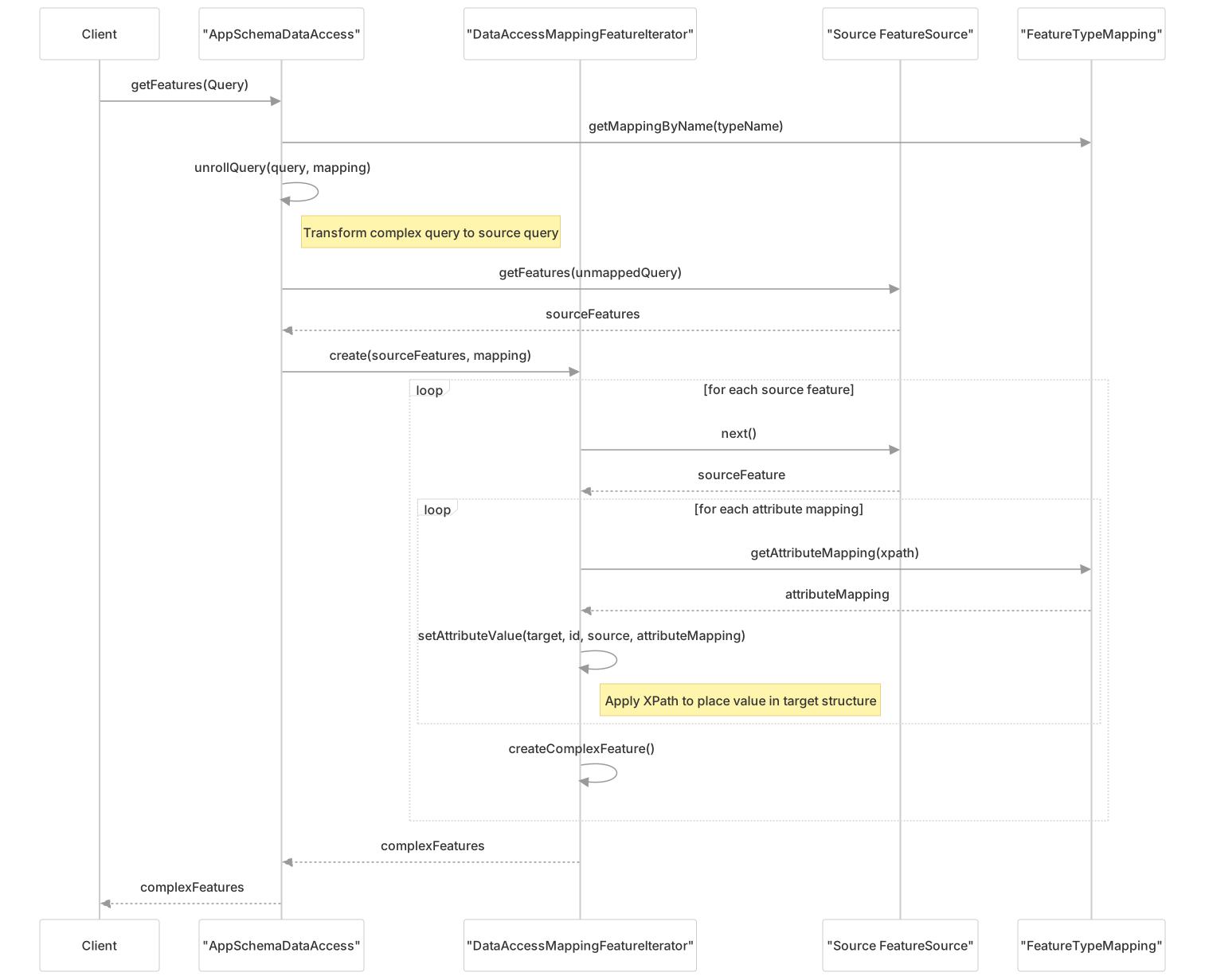
The mapping process steps:
- Client requests complex features with a query
- The query is transformed to operate on source features
- Source features are retrieved from the data source
- Each source feature is processed to create a complex feature:
- For each attribute mapping, extract the value from the source
- Use XPath to place the value in the correct location in the target structure
- The resulting complex features are returned to the client
- modules/extension/app-schema/app-schema/src/main/java/org/geotools/data/complex/DataAccessMappingFeatureIterator.java143-180
- modules/extension/app-schema/app-schema/src/main/java/org/geotools/data/complex/DataAccessMappingFeatureIterator.java550-782
- modules/extension/app-schema/app-schema/src/main/java/org/geotools/data/complex/AppSchemaDataAccess.java432-520
Attribute Mapping
Attribute mapping defines how values from source features are mapped to complex features. There are two main types:
- Simple Attribute Mapping: Maps a simple attribute from source to target
- Nested Attribute Mapping: Maps a complex attribute that contains nested features
Each AttributeMapping contains:
- Source expression: How to extract the value from the source feature (typically an OGC CQL expression)
- Target XPath: Where to place the value in the target feature structure
- Optional client properties: Additional properties to set on the attribute
Example of an attribute mapping in XML configuration:
<AttributeMapping>
  <targetAttribute>gsml:description</targetAttribute>
  <sourceExpression>
    <OCQL>DESCRIPTION</OCQL>
  </sourceExpression>
</AttributeMapping>The XPath utility is used to evaluate these expressions and build the complex structures according to the mappings.
- modules/extension/app-schema/app-schema/src/main/java/org/geotools/data/complex/config/AttributeMapping.java
- modules/extension/app-schema/app-schema/src/main/java/org/geotools/data/complex/filter/XPath.java143-183
- modules/extension/app-schema/app-schema/src/test/resources/test-data/AppSchemaDataAccess.xsd
Feature Chaining
Feature chaining is a powerful capability that allows complex features to reference or contain other features. This is implemented using NestedAttributeMapping.
There are two approaches to feature chaining:
- Standard Chaining: Retrieves nested features one by one
- Joining: Uses SQL joins to retrieve nested features efficiently (for database sources)
For database sources, joining is implemented by JoiningNestedAttributeMapping and JoiningJDBCFeatureSource, which optimize the retrieval of nested features using SQL joins.
In the XML configuration, feature chaining is defined using the linkElement and linkField elements:
<AttributeMapping>
  <targetAttribute>gsml:composition</targetAttribute>
  <sourceExpression>
    <OCQL>ID</OCQL>
    <linkElement>gsml:CompositionPart</linkElement>
    <linkField>gsml:GeologicUnit/gsml:id</linkField>
  </sourceExpression>
  <isMultiple>true</isMultiple>
</AttributeMapping>- modules/extension/app-schema/app-schema/src/main/java/org/geotools/data/complex/NestedAttributeMapping.java59-90
- modules/extension/app-schema/app-schema/src/main/java/org/geotools/data/joining/JoiningNestedAttributeMapping.java55-130
- modules/extension/app-schema/app-schema/src/main/java/org/geotools/appschema/jdbc/JoiningJDBCFeatureSource.java88-150
Query and Filtering
Querying complex features involves transforming queries and filters to operate on source features.

The key components in this process are:
- UnmappingFilterVisitor: Transforms filters on complex features to equivalent filters on source features
- ComplexFilterSplitter: Splits the filter into:
- Pre-filter: Applied at the source (database/datastore level)
- Post-filter: Applied after feature mapping (in memory)
- NestedFilterToSQL: For database sources, encodes filters on nested attributes to SQL
This approach enables efficient filtering by pushing down as much of the query as possible to the source data store.
- modules/extension/app-schema/app-schema/src/main/java/org/geotools/data/complex/filter/UnmappingFilterVisitor.java125-180
- modules/extension/app-schema/app-schema/src/main/java/org/geotools/data/complex/filter/ComplexFilterSplitter.java70-150
- modules/extension/app-schema/app-schema/src/main/java/org/geotools/appschema/jdbc/NestedFilterToSQL.java113-200
Configuration
App-Schema is configured using XML mapping files that define the relationship between source data stores and target complex feature types.
Basic Configuration Structure
<AppSchemaDataAccess>
  <namespaces>
    <!-- Namespace definitions -->
  </namespaces>
  <sourceDataStores>
    <!-- Source datastore definitions -->
  </sourceDataStores>
  <targetTypes>
    <!-- Target type definitions -->
  </targetTypes>
  <typeMappings>
    <!-- Type mapping definitions -->
  </typeMappings>
</AppSchemaDataAccess>Components of the Configuration
- namespaces: Defines namespace prefixes used in the mapping
- sourceDataStores: Defines the source data stores (e.g., databases, shapefiles)
- targetTypes: Defines the target complex types (referencing XML schemas)
- typeMappings: Defines the mappings between source and target types
Type Mapping Example
<TypeMapping>
  <sourceDataStore>postgisDataStore</sourceDataStore>
  <sourceType>geologic_units</sourceType>
  <targetElement>gsml:GeologicUnit</targetElement>
  <attributeMappings>
    <AttributeMapping>
      <targetAttribute>gsml:description</targetAttribute>
      <sourceExpression>
        <OCQL>description</OCQL>
      </sourceExpression>
    </AttributeMapping>
    <!-- Feature chaining example -->
    <AttributeMapping>
      <targetAttribute>gsml:composition</targetAttribute>
      <sourceExpression>
        <OCQL>id</OCQL>
        <linkElement>gsml:CompositionPart</linkElement>
        <linkField>gsml:GeologicUnit/gsml:id</linkField>
      </sourceExpression>
      <isMultiple>true</isMultiple>
    </AttributeMapping>
  </attributeMappings>
</TypeMapping>The configuration is processed by XMLConfigDigester and AppSchemaDataAccessConfigurator to create the necessary mappings and data access objects.
- modules/extension/app-schema/app-schema/src/main/java/org/geotools/data/complex/config/AppSchemaDataAccessConfigurator.java112-180
- modules/extension/app-schema/app-schema/src/main/java/org/geotools/data/complex/config/XMLConfigDigester.java
- modules/extension/app-schema/app-schema/src/main/java/org/geotools/data/complex/AppSchemaDataAccessFactory.java55-100
Performance Considerations
The App-Schema module includes several optimizations to improve performance:
Joining for Feature Chaining
For database sources, joining is used to efficiently retrieve nested features:
Instead of retrieving nested features with separate queries, a single SQL JOIN query can retrieve all the necessary data, significantly improving performance for deep feature hierarchies.
Filter Pushing
The ComplexFilterSplitter optimizes queries by pushing down filters to the source when possible:
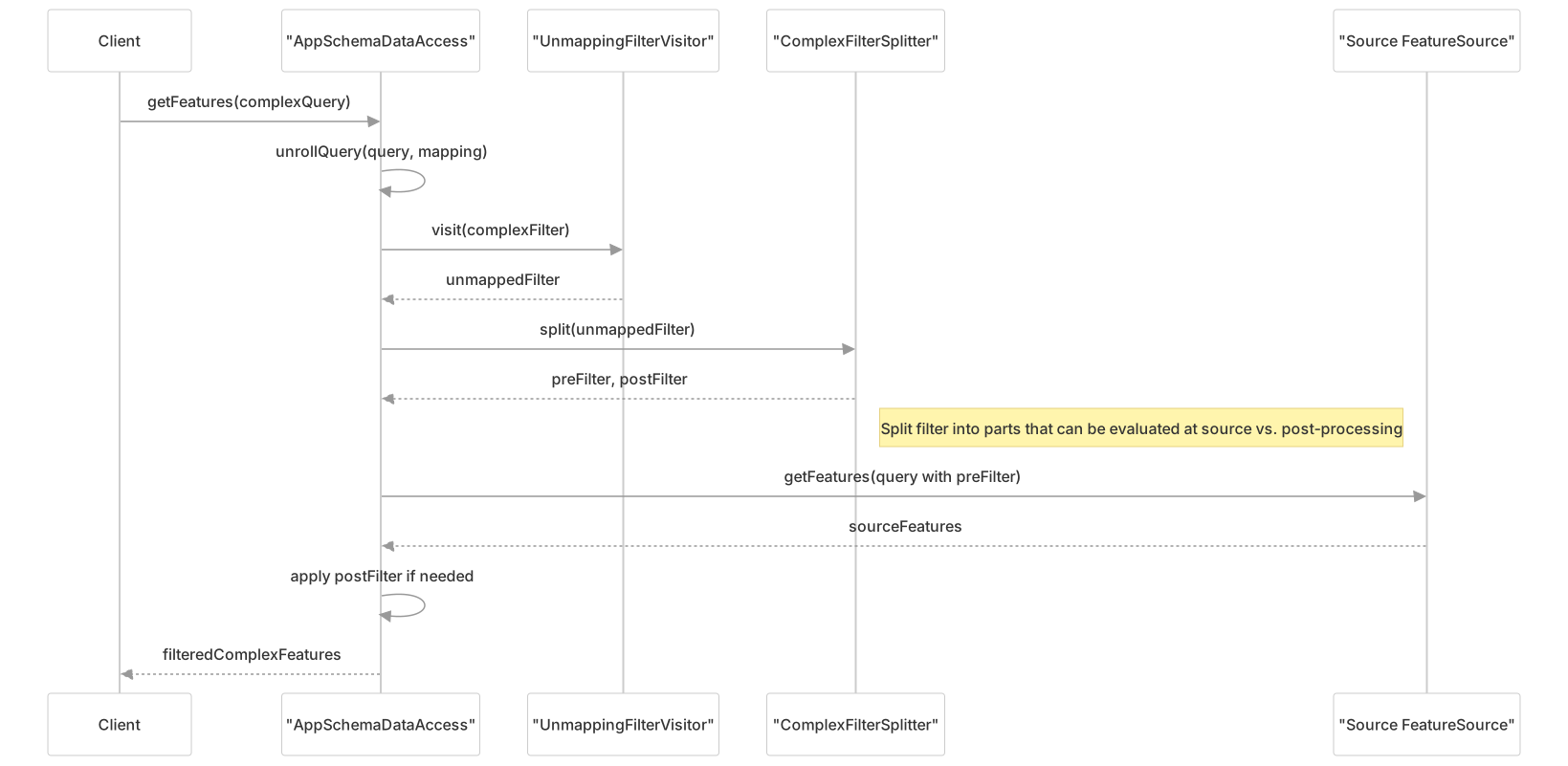
This reduces the amount of data that needs to be transferred and processed.
- modules/extension/app-schema/app-schema/src/main/java/org/geotools/appschema/jdbc/JoiningJDBCFeatureSource.java250-350
- modules/extension/app-schema/app-schema/src/main/java/org/geotools/data/complex/filter/ComplexFilterSplitter.java200-300
- modules/extension/app-schema/app-schema/src/main/java/org/geotools/data/complex/DataAccessRegistry.java48-100
Common Use Cases
The App-Schema module is particularly useful for:
- GML Application Schema Support: Mapping database tables to GML application schemas like GeoSciML, INSPIRE, or custom schemas
- Complex Data Structures: Representing complex geological, hydrological, or other scientific data that has hierarchical relationships
- OGC Web Services: Providing WFS services with complex feature support
Example: Geological Unit with Composition Parts

This complex structure can be mapped from simpler database tables using App-Schema feature chaining, allowing the representation of complex geological information in a standards-compliant way.