Rendering System
The Rendering System in GeoTools provides the framework for transforming geographic data into visual representations. This system handles the complex tasks of applying styles to features, managing coordinate transformations, optimizing rendering performance, and addressing special cases like dateline crossing.
Overview
GeoTools' rendering system is built around a streaming architecture that processes features directly from data sources without loading everything into memory. This approach enables efficient rendering of large datasets while maintaining a low memory footprint.

StreamingRenderer
The core of the rendering system is the StreamingRenderer class, which implements the GTRenderer interface. It is designed to:
- Process features as they are streamed from data sources
- Maintain a low memory footprint
- Apply coordinate transformations
- Handle style application
- Manage text and label placement
Architecture
The StreamingRenderer uses a parallel processing architecture:

Rendering Hints
The renderer's behavior can be customized with rendering hints:
| Hint Key | Description | Default |
|---|---|---|
ADVANCED_PROJECTION_HANDLING_KEY | Enables advanced projection handling | false |
CONTINUOUS_MAP_WRAPPING | Enables continuous cartographic wrapping | false |
TEXT_RENDERING_KEY | Controls text rendering method | STRING |
OPTIMIZE_FTS_RENDERING_KEY | Memory/speed tradeoff for feature style rendering | true |
VECTOR_RENDERING_KEY | Enables vector rendering for graphic fills | false |
SCALE_COMPUTATION_METHOD_KEY | Method for computing scale (OGC, ACCURATE) | "OGC" |
RENDERING_BUFFER | Buffer around requested area (pixels) | 0 |
DPI_KEY | DPI for the output device | 90 |
Rendering Process
The rendering process follows these steps:
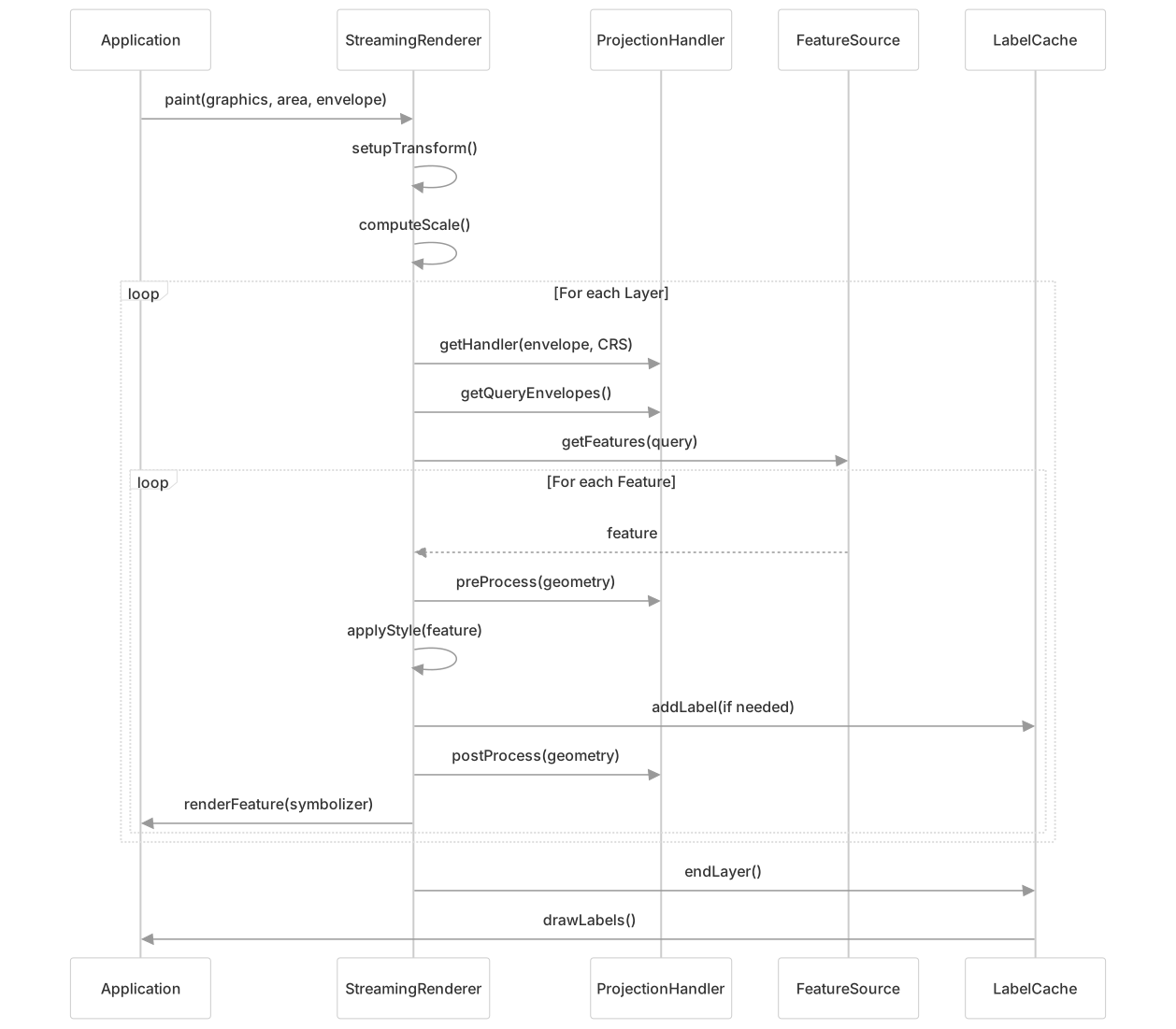
Projection Handling System
The Projection Handling System manages coordinate transformations and addresses issues like dateline crossing and polar singularities.
ProjectionHandler
The ProjectionHandler class provides the base functionality for:
- Transforming geometries between coordinate systems
- Handling singularities in projections
- Optimizing query envelopes
- Pre-processing and post-processing geometries

WrappingProjectionHandler
The WrappingProjectionHandler is a specialized handler that enables continuous map displays similar to Google Maps by:
- Replicating geometries across the dateline
- Supporting "world wrapping" for infinite scrolling
- Providing seamless display across the -180°/180° boundary
// Example configuration in application code
Map<String, Object> hints = new HashMap<>();
hints.put(StreamingRenderer.ADVANCED_PROJECTION_HANDLING_KEY, true);
hints.put(StreamingRenderer.CONTINUOUS_MAP_WRAPPING, true);
renderer.setRendererHints(hints);WarpBuilder
The WarpBuilder creates optimized transformation objects:
- Builds grid-based approximations of complex transformations
- Uses recursive subdivision to determine optimal grid size
- Maintains accuracy within specified tolerance
- Implements special optimizations for affine transforms
Style System
The Style System determines how geographic features are visually represented.
Style Structure

CSS Support
GeoTools provides CSS styling support as an alternative to SLD:
- CssParser: Parses CSS syntax into a
Stylesheetobject - CssTranslator: Converts the
Stylesheetinto SLD/Style objects

Example CSS to convert to Style:
/* CSS style */
* {
  fill: #9999cc;
  stroke: #000000;
  stroke-width: 0.5;
}

[population > 100000] {
  fill: #cc3333;
}// Java code to translate CSS to Style
Stylesheet ss = CssParser.parse(css);
CssTranslator translator = new CssTranslator();
Style style = translator.translate(ss);Advanced Features
Label Cache
The renderer uses a label cache for optimized text placement:
- Collects all labels during the rendering process
- Applies conflict resolution to avoid overlaps
- Supports different text rendering modes:
TEXT_RENDERING_STRING: Fast rendering using standard text methodsTEXT_RENDERING_OUTLINE: Precise text+halo centering using vector outlinesTEXT_RENDERING_ADAPTIVE: Mixed mode for optimal quality
Multi-threaded Rendering
The renderer supports parallel processing:
// Set up a thread pool
ExecutorService threadPool = Executors.newFixedThreadPool(4);
renderer.setThreadPool(threadPool);Integration Example
A complete example of the rendering pipeline:
// Create map content with layers
MapContent map = new MapContent();
map.addLayer(new FeatureLayer(featureSource, style));

// Configure renderer
StreamingRenderer renderer = new StreamingRenderer();
Map<String, Object> hints = new HashMap<>();
hints.put(StreamingRenderer.ADVANCED_PROJECTION_HANDLING_KEY, true);
hints.put(StreamingRenderer.CONTINUOUS_MAP_WRAPPING, true);
renderer.setRendererHints(hints);
renderer.setMapContent(map);

// Set up output
BufferedImage image = new BufferedImage(width, height,
                                       BufferedImage.TYPE_INT_ARGB);
Graphics2D graphics = image.createGraphics();

// Render
ReferencedEnvelope bounds = featureSource.getBounds();
renderer.paint(graphics, new Rectangle(width, height), bounds);