Streaming Renderer
The Streaming Renderer is GeoTools' primary rendering engine that efficiently converts geographic data into visual representations. It processes features in a streaming fashion (as they are retrieved from data sources) rather than loading all data into memory first, making it memory efficient for large datasets.
This page documents the architecture and functionality of the StreamingRenderer, focusing on its rendering pipeline, projection handling capabilities, and configuration options. For related rendering components, see Styling with CSS.
Architecture Overview
The StreamingRenderer implements the GTRenderer interface and is designed to provide low memory footprint rendering with decent performance on the first call. It uses a streaming architecture combined with a multi-threaded approach for efficient rendering.

Key Components
StreamingRenderer Class
The StreamingRenderer is the core class that:
- Handles coordinate transformations between different CRS
- Processes features in streaming fashion to minimize memory usage
- Manages label placement and rendering optimization
- Provides thread-safe rendering operations
Main features:
- Not thread-safe for concurrent use, but uses threads internally
- Designed for low memory footprint over optimal performance
- Supports advanced projection handling
- Manages various symbolizers (Point, Line, Polygon, Raster, Text)
Rendering Pipeline
The rendering process follows these steps:
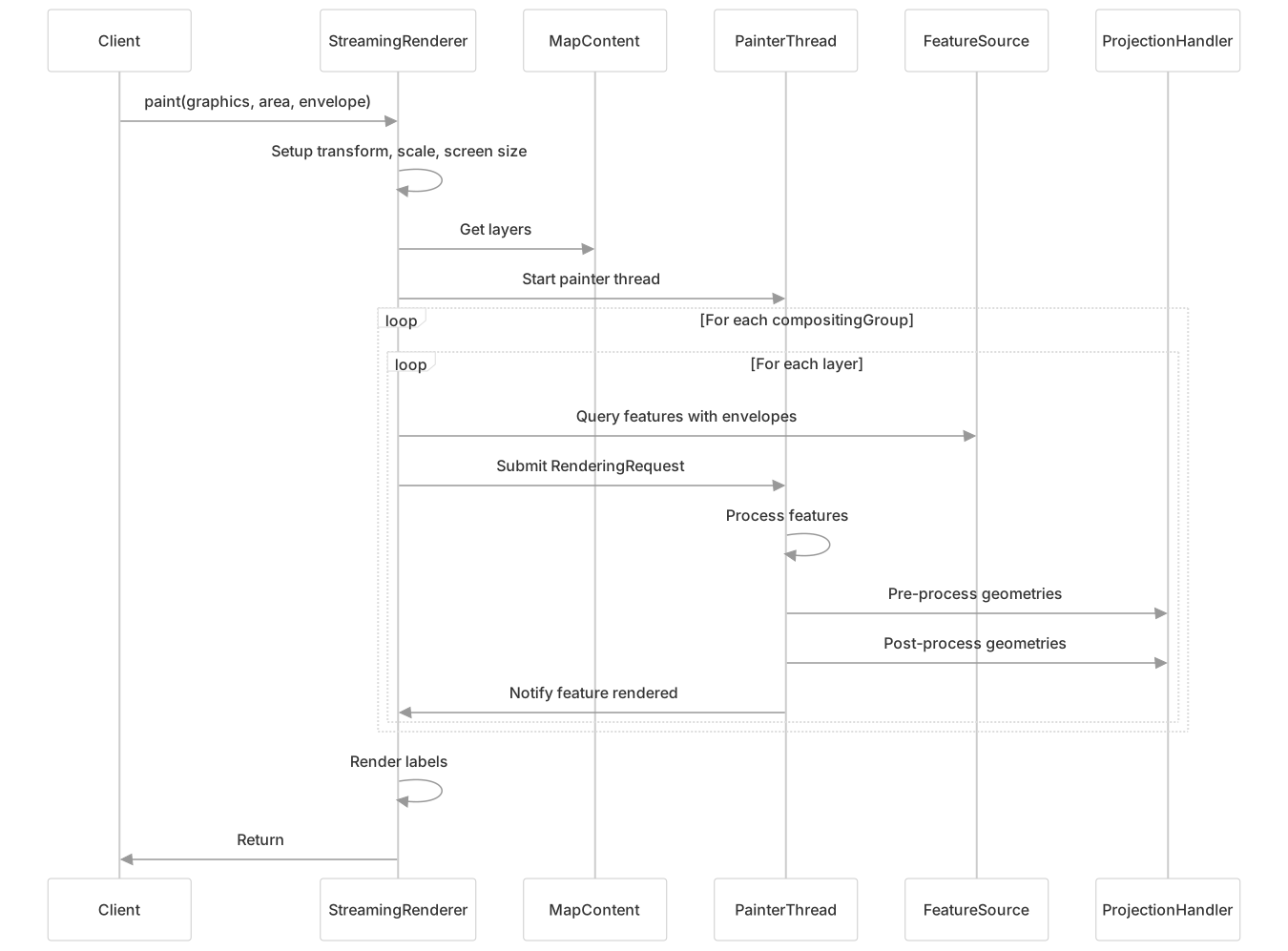
Multi-threaded Processing
The renderer uses a multi-threaded approach:
- Main Thread - Handles coordination and submits rendering requests
- Painter Thread - Processes rendering requests from a queue
- Optional Thread Pool - Can be configured for parallel processing
The PainterThread retrieves RenderingRequest objects from a blocking queue. This architecture allows the main thread to continue submitting tasks while rendering happens in parallel.
Projection Handling System
One of the most sophisticated aspects of the StreamingRenderer is its projection handling system.

ProjectionHandler
The ProjectionHandler manages coordinate transformations and handles special cases:
- Cuts geometries that extend beyond valid areas of projections
- Handles dateline crossing
- Manages area expansions for proper rendering
It has two critical processing phases:
- Pre-processing (
preProcess) - Prepares geometries before they're rendered - Post-processing (
postProcess) - Handles transformations after rendering
Special Projection Handlers
Different projections require specialized handling:
- WrappingProjectionHandler - Handles projections that wrap in the East/West direction, creating continuous maps
- PolarStereographicHandler - Manages polar projections and pole singularities
- OrthographicProjectionHandler - Handles spherical viewing projections with limited visible area
- HomolosineHandler - Manages interrupted projections with multiple discontinuities
- GeosProjectionHandler - Handles geostationary satellite projections
Dateline Handling
The renderer has sophisticated logic for handling the 180°/-180° meridian:
- When geometries cross the dateline, they are split and wrapped appropriately
- For certain projections (e.g., Mercator), continuous wrapping is supported
- Heuristics detect dateline crossing based on geometry dimensions and coordinates
Advanced Features
Geometry Densification
For certain projections, curved features may appear straight and inaccurate when rendered. The StreamingRenderer can automatically densify geometries (add intermediate points) to improve visual quality.
This is controlled by the ADVANCED_PROJECTION_DENSIFICATION_KEY rendering hint:

Label Cache
The renderer uses a label cache to optimize label placement, avoid overlaps, and improve rendering quality. It supports three rendering modes:
TEXT_RENDERING_STRING- Uses standard text rendering (faster)TEXT_RENDERING_OUTLINE- Renders text as shapes (better alignment with halos)TEXT_RENDERING_ADAPTIVE- Uses outlines for non-horizontal text and strings for horizontal (best balance)
Envelope Reprojection
The EnvelopeReprojector handles the complex task of reprojecting bounding boxes between different coordinate systems, considering:
- Singularity points (poles)
- Dateline crossing
- Projection valid areas
- Quadrant-based expansion for special projections
WarpBuilder
For raster data, the WarpBuilder creates optimized transformation warps that balance performance and accuracy:
- Analyzes the transformation to determine optimal grid size
- Creates either affine transforms (for simple transformations) or grid warps
- Handles edge cases and projections with varying deformation across the image
Configuration and Customization
Rendering Hints
The StreamingRenderer supports numerous rendering hints to customize behavior:
| Hint Key | Description | Default |
|---|---|---|
RENDERING_BUFFER | Buffer size around rendering area | 0 |
SCALE_COMPUTATION_METHOD | Method for computing scale (SCALE_ACCURATE or SCALE_OGC) | SCALE_OGC |
TEXT_RENDERING_KEY | Text rendering mode | TEXT_RENDERING_STRING |
LINE_WIDTH_OPTIMIZATION_KEY | Whether to optimize thin line rendering | true |
OPTIMIZE_FTS_RENDERING_KEY | Use memory buffers for multiple feature type styles | true |
ADVANCED_PROJECTION_HANDLING_KEY | Enable advanced projection handling | false |
CONTINUOUS_MAP_WRAPPING | Enable continuous map wrapping | false |
VECTOR_RENDERING_KEY | Prefer vector rendering for fills | false |
ADVANCED_PROJECTION_DENSIFICATION_KEY | Enable geometry densification | false |
DATELINE_WRAPPING_HEURISTIC_KEY | Enable dateline wrapping detection | true |
Example usage:
Map<Object, Object> hints = new HashMap<>();
hints.put(StreamingRenderer.ADVANCED_PROJECTION_HANDLING_KEY, true);
hints.put(StreamingRenderer.CONTINUOUS_MAP_WRAPPING, true);
renderer.setRendererHints(hints);Thread Pool Configuration
For parallel processing, you can configure a thread pool:
StreamingRenderer renderer = new StreamingRenderer();
renderer.setThreadPool(Executors.newFixedThreadPool(4));Error Handling
The renderer provides an event-based error reporting system:
renderer.addRenderListener(new RenderListener() {
    @Override
    public void featureRenderer(SimpleFeature feature) {
        // Feature rendered successfully
    }

    @Override
    public void errorOccurred(Exception e) {
        // Handle error
    }
});Performance Considerations
Memory vs. Speed Trade-offs
Memory Efficiency:
- Streaming data access minimizes memory usage
- Feature simplification reduces memory footprint
- ScreenMap optimizes away small features
Performance Optimizations:
- Projection-specific optimizations reduce computation
- Label cache prevents redundant text operations
- Multi-threading for parallel rendering
Configuration Tips:
- For large datasets, keep
OPTIMIZE_FTS_RENDERING_KEYenabled - Adjust
RENDERING_BUFFERbased on your geometry complexity - Consider disabling
ADVANCED_PROJECTION_HANDLING_KEYfor simple projections
- For large datasets, keep
Limitations
- Not thread-safe for concurrent use by multiple threads
- May not perform optimally for repeated rendering of the same data
- Densification can significantly increase the number of vertices in geometries
Integration with Other Components
The StreamingRenderer integrates with several other GeoTools components:
- Map Content - Provides layers and styles for rendering
- SLD Style Factory - Translates SLD styles into rendering instructions
- Label Cache - Manages text placement and rendering
- Grid Coverage Renderer - Handles raster data rendering
