Image Mosaic System
The Image Mosaic system is a powerful module in GeoTools that enables the creation of seamless mosaics from multiple raster images. It allows users to treat numerous individual geospatial images as a single virtual dataset, providing efficient access through spatial, temporal, and other dimensional queries. This page explains how the Image Mosaic system is architected, how it operates, and its key capabilities.
Architecture Overview
The Image Mosaic system is designed as a layered architecture with clear separation of concerns between components.

Key Components
ImageMosaicReader
The ImageMosaicReader is the main entry point for accessing mosaic data. It implements the GridCoverage2DReader interface and serves as the facade to the entire system. It manages one or more RasterManager instances, one per coverage.
public class ImageMosaicReader extends AbstractGridCoverage2DReader implements StructuredGridCoverage2DReader {
    Map<String, RasterManager> rasterManagers = new ConcurrentHashMap<>();
    GranuleCatalog granuleCatalog;
    // ...
}RasterManager
The RasterManager handles a single coverage within the mosaic. It manages dimensional domains (time, elevation, etc.), oversees the query process, and coordinates access to granules.
public class RasterManager implements Cloneable {
    class SpatialDomainManager {
        // Handles spatial extent and transforms
    }

    class DomainDescriptor {
        // Describes a single domain (time, elevation, etc.)
    }

    GranuleCatalog catalog;
    // ...
}GranuleDescriptor
A GranuleDescriptor represents a single piece (granule) of the mosaic. It contains metadata about the granule and methods to load the actual raster data when needed.
public class GranuleDescriptor {
    class GranuleOverviewLevelDescriptor {
        // Information about an overview level
    }

    URL granuleUrl;
    ReferencedEnvelope granuleBBOX;
    AffineTransform baseGridToWorld;
    MultiLevelROI roiProvider;
    // ...
}GranuleCatalog
The GranuleCatalog provides an abstraction over the storage mechanism for granule metadata. It has multiple implementations for different backends:

Request/Response Cycle
Reading from a mosaic involves:
RasterLayerRequest: Encapsulates the parameters for a read operationRasterLayerResponse: Processes the request and produces the output coverageMosaicProducer: Coordinates the creation of the mosaicSubmosaicProducer: Handles individual parts of the mosaic, potentially with reprojection
Core Operations
Creating a Mosaic
The creation of a mosaic involves scanning directories for raster files, extracting metadata, and building an index.

Reading from a Mosaic
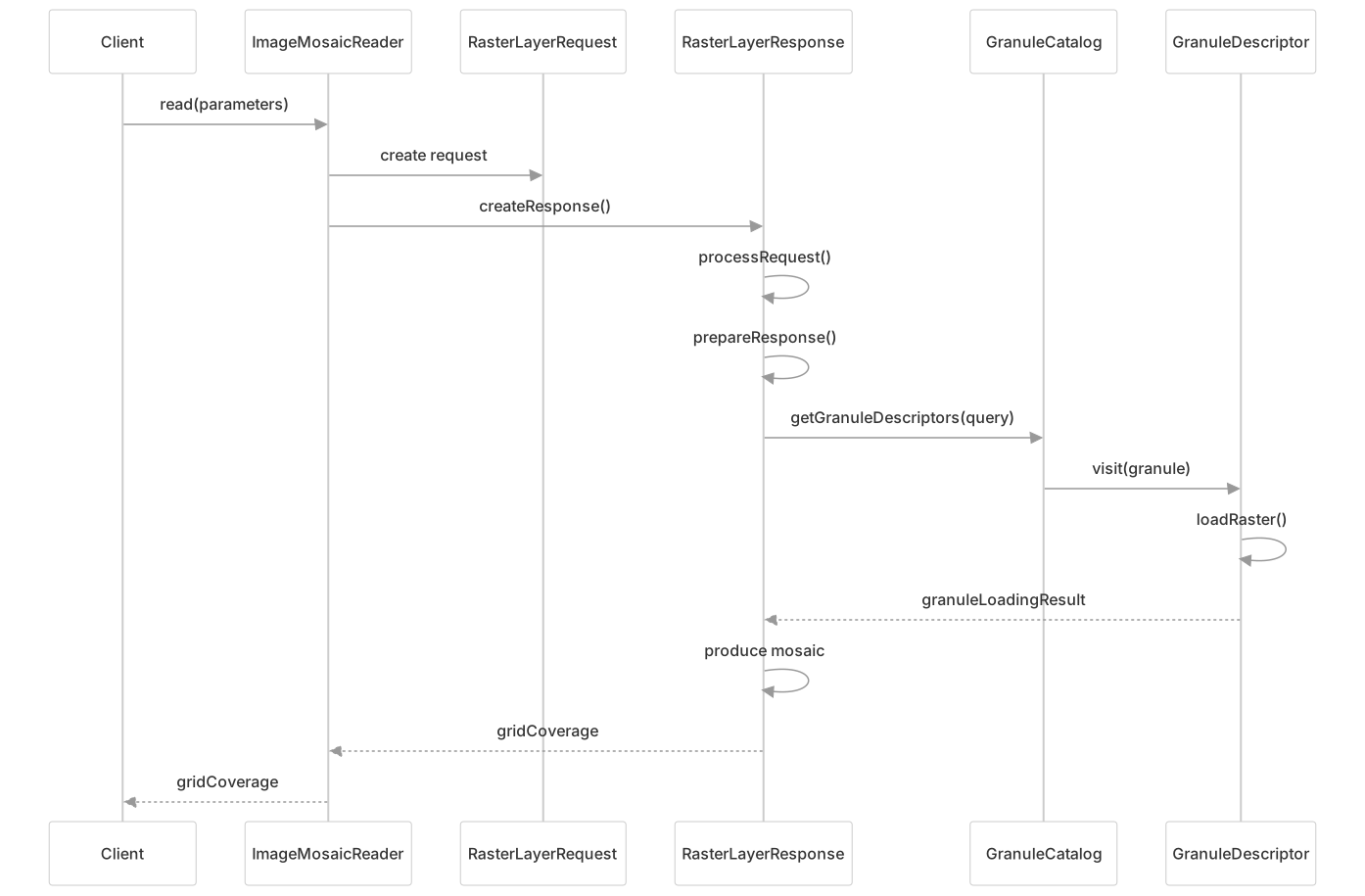
Reading data from a mosaic involves:
GranuleDescriptorGranuleCatalogRasterLayerResponseRasterLayerRequestImageMosaicReaderClientGranuleDescriptorGranuleCatalogRasterLayerResponseRasterLayerRequestImageMosaicReaderClient#mermaid-gb7oovqk9zq{font-family:ui-sans-serif,-apple-system,system-ui,Segoe UI,Helvetica;font-size:16px;fill:#333;}@keyframes edge-animation-frame{from{stroke-dashoffset:0;}}@keyframes dash{to{stroke-dashoffset:0;}}#mermaid-gb7oovqk9zq .edge-animation-slow{stroke-dasharray:9,5!important;stroke-dashoffset:900;animation:dash 50s linear infinite;stroke-linecap:round;}#mermaid-gb7oovqk9zq .edge-animation-fast{stroke-dasharray:9,5!important;stroke-dashoffset:900;animation:dash 20s linear infinite;stroke-linecap:round;}#mermaid-gb7oovqk9zq .error-icon{fill:#dddddd;}#mermaid-gb7oovqk9zq .error-text{fill:#222222;stroke:#222222;}#mermaid-gb7oovqk9zq .edge-thickness-normal{stroke-width:1px;}#mermaid-gb7oovqk9zq .edge-thickness-thick{stroke-width:3.5px;}#mermaid-gb7oovqk9zq .edge-pattern-solid{stroke-dasharray:0;}#mermaid-gb7oovqk9zq .edge-thickness-invisible{stroke-width:0;fill:none;}#mermaid-gb7oovqk9zq .edge-pattern-dashed{stroke-dasharray:3;}#mermaid-gb7oovqk9zq .edge-pattern-dotted{stroke-dasharray:2;}#mermaid-gb7oovqk9zq .marker{fill:#999;stroke:#999;}#mermaid-gb7oovqk9zq .marker.cross{stroke:#999;}#mermaid-gb7oovqk9zq svg{font-family:ui-sans-serif,-apple-system,system-ui,Segoe UI,Helvetica;font-size:16px;}#mermaid-gb7oovqk9zq p{margin:0;}#mermaid-gb7oovqk9zq .actor{stroke:#cccccc;fill:#ffffff;}#mermaid-gb7oovqk9zq text.actor>tspan{fill:#333;stroke:none;}#mermaid-gb7oovqk9zq .actor-line{stroke:#cccccc;}#mermaid-gb7oovqk9zq .innerArc{stroke-width:1.5;stroke-dasharray:none;}#mermaid-gb7oovqk9zq .messageLine0{stroke-width:1.5;stroke-dasharray:none;stroke:#999999;}#mermaid-gb7oovqk9zq .messageLine1{stroke-width:1.5;stroke-dasharray:2,2;stroke:#999999;}#mermaid-gb7oovqk9zq #arrowhead path{fill:#999999;stroke:#999999;}#mermaid-gb7oovqk9zq .sequenceNumber{fill:#666666;}#mermaid-gb7oovqk9zq #sequencenumber{fill:#999999;}#mermaid-gb7oovqk9zq #crosshead path{fill:#999999;stroke:#999999;}#mermaid-gb7oovqk9zq .messageText{fill:#333333;stroke:none;}#mermaid-gb7oovqk9zq .labelBox{stroke:#dddddd;fill:#ffffff;}#mermaid-gb7oovqk9zq .labelText,#mermaid-gb7oovqk9zq .labelText>tspan{fill:#333;stroke:none;}#mermaid-gb7oovqk9zq .loopText,#mermaid-gb7oovqk9zq .loopText>tspan{fill:#333;stroke:none;}#mermaid-gb7oovqk9zq .loopLine{stroke-width:2px;stroke-dasharray:2,2;stroke:#dddddd;fill:#dddddd;}#mermaid-gb7oovqk9zq .note{stroke:#e6d280;fill:#fff5ad;}#mermaid-gb7oovqk9zq .noteText,#mermaid-gb7oovqk9zq .noteText>tspan{fill:#333;stroke:none;}#mermaid-gb7oovqk9zq .activation0{fill:hsl(-120, 0%, 91.7647058824%);stroke:hsl(-120, 0%, 81.7647058824%);}#mermaid-gb7oovqk9zq .activation1{fill:hsl(-120, 0%, 91.7647058824%);stroke:hsl(-120, 0%, 81.7647058824%);}#mermaid-gb7oovqk9zq .activation2{fill:hsl(-120, 0%, 91.7647058824%);stroke:hsl(-120, 0%, 81.7647058824%);}#mermaid-gb7oovqk9zq .actorPopupMenu{position:absolute;}#mermaid-gb7oovqk9zq .actorPopupMenuPanel{position:absolute;fill:#ffffff;box-shadow:0px 8px 16px 0px rgba(0,0,0,0.2);filter:drop-shadow(3px 5px 2px rgb(0 0 0 / 0.4));}#mermaid-gb7oovqk9zq .actor-man line{stroke:#cccccc;fill:#ffffff;}#mermaid-gb7oovqk9zq .actor-man circle,#mermaid-gb7oovqk9zq line{stroke:#cccccc;fill:#ffffff;stroke-width:2px;}#mermaid-gb7oovqk9zq :root{--mermaid-font-family:"trebuchet ms",verdana,arial,sans-serif;}read(parameters)create requestcreateResponse()processRequest()prepareResponse()getGranuleDescriptors(query)visit(granule)loadRaster()granuleLoadingResultproduce mosaicgridCoveragegridCoverageKey steps:
- Create a request with parameters (bbox, time, elevation, etc.)
- Prepare the response by initializing transformations and other settings
- Query the catalog to find matching granules
- Load each granule's data
- Combine the granules into a final mosaic
- Apply any post-processing like transparency handling
Multi-dimensional Support
The Image Mosaic system supports multiple dimensions beyond spatial extent:
| Dimension Type | Description | Implementation |
|---|---|---|
| Time | Temporal dimension for time-series data | Date/timestamp attributes in catalog |
| Elevation | Vertical dimension for 3D data | Numeric attributes in catalog |
| Custom | User-defined dimensions | Any attribute in the granule catalog |
Each dimension is managed through a DomainDescriptor in the RasterManager, allowing for filtering and selection of granules based on these dimensions.
Advanced Features
Heterogeneous CRS Support
The system can handle granules with different coordinate reference systems:
The ReprojectingSubmosaicProducer handles on-the-fly reprojection of granules with different CRS to match the target CRS.
Footprint Management
The system supports footprint handling to define the valid data areas within granules:
| Footprint Behavior | Description |
|---|---|
| None | No footprint handling, use entire granule bounds |
| Copy | Use the footprint as-is for masking |
| Cut | Cut the granule to the footprint |
| Transparent | Make areas outside the footprint transparent |
Footprints can be loaded from:
- Shapefiles in the mosaic directory
- WKT (Well-Known Text) sidecar files
- WKB (Well-Known Binary) sidecar files
- Image internal masks
Performance Optimizations
The Image Mosaic system includes several performance optimizations:
Caching mechanisms:
- Granule descriptor caching in
CachingDataStoreGranuleCatalog - Query result caching in
QueryCacheGranuleCatalog - In-memory spatial indexes in
STRTreeGranuleCatalog
- Granule descriptor caching in
Excess Granule Removal:
ROIExcessGranuleRemovereliminates granules that don't contribute to the final output- Reduces unnecessary data loading and processing
Multi-threading support:
- Parallel granule loading through
ExecutorService - Configurable through the
AllowMultithreadingparameter
- Parallel granule loading through
Configuration Options
The Image Mosaic system is highly configurable through parameters:
| Parameter | Description | Default |
|---|---|---|
| MaxAllowedTiles | Maximum number of tiles to load | -1 (unlimited) |
| BackgroundValues | Values to use for background/nodata | null |
| AllowMultithreading | Enable/disable multithreading | false |
| FootprintBehavior | How to handle footprints | None |
| ExcessGranuleRemoval | Strategy for removing excess granules | NONE |
| SortBy | Sorting criteria for granules | null |
| MergeBehavior | How to merge granules | FLAT |
| OutputTransparentColor | Color to make transparent in output | null |
| InputTransparentColor | Color to make transparent in input | null |
| FILTER | Filter granules based on attributes | null |
These parameters can be specified when creating a reader or during read operations to customize the behavior of the mosaic.
Catalog Storage Options
The Image Mosaic system supports multiple backend storage options for the granule catalog:
| Storage Type | Description | Use Case |
|---|---|---|
| Shapefile | File-based index | Simple setups, small to medium mosaics |
| H2 Database | Embedded database | Medium-sized mosaics, additional indexing needs |
| PostGIS | PostgreSQL with spatial extensions | Large mosaics, multi-user environments |
| Oracle | Oracle database | Enterprise environments |
| SQL Server | Microsoft SQL Server | Enterprise environments |
| In-memory | STRTree spatial index | Temporary mosaics, testing |
The appropriate catalog can be configured through the datastore.properties file in the mosaic directory.
Usage Flow
The typical process for using the Image Mosaic system involves:
- Creating a mosaic: Organize raster files and create the mosaic directory structure
- Configure indexing: Set up the indexer.properties or indexer.xml to define dimensions and other settings
- Initialize reader: Create an ImageMosaicReader pointing to the mosaic
- Prepare parameters: Set up GeneralParameterValue objects for the read operation
- Read data: Call the read method with the parameters to retrieve the desired subset of the mosaic
This process enables efficient access to large collections of raster data through a unified interface.