Image Processing
Overview
The image processing subsystem in GeoTools provides a robust framework for manipulating and transforming raster data. It serves as a bridge between raw raster data and the rendering pipeline, offering capabilities for format conversion, color manipulation, filtering, and geometric transformations. This page documents the core components of the image processing system, with a particular focus on the ImageWorker class.
For information about the rendering pipeline that uses these image processing capabilities, see Rendering System.
Architecture
The image processing system is designed around a fluent API pattern that allows operations to be chained together. At the center of this system is the ImageWorker class, which encapsulates a rendered image and provides methods to manipulate it.

The ImageWorker class wraps a rendered image and provides methods to apply various operations on it. It uses JAI (Java Advanced Imaging) operations internally but provides a more convenient API and handles many common scenarios automatically.
ImageWorker Class
The ImageWorker class is the central component of the image processing system. It provides a fluent API for chaining image operations, making it easy to perform complex transformations with minimal code.
Basic Usage
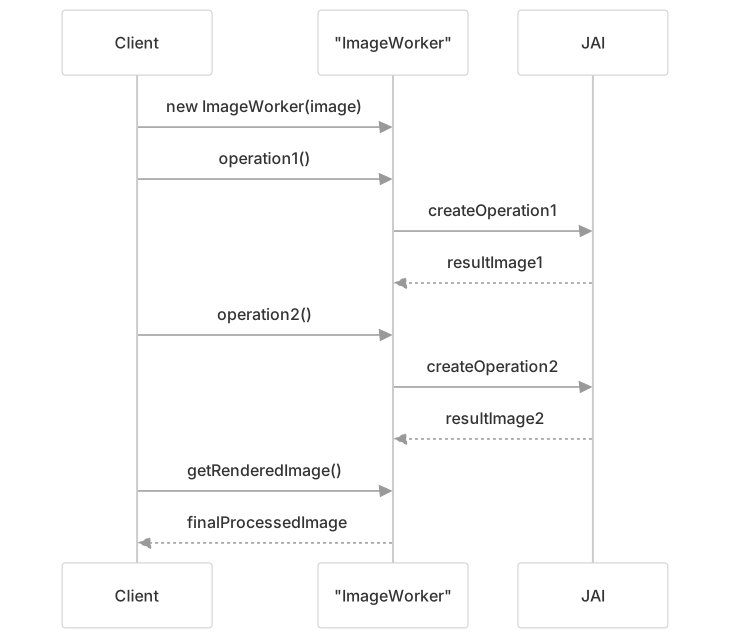
The typical pattern for using ImageWorker is:
- Create an
ImageWorkerinstance with an input image - Apply one or more operations to the image
- Get the final processed image using
getRenderedImage()or one of the related methods
Core Capabilities
The ImageWorker class provides numerous methods for image manipulation:
Image Reading and Creation
- Loading images from files or URLs
- Creating new images with constant values
- Creating new images from functions
Image Format Operations
- Converting between data types (byte, short, int, float, double)
- Converting between color models (RGB, grayscale, indexed)
- Handling transparency and no-data values
Color Manipulation
- Color channel selection
- Color mapping and palette operations
- Contrast enhancement
- Alpha channel manipulation
Geometric Operations
- Scaling and resizing
- Affine transformations (rotation, translation, shearing)
- Warping and reprojection
- Cropping and clipping
Image Writing
- Writing to various formats (JPEG, PNG, GIF, TIFF)
- Format-specific optimizations
- Compression control
Common Image Processing Operations
Format Conversion Operations
The ImageWorker provides methods to convert between different data types and color models:
forceBitmaskIndexColorModel()- Forces an image to use a bitmask index color modelforceIndexColorModel()- Forces an image to use an index color modelforceComponentColorModel()- Forces an image to use a component color modelrescaleToBytes()- Rescales the pixel values to the byte rangeformat()- Converts the image to a specific data type
These operations are particularly useful when preparing images for display or when specific formats are required for further processing.
Color Manipulation Operations
Color manipulation operations include:
bandSelect()- Selects specific bands from the imagebandCombine()- Combines bands using a transformation matrixlookup()- Applies a lookup table to transform pixel valuescolorMap()- Maps pixel values to colors according to a color mapintensity()- Computes an intensity (grayscale) representation of a color imagebinarize()- Converts an image to binary (black and white)makeColorTransparent()- Makes a specific color transparent
These operations are essential for visualization and analysis of raster data, allowing attributes to be highlighted and specific features to be emphasized.
Geometric Operations
Geometric operations transform the spatial properties of an image:
scale()- Resizes the imageaffine()- Applies an affine transformation (rotation, translation, scaling, shearing)crop()- Crops the image to a specified regionwarp()- Applies a general warping transformationreproject()- Reprojects the image to a different coordinate reference system
These operations are critical for aligning raster data with other spatial data and for preparing images for display at different scales and orientations.

Image Writing Operations
The ImageWorker provides methods to write images to various formats:
writeJPEG()- Writes the image as JPEGwritePNG()- Writes the image as PNGwriteGIF()- Writes the image as GIFwriteTIFF()- Writes the image as TIFF
Each method provides options for controlling the output quality, compression, and other format-specific settings.
Integration with Rendering Pipeline
The ImageWorker class is a key component in the rendering pipeline, especially in the GridCoverageRenderer class, which uses it to process grid coverages before rendering them.
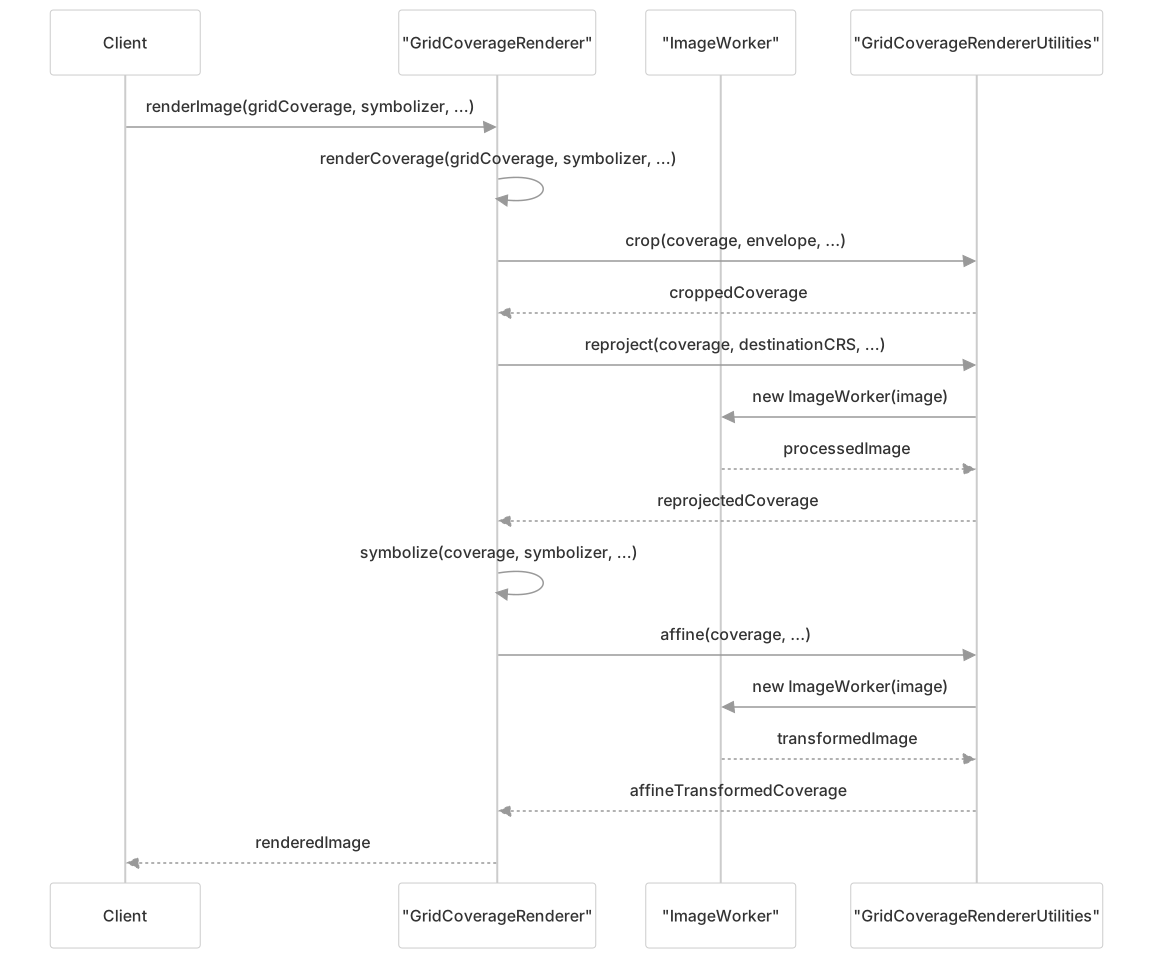
The GridCoverageRenderer uses the ImageWorker class through the GridCoverageRendererUtilities class to perform various transformations on grid coverages:
- Cropping: The coverage is cropped to the area of interest using
crop() - Reprojection: The coverage is reprojected to the target coordinate reference system using
reproject() - Affine Transformation: The coverage is transformed to align with the target grid using
affine() - Symbolization: The coverage is styled according to the specified symbolizer
Advanced Topics
Resolution and Scaling
The ReadResolutionCalculator class is used to determine the appropriate resolution at which to read a grid coverage. This is important for optimizing performance by only reading data at the resolution needed for the current view.
The resolution calculation takes into account:
- The requested grid geometry
- The native CRS of the data
- The full resolution of the data
- The interpolation method to be used
Performance Considerations
Tiling
The ImageWorker class includes options for controlling tiling, which can significantly impact performance:
- Setting the
TILING_ALLOWEDhint toBoolean.FALSEforces operators to produce untiled images - Setting the
JAI.KEY_TILE_CACHEhint tonulldisables the tile cache - The
tileCacheEnabled()method provides control over tile caching
Proper tiling can improve memory usage and processing performance, especially for large images.
Memory Management
Working with large raster datasets requires careful memory management. The ImageWorker class includes features to help manage memory:
- The
commonHintsfield allows setting rendering hints that control memory usage - The
JAI.KEY_TILE_CACHEhint can be used to control the tile cache - The
dispose()method should be called when anImageWorkeris no longer needed to release resources
Dealing with Projection Issues
When reprojecting raster data, various issues can arise, especially around the dateline and poles. The GridCoverageReaderHelper and ProjectionHandler classes work together to handle these issues:
- The
ProjectionHandleridentifies areas that need special handling - The
GridCoverageReaderHelpersplits read operations as needed to handle dateline crossing - The
wrapEnabledproperty controls whether wrapping is performed around the dateline
Conclusion
The image processing subsystem in GeoTools, centered around the ImageWorker class, provides a powerful and flexible framework for manipulating raster data. It integrates seamlessly with the rendering pipeline to enable efficient and high-quality visualization of spatial data.
Key strengths of the system include:
- A fluent API that makes complex image processing operations easy to express
- Comprehensive support for format conversions, color manipulation, and geometric transformations
- Integration with the JAI library for high-performance image processing
- Handling of projection issues, particularly around the dateline and poles
- Control over performance-critical aspects like tiling and memory management
For developers working with GeoTools, understanding the capabilities and usage patterns of the ImageWorker class is essential for effective manipulation and visualization of raster data.