Shader Programs & Compilation
This document explains how Three.js compiles and manages WebGL shader programs, transforming material properties and scene lighting into optimized GLSL code. The system generates shaders dynamically based on material features, caches compiled programs for reuse, and manages the WebGL compilation pipeline.
For information about how uniforms are uploaded to the GPU, see the broader state management documentation. For lighting calculations performed within shaders, see Lighting & Shadows.
System Overview
The shader compilation system consists of two main components: WebGLPrograms manages program caching and parameter generation, while WebGLProgram handles the actual compilation of GLSL code. The system generates unique shader variants for each combination of material features (maps, lighting, effects) and caches them to avoid redundant compilation.

Diagram: Shader Compilation Pipeline
The flow begins when a material needs rendering. WebGLPrograms.getParameters() analyzes the material, scene, and geometry to produce a parameters object containing feature flags and defines. This generates a cache key that identifies the unique shader variant. If the program exists in programsMap, it's reused; otherwise, WebGLProgram compiles a new program by assembling GLSL from ShaderLib templates and ShaderChunk fragments.
WebGLPrograms: Cache Management
The WebGLPrograms class maintains a cache of compiled programs and generates the parameters that define each unique shader variant. It maps cache keys to WebGLProgram instances and tracks usage counts for garbage collection.

Diagram: Program Acquisition Flow
Parameter Generation
The getParameters() function analyzes material properties to determine which shader features to enable. It produces a parameters object with boolean flags, numeric counts, and string identifiers.
| Parameter Type | Purpose | Examples |
|---|---|---|
| Material Features | Enable/disable shader blocks | map, normalMap, envMap, clearcoat |
| Lighting Counts | Size uniform arrays | numDirLights, numPointLights, numSpotLights |
| Texture Channels | UV channel selection | mapUv, normalMapUv, alphaMapUv |
| Render State | Output configuration | toneMapping, shadowMapType, outputColorSpace |
| Geometry Features | Vertex attribute usage | vertexColors, skinning, morphTargets |
The function inspects material properties like material.map, material.normalMap, and converts them to boolean flags (HAS_MAP, HAS_NORMALMAP). It counts lights by type, determines which texture channels are used, and checks geometry attributes:
// Example parameter generation logic (conceptual)
const HAS_MAP = !! material.map;
const HAS_NORMALMAP = !! material.normalMap;
const HAS_ANISOTROPY = material.anisotropy > 0;

parameters.map = HAS_MAP;
parameters.normalMap = HAS_NORMALMAP;
parameters.anisotropy = HAS_ANISOTROPY;
parameters.numDirLights = lights.directional.length;Cache Key Generation
The getProgramCacheKey() function converts parameters into a string key by concatenating values. Two programs with identical parameters produce identical keys, enabling efficient caching.
The key includes:
- Shader ID or custom shader hashes (
shaderID/customVertexShaderID) - All defines from
material.defines - Numeric parameters (precision, light counts, UV channels)
- Boolean flags encoded as bitmasks via
_programLayers - Custom cache key from
material.customProgramCacheKey()
The boolean flags use a Layers object to pack multiple flags into integers, reducing key length:
// Flags packed into _programLayers.mask
_programLayers.enable(0); // instancing
_programLayers.enable(1); // instancingColor
_programLayers.enable(4); // envMap
array.push(_programLayers.mask); // Single integerProgram Lifecycle
Programs are reference-counted via usedTimes. When a material is rendered, acquireProgram() increments the count. When released via releaseProgram(), the count decrements, and at zero, the program is deleted.
WebGLProgram: Compilation Process
The WebGLProgram constructor compiles vertex and fragment shaders and links them into a WebGL program. It injects preprocessor defines, resolves includes from ShaderChunk, and handles GLSL version conversion.
Diagram: Shader Compilation Steps
Prefix Injection
The constructor assembles shader prefixes containing GLSL version, precision directives, defines, and uniform declarations. For non-raw materials, extensive prefixes enable/disable shader features:
Vertex Shader Prefix (excerpt):
#version 300 es
precision highp float;
#define SHADER_TYPE MeshStandardMaterial
#define SHADER_NAME MeshStandardMaterial
#define STANDARD
#define USE_MAP
#define USE_NORMALMAP
#define USE_ENVMAP
#define ENVMAP_MODE_REFLECTION
uniform mat4 modelMatrix;
uniform mat4 modelViewMatrix;
uniform mat4 projectionMatrix;
// ... more uniforms and definesFragment Shader Prefix (excerpt):
#version 300 es
precision highp float;
#define SHADER_TYPE MeshStandardMaterial
#define STANDARD
#define USE_MAP
#define USE_NORMALMAP
#define TONE_MAPPING
// Inline tone mapping function
vec3 toneMapping( vec3 color ) { return ACESFilmicToneMapping( color ); }
// Inline color space conversion
vec4 linearToOutputTexel( vec4 value ) { return sRGBTransferOETF( vec4( value.rgb * mat3(...), value.a ) ); }The prefixes inject:
- Defines: Feature flags like
USE_MAP,USE_NORMALMAP,USE_ENVMAP - Precision:
highp,mediump, orlowpfor all types - Uniforms: Standard matrices and vectors
- Inline Functions: Tone mapping, color space conversion, luminance
Include Resolution
The resolveIncludes() function replaces #include <name> directives with GLSL from ShaderChunk. It recursively processes nested includes:
// Pattern: #include <chunk_name>
const includePattern = /^[ t]*#include +<([wd./]+)>/gm;

function resolveIncludes( string ) {
    return string.replace( includePattern, includeReplacer );
}

function includeReplacer( match, include ) {
    let string = ShaderChunk[ include ];
    // Error if chunk not found
    return resolveIncludes( string ); // Recursive
}This allows shader templates in ShaderLib to be modular. For example, meshphysical_frag includes:
#include <common>
#include <packing>
#include <lights_pars_begin>
#include <lights_physical_pars_fragment>
#include <shadowmap_pars_fragment>Each #include is replaced with the actual GLSL code from the corresponding ShaderChunk entry.
Macro Replacement
After include resolution, the code replaces placeholder macros with actual values:
replaceLightNums() replaces light count constants:
// Before
#if NUM_DIR_LIGHTS > 0
uniform DirectionalLight directionalLights[ NUM_DIR_LIGHTS ];
#endif

// After (if parameters.numDirLights === 3)
#if 3 > 0
uniform DirectionalLight directionalLights[ 3 ];
#endifreplaceClippingPlaneNums() replaces clipping plane counts:
// NUM_CLIPPING_PLANES → parameters.numClippingPlanes
// UNION_CLIPPING_PLANES → (numClippingPlanes - numClipIntersection)Loop Unrolling
The unrollLoops() function expands pragma-annotated loops at compile time to improve GPU performance:
// Before
#pragma unroll_loop_start
for ( int i = 0; i < 3; i ++ ) {
    lights[ i ] = computeLight( i );
}
#pragma unroll_loop_end

// After
lights[ 0 ] = computeLight( 0 );
lights[ 1 ] = computeLight( 1 );
lights[ 2 ] = computeLight( 2 );Loop unrolling eliminates branching overhead on GPUs that struggle with dynamic loops. The system automatically unrolls loops for light iteration when light counts are known at compile time.
GLSL 3.0 Conversion
For non-raw materials, the system converts GLSL 1.0 syntax to GLSL 3.0 (ES 300):
| GLSL 1.0 | GLSL 3.0 |
|---|---|
| attribute | in (vertex shader) |
| varying | out (vertex), in (fragment) |
| texture2D() | texture() |
| gl_FragColor | layout(location=0) out vec4 pc_fragColor |
This conversion allows ShaderLib templates to use simpler syntax while outputting modern GLSL.
Shader Compilation & Linking
After preprocessing, the code creates WebGL shader objects and compiles them:
const glVertexShader = WebGLShader( gl, gl.VERTEX_SHADER, vertexGlsl );
const glFragmentShader = WebGLShader( gl, gl.FRAGMENT_SHADER, fragmentGlsl );

gl.attachShader( program, glVertexShader );
gl.attachShader( program, glFragmentShader );

// Force 'position' to index 0 for morphTargets
if ( parameters.morphTargets === true ) {
    gl.bindAttribLocation( program, 0, 'position' );
}

gl.linkProgram( program );The WebGLShader function wraps gl.createShader(), gl.shaderSource(), and gl.compileShader(), returning a compiled shader handle.
Error Handling
Compilation errors are detected in onFirstUse(), which is called lazily when the program is first accessed (for uniforms or attributes). This supports asynchronous compilation via KHR_parallel_shader_compile:
function onFirstUse( self ) {
    if ( renderer.debug.checkShaderErrors ) {
        const programLog = gl.getProgramInfoLog( program );
        const vertexLog = gl.getShaderInfoLog( glVertexShader );
        const fragmentLog = gl.getShaderInfoLog( glFragmentShader );

        if ( gl.getProgramParameter( program, gl.LINK_STATUS ) === false ) {
            const vertexErrors = getShaderErrors( gl, glVertexShader, 'vertex' );
            const fragmentErrors = getShaderErrors( gl, glFragmentShader, 'fragment' );
            error( 'THREE.WebGLProgram: Shader Error ... ', vertexErrors, fragmentErrors );
        }
    }

    // Extract uniforms and attributes
    cachedUniforms = new WebGLUniforms( gl, program );
    cachedAttributes = fetchAttributeLocations( gl, program );
}The getShaderErrors() function parses error messages to extract line numbers and displays context from the source:
function getShaderErrors( gl, shader, type ) {
    const errors = gl.getShaderInfoLog( shader ).trim();
    const errorMatches = /ERROR: 0:(d+)/.exec( errors );
    if ( errorMatches ) {
        const errorLine = parseInt( errorMatches[ 1 ] );
        return type.toUpperCase() + 'nn' + errors + 'nn' + handleSource( gl.getShaderSource( shader ), errorLine );
    }
    return errors;
}

function handleSource( string, errorLine ) {
    const lines = string.split( 'n' );
    const from = Math.max( errorLine - 6, 0 );
    const to = Math.min( errorLine + 6, lines.length );
    // Returns formatted source with line numbers, highlighting error line
}Parallel Compilation
If the KHR_parallel_shader_compile extension is available, programs compile asynchronously. The isReady() method checks completion:
let programReady = ( parameters.rendererExtensionParallelShaderCompile === false );

this.isReady = function () {
    if ( programReady === false ) {
        programReady = gl.getProgramParameter( program, COMPLETION_STATUS_KHR );
    }
    return programReady;
};This allows the renderer to initiate multiple compilations without blocking, checking completion in later frames.
ShaderLib: Built-in Shader Templates
The ShaderLib object contains shader templates for standard materials. Each entry defines uniforms, vertexShader, and fragmentShader:

Diagram: ShaderLib Material Shaders
Shader Structure
Each shader entry merges UniformsLib groups for common functionality:
Example: physical shader
ShaderLib.physical = {
    uniforms: mergeUniforms([
        ShaderLib.standard.uniforms,
        {
            clearcoat: { value: 0 },
            clearcoatMap: { value: null },
            clearcoatRoughness: { value: 0 },
            iridescence: { value: 0 },
            sheen: { value: 0 },
            transmission: { value: 0 },
            thickness: { value: 0 },
            // ... more physical properties
        }
    ]),
    vertexShader: ShaderChunk.meshphysical_vert,
    fragmentShader: ShaderChunk.meshphysical_frag
};The physical shader extends standard by adding uniforms for clearcoat, iridescence, sheen, and transmission. The vertex and fragment shaders reference ShaderChunk entries, which are GLSL strings with #include directives.
Uniform Libraries
The UniformsLib object groups related uniforms:
| Library | Purpose | Uniforms |
|---|---|---|
| common | Basic material | diffuse, opacity, map, alphaMap, alphaTest |
| envmap | Environment mapping | envMap, envMapRotation, reflectivity, ior |
| lights | Lighting arrays | directionalLights, pointLights, spotLights, shadow matrices |
| fog | Fog parameters | fogColor, fogNear, fogFar, fogDensity |
| normalmap | Normal mapping | normalMap, normalScale |
| bumpmap | Bump mapping | bumpMap, bumpScale |
| displacementmap | Vertex displacement | displacementMap, displacementScale, displacementBias |
Shaders compose these libraries via mergeUniforms():
// Lambert shader uniforms
uniforms: mergeUniforms([
    UniformsLib.common,
    UniformsLib.specularmap,
    UniformsLib.envmap,
    UniformsLib.aomap,
    UniformsLib.lightmap,
    UniformsLib.emissivemap,
    UniformsLib.bumpmap,
    UniformsLib.normalmap,
    UniformsLib.displacementmap,
    UniformsLib.fog,
    UniformsLib.lights,
    { emissive: { value: new Color(0x000000) }, envMapIntensity: { value: 1 } }
])ShaderChunk: GLSL Fragment Library
The ShaderChunk object contains reusable GLSL code fragments. Shaders include these via #include <chunk_name> directives:

Diagram: Key ShaderChunk Fragments
Common Chunks
common defines mathematical constants and utility functions:
#define RECIPROCAL_PI 0.3183098861837907
#define EPSILON 1e-6

float pow2( const in float x ) { return x*x; }
vec3 pow2( const in vec3 x ) { return x*x; }
float saturate( const in float a ) { return clamp( a, 0.0, 1.0 ); }bsdfs provides BRDF (Bidirectional Reflectance Distribution Function) calculations:
float D_BlinnPhong( const in float shininess, const in float dotNH ) {
    return RECIPROCAL_PI * ( shininess * 0.5 + 1.0 ) * pow( dotNH, shininess );
}

vec3 BRDF_BlinnPhong( const in vec3 lightDir, const in vec3 viewDir, const in vec3 normal, const in vec3 specularColor, const in float shininess ) {
    vec3 halfDir = normalize( lightDir + viewDir );
    float dotNH = saturate( dot( normal, halfDir ) );
    vec3 F = F_Schlick( specularColor, 1.0, dotVH );
    float D = D_BlinnPhong( shininess, dotNH );
    return F * D * 0.25;
}Lighting Chunks
lights_pars_begin declares light structs and uniforms:
uniform vec3 ambientLightColor;

struct DirectionalLight {
    vec3 direction;
    vec3 color;
};
uniform DirectionalLight directionalLights[ NUM_DIR_LIGHTS ];

struct PointLight {
    vec3 position;
    vec3 color;
    float distance;
    float decay;
};
uniform PointLight pointLights[ NUM_POINT_LIGHTS ];lights_physical_pars_fragment defines PBR functions for MeshStandardMaterial and MeshPhysicalMaterial:
struct PhysicalMaterial {
    vec3 diffuseColor;
    vec3 specularColor;
    float roughness;
    float metalness;
    #ifdef USE_CLEARCOAT
        float clearcoat;
        float clearcoatRoughness;
    #endif
    #ifdef USE_IRIDESCENCE
        float iridescence;
        float iridescenceIOR;
    #endif
};

vec3 BRDF_GGX( const in vec3 lightDir, const in vec3 viewDir, const in vec3 normal, const in PhysicalMaterial material ) {
    // GGX microfacet BRDF implementation
}lights_fragment_begin iterates over lights and accumulates contributions:
#pragma unroll_loop_start
for ( int i = 0; i < NUM_DIR_LIGHTS; i ++ ) {
    directionalLight = directionalLights[ i ];
    getDirectionalLightInfo( directionalLight, directLight );

    #if defined( USE_SHADOWMAP ) && ( UNROLLED_LOOP_INDEX < NUM_DIR_LIGHT_SHADOWS )
        directionalLightShadow = directionalLightShadows[ i ];
        directLight.color *= getShadow( directionalShadowMap[ i ], ... );
    #endif

    RE_Direct( directLight, geometryPosition, geometryNormal, geometryViewDir, material, reflectedLight );
}
#pragma unroll_loop_endShadow Chunks
shadowmap_pars_fragment provides shadow sampling functions:
float getShadow( sampler2D shadowMap, vec2 shadowMapSize, float shadowIntensity, float shadowBias, float shadowRadius, vec4 shadowCoord ) {
    // PCF (Percentage Closer Filtering) implementation
    // Samples shadow map in a grid pattern around shadowCoord
}

float getPointShadow( samplerCube shadowMap, vec2 shadowMapSize, ... ) {
    // Cube map shadow sampling for point lights
}shadowmap_vertex calculates shadow coordinates in vertex shader:
#pragma unroll_loop_start
for ( int i = 0; i < NUM_DIR_LIGHT_SHADOWS; i ++ ) {
    shadowWorldPosition = worldPosition + vec4( shadowWorldNormal * directionalLightShadows[ i ].shadowNormalBias, 0 );
    vDirectionalShadowCoord[ i ] = directionalShadowMatrix[ i ] * shadowWorldPosition;
}
#pragma unroll_loop_endDynamic Shader Generation
Shaders are customized based on material and scene properties. The system injects defines, composes chunks, and generates specialized code paths.
Feature Defines
The parameters object contains boolean flags that become preprocessor defines:
// In WebGLPrograms.getParameters()
const parameters = {
    map: !! material.map,
    normalMap: !! material.normalMap,
    envMap: !! envMap,
    clearcoat: material.clearcoat > 0,
    transmission: material.transmission > 0,
    shadowMapEnabled: renderer.shadowMap.enabled && shadows.length > 0,
    // ... hundreds more
};

// In WebGLProgram constructor
prefixFragment = [
    '#define SHADER_TYPE ' + parameters.shaderType,
    parameters.map ? '#define USE_MAP' : '',
    parameters.normalMap ? '#define USE_NORMALMAP' : '',
    parameters.envMap ? '#define USE_ENVMAP' : '',
    parameters.clearcoat ? '#define USE_CLEARCOAT' : '',
    // ...
].filter( filterEmptyLine ).join( 'n' );Shader code uses these defines for conditional compilation:
#ifdef USE_MAP
    vec4 sampledDiffuseColor = texture2D( map, vMapUv );
    diffuseColor *= sampledDiffuseColor;
#endif

#ifdef USE_NORMALMAP
    vec3 mapN = texture2D( normalMap, vNormalMapUv ).xyz * 2.0 - 1.0;
    normal = normalize( tbn * mapN );
#endif

#ifdef USE_CLEARCOAT
    material.clearcoat = clearcoat;
    material.clearcoatRoughness = clearcoatRoughness;
    #ifdef USE_CLEARCOATMAP
        material.clearcoat *= texture2D( clearcoatMap, vClearcoatMapUv ).x;
    #endif
#endifThis eliminates inactive code paths at compile time, optimizing performance.
UV Channel Selection
Materials can use different UV channels for each texture map. The system generates defines like MAP_UV, NORMALMAP_UV:
// In getParameters()
parameters.mapUv = HAS_MAP && getChannel( material.map.channel );
parameters.normalMapUv = HAS_NORMALMAP && getChannel( material.normalMap.channel );

function getChannel( value ) {
    _activeChannels.add( value );
    if ( value === 0 ) return 'uv';
    return `uv${ value }`;
}This becomes:
#define MAP_UV uv
#define NORMALMAP_UV uv1

varying vec2 vMapUv;
varying vec2 vNormalMapUv;

// In vertex shader
vMapUv = ( uvTransform * vec3( uv, 1 ) ).xy;
vNormalMapUv = ( normalMapTransform * vec3( uv1, 1 ) ).xy;Light Count Specialization
The number of lights determines array sizes and loop bounds:
parameters.numDirLights = lights.directional.length;
parameters.numPointLights = lights.point.length;
parameters.numSpotLights = lights.spot.length;These counts replace placeholders:
// Before replacement
uniform DirectionalLight directionalLights[ NUM_DIR_LIGHTS ];
for ( int i = 0; i < NUM_DIR_LIGHTS; i ++ ) { ... }

// After replacement (if numDirLights = 2)
uniform DirectionalLight directionalLights[ 2 ];
for ( int i = 0; i < 2; i ++ ) { ... }Then loop unrolling expands the loop:
// After unrolling
directionalLight = directionalLights[ 0 ];
getDirectionalLightInfo( directionalLight, directLight );
RE_Direct( directLight, ... );

directionalLight = directionalLights[ 1 ];
getDirectionalLightInfo( directionalLight, directLight );
RE_Direct( directLight, ... );Tone Mapping Injection
The fragment shader prefix injects the tone mapping function inline based on parameters.toneMapping:
const toneMappingFunctions = {
    [ LinearToneMapping ]: 'Linear',
    [ ReinhardToneMapping ]: 'Reinhard',
    [ CineonToneMapping ]: 'Cineon',
    [ ACESFilmicToneMapping ]: 'ACESFilmic',
};

function getToneMappingFunction( functionName, toneMapping ) {
    const toneMappingName = toneMappingFunctions[ toneMapping ];
    return 'vec3 ' + functionName + '( vec3 color ) { return ' + toneMappingName + 'ToneMapping( color ); }';
}

// Injected into fragment prefix
prefixFragment = [
    // ...
    ( parameters.toneMapping !== NoToneMapping ) ? '#define TONE_MAPPING' : '',
    ( parameters.toneMapping !== NoToneMapping ) ? getToneMappingFunction( 'toneMapping', parameters.toneMapping ) : '',
    // ...
];This generates:
#define TONE_MAPPING
vec3 toneMapping( vec3 color ) { return ACESFilmicToneMapping( color ); }The shader later calls toneMapping( outgoingLight ) to apply the tone curve.
Color Space Conversion
Similar to tone mapping, color space output functions are injected:
function getTexelEncodingFunction( functionName, colorSpace ) {
    const components = getEncodingComponents( colorSpace );
    return [
        `vec4 ${functionName}( vec4 value ) {`,
        `  return ${components[1]}( vec4( value.rgb * ${components[0]}, value.a ) );`,
        '}'
    ].join( 'n' );
}

function getEncodingComponents( colorSpace ) {
    ColorManagement._getMatrix( _m0, ColorManagement.workingColorSpace, colorSpace );
    const encodingMatrix = `mat3( ${ _m0.elements.map( v => v.toFixed(4) ) } )`;

    switch ( ColorManagement.getTransfer( colorSpace ) ) {
        case LinearTransfer:
            return [ encodingMatrix, 'LinearTransferOETF' ];
        case SRGBTransfer:
            return [ encodingMatrix, 'sRGBTransferOETF' ];
    }
}This generates matrix multiplication and transfer function:
vec4 linearToOutputTexel( vec4 value ) {
    return sRGBTransferOETF( vec4( value.rgb * mat3( 1.0, 0.0, 0.0, 0.0, 1.0, 0.0, 0.0, 0.0, 1.0 ), value.a ) );
}The shader calls this to convert from linear to the output color space (sRGB, Display P3, etc.).
Uniform Management
After program linking, the system extracts uniform locations and creates a caching structure via WebGLUniforms. This happens lazily in onFirstUse().
Uniform Location Extraction
The WebGLUniforms constructor queries the WebGL program for all active uniforms:
cachedUniforms = new WebGLUniforms( gl, program );

// Inside WebGLUniforms
const n = gl.getProgramParameter( program, gl.ACTIVE_UNIFORMS );
for ( let i = 0; i < n; i++ ) {
    const info = gl.getActiveUniform( program, i );
    const name = info.name;
    const addr = gl.getUniformLocation( program, name );
    // Store location and type
}This creates a uniform cache that maps names to WebGL locations, enabling efficient updates without repeated getUniformLocation() calls.
Attribute Location Extraction
Similarly, fetchAttributeLocations() queries vertex attributes:
function fetchAttributeLocations( gl, program ) {
    const attributes = {};
    const n = gl.getProgramParameter( program, gl.ACTIVE_ATTRIBUTES );

    for ( let i = 0; i < n; i++ ) {
        const info = gl.getActiveAttrib( program, i );
        const name = info.name;

        let locationSize = 1;
        if ( info.type === gl.FLOAT_MAT2 ) locationSize = 2;
        if ( info.type === gl.FLOAT_MAT3 ) locationSize = 3;
        if ( info.type === gl.FLOAT_MAT4 ) locationSize = 4;

        attributes[ name ] = {
            type: info.type,
            location: gl.getAttribLocation( program, name ),
            locationSize: locationSize
        };
    }

    return attributes;
}Matrices occupy multiple attribute locations (e.g., mat4 uses 4 consecutive locations), so locationSize tracks this.
Lazy Initialization
Uniform and attribute extraction is deferred until first use to support asynchronous compilation:
this.getUniforms = function () {
    if ( cachedUniforms === undefined ) {
        onFirstUse( this ); // Populates cachedUniforms
    }
    return cachedUniforms;
};

this.getAttributes = function () {
    if ( cachedAttributes === undefined ) {
        onFirstUse( this ); // Populates cachedAttributes
    }
    return cachedAttributes;
};This allows the renderer to initiate compilation, continue with other work, and access uniforms only when the program is ready.
Program Usage Example
A complete shader compilation flow:
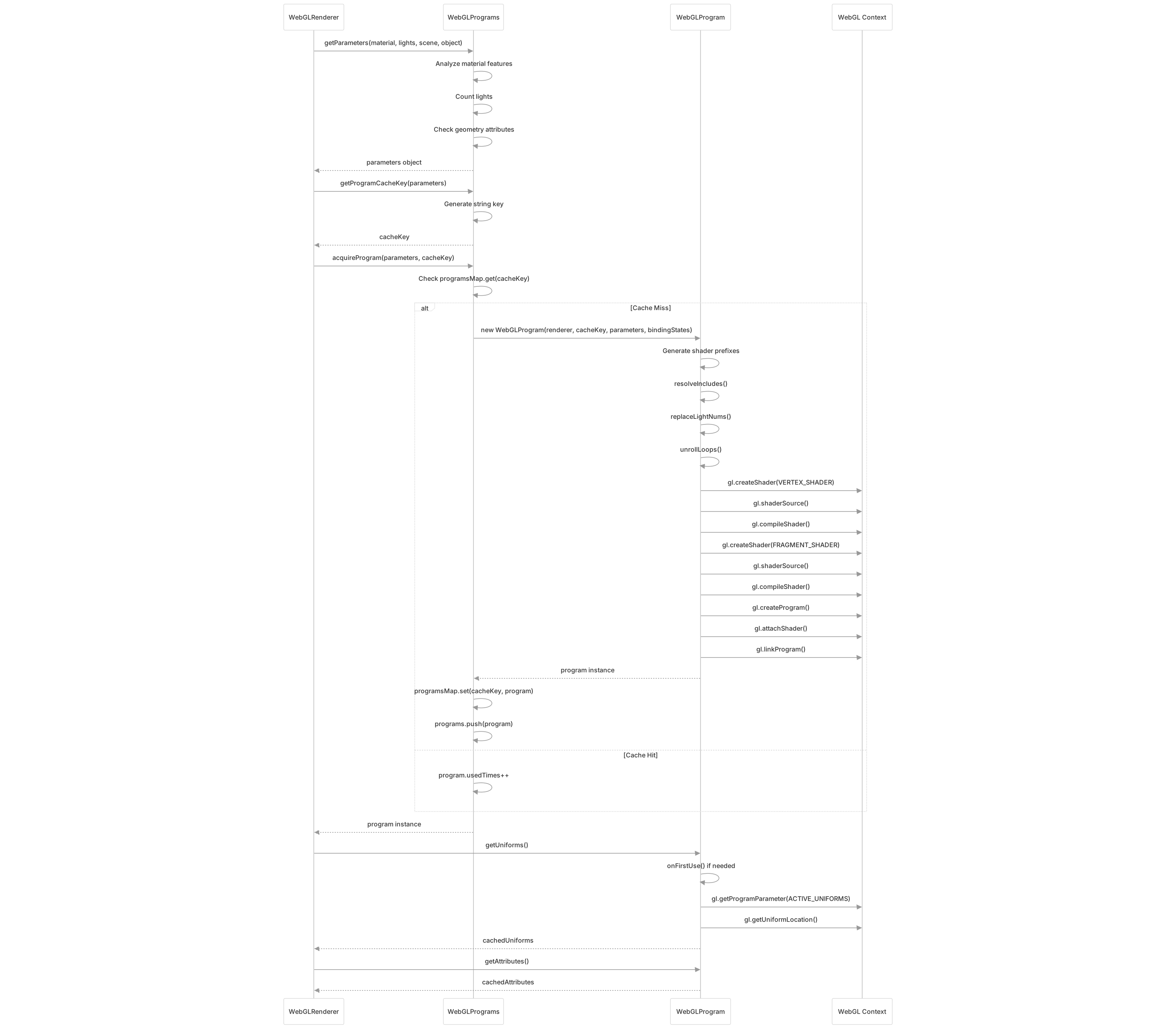
Diagram: Complete Program Acquisition Flow
The process begins when the renderer needs to draw a material. It generates parameters describing the material's features, creates a cache key, and checks if a matching program exists. On a cache miss, WebGLProgram compiles a new program from shader templates, inserting defines and processing includes. The program is cached for future draws with identical parameters. Uniforms and attributes are extracted lazily when first accessed, supporting asynchronous compilation.