Developer Tools
Purpose and Scope
This document describes the ecosystem of developer tools built on top of Three.js, including the visual editor application, examples browser, documentation system, and testing infrastructure. These tools enable developers to learn, experiment, build, and maintain Three.js projects.
For implementation details of specific tools, see:
- Visual Editor Application: #6.1
- Examples System & Browser: #6.2
- Documentation Browser: #6.3
- Testing & Quality Assurance: #6.4
For information about the Three.js core library that these tools consume, see Three.js Overview.
Developer Tools Ecosystem Overview
The Three.js project includes four primary developer tools:
| Tool | Purpose | Entry Point | Key Features |
|---|---|---|---|
| Visual Editor | 3D scene authoring and editing | editor/index.html | Visual scene construction, multi-format import, undo/redo, IndexedDB persistence |
| Examples Browser | Interactive demo catalog | examples/index.html | 400+ categorized examples, search/filter, screenshot testing |
| Documentation Browser | API reference and manual | docs/index.html | Searchable API docs, live code console, iframe integration |
| Testing Infrastructure | Quality assurance | test/e2e/puppeteer.js | Visual regression testing, deterministic rendering, CI integration |
All tools are distributed as part of the Three.js repository and consume the library's build outputs (build/three.module.js, build/three.webgpu.js).
High-Level Architecture

Architecture Overview: Developer tools consume Three.js build outputs and provide different development workflows. The editor loads ESM and WebGPU builds via import maps, the examples system references individual example files, and the documentation exposes API reference pages with integrated search.
Visual Editor Application Architecture
The visual editor is a complete 3D authoring application built on Three.js. It provides a viewport for scene rendering, sidebar panels for property editing, menubar actions, and persistent storage.

Editor Architecture: The Editor class manages scene state and coordinates UI components through a signal-based event system. User actions dispatch commands that execute through the history system, enabling undo/redo. The viewport renders the scene using a configurable renderer (WebGL or WebGPU), while sidebar panels expose object properties. Multi-format loading is handled by the Loader class, which delegates to format-specific loaders from examples/jsm/loaders/.
Editor Signal System
The editor uses a publish-subscribe pattern for component coordination:

Signal System: The editor defines 40+ signals in Editor.js that decouple UI components. When a command modifies scene state, it dispatches relevant signals (e.g., objectChanged, sceneGraphChanged). Listeners in Viewport.js trigger re-renders, sidebar panels refresh UI, and the autosave system persists state to IndexedDB after a debounce period.
Editor Storage and Persistence

Persistence Architecture: The editor serializes its entire state (scene, camera, scripts, history) to JSON using Three.js's ObjectLoader format. State is stored in IndexedDB and restored on page load. Autosave is triggered by signals (object changes, material changes, etc.) with a 1-second debounce to avoid excessive writes. The serialization format is compatible with Three.js's ObjectLoader, enabling export and import of complete projects.
Examples System Architecture
The examples browser provides a filterable catalog of 400+ Three.js demonstrations with live preview:

Examples System: The browser fetches files.json and tags.json at startup, building a navigable catalog with thumbnails from the screenshots/ directory. User interactions update the URL hash and load examples into an iframe. Search filters examples using regex matching against file names and tags. Each example HTML file uses an import map to resolve three and three/addons/ paths to the build outputs.
Examples Browser Data Flow
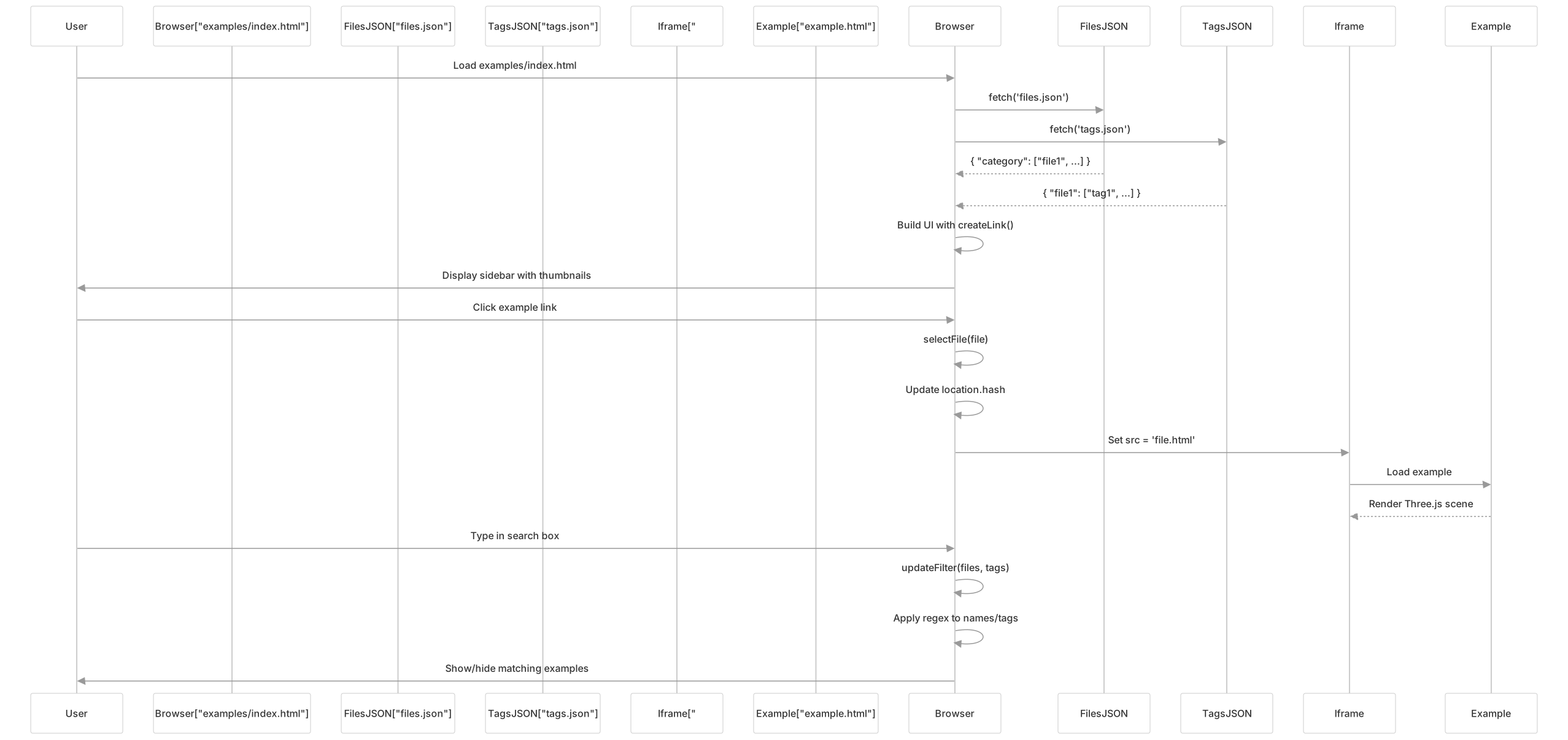
Browser Flow: On page load, the browser fetches metadata files and constructs the sidebar with example links. Clicking an example updates the URL hash and loads the example HTML into the iframe. Search input triggers regex filtering against file names and tags, showing/hiding examples dynamically. This architecture allows the examples to run in isolation while maintaining a consistent navigation frame.
Documentation Browser Architecture
The documentation system provides searchable API reference pages with live code console:

Documentation Architecture: The documentation browser loads a pre-built search index (search.json) containing all API symbols. User input triggers fuzzy search, displaying results in a dropdown. Clicking a result loads the corresponding API page into an iframe. The main page imports Three.js and exposes it as window.THREE, enabling developers to experiment with the library in the browser console while reading documentation.
Documentation Search Implementation

Search Implementation: The search system performs case-insensitive substring matching against page titles, paths, and keywords. Results are ranked by match quality (exact matches first, then prefix matches, then substring matches) and limited to 10 entries. The search runs on every keystroke, providing instant feedback. Clicking a result navigates the iframe to the corresponding API page and updates the URL hash for bookmarkability.
Editor Multi-Format Loading System
The editor's Loader class supports 30+ 3D file formats through dynamic imports:

Loader Architecture: The Loader class examines file extensions and dynamically imports the appropriate loader from examples/jsm/loaders/. For GLTF/GLB files, it displays an import dialog asking whether to replace the entire scene or add as an object. Loaded objects are added to the scene via the command system, enabling undo. The loader also handles file maps for multi-file formats (e.g., OBJ+MTL) and compressed archives (ZIP).
Editor Command Pattern
All editor operations execute through a command pattern that enables undo/redo:

Command Pattern: Every state-modifying operation is encapsulated in a command object with execute() and undo() methods. Commands are passed to editor.execute(), which forwards them to the history system. The history maintains two stacks: undos (executed commands) and redos (undone commands). Executing a new command clears the redo stack. This architecture ensures all editor operations are reversible and provides a consistent interface for batch operations via MultiCmdsCommand.
Shared UI Framework
All three developer tools share common CSS and UI patterns:
| UI Pattern | Implementation | Used By |
|---|---|---|
| Panel Layout | #panel sidebar + #viewer iframe | Examples, Docs |
| Search Box | #filterInput with live filtering | Examples, Docs |
| Dark Mode | CSS prefers-color-scheme: dark | All tools |
| Responsive Design | Mobile-friendly breakpoints | All tools |
| Icon System | SVG icons in files/ directory | Examples, Editor |
The editor uses a custom UI framework (editor/js/libs/ui.js) with classes like UIPanel, UIRow, UIInput, providing a consistent look across all panels.
Integration with Three.js Core
All developer tools consume Three.js through import maps or script tags:
Editor Import Map (editor/index.html15-27):
{
  "imports": {
    "three": "../build/three.module.js",
    "three/webgpu": "../build/three.webgpu.js",
    "three/addons/": "../examples/jsm/"
  }
}Documentation Console (docs/index.html11-14):
import * as THREE from '../build/three.module.js';
window.THREE = THREE;Examples: Each example HTML file includes its own import map referencing the same build outputs.
This consistent integration pattern ensures all tools use the same Three.js version and can share code from the examples/jsm/ addon library.
Summary
The Three.js developer tools ecosystem provides:
- Visual Editor: Full-featured 3D scene authoring with signal-based architecture, command pattern for undo/redo, and IndexedDB persistence
- Examples Browser: Catalog of 400+ demos with filtering, thumbnails, and visual regression testing
- Documentation: Searchable API reference with live console integration
- Testing: Puppeteer-based screenshot testing for visual regression detection
These tools share common UI patterns, integrate consistently with the core library, and provide complementary workflows for learning, experimentation, and production authoring.