Testing & Quality Assurance
Purpose and Scope
The Testing & Quality Assurance system provides automated validation of Three.js rendering correctness and API functionality through two complementary approaches: Puppeteer-based visual regression testing and QUnit-based unit tests. The primary system is an end-to-end (E2E) screenshot testing harness that captures and compares rendered output from 460+ examples across WebGL and WebGPU backends. This document explains the Puppeteer test infrastructure, deterministic rendering techniques, pixel comparison algorithms, unit test organization, and continuous integration parallelization.
For the Examples Browser that hosts these examples, see page 6.2. For documentation generation, see page 6.3.
Overview
The testing infrastructure consists of two complementary systems:
- E2E Visual Regression Tests - Puppeteer-driven system in test/e2e/puppeteer.js that renders examples in headless Chrome with SwiftShader, captures screenshots at 400×250 resolution, and performs pixel-by-pixel comparison against reference images in examples/screenshots/
- Unit Tests - QUnit-based test suite in test/unit/ that validates individual classes and mathematical primitives
The E2E system detects visual regressions in rendering output caused by changes to core library code, shader implementations, or material systems. It processes the example catalog from examples/files.json and generates comparison reports showing actual vs. expected output with pixel difference highlighting.
Overview
The testing infrastructure consists of two main components:
- E2E Visual Regression Tests - Puppeteer-based system that renders examples in headless Chrome, captures screenshots, and compares them against reference images
- Unit Tests - QUnit-based test suite located in
test/unit/(referenced but not primary focus)
The E2E system is designed to catch visual regressions introduced by code changes, ensuring that rendering output remains consistent across updates to core library code, shaders, and materials.
System Architecture

Configuration Parameters
The test system configures rendering and comparison thresholds through constants defined in test/e2e/puppeteer.js94-111:
| Parameter | Value | Purpose | Line Reference |
|---|---|---|---|
| port | 1234 | HTTP server port for createServer() | 96 |
| pixelThreshold | 0.1 | Per-pixel color distance threshold for Image.compare() | 97 |
| maxDifferentPixels | 0.3% | Percentage threshold for test pass/fail | 98 |
| idleTime | 2 seconds | page.waitForNetworkIdle() timeout | 100 |
| parseTime | 1 second/MB | Additional delay: page.pageSize * parseTime | 101 |
| networkTimeout | 5 minutes | Maximum for page.goto() and network idle | 103 |
| renderTimeout | 5 seconds | Maximum wait for window._renderFinished flag | 104 |
| numAttempts | 2 | Retry count in makeAttempt() before failure | 105 |
| numCIJobs | 5 | GitHub Actions matrix size for parallelization | 106 |
| width × height | 400 × 250 | Screenshot logical pixel dimensions | 108-109 |
| viewScale | 2 | Multiplier for actual viewport: width * viewScale | 110 |
| jpgQuality | 95 | JPEG compression quality for Image.write() | 111 |
Exception List
The test harness maintains an exception list of examples that are skipped during automated testing. These fall into several categories:

Test Execution Flow
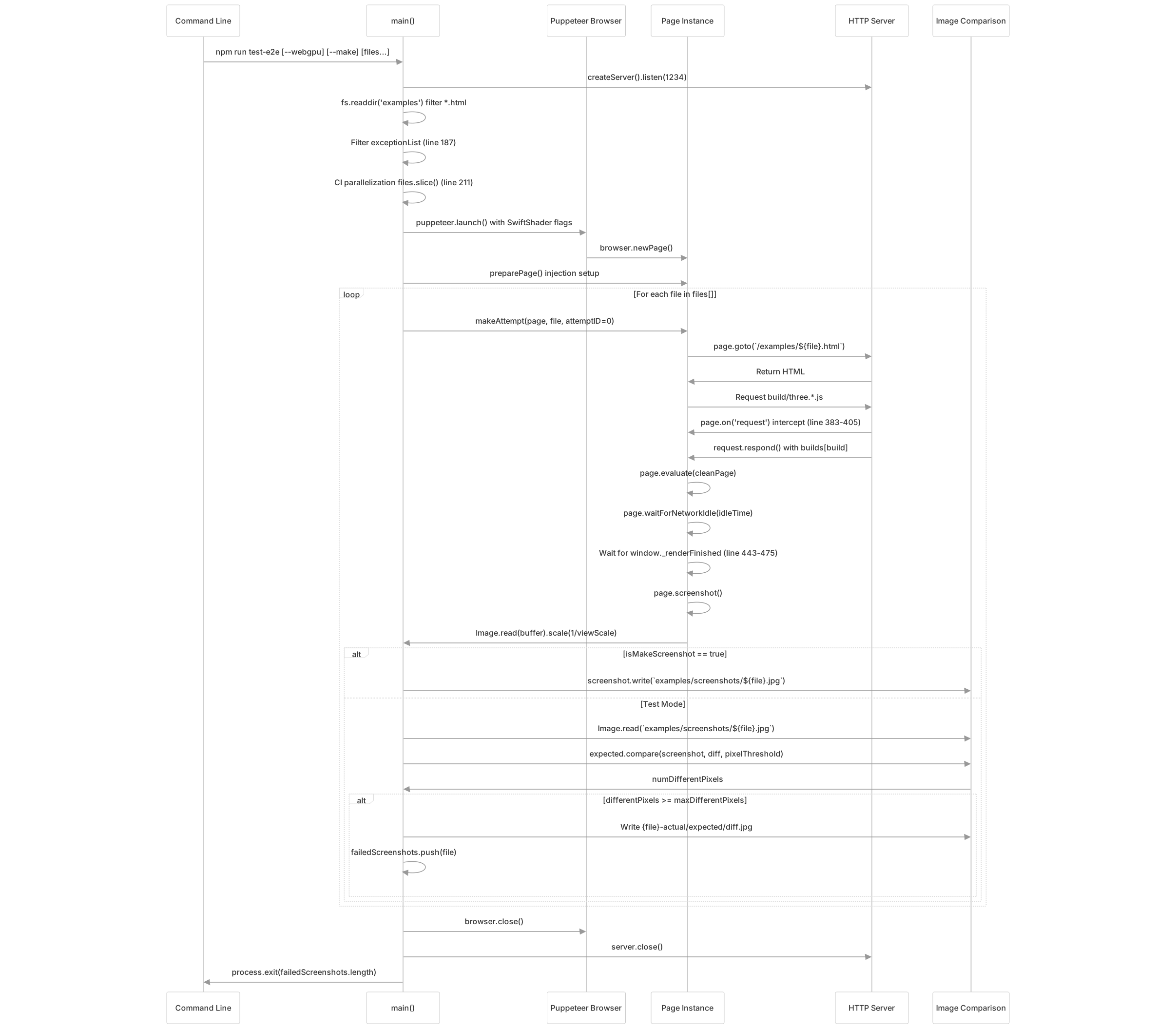
Puppeteer Configuration
The test harness launches Chrome with specific flags to ensure consistent rendering:
// Browser flags
const flags = [
    '--hide-scrollbars',
    '--use-angle=swiftshader',      // Force software rendering
    '--enable-unsafe-swiftshader',
    '--no-sandbox'
];

const viewport = {
    width: width * viewScale,   // 800px
    height: height * viewScale  // 500px
};The --use-angle=swiftshader flag forces software rendering via SwiftShader, ensuring consistent output across different hardware configurations and eliminating GPU driver variation.
Deterministic Rendering
To ensure reproducible test results, the system injects code that overrides non-deterministic JavaScript APIs:
Build Injection
The buildInjection() function at test/e2e/puppeteer.js240 patches Three.js build files by replacing Math.random() calls with a deterministic alternative:
// Line 240
const buildInjection = (code) =>
code.replace(/Math.random() * 0xffffffff/g, 'Math._random() * 0xffffffff');This targets the specific pattern used for generating unique IDs in Object3D and other Three.js core classes. The patched builds are stored in the builds object:
// Lines 245-249
const builds = {
    'three.core.js': buildInjection(await fs.readFile('build/three.core.js', 'utf8')),
    'three.module.js': buildInjection(await fs.readFile('build/three.module.js', 'utf8')),
    'three.webgpu.js': buildInjection(await fs.readFile('build/three.webgpu.js', 'utf8'))
};Injection Script
The test/e2e/deterministic-injection.js file provides deterministic replacements evaluated via page.evaluateOnNewDocument() at test/e2e/puppeteer.js301:
Math._random()- Seeded pseudo-random number generatorperformance._now()- Monotonic timestamp provider
These overrides ensure animations and random values produce identical output across test runs.
Request Interception
The test harness intercepts HTTP requests to inject patched Three.js builds:

This allows the system to serve modified builds that replace non-deterministic functions while keeping all other assets unchanged.
Screenshot Comparison
Image Comparison Algorithm
The Image.compare() method compares two screenshots pixel-by-pixel:
| Step | Operation |
|---|---|
| 1. Size Check | Verify dimensions match |
| 2. Pixel Iteration | Loop through all pixels |
| 3. Color Distance | Calculate per-channel difference |
| 4. Threshold Test | Check if distance > pixelThreshold |
| 5. Diff Marking | Mark different pixels in output |
| 6. Count | Return total different pixels |
Comparison Logic
The comparison logic at test/e2e/puppeteer.js519-552 calculates pixel difference percentage:
// Line 527
const numDifferentPixels = expected.compare(screenshot, diff, pixelThreshold);

// Line 539
const differentPixels = numDifferentPixels / (actual.width * actual.height) * 100;

// Line 541
if (differentPixels < maxDifferentPixels) {
    console.green(`Diff ${differentPixels.toFixed(1)}% in file: ${file}`);
} else {
    // Lines 547-550: Write three output files for debugging
    await screenshot.write(`test/e2e/output-screenshots/${file}-actual.jpg`, jpgQuality);
    await expected.write(`test/e2e/output-screenshots/${file}-expected.jpg`, jpgQuality);
    await diff.write(`test/e2e/output-screenshots/${file}-diff.jpg`, jpgQuality);
    throw new Error(`Diff wrong in ${differentPixels.toFixed(1)}% of pixels`);
}Render Wait Loop
Examples must signal render completion by setting window._renderFinished = true. The test harness waits for this flag:

CI Parallelization
GitHub Actions runs the test suite across 5 parallel jobs. Each job processes a subset of examples:
if ('CI' in process.env) {
    const CI = parseInt(process.env.CI);

    files = files.slice(
        Math.floor(CI * files.length / numCIJobs),
        Math.floor((CI + 1) * files.length / numCIJobs)
    );
}Job Distribution
| CI Index | Example Range | Approximate Count |
|---|---|---|
| 0 | 0% - 20% | ~92 examples |
| 1 | 20% - 40% | ~92 examples |
| 2 | 40% - 60% | ~92 examples |
| 3 | 60% - 80% | ~92 examples |
| 4 | 80% - 100% | ~92 examples |
This distributes the ~460 example tests across 5 workers for faster total execution time.
Console and Error Handling
The test harness monitors browser console output and page errors:
Console Handler
The page.on('console') handler at test/e2e/puppeteer.js304-367 captures browser console output:
// Lines 304-320: Extract console arguments
page.on('console', async msg => {
    const type = msg.type();
    const args = await Promise.all(msg.args().map(async arg => {
        return await arg.executionContext().evaluate(
            arg => arg instanceof Error ? arg.message : arg,
            arg
        );
    }));

    let text = args.join(' ');
    text = file + ': ' + text.replace(/[.WebGL-(.+?)] /g, '');

    // Lines 353-359: Handle error type
    if (type === 'error') {
        page.error = text;  // Marks page as failed
    }
});The errorMessagesCache array at test/e2e/puppeteer.js253 deduplicates messages across retry attempts.
Response Handler
The page.on('response') handler at test/e2e/puppeteer.js369-380 accumulates page size for parse time calculation:
// Lines 369-376
page.on('response', async (response) => {
    if (response.status === 200) {
        await response.buffer().then(buffer => page.pageSize += buffer.length);
    }
});

// Used in line 475: parseTime = page.pageSize / 1024 / 1024 * parseTime * 1000Retry Logic
Each example attempt can be retried up to numAttempts times (default: 2):

This handles transient failures from timing issues or network glitches.
Command Line Interface
Test Mode (Compare against reference)
npm run test-e2e                           # Test all non-excepted examples
npm run test-e2e --webgpu                  # Filter to webgpu_* examples (line 203)
npm run test-e2e webgl_animation_keyframes # Test specific example by name
npm run test-e2e file1 file2 file3 # Test multiple specific examplesMake Mode (Generate reference screenshots)
npm run make-screenshot file1 file2         # Generate new reference JPGs
npm run make-screenshot --webgpu file1 # Generate WebGPU referenceThe argument parsing at test/e2e/puppeteer.js164-180 handles --webgpu and --make flags:
- Line 165-169:
--webgpuflag detection - Line 172-176:
--makeflag setsisMakeScreenshot = true - Line 179-180: Remaining args are
exactListof example names
Output and Reporting
Success Output
✓ Diff 0.1% in file: webgl_animation_keyframes
✓ Screenshot generated for file: webgl_animation_keyframes
✓ TEST PASSED! 220 screenshots rendered correctly.Failure Output
✗ Diff wrong in 1.5% of pixels in file: webgl_materials_physical_transmission
✗ List of failed screenshots: webgl_materials_physical_transmission
✗ If you are sure that everything is correct, try to run "npm run make-screenshot webgl_materials_physical_transmission"
✗ TEST FAILED! 1 from 220 screenshots have not rendered correctly.Failed tests produce three output images:
{file}-actual.jpg- Current render output{file}-expected.jpg- Reference screenshot{file}-diff.jpg- Visual diff highlighting differences
Integration with Examples System
The test infrastructure depends on the examples system structure defined in page 6.2:
| Component | Path | Purpose | Code Reference |
|---|---|---|---|
| Example HTML | examples/{name}.html | Individual example pages | Navigated via page.goto() line 421 |
| Example List | examples/files.json | JSON arrays: webgl[], webgpu[], etc. | Read via fs.readdir('examples') line 184 |
| Example Tags | examples/tags.json | Feature categorization and search metadata | Not used by test harness |
| Screenshots | examples/screenshots/{name}.jpg | Reference images for comparison | Read via Image.read() line 511 |
| Build Files | build/three.core.jsbuild/three.module.jsbuild/three.webgpu.js | Library distributions | Patched and intercepted lines 245-249, 383-405 |
The test system constructs URLs as http://localhost:${port}/examples/${file}.html and intercepts requests to /build/three.*.js to inject deterministic patches.
Unit Testing
Unit tests are located in test/unit/ and use QUnit as the testing framework. These tests focus on:
- Mathematical primitives (Vector3, Matrix4, Quaternion)
- Core class functionality
- API contract validation
- Edge case handling
The E2E system complements unit tests by validating integrated rendering behavior that cannot be tested in isolation.