Rendering System
The Rendering System in Mapbox GL JS is responsible for transforming geographic data and styling information into visual representations on the screen. It leverages WebGL to provide hardware-accelerated rendering of map elements including fills, lines, symbols, and 3D features like terrain and buildings. This page explains the core rendering architecture, shader system, and rendering process, providing a foundation for understanding more specific aspects of the system. For details on the Painter class that coordinates rendering operations, see Painter, and for information about specific layer types, see Layer Rendering.
Rendering Architecture
The Mapbox GL JS rendering system follows a pipeline architecture that transforms geographic data and styles into pixels on the screen.

Key Components
Painter: Coordinates the rendering process, manages WebGL context, and handles drawing of different layer types. The Painter controls the rendering order, depth and stencil settings, and dispatches draw calls to the GPU.
Shader Programs: WebGL shader programs specialized for each layer type with:
- Vertex shaders for position transformation and attribute processing
- Fragment shaders for determining pixel colors, textures, and effects
Data Buckets: Layer-specific data structures optimized for efficient rendering, containing:
- Vertex arrays for geometric data
- Index arrays for defining primitives
- Program configurations for style properties
Transform State: Manages the viewport, camera position, and projection matrices used to convert geographic coordinates to screen space.
Shader System
Mapbox GL JS uses GLSL (OpenGL Shading Language) shaders for rendering different layer types with specialized visual effects. The shader system consists of multiple interconnected components:

Shader Preludes
Shader preludes are included at the beginning of vertex and fragment shaders to provide common functionality:
Terrain Prelude (
_prelude_terrain.vertex.glsl):- Handles elevation sampling from DEM textures
- Calculates terrain elevations and exaggeration
- Provides vertex displacement for terrain-following layers
Lighting Prelude (
_prelude_lighting.glsl):- Implements ambient and directional lighting calculations
- Handles shadow mapping and lighting effects
- Controls material properties for 3D objects
Fog Prelude (
_prelude_fog.fragment.glsl):- Implements atmospheric effects and distance fog
- Handles color blending based on distance
Shadow Prelude (
_prelude_shadow.fragment.glsl):- Implements shadow mapping techniques
- Handles shadow sampling and filtering
- Controls shadow intensity and bias
GLSL Pragma Instructions
The shader system uses a special pragma-based template system to inject style properties into shaders:
#pragma mapbox: define highp vec4 color
#pragma mapbox: define lowp float opacity

// Later in the shader:
#pragma mapbox: initialize highp vec4 color
#pragma mapbox: initialize lowp float opacityThis allows the shaders to access style properties defined in the style specification, bridging the gap between JavaScript style definitions and GLSL shader code.
Rendering Process
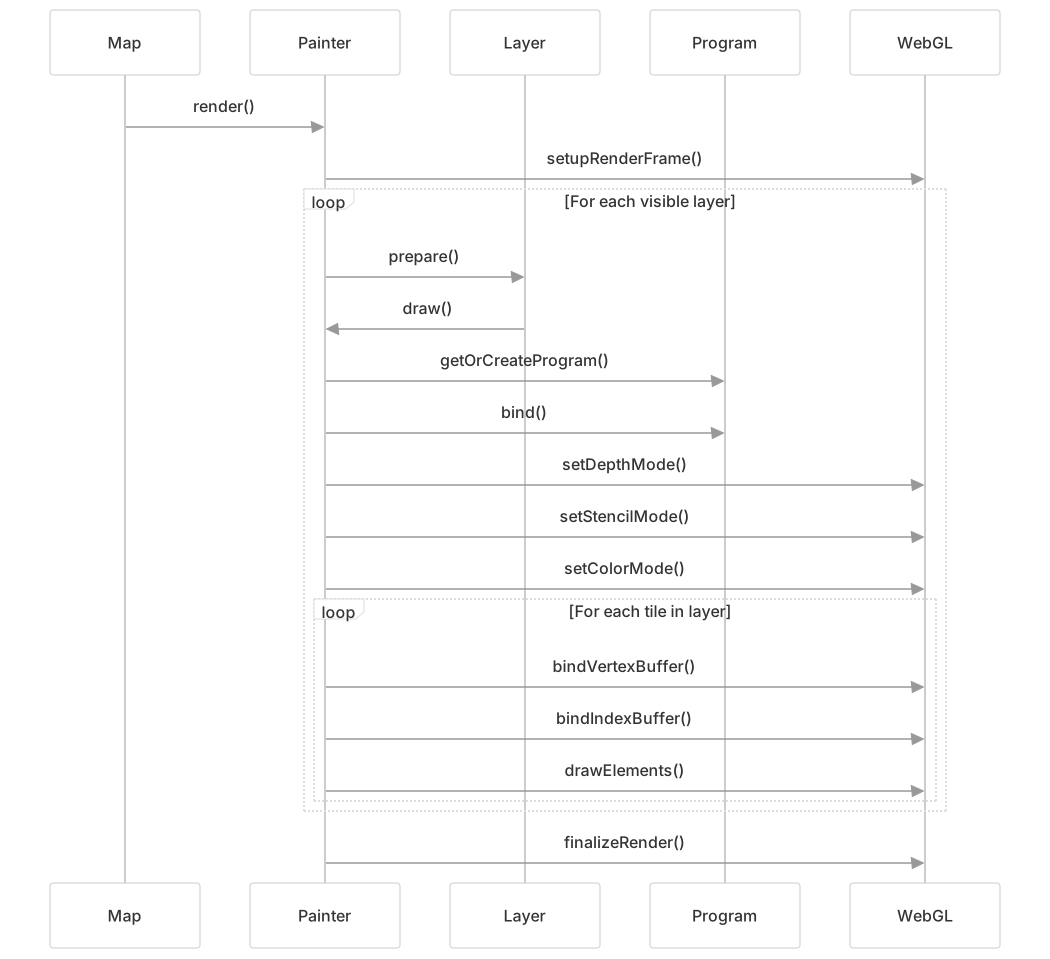
The rendering pipeline processes data from source to screen through several stages:
Layer Rendering
Let's examine how line layers are rendered as an example:
Preparation Phase:
- Check if the layer has opacity and width
- Load necessary textures (for patterns or gradients)
- Determine elevated sections for terrain interaction
Shader Selection:
- Choose between regular line or pattern programs
- Add appropriate #define values for features like dashes, gradients, or borders
Draw Call Execution:
- Set appropriate depth and stencil states
- Upload uniforms like matrices, widths, and colors
- Bind vertex and index buffers
- Execute WebGL draw calls
Uniform Values
Uniforms transfer style properties and state to shaders. For line layers, these include:
// From line_program.ts
'u_matrix': calculateMatrix(painter, tile, layer, matrix),
'u_pixels_to_tile_units': pixelsToTileUnits,
'u_device_pixel_ratio': pixelRatio,
'u_width_scale': widthScale,
'u_floor_width_scale': floorWidthScale,
'u_units_to_pixels': [
    1 / transform.pixelsToGLUnits[0],
    1 / transform.pixelsToGLUnits[1]
],
// ... additional uniformsData Structures
To efficiently organize geometric data for rendering, Mapbox GL JS uses specialized data structures:
Bucket System
Each layer type has a corresponding bucket type that organizes data for rendering:

Array Types
Mapbox GL JS uses typed arrays with specific layouts to efficiently transfer data to WebGL:

These array types are defined with specific memory layouts to match WebGL vertex attributes exactly, minimizing data conversion overhead.
Advanced Rendering Features
Mapbox GL JS includes several advanced rendering features:
Terrain Rendering
The terrain system samples elevation data to create 3D terrain surfaces and affects how other layers are rendered:

Lighting System
The 3D lighting system provides realistic shading for 3D elements:

The lighting system supports both flat lighting for simple maps and 3D lighting for more complex scenes with terrain and 3D buildings.
Rendering Modes and Effects
Mapbox GL JS supports various rendering modes and effects that can be combined to create diverse visual styles:
| Effect | Description | Key Files |
|---|---|---|
| Fill | Rendering filled polygons | fill.vertex.glsl, fill.fragment.glsl |
| Line | Rendering lines with various styles | line.vertex.glsl, line.fragment.glsl |
| Pattern | Textured fills and lines | fill_pattern.vertex.glsl, line_pattern.vertex.glsl |
| Extrusion | 3D buildings and extruded polygons | fill_extrusion.vertex.glsl, fill_extrusion.fragment.glsl |
| Terrain | Elevation-based terrain rendering | _prelude_terrain.vertex.glsl |
| Fog | Atmospheric distance fog | _prelude_fog.fragment.glsl |
| Shadows | Dynamic shadows for 3D elements | _prelude_shadow.fragment.glsl, _prelude_shadow.vertex.glsl |
WebGL Integration
Mapbox GL JS interacts with WebGL through a carefully designed abstraction layer:

This abstraction layer provides:
- WebGL state caching to minimize redundant state changes
- Cross-browser compatibility handling
- Resource management for programs, buffers, and textures
- Error handling and debugging support
Performance Optimizations
The rendering system employs several optimizations to maintain high performance:
- Bucket system: Organizes data for efficient GPU transfer and rendering
- Shader preprocessing: Generates specialized shaders for different styling needs
- Buffer reuse: Minimizes GPU memory allocation and transfer
- Draw call batching: Reduces WebGL state changes
- WebGL state caching: Avoids redundant state changes
- Web Workers: Processes tile data in parallel threads
These optimizations allow Mapbox GL JS to render complex maps with high performance, even on mobile devices.