Networking and AJAX
This document explains how Mapbox GL JS handles network requests, including authentication, request transformation, and caching strategies. The library makes numerous requests to load map tiles, styles, sprites, fonts, and other resources required for rendering interactive maps.
Overview of Network Architecture
Mapbox GL JS employs a comprehensive networking system to load various resources required for rendering maps. The library needs to efficiently fetch multiple types of data, often in parallel, while handling authentication, caching, and error cases appropriately.

Resource Types
Mapbox GL JS loads various resource types, each with its own request pattern and handling logic. The library uses the ResourceType enumeration to categorize these different resources.
| Resource Type | Description | URL Pattern Example |
|---|---|---|
| Style | Map style specification | mapbox://styles/mapbox/streets-v11 |
| Source | Source data like vector tiles | mapbox://mapbox.mapbox-streets-v8 |
| Tile | Individual map tiles | mapbox://tiles/{z}/{x}/{y} |
| Glyphs | Font characters used for text | mapbox://fonts/{fontstack}/{range}.pbf |
| Sprite | Icons used in the map | mapbox://sprites/mapbox/streets-v11 |
| Image | Images for custom icons | User-defined URLs |
| Video | Video sources for dynamic maps | User-defined URLs |
The library handles each resource type appropriately, with specific parsing logic and error handling for each.
Sources: CHANGELOG.md, README.md
Request Flow Lifecycle
The following diagram illustrates the complete lifecycle of a network request in Mapbox GL JS, from initiation to rendering:
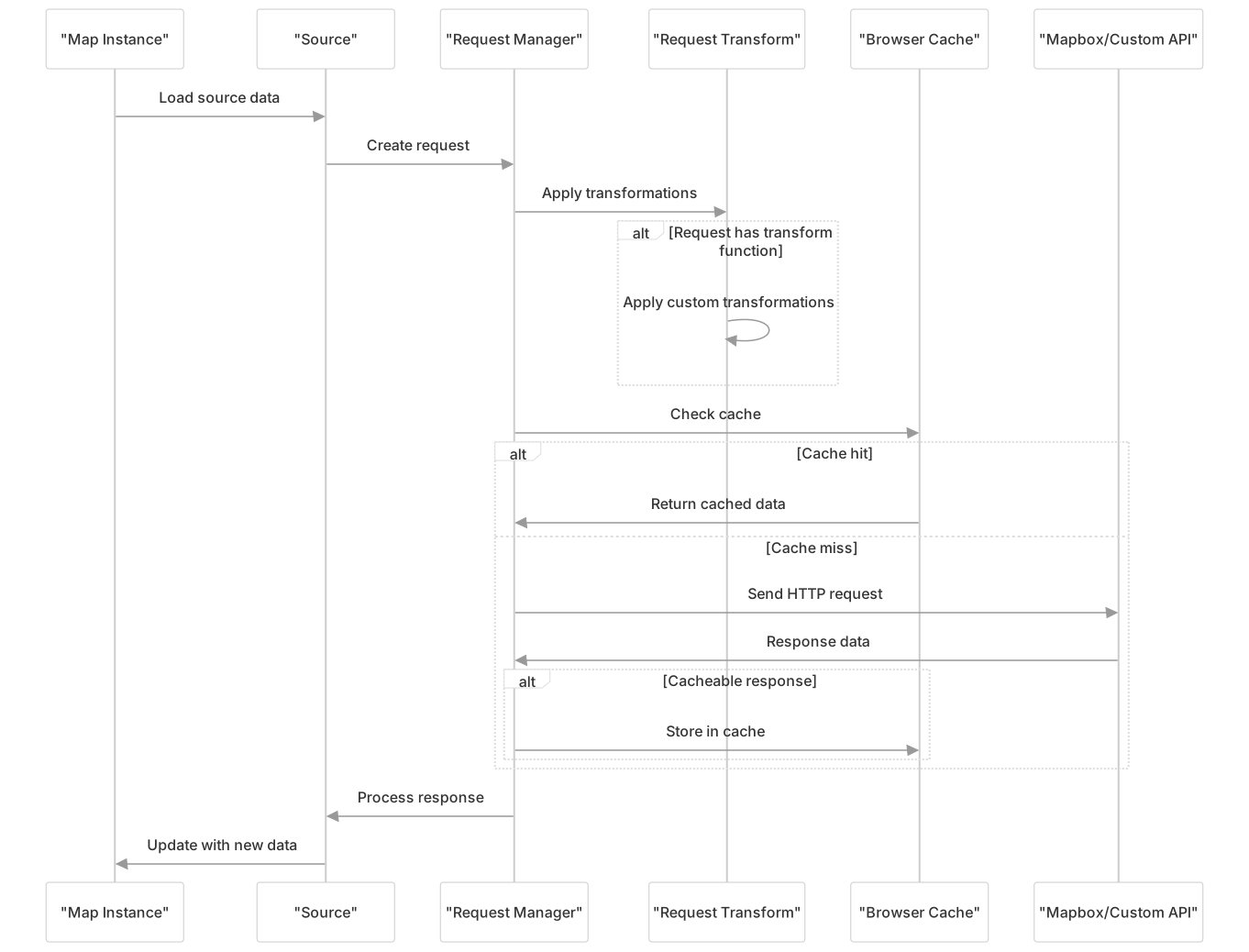
Authentication and Request Transformation
Mapbox GL JS provides flexible request handling through request transformation functions. This functionality allows developers to modify requests before they are sent, enabling custom authentication, headers, and other modifications.
Request Parameters
The RequestParameters interface defines the structure of a request:
interface RequestParameters {
    url: string;
    method?: string;
    headers?: {[key: string]: string};
    body?: string;
    type?: 'string' | 'json' | 'arrayBuffer';
    credentials?: 'same-origin' | 'include';
    collectResourceTiming?: boolean;
}Request Transformation
The RequestTransformFunction type allows developers to modify outgoing requests:
type RequestTransformFunction = (url: string, resourceType: ResourceType) => RequestParameters;This function can be provided to the map options to transform all outgoing requests:

Authentication Examples
Mapbox GL JS needs authentication for requests to Mapbox services. This is typically done with an access token that can be provided in several ways:
- As a token parameter in the Map constructor
- Through request transformation
- Via mapboxgl.accessToken global property
Sources: CHANGELOG.md
Caching Strategies
Mapbox GL JS leverages both browser caching and its own caching mechanisms to optimize performance and reduce bandwidth usage.
Browser Caching
By default, responses from tile requests are cached according to their HTTP headers. The library respects standard cache control headers like Cache-Control and Expires.
Local Storage Caching
For tile data, Mapbox GL JS can store tiles in the browser's local storage, controlled by the volatile source property:

The volatile property controls whether tiles are stored in local storage:
volatile: true(default): Tiles are not stored in local storagevolatile: false: Tiles are stored in local storage for improved offline performance
Error Handling
Mapbox GL JS implements comprehensive error handling for network requests. When a request fails, the library:
- Emits an error event with details about the failure
- Attempts to retry certain types of requests (such as tile requests)
- Degrades gracefully when resources cannot be loaded
For example, if a style resource fails to load, the library will emit an error but continue to function with default styling. If tile data fails to load, the library will display what data it has while continuing to attempt loading the missing tiles.
Making Custom Requests
For applications that need to extend Mapbox GL JS with custom data sources, the library exposes several interfaces for making custom requests.
GeoJSON Source Example
When using a GeoJSON source with a URL, Mapbox GL JS will automatically fetch the data:
map.addSource('my-data', {
    type: 'geojson',
    data: 'https://example.com/data.geojson'
});Custom Request Transform
For more control, you can implement a custom request transform function:
const map = new mapboxgl.Map({
    container: 'map',
    style: 'mapbox://styles/mapbox/streets-v11',
    transformRequest: (url, resourceType) => {
        if (resourceType === 'Source' && url.startsWith('https://myapi.example.com')) {
            return {
                url: url,
                headers: { 'Authorization': 'Bearer ' + myApiKey },
                credentials: 'same-origin'
            };
        }
    }
});This allows adding authentication or other modifications to specific requests while leaving others untouched.
Optimizing Network Performance
Mapbox GL JS implements several strategies to optimize network performance:
- Parallel Loading: The library loads multiple resources in parallel to minimize loading time
- Preloading: Tiles adjacent to the current view can be preloaded to improve panning experience
- Request Prioritization: Critical resources like visible tiles are prioritized over non-visible resources
- Response Size Optimization: Vector tiles are compressed to minimize bandwidth usage
- Cancellation: Requests for resources that are no longer needed (e.g., when the map view changes significantly) can be cancelled
Sources: CHANGELOG.md
Advanced Use Cases
Custom Protocols
Mapbox GL JS supports custom protocols for resource URLs, enabling integration with various backend systems:
mapbox://: Resources from Mapbox serviceshttp://andhttps://: Standard web resources- Custom protocols: Can be handled with a request transform function
Offline Support
By leveraging the caching capabilities and controlling the volatile property, applications can implement offline support:
- Pre-cache required tiles using custom logic
- Set
volatile: falseon sources to enable local storage caching - Implement a request transform function that serves cached resources when offline
Sources: style-spec/CHANGELOG.md
Summary
Mapbox GL JS provides a flexible and powerful networking system to handle the various resources needed for interactive maps. By understanding the request flow, transformation capabilities, and caching strategies, developers can optimize map loading performance and customize the network behavior to meet their application's specific needs.
The library's architecture allows for:
- Custom authentication
- Request modification
- Robust caching
- Error handling
- Performance optimization
These capabilities make it suitable for a wide range of applications, from simple maps to complex data visualizations with custom data sources and offline capabilities.