Tile System
The Tile System in Mapbox GL JS manages the organization, loading, and caching of map tiles—the fundamental building blocks of web maps. This system is responsible for efficiently requesting, processing, and rendering geographic data at various zoom levels to create a seamless mapping experience.
For information about different source types that provide these tiles, see Source Types. For details on how tiles are processed in parallel, see Worker Architecture.
Tile Coordinates and Structure
Web Mercator Projection
Mapbox GL JS uses the Web Mercator projection (EPSG:3857), which maps the spherical Earth onto a square that can be divided into tiles.
Tile Coordinate System
Tiles are identified by three integer coordinates:
| Coordinate | Description |
|---|---|
| z | Zoom level (0 is whole world, each increment doubles the resolution) |
| x | Column (increases eastward from 0 to 2^z-1) |
| y | Row (increases southward from 0 to 2^z-1) |
The TileCoord class encapsulates these coordinates and provides methods for comparing tiles and calculating relationships.
Sources:
Tile Loading Lifecycle
Map tiles go through several states during their lifecycle, managed by the SourceCache class.

The SourceCache implements strategies to optimize performance:
- Predictive Loading: Loads tiles adjacent to the viewport in anticipation of user panning
- Parent Tile Display: Shows lower-zoom parent tiles while higher-zoom children are loading
- Retention Policy: Keeps recently used tiles in memory to avoid reloading when returning to an area
- Fade Animation: Smoothly transitions between different resolution tiles
Sources:
Overzooming
Overzooming is a technique that allows users to zoom beyond the maximum zoom level for which tile data is available.

When a user zooms beyond the maximum available zoom level:
The
TileCoordclass creates an "overzoomed" coordinate with:- A display zoom level that matches the user's view
- A "canonical" zoom level pointing to the actual source data
- Adjusted x and y coordinates
For vector tiles, vertex data is transformed to render at higher resolution
For raster tiles, pixel data is scaled up (which may appear blurry)
Sources:
Source Cache
The SourceCache class is the central component of the tile system, managing tiles for a particular source.

When the map view changes, the SourceCache.update() method:
- Calculates which tiles are needed for the current view
- Requests missing tiles
- Unloads tiles that are no longer needed
- Determines which loaded tiles to render
Sources:
Tile Generation and Processing
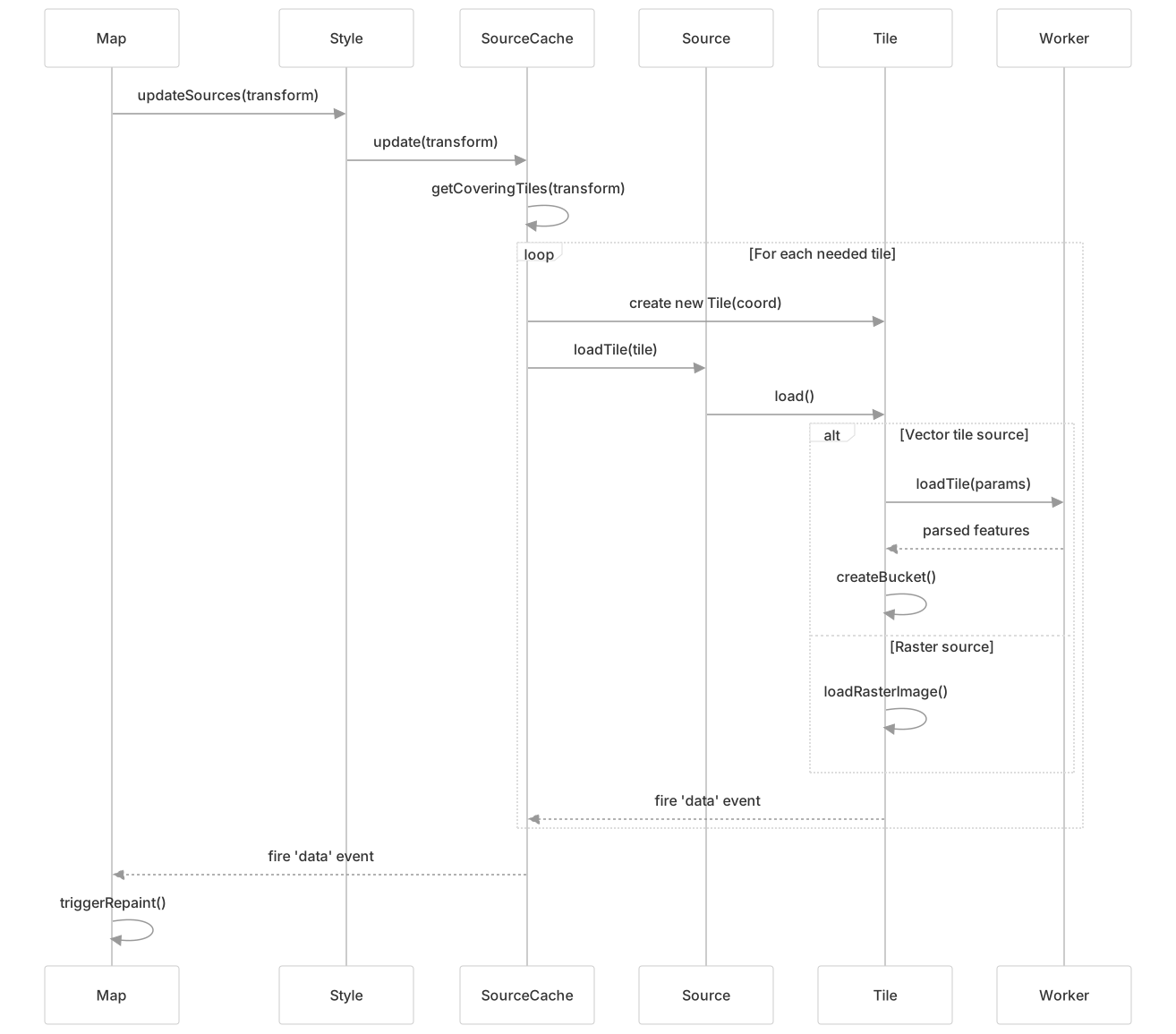
For vector tiles, the process involves:
- The
Mapclass triggersupdateSources()based on the current view SourceCachedetermines needed tiles usinggetCoveringTiles()- For each needed tile, a
Tileinstance is created and loaded - Vector tile data is sent to web workers for parsing
- Parsed data returns to the main thread and is organized into "buckets" for rendering
- The map is repainted with the new tile data
Sources:
Tile Coordinate Utilities
Mapbox GL JS includes several utility functions for working with tile coordinates:
| Function | Purpose |
|---|---|
pointToTileCoord | Converts a point in mercator coordinates to a tile coordinate |
tileCoordsAtZoom | Gets all possible tile coordinates at a given zoom level |
getTileCoordCenter | Calculates the mercator coordinates for the center of a tile |
pointToLatLng | Converts mercator coordinates to latitude/longitude |
latLngToPoint | Converts latitude/longitude to mercator coordinates |
These utilities help with operations like:
- Determining which tiles to load for a given map view
- Converting between different coordinate systems
- Calculating the geographic bounds of tiles
Sources:
Integration with Other Systems
The tile system interacts with several other components in Mapbox GL JS:

Key integration points:
- Style System: The style determines which sources and layers are active, which affects which tiles need to be loaded
- Source Types: Different source types (vector, raster, GeoJSON) implement specialized loading behavior
- Worker Architecture: Web workers parse and process vector tile data without blocking the main thread
- Rendering System: Processed tile data is passed to the rendering pipeline for drawing
- Interaction: The feature index enables querying of features within tiles for interactive maps
Sources:
Caching and Performance Optimization
Mapbox GL JS implements several caching strategies to optimize performance:
- Local Tile Cache: The
SourceCachemaintains an in-memory cache of recently used tiles - HTTP Caching: Utilizes standard HTTP caching headers for network requests
- Parent/Child Relationships: Shows available parent tiles while child tiles are loading
- Coordinate Covering Algorithm: Optimizes which tiles are requested for the current view
- Tile Expiry: Automatically reloads tiles after their expiration time
These strategies work together to provide a responsive mapping experience while minimizing network usage and processing time.