Core Architecture
OpenLayers is built around four fundamental components that form the backbone of every mapping application: Map, View, Layers, and Sources. These components work together to create an interactive map that can display and manipulate geospatial data from various sources.
The Four Core Components
OpenLayers Core Architecture Overview

Map: The Central Orchestrator
The Map class (src/ol/Map.js242) serves as the central orchestrator that coordinates all other components. It manages the rendering lifecycle and maintains the overall state of the mapping application.
Map Class Structure

Map Responsibilities
The Map class orchestrates the rendering process through several key mechanisms:
| Component | Responsibility |
|---|---|
| DOM Management | Creates viewport, overlay containers src/ol/Map.js369-401 |
| Rendering Coordination | Manages FrameState and triggers renders src/ol/Map.js336-338 |
| Tile Loading | Coordinates tile loading through TileQueue src/ol/Map.js484-487 |
| Event Routing | Routes browser events to interactions and controls |
| Component Lifecycle | Manages collections of layers, controls, interactions, overlays |
View: State Management and Projections
The View class manages the visual state of the map including center position, resolution (zoom level), and rotation. It provides the geometric context for rendering and user interactions.
View State and FrameState Integration

Key View Responsibilities
| Function | Purpose | Implementation |
|---|---|---|
| State Management | Track center, resolution, rotation | ViewState object in FrameState |
| Projection Handling | Convert between coordinate systems | Uses ol/proj system |
| Constraint Application | Limit view changes to valid ranges | Constraint functions applied on change |
| Animation Support | Smooth transitions between states | Animation queue with easing functions |
| Transform Calculation | Convert coordinates to pixels | Creates transform matrices for FrameState |
Layers: Display Hierarchy
Layers define what gets rendered on the map and in what order. Each layer references a source for its data and can have rendering-specific properties like opacity and visibility.
Layer Architecture and Inheritance

Layer-Source Relationship

Sources: Data Providers
Sources provide the data that layers display. They handle loading, caching, and managing geospatial data from various formats and protocols.
Source Types and Tile Management

Tile Loading and Priority System
The TileQueue manages tile loading with a priority system based on distance from viewport center:
| Component | Function | Location |
|---|---|---|
| TileQueue | Manages loading queue | src/ol/TileQueue.js19-50 |
| getTilePriority | Calculates tile priority | src/ol/TileQueue.js131-159 |
| Tile states | Track loading progress | src/ol/TileState.js8-18 |
| VectorRenderTile | Special tiles for vector data | src/ol/VectorRenderTile.js24-100 |
Tile State Lifecycle

FrameState: The Rendering Context
The FrameState object is central to OpenLayers' rendering architecture. It captures a snapshot of the map's state at a specific moment and provides all information needed for rendering.
FrameState Structure and Usage

Key FrameState Properties
| Property | Type | Purpose |
|---|---|---|
viewState | ViewState | Current view center, resolution, rotation |
layerStatesArray | Array<LayerState> | Visibility, opacity, extent for each layer |
tileQueue | TileQueue | Tile loading management |
coordinateToPixelTransform | Transform | Convert map coordinates to screen pixels |
pixelToCoordinateTransform | Transform | Convert screen pixels to map coordinates |
time | number | Timestamp for animations and transitions |
extent | Extent | Visible map extent in map units |
size | Size | Map size in pixels |
Component Lifecycle and Initialization
The four core components follow a specific initialization order and lifecycle when creating an OpenLayers map.
Initialization Sequence
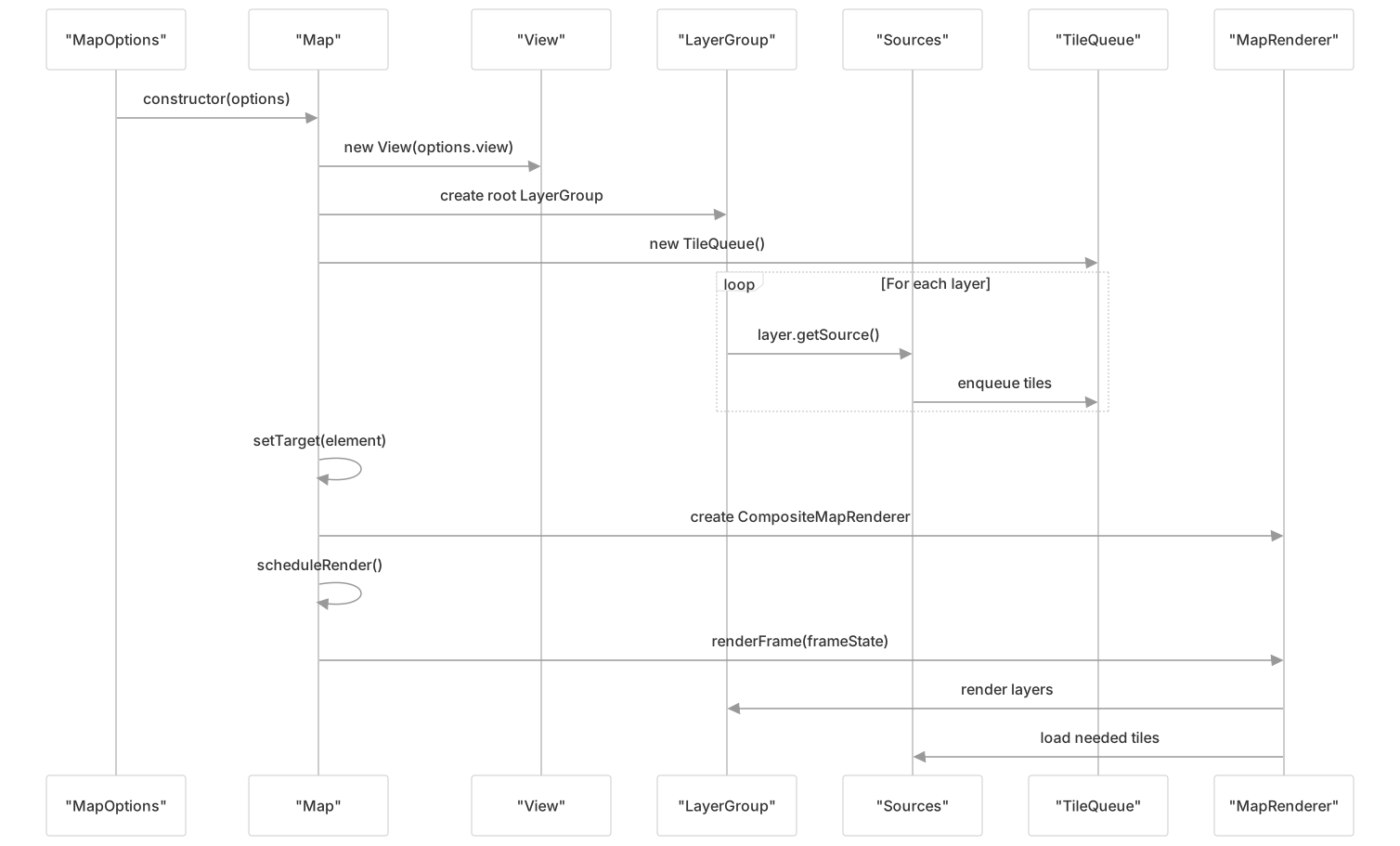
Core Component Dependencies

Summary
The OpenLayers Core Architecture is built around four fundamental components:
Component Responsibilities
| Component | Primary Role | Key Classes |
|---|---|---|
| Map | Central orchestrator and rendering coordinator | Map, FrameState |
| View | State management and coordinate transformations | View, ViewState |
| Layers | Display hierarchy and rendering configuration | LayerGroup, VectorLayer, TileLayer |
| Sources | Data provision and tile management | VectorSource, OSM, XYZ, TileQueue |
Critical Interactions
- Map creates and maintains
FrameStateobjects that capture rendering context - View provides geometric state (
ViewState) that becomes part ofFrameState - Layers organize what gets rendered and reference Sources for data
- Sources manage data loading through the
TileQueuesystem - TileQueue prioritizes tile loading based on distance from viewport center
This architecture provides a clean separation of concerns while maintaining efficient coordination between components. The FrameState concept is central to understanding how these components work together during rendering.
Default Interactions and Controls
OpenLayers provides default sets of interactions and controls that are automatically added to maps unless specified otherwise:
| Default Interactions | Description |
|---|---|
DragRotate | Rotate the map by dragging with Alt+Shift+drag |
DragPan | Pan the map by dragging |
PinchRotate | Rotate the map using two-finger rotation |
PinchZoom | Zoom the map using two-finger pinch |
KeyboardPan | Pan the map using keyboard arrows |
KeyboardZoom | Zoom the map using keyboard +/- |
MouseWheelZoom | Zoom the map using the mouse wheel |
DragZoom | Zoom to a box by Shift+drag |
DoubleClickZoom | Zoom by double-clicking |
| Default Controls | Description |
|---|---|
Zoom | Buttons to zoom in and out |
Rotate | Button to reset rotation to north |
Attribution | Attribution text |
These default sets can be customized or replaced entirely:
// Custom interactions
const map = new Map({
  interactions: [
    new DragPan(),
    new MouseWheelZoom({
      constrainResolution: true
    })
  ],
  // ... other options
});

// No interactions
const map = new Map({
  interactions: [],
  // ... other options
});

// Default interactions with custom options
const map = new Map({
  interactions: defaultInteractions({
    altShiftDragRotate: false,
    pinchRotate: false
  }),
  // ... other options
});Summary
The Core Architecture of OpenLayers is built around the Map as the central component, which manages a View for handling the map's visual state, collections of Interactions for user input, and collections of Layers for displaying content. This architecture provides a clean separation of concerns while maintaining efficient communication between components.
The constraints system in the View ensures consistent and predictable behavior when interacting with the map, while the Interaction system provides a flexible way to handle various types of user input. Together, these components form the foundation of the OpenLayers library.