WebGL Rendering System
This page documents OpenLayers' high-performance WebGL rendering system designed for large datasets, shader-based styling, and GPU-accelerated graphics. The WebGL system provides significant performance improvements over Canvas rendering, particularly when handling thousands of features, complex visual effects, and interactive applications.
The WebGL rendering architecture leverages GPU acceleration to efficiently render large quantities of geographic data while supporting advanced styling through custom shaders and real-time visual effects.
1. Architecture Overview
OpenLayers' WebGL rendering system provides GPU-accelerated rendering optimized for large datasets and performance-critical applications. The architecture consists of specialized renderer classes that handle different geographic data types while leveraging shared WebGL infrastructure for maximum efficiency.
WebGL Renderer Class Hierarchy

Performance Optimization Architecture

The system is designed to minimize CPU-GPU data transfer while maximizing GPU utilization through efficient buffer management and batch rendering techniques.
2. Core Classes
2.1 WebGLHelper
The WebGLHelper class is the foundation of the OpenLayers WebGL rendering system. It provides a high-level interface to WebGL operations, handling shader compilation, buffer management, and drawing operations.
Key responsibilities:
- Managing the WebGL context
- Compiling and linking shaders
- Creating and binding WebGL buffers
- Setting up attributes and uniforms
- Drawing primitives to the screen or render targets
- Managing post-processing effects

The WebGLHelper class provides many utility methods that abstract away the complexities of direct WebGL API usage, simplifying the rendering process for layer renderers.
2.2 WebGLArrayBuffer
The WebGLArrayBuffer class is a wrapper around WebGL buffer objects, providing methods for creating, populating, and managing buffer data.
// Create a buffer for vertex positions
const verticesBuffer = new WebGLArrayBuffer(ARRAY_BUFFER, DYNAMIC_DRAW);
// Create a buffer for indices
const indicesBuffer = new WebGLArrayBuffer(ELEMENT_ARRAY_BUFFER, STATIC_DRAW);

// Flush data to the GPU
helper.flushBufferData(verticesBuffer);
helper.flushBufferData(indicesBuffer);This class provides a clean interface for working with WebGL buffers, handling the complexity of buffer types and usage patterns.
2.3 WebGLRenderTarget
The WebGLRenderTarget class enables rendering to a texture instead of directly to the canvas. This is essential for:
- Hit detection (determining which feature is at a specific pixel)
- Post-processing effects
- Multi-pass rendering techniques

2.4 WebGLPostProcessingPass
The WebGLPostProcessingPass class represents a single post-processing step. Post-processing allows for effects to be applied to the rendered image before it is displayed on the screen.

Post-processing passes can be chained together to create complex visual effects.
3. Layer Renderers
3.1 WebGLLayerRenderer
The WebGLLayerRenderer class is the base class for all WebGL layer renderers. It handles common rendering tasks and lifecycle management:
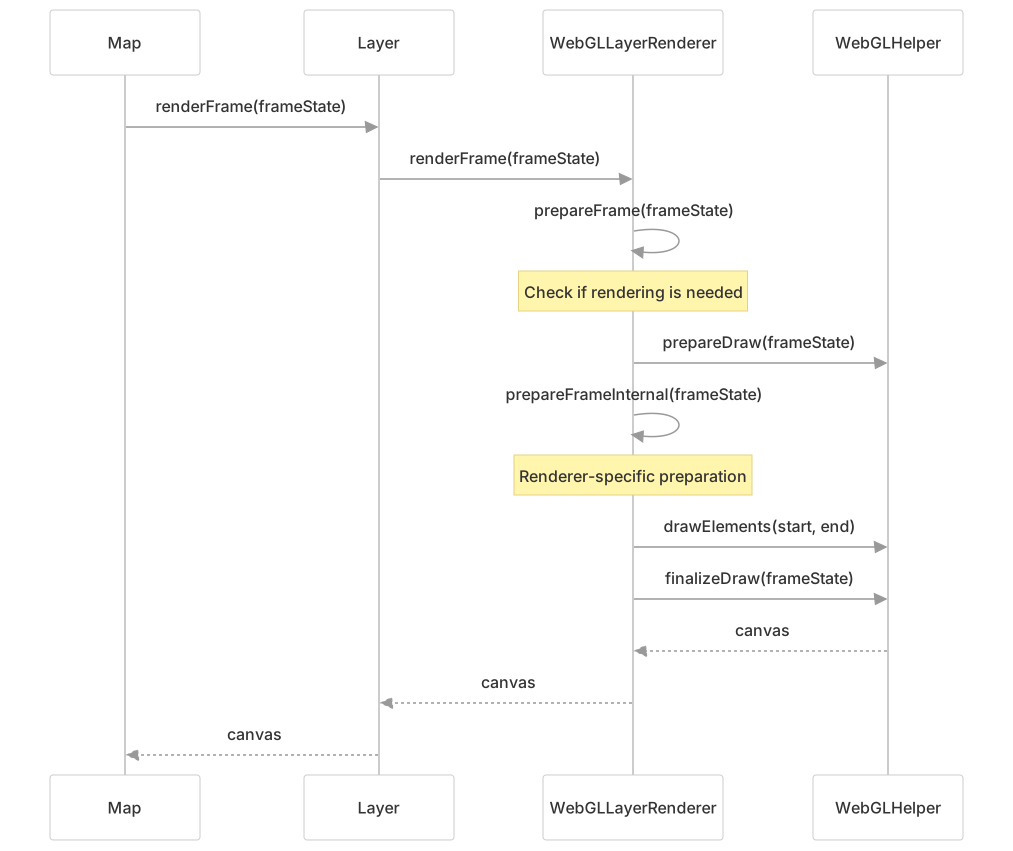
This sequence represents the general rendering flow for WebGL layers in OpenLayers.
3.2 WebGLPointsLayerRenderer
The WebGLPointsLayerRenderer is optimized for high-performance rendering of large point datasets, capable of efficiently handling tens of thousands of features with GPU acceleration.
Large Dataset Optimization Features
- Web Worker Processing: Buffer generation is offloaded to
WebGLWorkerto prevent main thread blocking - Instanced Rendering: Uses
drawElementsInstanced()for efficient rendering of multiple instances - Quad-based Points: Renders each point as a quad (4 vertices forming 2 triangles) for flexible styling
- Dynamic Buffer Management: Uses
DYNAMIC_DRAWbuffers for frequent updates
Point Rendering Pipeline for Large Datasets
Custom Attributes and Styling
The renderer supports custom attributes that are computed from feature properties and passed to the GPU:
// Example custom attributes configuration
const attributes = [
  {
    name: 'size',
    callback: function(feature, properties) {
      return properties.population / 1000; // Size based on population
    }
  },
  {
    name: 'category',
    callback: function(feature, properties) {
      return properties.type === 'city' ? 1.0 : 0.0;
    }
  }
];The attributes are accessible in shaders as a_size and a_category respectively, enabling complex, data-driven styling on the GPU.
3.3 WebGLVectorLayerRenderer
The WebGLVectorLayerRenderer handles rendering of vector features (points, lines, and polygons) using WebGL. It provides a more general-purpose rendering solution than the specialized points renderer.
Key features:
- Support for all geometry types (point, line, polygon)
- Style-based filtering of features
- Custom attributes for styling based on feature properties
- Multiple styles with filters
- Hit detection support
The vector layer renderer handles different geometry types by using specialized buffer generators for each type, then combining them in a unified rendering approach.
3.4 WebGLTileLayerRenderer
The WebGLTileLayerRenderer handles rendering of tile layers using WebGL, allowing for custom shader effects on raster tile data.
Key features:
- Custom fragment shaders for processing tile pixel data
- Support for multiple tile sources
- Smooth transitions between tiles
- Palette textures for specialized rendering
This renderer enables powerful visual effects on raster tile data by leveraging WebGL's fragment shaders.
4. Rendering Pipeline
The WebGL rendering pipeline in OpenLayers involves several stages from data preparation to final rendering:

4.1 Data Preparation
- Layer's source loads features or tiles
- Features are filtered based on style rules
- Data is transformed to the view projection
- Batch collects features by geometry type
4.2 Buffer Generation
- Generate render instructions from features
- WebGL worker converts instructions to buffer data
- Buffers are created for vertices and indices
- Custom attributes are calculated from feature properties
4.3 WebGL Rendering
- WebGL programs (shaders) are prepared
- Buffers are bound to attributes
- Uniforms are set (transforms, style parameters, etc.)
- Draw commands are executed to render features
- Multiple worlds may be rendered for wrapping
4.4 Post Processing
- Apply custom effects with post-processing passes
- Chain multiple passes for complex effects
- Final result is composited to the canvas
5. Shader-Based Styling System
OpenLayers' WebGL rendering system provides advanced styling capabilities through GPU-accelerated shaders, enabling complex visual effects and data-driven styling that would be performance-prohibitive with CPU rendering.
5.1 Declarative Style to Shader Compilation
The system automatically converts declarative styles into optimized GLSL shaders, providing both ease of use and GPU performance:
Tile Layer Shader Generation
For WebGLTileLayer, the style compilation process generates vertex and fragment shaders:
Expression-Based Styling
Complex styling expressions are compiled to GLSL code for GPU execution:
// Style with expressions compiled to shaders
const style = {
  color: ['interpolate', ['linear'], ['band', 1], 0, 'black', 255, 'white'],
  brightness: ['*', ['var', 'brightnessLevel'], 0.5],
  contrast: ['case', ['>', ['band', 1], 128], 0.3, -0.3]
};This compiles to GLSL fragment shader code that processes pixels in parallel on the GPU.
5.2 Custom Shader Support
For maximum control, the system supports direct shader specification:
// WebGLPointsLayerRenderer with custom shaders
const pointsRenderer = new WebGLPointsLayerRenderer(layer, {
  vertexShader: `
    attribute vec2 a_position;
    attribute float a_size;
    uniform mat4 u_projectionMatrix;

    void main() {
      gl_Position = u_projectionMatrix * vec4(a_position, 0.0, 1.0);
      gl_PointSize = a_size;
    }
  `,
  fragmentShader: `
    precision mediump float;
    uniform vec3 u_color;

    void main() {
      gl_FragColor = vec4(u_color, 1.0);
    }
  `
});5.3 Style Variable System
Style variables enable dynamic styling without shader recompilation:
// WebGLTileLayer with dynamic variables
const layer = new WebGLTileLayer({
  style: {
    variables: {
      brightnessLevel: 0.5,
      contrastLevel: 0.2
    },
    brightness: ['var', 'brightnessLevel'],
    contrast: ['var', 'contrastLevel']
  }
});

// Update styling in real-time
layer.updateStyleVariables({
  brightnessLevel: 0.8,
  contrastLevel: 0.5
});Variables are passed as uniforms to shaders, allowing real-time style updates without performance penalties.
6. Hit Detection
WebGL renderers support hit detection - determining which feature is at a specific pixel position:

The process works by:
- Rendering features with encoded IDs as colors to a separate render target
- Reading the pixel color at the hit location
- Decoding the color to get the feature ID
- Looking up the feature by ID
This technique allows efficient hit detection even with thousands of features.
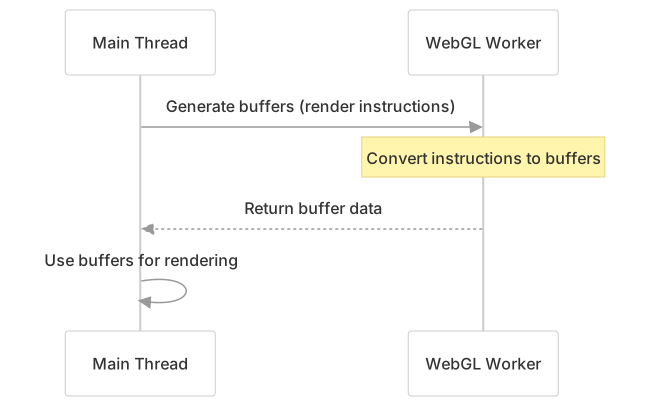
7. WebGL Workers
To improve performance, OpenLayers offloads CPU-intensive tasks to web workers:

The worker handles:
- Converting render instructions to buffer data
- Generating buffer data for different geometry types
- Transferring data efficiently with transferable objects
This approach keeps the main thread responsive while handling large datasets.
8. Large Dataset Applications
The WebGL rendering system excels at handling large geographic datasets that would be performance-prohibitive with traditional Canvas rendering.
8.1 WebGL Layer Types for Large Datasets
| Layer Class | Optimal Dataset Size | Performance Features | Use Cases |
|---|---|---|---|
| WebGLPointsLayerRenderer | 10k-100k+ points | Instanced rendering, web workers | UFO sightings (80k), meteorite impacts (45k) |
| WebGLTileLayerRenderer | Any tile resolution | GPU shader processing | Satellite imagery analysis, raster processing |
| WebGLVectorLayerRenderer | 1k-50k features | Batch rendering, hit detection | Complex vector datasets with styling |
8.2 Real-World Large Dataset Examples
UFO Sightings Visualization (80,000+ Features)
// Handling 80k UFO sighting features with WebGL
const pointsLayer = new WebGLVectorLayer({
  source: new VectorSource({
    features: [], // 80k features loaded dynamically
    attributions: 'National UFO Reporting Center'
  }),
  style: [{
    style: {
      'icon-src': 'data/ufo_shapes.png',
      'icon-width': 128,
      'icon-height': 64,
      'icon-color': ['interpolate', ['linear'], ['get', 'year'],
                     1950, [255, 160, 110], 2013, [180, 255, 200]],
      'icon-offset': ['match', ['get', 'shape'],
                     'light', [0, 0], 'sphere', [32, 0], 'disc', [64, 0]]
    },
    filter: ['any',
             ['==', ['var', 'filterShape'], 'all'],
             ['==', ['var', 'filterShape'], ['get', 'shape']]]
  }]
});Meteorite Impact Filtering (45,000+ Features)
// Real-time filtering of 45k meteorite landing features
const meteoriteLayer = new WebGLVectorLayer({
  variables: {
    minYear: 1850,
    maxYear: 2015
  },
  style: [{
    style: {
      'circle-radius': ['*',
                       ['interpolate', ['linear'], ['get', 'mass'], 0, 4, 200000, 13],
                       ['-', 1.75, ['*', animRatio, 0.75]]],
      'circle-fill-color': ['interpolate', ['linear'], animRatio, 0, '#ffe52c', 1, 'rgba(242,56,22,0.61)']
    },
    filter: ['between', ['get', 'year'], ['var', 'minYear'], ['var', 'maxYear']]
  }],
  disableHitDetection: true // Performance optimization for large datasets
});

// Update filter variables in real-time
meteoriteLayer.updateStyleVariables({
  minYear: parseInt(minYearInput.value),
  maxYear: parseInt(maxYearInput.value)
});8.3 Performance Optimization for Large Datasets
Buffer Management Strategy
Memory and Performance Optimizations
- Hit Detection Control: Use
disableHitDetection: truefor view-only large datasets - Feature Caching:
featureCache_system reduces property access overhead - Buffer Reuse: Dynamic buffers are reused when feature count matches
- LOD Considerations: Consider level-of-detail for extremely large datasets
8.4 Interactive Large Dataset Features
- Real-time Filtering: Style variables enable filtering without buffer regeneration
- Dynamic Styling: Attribute-based styling computed on GPU
- Smooth Animations: Time-based uniforms for continuous animations
- Efficient Hit Detection: Color-encoded hit detection for interactive features
9. Performance Considerations
WebGL rendering offers significant performance benefits for large datasets, but comes with considerations:
- Memory usage: Buffer data can consume significant memory, especially for complex geometries
- CPU-GPU transfer: Transferring large datasets to the GPU can be a bottleneck
- Shader compilation: Complex shaders take time to compile
- Context limitations: WebGL contexts have resource limits
To optimize performance:
- Use appropriate buffer usage patterns (
STATIC_DRAWvsDYNAMIC_DRAW) - Limit the number of style rules and filters
- Consider using simplified geometries for better rendering performance
- Use hit detection judiciously as it requires additional resources