Rendering System
OpenLayers implements a multi-renderer architecture that supports Canvas, WebGL, and DOM-based rendering backends. This flexible system allows applications to choose the optimal rendering approach based on performance requirements, feature complexity, and browser capabilities. The rendering system abstracts the complexity of different graphics APIs while providing specialized renderers for different layer types and use cases.
Multi-Renderer Architecture
The rendering system is built around a core abstraction that supports three primary rendering backends: Canvas (2D), WebGL, and DOM. Each backend provides specialized renderers optimized for different layer types and performance characteristics.
Core Renderer Hierarchy

Renderer Selection Strategy
| Layer Type | Canvas Renderer | WebGL Renderer | DOM Renderer |
|---|---|---|---|
| Vector features | CanvasVectorLayerRenderer | WebGLPointsLayerRenderer | N/A |
| Tile layers | CanvasTileLayerRenderer | WebGLTileLayerRenderer | N/A |
| Image layers | CanvasImageLayerRenderer | N/A | N/A |
| Vector tiles | CanvasVectorTileLayerRenderer | N/A | N/A |
| HTML overlays | N/A | N/A | DOM positioning |
Rendering Pipeline
The rendering pipeline is implemented through a standardized interface across all renderer types, with each layer renderer implementing the core methods prepareFrame(), renderFrame(), and renderDeferred().
Core Rendering Flow
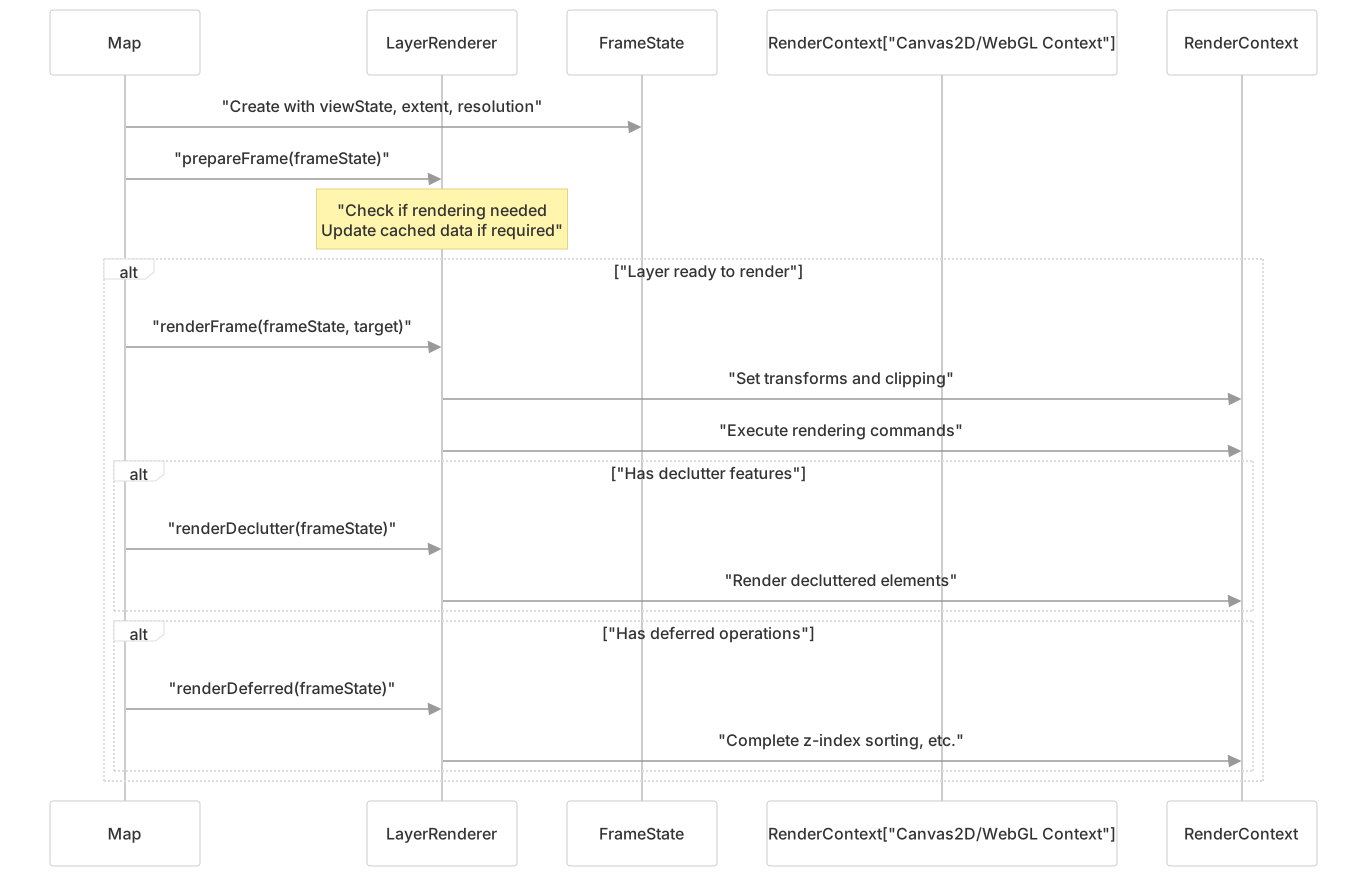
Frame State Structure
Each rendering cycle operates on a FrameState object containing:
| Property | Purpose | Used By |
|---|---|---|
| viewState | Camera position, zoom, rotation | All renderers |
| extent | Visible area bounds | Culling, tile selection |
| pixelRatio | Device pixel ratio | Canvas sizing, WebGL buffers |
| layerStatesArray | Layer visibility, opacity | Layer iteration |
| declutter | Decluttering trees | Text/symbol positioning |
Canvas Rendering System
The Canvas rendering system uses the HTML5 Canvas API to draw map elements. It forms the default rendering backend for OpenLayers and supports all layer types.
Canvas Rendering Hierarchy
The Canvas rendering system is built around a core set of renderer classes:
| Renderer Class | Purpose | Main Methods |
|---|---|---|
| CanvasLayerRenderer | Base class for all Canvas renderers | prepareFrame(), renderFrame() |
| CanvasTileLayerRenderer | Renders tile-based layers (OSM, etc.) | drawTile(), enqueueTiles() |
| CanvasVectorLayerRenderer | Renders vector features | renderFeature(), renderWorlds() |
| CanvasImageLayerRenderer | Renders image-based layers | loadImage(), getImage() |
| CanvasVectorTileLayerRenderer | Renders vector tiles | drawTile(), updateExecutorGroup_() |
Canvas Rendering Process

Canvas Instruction-Based Rendering
Canvas renderers implement an instruction-based rendering system that separates command generation from execution, enabling efficient caching and decluttering.
Builder/Executor Pattern Implementation

Vector Tile Rendering Specifics
The CanvasVectorTileLayerRenderer extends this pattern with tile-specific optimizations:
// From src/ol/renderer/canvas/VectorTileLayer.js:203-320
updateExecutorGroup_(tile, pixelRatio, projection) {
  // Create CanvasBuilderGroup for tile extent
  const builderGroup = new CanvasBuilderGroup(0, sharedExtent, resolution, pixelRatio);

  // Render features to instructions
  const render = function (feature, index) {
    const dirty = this.renderFeature(feature, squaredTolerance, styles, builderGroup, declutter, index);
  };

  // Create executor group from instructions
  const executorGroupInstructions = builderGroup.finish();
  const renderingReplayGroup = new CanvasExecutorGroup(replayExtent, resolution, pixelRatio, ...);
}WebGL GPU-Accelerated Rendering
The WebGL rendering system leverages GPU acceleration through shader-based rendering, providing high performance for large datasets and complex visual effects.
WebGL Architecture Components

WebGL Buffer Management
The WebGLHelper class centralizes WebGL resource management:
| Class | Purpose | Key Methods |
|---|---|---|
| WebGLHelper | WebGL context and resource management | bindBuffer(), flushBufferData(), useProgram() |
| WebGLArrayBuffer | Typed array management for GPU | fromArray(), getArray(), getSize() |
| WebGLPostProcessingPass | Shader-based post-processing | render(), setUniforms() |
| WebGLRenderTarget | Off-screen rendering targets | clearCachedData(), readPixel() |
WebGL Points Rendering Pipeline
The WebGLPointsLayerRenderer implements a specialized pipeline for high-performance point feature rendering using GPU acceleration and web workers.
Points-to-GPU Data Flow

Shader Attribute System
Points are rendered as quads with the following vertex structure:
// From src/ol/renderer/webgl/PointsLayer.js:205-236
this.attributes = [
  {
    name: 'a_localPosition',  // Quad corner: (0,0), (1,0), (1,1), (0,1)
    size: 2,
    type: AttributeType.FLOAT,
  },
];

this.instanceAttributes = [
  {
    name: 'a_position',      // World position of point center
    size: 2,
    type: AttributeType.FLOAT,
  },
  {
    name: 'a_hitColor',      // Hit detection color encoding
    size: 2,
    type: AttributeType.FLOAT,
  },
  {
    name: 'a_featureUid',    // Feature unique identifier
    size: 1,
    type: AttributeType.FLOAT,
  },
  // ... custom attributes from user configuration
];Hit Detection Implementation
WebGL hit detection uses GPU-based color encoding:
// From src/ol/renderer/webgl/PointsLayer.js:655-666
const data = this.hitRenderTarget_.readPixel(pixel[0] / 2, pixel[1] / 2);
const color = [data[0] / 255, data[1] / 255, data[2] / 255, data[3] / 255];
const index = colorDecodeId(color);
const opacity = this.renderInstructions_[index];
const uid = Math.floor(opacity).toString();
const feature = source.getFeatureByUid(uid);WebGL Tile Rendering System
The WebGLTileLayerRenderer extends WebGLBaseTileLayerRenderer to provide texture-based tile rendering with custom shader support.
Tile-to-Texture Pipeline

Tile Rendering Uniforms
The tile renderer provides these uniforms to shaders:
// From src/ol/renderer/webgl/TileLayer.js:23-31
export const Uniforms = {
  TILE_TEXTURE_ARRAY: 'u_tileTextures',      // Texture array sampler
  TEXTURE_PIXEL_WIDTH: 'u_texturePixelWidth', // Texture dimensions
  TEXTURE_PIXEL_HEIGHT: 'u_texturePixelHeight',
  TEXTURE_RESOLUTION: 'u_textureResolution',   // Map units per pixel
  TEXTURE_ORIGIN_X: 'u_textureOriginX',       // World coordinate origin
  TEXTURE_ORIGIN_Y: 'u_textureOriginY',
};Tile Quad Rendering
Each tile is rendered as a quad with texture coordinates:
// From src/ol/renderer/webgl/TileLayer.js:115-116
// Triangle A: P0, P1, P3
// Triangle B: P1, P2, P3
this.indices_.fromArray([0, 1, 3, 1, 2, 3]);Coordinate Transformations
A crucial aspect of the rendering system is transforming between different coordinate spaces:

Every renderer maintains transformation matrices to convert between these spaces:
pixelTransform: Transforms from world coordinates to pixel coordinates
inversePixelTransform: Transforms from pixel coordinates to world coordinates
renderTransform: Transforms from pixel coordinates to render target coordinatesCross-Renderer Hit Detection
Hit detection implementations vary significantly between rendering backends, each optimized for their respective graphics API constraints.
Canvas Hit Detection Strategies
| Strategy | Implementation | Use Case |
|---|---|---|
| Geometric | Direct coordinate-in-geometry tests | Simple shapes, precise detection |
| Color-coded | Off-screen rendering with unique colors | Complex styling, overlapping features |
| Executor replay | Re-execute drawing commands for hit testing | Vector tile features |
Canvas Vector Hit Detection
// From src/ol/renderer/canvas/VectorLayer.js:370-460
getFeatures(pixel) {
  if (!this.hitDetectionImageData_ && !this.animatingOrInteracting_) {
    // Create hit detection image with color-coded features
    this.hitDetectionImageData_ = createHitDetectionImageData(
      size, transforms, this.renderedFeatures_,
      layer.getStyleFunction(), extent, resolution, rotation
    );
  }
  return hitDetect(pixel, this.renderedFeatures_, this.hitDetectionImageData_);
}Canvas Vector Tile Hit Detection
// From src/ol/renderer/canvas/VectorTileLayer.js:332-425
forEachFeatureAtCoordinate(coordinate, frameState, hitTolerance, callback, matches) {
  for (let i = 0; i < renderedTiles.length; i++) {
    const executorGroups = tile.executorGroups[layerUid];
    for (let t = 0; t < executorGroups.length; t++) {
      found = executorGroups[t].forEachFeatureAtCoordinate(
        coordinate, resolution, rotation, hitTolerance, featureCallback
      );
    }
  }
}WebGL Hit Detection Implementation
WebGL hit detection uses GPU-accelerated color encoding for high-performance feature identification:
// From src/ol/renderer/webgl/PointsLayer.js:635-667
forEachFeatureAtCoordinate(coordinate, frameState, hitTolerance, callback, matches) {
  const pixel = applyTransform(frameState.coordinateToPixelTransform, coordinate.slice());
  const data = this.hitRenderTarget_.readPixel(pixel[0] / 2, pixel[1] / 2);

  // Decode feature ID from pixel color
  const color = [data[0] / 255, data[1] / 255, data[2] / 255, data[3] / 255];
  const index = colorDecodeId(color);
  const uid = Math.floor(this.renderInstructions_[index]).toString();

  const feature = source.getFeatureByUid(uid);
  if (feature) {
    return callback(feature, this.getLayer(), null);
  }
}Decluttering System
Decluttering prevents overlapping labels and symbols for better readability:
- Features are assigned Z-index values based on their importance
- Features are rendered in Z-index order
- Features that would overlap already-rendered features are skipped or repositioned

Performance Considerations
Caching Strategies
The rendering system employs various caching strategies to improve performance:
- Tile Caching: Rendered tiles are cached to avoid re-fetching and re-rendering
- Canvas Caching: Canvas elements are reused when possible
- Executor Caching: Vector rendering instructions are cached and reused
Render Optimization Techniques
- Viewport Culling: Only rendering features within the visible viewport
- Level-of-Detail: Using appropriate tile levels based on zoom
- Preloading: Loading tiles at nearby zoom levels for smooth transitions
- Web Workers: Using web workers for offloading processing (WebGL)
Canvas vs. WebGL Guidelines
| Scenario | Recommended Renderer | Reason |
|---|---|---|
| Large number of points (>10,000) | WebGL | Hardware acceleration for better performance |
| Complex vector styling | Canvas | Better support for complex styles |
| Standard map visualization | Canvas | Simpler implementation, good browser compatibility |
| Custom data visualization | WebGL | Custom shaders for visual effects |
| Mobile devices | Context-dependent | WebGL may be faster but Canvas is more reliable |