Map
Purpose and Scope
This document details the Map class, which serves as the central orchestrator in OpenLayers that coordinates all mapping functionality. The Map class manages the rendering pipeline, integrates layers and data sources, handles user interactions, controls the tile loading system, and maintains the overall application state. For view state management, see View System. For layer architecture details, see Layer Architecture.
Overview
The Map class is the central orchestrator that coordinates all OpenLayers components into a cohesive mapping application. It manages the FrameState object that drives the rendering pipeline, coordinates the TileQueue for efficient data loading, and integrates Collection objects containing layers, controls, interactions, and overlays. The class extends BaseObject and provides the primary API for map manipulation and event handling.
Map Orchestration Architecture

Map Class Structure

Architecture
Map Class Diagram

Constructor Options
The Map constructor accepts a MapOptions object with the following properties:
| Option | Type | Description |
|---|---|---|
| target | HTMLElement|string | The DOM element or its ID where the map will be rendered |
| layers | Array|Collection|LayerGroup | The layers to include in the map |
| view | View|Promise | The view configuration for the map |
| controls | Collection|Array | The controls to add to the map (default: defaultControls()) |
| interactions | Collection|Array | The interactions to add to the map (default: defaultInteractions()) |
| overlays | Collection|Array | The overlays to add to the map |
| pixelRatio | number | The device pixel ratio (default: DEVICE_PIXEL_RATIO) |
| moveTolerance | number | The movement tolerance for click events (default: 1) |
| keyboardEventTarget | HTMLElement|Document|string | The element to listen for keyboard events |
| maxTilesLoading | number | Maximum number of tiles to load simultaneously (default: 16) |
The constructor processes these options through createOptionsInternal() and initializes the map's internal state, including the TileQueue, viewport DOM structure, and event handlers.
Initialization
To create a new map instance, you need to provide configuration options including target element, view, and layers. The following shows the typical initialization pattern:
const map = new Map({
  target: 'map',
  layers: [
    new TileLayer({
      source: new OSM()
    })
  ],
  view: new View({
    center: [0, 0],
    zoom: 2
  })
});DOM Structure and Viewport Management
The Map class creates a hierarchical DOM structure that manages rendering layers, overlays, and controls. This structure is dynamically created and inserted into the target element.
Map DOM Hierarchy

The DOM structure creation process:
viewport creation: src/ol/Map.js369-375
- CSS class includes touch detection:
'ol-viewport' + ('ontouchstart' in window ? ' ol-touch' : '') - Positioned relatively with hidden overflow
- CSS class includes touch detection:
overlayContainer setup: src/ol/Map.js381-388
- Absolutely positioned, full size
pointerEvents: 'none'to allow map interaction
overlayContainerStopEvent setup: src/ol/Map.js394-401
- Similar to
overlayContainer_but stops event propagation - Used for controls and blocking overlays
- Similar to
Access methods:
getViewport(): Returns the main viewport element src/ol/Map.js1059-1061getOverlayContainer(): Returns the overlay container src/ol/Map.js1070-1072getOverlayContainerStopEvent(): Returns the stop-event container src/ol/Map.js1081-1083
Sources: src/ol/Map.js369-401 src/ol/Map.js1059-1083
Rendering Pipeline and FrameState Management
The Map class orchestrates a sophisticated rendering pipeline centered around the FrameState object, which contains all information needed for a single render frame.
Rendering Flow

FrameState Object Structure
The FrameState typedef defines the complete rendering context:
| Property | Type | Purpose |
|---|---|---|
| pixelRatio | number | Device pixel ratio for high-DPI displays |
| time | number | Timestamp when rendering was requested |
| viewState | ViewState | Current view center, zoom, rotation, projection |
| layerStatesArray | LayerState[] | Computed state for all layers |
| tileQueue | TileQueue | Tile loading priority queue |
| coordinateToPixelTransform | Transform | Map coordinates to pixel transformation |
| pixelToCoordinateTransform | Transform | Pixel to map coordinates transformation |
| extent | Extent | Current visible extent in view projection |
| size | Size | Map size in pixels |
| declutter | Object | Decluttering trees for overlapping features |
The rendering process:
- Frame Scheduling:
render()usesrequestAnimationFramefor smooth animation src/ol/Map.js1486-1490 - State Creation:
renderFrame_()builds theFrameStatewith current map state src/ol/Map.js1549-1655 - Renderer Execution: The
renderer_processes the frame state and renders all layers - Post-Processing: Handles tile loading, events, and frame scheduling
Core Components Management
View Management
The Map manages a View object that controls the center, zoom level, rotation, and projection of the map. The view can be set during initialization or later using setView().
// Set a new view
map.setView(new View({
  center: [0, 0],
  zoom: 2
}));

// Get the current view
const view = map.getView();When the view changes, the map updates its rendering to reflect the new view state.
Layer Management
The Map manages layers through a LayerGroup. Layers can be added, removed, or modified using the following methods:
// Add a new layer
map.addLayer(newLayer);

// Remove a layer
map.removeLayer(existingLayer);

// Clear and set new layers
map.setLayers([layer1, layer2]);

// Get all layers
const layers = map.getLayers();Controls and Interactions
The Map manages collections of controls and interactions:
// Add a control
map.addControl(new ZoomControl());

// Add an interaction
map.addInteraction(new DragRotate());

// Remove a control
map.removeControl(control);

// Remove an interaction
map.removeInteraction(interaction);The map properly sets up event listeners for these components and ensures they are correctly wired to the map.
Rendering Process
Rendering Flow

The rendering process starts with the render() method, which schedules a new frame to be rendered at the next animation frame. The actual rendering happens in renderFrame_(), which:
- Creates a
FrameStateobject with the current map state - Passes the frame state to the renderer
- Handles post-render functions
- Dispatches map events like
movestart,moveend, etc.
The FrameState object contains all information needed for rendering, including the view state, layer states, and transformations.
Event Handling
Map Browser Events
The Map class handles browser events through the MapBrowserEventHandler class. Events are processed and dispatched as MapBrowserEvent instances.
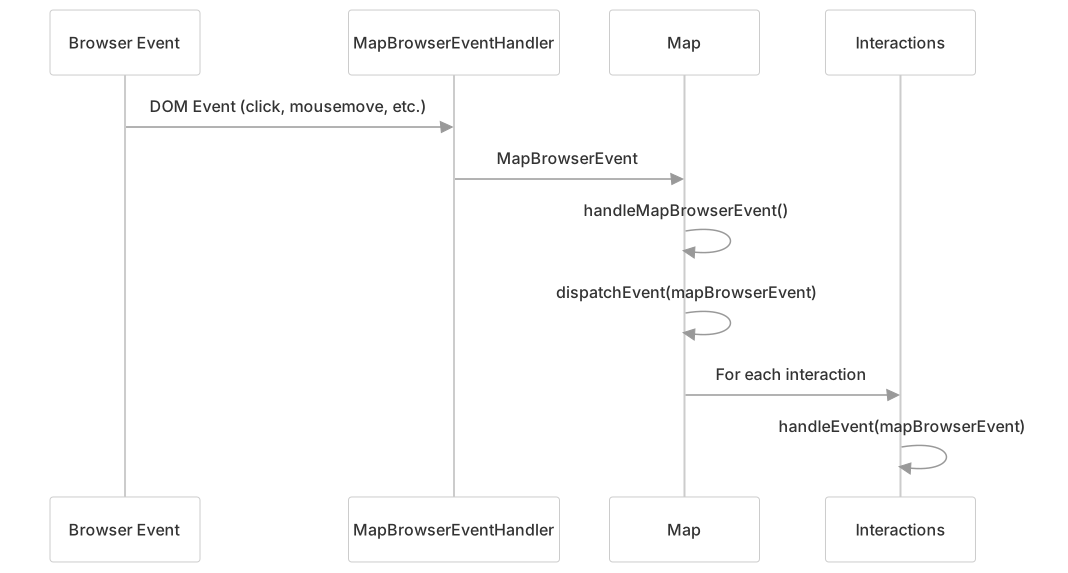
The map first dispatches events to its own listeners, then to all active interactions in reverse order of their addition.
Feature Detection
The Map provides methods to detect features at a given pixel:
// Check if there's a feature at a pixel
const hasFeature = map.hasFeatureAtPixel(pixel, options);

// Get all features at a pixel
const features = map.getFeaturesAtPixel(pixel, options);

// Execute a callback for each feature at a pixel
map.forEachFeatureAtPixel(pixel, function(feature, layer) {
  // Do something with the feature
}, options);These methods are useful for implementing feature selection and interaction.
Common Operations
Coordinate Transformations and Event Handling
The Map class provides coordinate transformation capabilities and comprehensive event processing for user interactions.
Coordinate Transformation Methods
// Convert from pixel to coordinate (user projection)
const coordinate = map.getCoordinateFromPixel(pixel);

// Convert from coordinate to pixel
const pixel = map.getPixelFromCoordinate(coordinate);

// Get coordinate from mouse/touch event
const eventCoord = map.getEventCoordinate(event);

// Internal methods (view projection)
const viewCoord = map.getCoordinateFromPixelInternal(pixel);
const viewPixel = map.getPixelFromCoordinateInternal(coordinate);The coordinate transformation system uses the FrameState transforms:
coordinateToPixelTransform: Converts map coordinates to screen pixelspixelToCoordinateTransform: Converts screen pixels to map coordinates
These transforms are updated each frame and account for the current view state (center, zoom, rotation).
Event Processing Pipeline
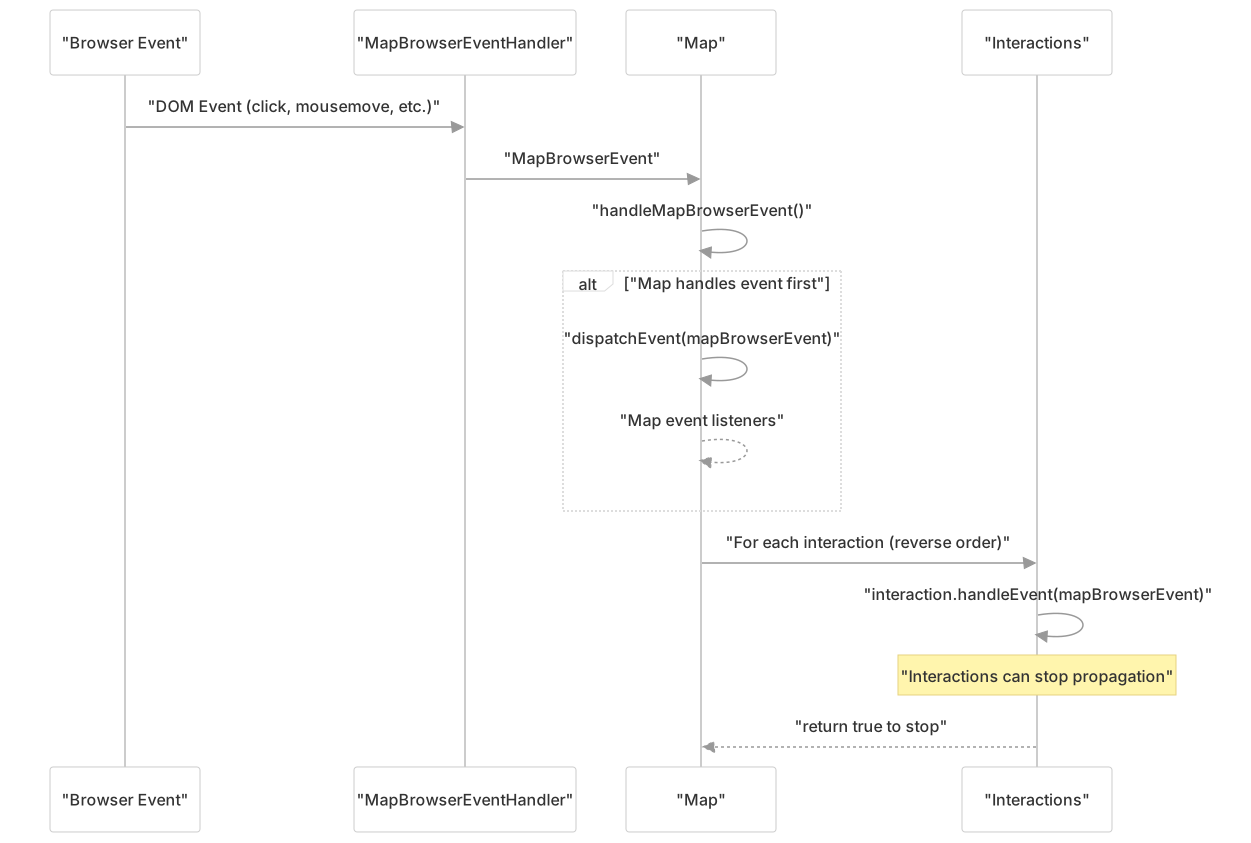
The event system processes MapBrowserEvent objects that include:
- Pixel coordinates relative to the map viewport
- Map coordinates in both user and view projections
- Original DOM event reference
- Event type and modifiers
Size Management
The Map automatically handles size changes of its container, but you can also force a size update:
// Force update of map size
map.updateSize();Component Integration and Lifecycle Management
The Map class serves as the integration point for all OpenLayers components, managing their lifecycle and coordinating their interactions.
Component Integration Architecture

Component Lifecycle Management
The Map class manages component lifecycle through event-driven patterns:
Collection Event Handling: src/ol/Map.js508-590
Collection.ADDevents automatically callsetMap(this)on new componentsCollection.REMOVEevents callsetMap(null)to clean up references
Layer Integration: src/ol/Map.js177-188
setLayerMapProperty()recursively sets map references on layers and layer groupsremoveLayerMapProperty()cleans up map references when layers are removed
View State Synchronization: src/ol/Map.js493-494
handleViewChanged_()responds to view property changes- Automatically triggers rendering when view state changes
Cleanup and Disposal: src/ol/Map.js662-669
disposeInternal()properly cleans up all collections and DOM elements- Disconnects
ResizeObserverand removes event listeners
The integration ensures that all components maintain proper references to their parent map and receive necessary lifecycle events for initialization and cleanup.
Summary
The Map class is the core component of OpenLayers that brings together all other components to create interactive maps. It manages the rendering process, handles user interactions, and provides an API for manipulating the map state. Understanding the Map class is essential for working with OpenLayers effectively.