Layer Architecture
This document covers the layer architecture in OpenLayers, including the different layer types (Vector, Tile, Image, WebGL) and how they integrate with the rendering system. Layers serve as the bridge between data sources and the rendering pipeline, organizing geospatial content for display.
For information about the central Map component that orchestrates layers, see Map Component. For details about data sources that feed into layers, see Source System. For specifics on the rendering pipeline that layers integrate with, see Rendering System.
Layer Type Hierarchy
OpenLayers supports several layer types, each optimized for different types of geospatial data and rendering requirements. The layer types form a hierarchy that determines their rendering behavior and data handling capabilities.

Layer Type Characteristics:
| Layer Type | Data Format | Rendering Method | Use Cases |
|---|---|---|---|
| VectorLayer | Features with geometries | Canvas 2D drawing | Interactive features, editing |
| TileLayer | Pre-rendered image tiles | Canvas image drawing | Base maps, raster overlays |
| ImageLayer | Single images | Canvas image drawing | WMS, static imagery |
| VectorTileLayer | Tiled vector data | Canvas 2D or pre-rendered | Scalable vector maps |
| VectorImageLayer | Vector rendered to image | Canvas image drawing | Performance optimization |
| WebGLLayer | Any, GPU processed | WebGL shaders | Large datasets, effects |
Renderer Architecture
Each layer type is paired with a corresponding renderer that handles the actual drawing operations. The renderer architecture follows a hierarchical pattern with shared base functionality and specialized implementations.

Core Renderer Responsibilities:
LayerRenderer: Abstract interface definingprepareFrame(),renderFrame(), and hit detection methodsCanvasLayerRenderer: Canvas context management, transform calculations, container preparation- Specialized Renderers: Layer-type-specific rendering logic and optimizations
Layer-Renderer Integration Pipeline
The layer rendering process follows a consistent pipeline that integrates with the Map's frame rendering cycle. Each renderer implements this pipeline according to its layer type's requirements.
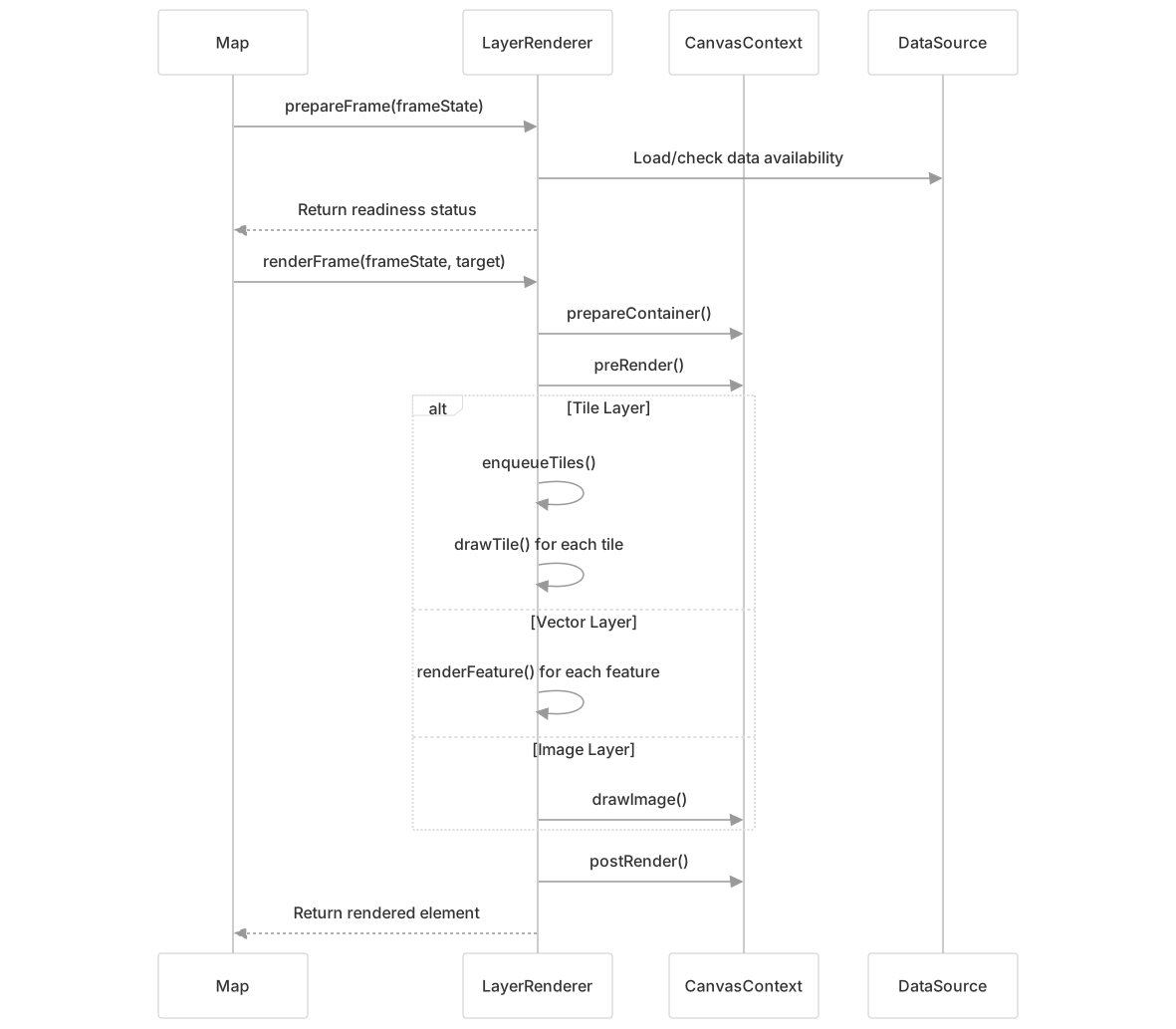
Pipeline Stages:
- Preparation (src/ol/renderer/Layer.js90-92): Determine if layer is ready to render
- Frame Setup (src/ol/renderer/canvas/Layer.js252-287): Configure canvas transforms and clipping
- Content Rendering: Layer-specific drawing operations
- Cleanup (src/ol/renderer/canvas/Layer.js326-331): Dispatch events and finalize rendering
Tile Layer Implementation
The CanvasTileLayerRenderer implements sophisticated tile management including caching, alternative zoom level handling, and efficient rendering of tile pyramids.

Key Tile Rendering Features:
- Tile Caching (src/ol/renderer/canvas/TileLayer.js196-212): LRU cache for efficient tile reuse
- Multi-zoom Rendering (src/ol/renderer/canvas/TileLayer.js700-726): Use parent/child tiles when target zoom unavailable
- Clipping (src/ol/renderer/canvas/TileLayer.js808-838): Prevent overlap artifacts between zoom levels
- Transition Effects (src/ol/renderer/canvas/TileLayer.js925-952): Smooth alpha transitions for loading tiles
Vector Layer Implementation
The CanvasVectorLayerRenderer handles feature-based rendering with support for styling, hit detection, and world wrapping for global projections.

Vector Rendering Pipeline:
- Feature Loading (src/ol/renderer/canvas/VectorLayer.js676-690): Spatial query for features in view extent
- Style Application (src/ol/renderer/canvas/VectorLayer.js700-718): Apply feature or layer styles
- Instruction Building (src/ol/renderer/canvas/VectorLayer.js666-671): Convert features to drawing instructions
- Rendering Execution (src/ol/renderer/canvas/VectorLayer.js221-236): Execute instructions with world wrapping
Vector Tile Layer Implementation
The CanvasVectorTileLayerRenderer combines tile-based loading with vector rendering, supporting multiple source tiles per render tile and efficient caching.

Vector Tile Rendering Features:
- Multi-source Aggregation (src/ol/renderer/canvas/VectorTileLayer.js227-316): Combine multiple source tiles into render tiles
- Render Mode Support (src/ol/renderer/canvas/VectorTileLayer.js47-60): Vector, image, or hybrid rendering
- Efficient Caching (src/ol/renderer/canvas/VectorTileLayer.js188-195): Cache both source data and rendered results
- Hit Detection (src/ol/renderer/canvas/VectorTileLayer.js332-425): Coordinate-based feature identification
Layer Integration with Map Rendering
Layers integrate with the Map's rendering system through the LayerRenderer interface, participating in the frame rendering cycle and coordinate transformations.

Integration Points:
- Frame State (src/ol/renderer/canvas/Layer.js252-270): Shared rendering context and transforms
- Layer States (src/ol/renderer/canvas/TileLayer.js578-589): Per-layer configuration and opacity
- Coordinate Transforms (src/ol/renderer/canvas/Layer.js388-413): Convert between pixel and map coordinates
- Event Dispatch (src/ol/renderer/canvas/Layer.js295-306): Pre/post render events for custom processing