Vector Data
This document details how OpenLayers manages vector data, focusing on features, geometries, and the VectorSource class that serves as the core component for handling vector features. For information about vector data formats and parsing, see Formats and Parsing. For information about vector tiles, see Tile System.
Introduction to Vector Features
Vector features in OpenLayers are geographic entities with geometries (points, lines, polygons) and attributes. Unlike raster data (like map tiles), vector features can be individually styled, selected, and modified. The VectorSource class manages these features, providing methods for addition, removal, spatial querying, and event handling.
VectorSource Architecture

Feature Management
Adding and Removing Features
VectorSource provides methods to add and remove features:
addFeature(feature): Adds a single featureaddFeatures(features): Adds multiple featuresremoveFeature(feature): Removes a featureclear(fast): Removes all features
When features are added, they are indexed by their ID (if provided) and assigned a unique identifier (UID). Features with geometries are added to a spatial index (R-Tree) for efficient spatial queries.
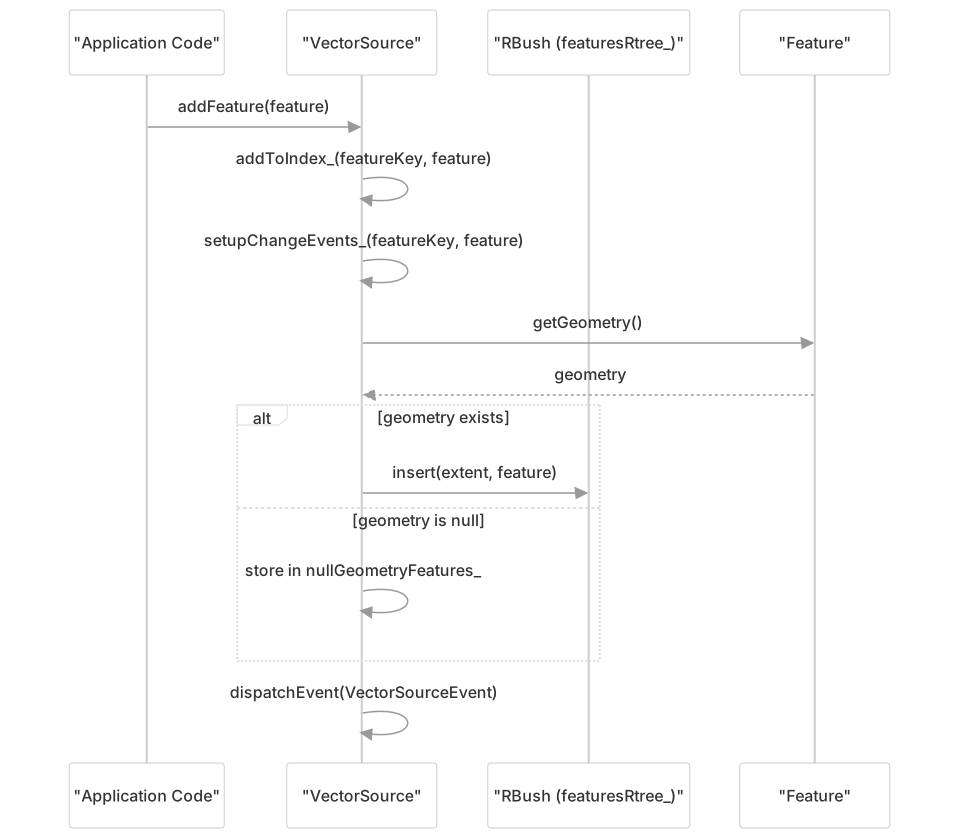
Spatial Indexing with RBush
OpenLayers uses an R-Tree implementation (RBush) to efficiently index and query features based on their spatial extents. This enables operations like:
- Finding features at a given coordinate
- Finding features intersecting a given extent
- Finding the closest feature to a coordinate

Extent System
Extents in OpenLayers are arrays of four numbers representing bounding boxes: [minX, minY, maxX, maxY]. The extent module provides various utility functions for working with extents.
Key Extent Operations:

Feature Querying
VectorSource provides several methods to query features:
getFeatures(): Get all features in the sourcegetFeatureById(id): Get a feature by its IDgetFeaturesInExtent(extent): Get features that intersect the given extentgetClosestFeatureToCoordinate(coordinate): Find the closest feature to a coordinateforEachFeatureInExtent(extent, callback): Iterate over features in an extent
The query methods utilize the spatial index for efficiency.
Loading Features from Remote Sources
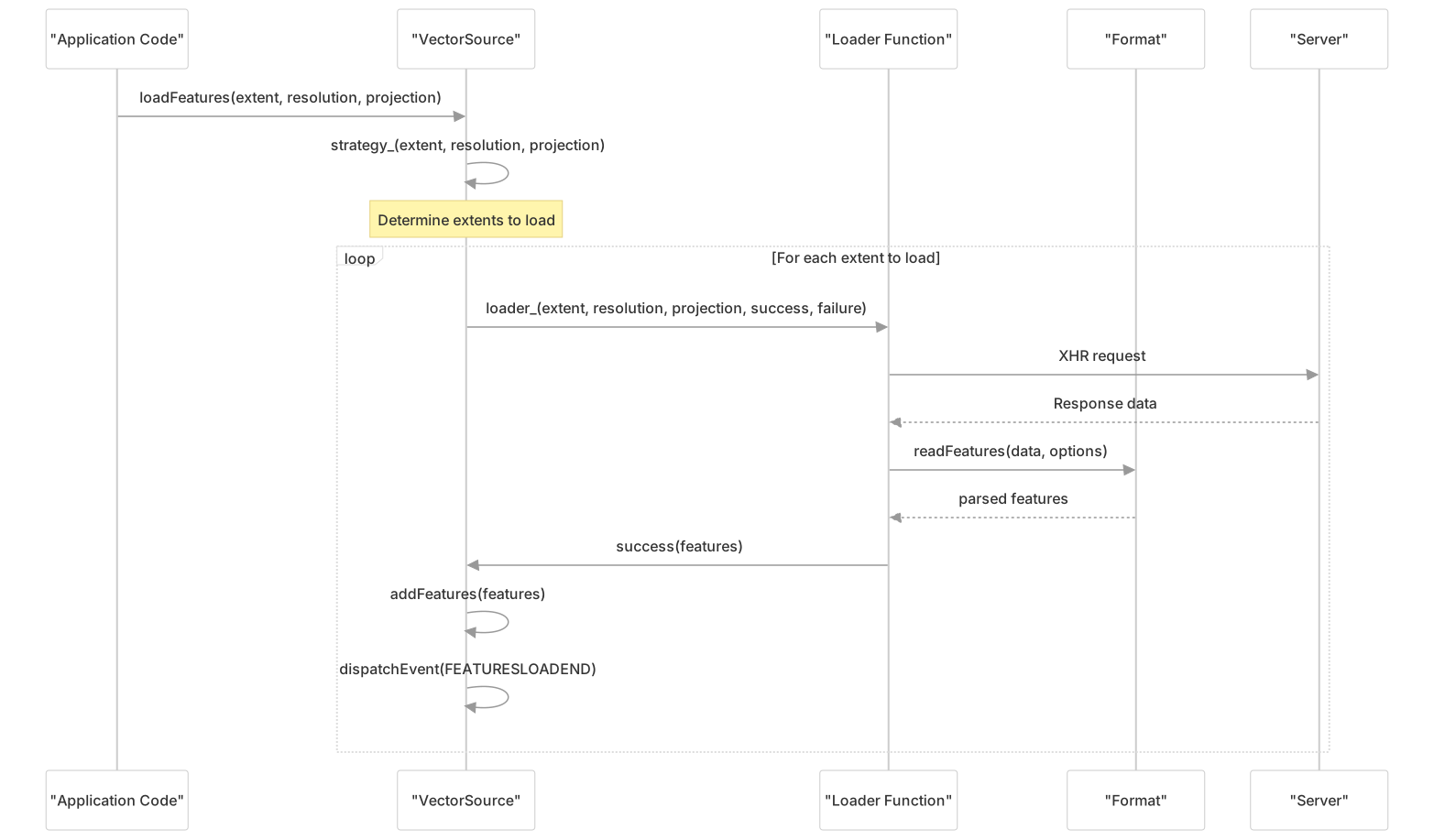
VectorSource can load features from remote URLs using a loader function. The default loader uses XHR to fetch data and parse it using the specified format.
Loading Strategies:
all: Load all features at once (default)bbox: Load features that intersect the current map view extent- Custom strategies that determine which extents to load based on the view
Feature Change Tracking
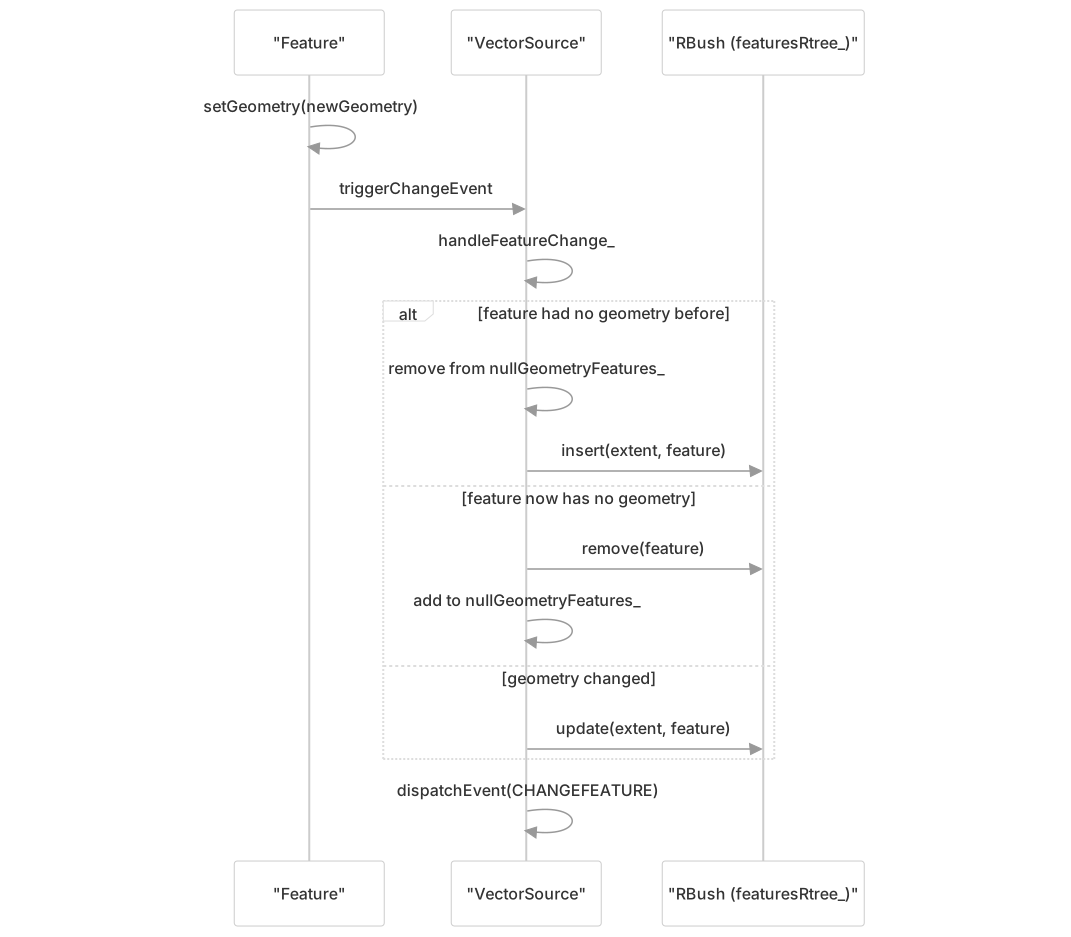
VectorSource listens for changes to features and their geometries, updating the spatial index accordingly:
- When a feature's geometry changes, it's removed from the old location and inserted at the new location in the spatial index
- When a feature's ID changes, the ID index is updated
- Events are dispatched when features change
Comparison: VectorSource vs VectorTile
| Aspect | VectorSource | VectorTile |
|---|---|---|
| Purpose | General-purpose vector feature management | Optimized for rendering tiled vector data |
| Feature editing | Supports feature editing | Not suitable for editing |
| Memory usage | Stores all features in memory | Loads tiles on demand based on viewport |
| Optimization | Features maintain their original geometries | Geometries are clipped near tile boundaries |
| Usage | Used with VectorLayer | Used with VectorTileLayer |
| Loading | Various strategies (all, bbox, etc.) | Tile-based loading |
Clustering Vector Features
The Cluster source can be used to group nearby features:

Performance Considerations
useSpatialIndex: Set tofalsefor sources with frequent feature updates and a small number of featuresoverlaps: Set tofalsefor non-overlapping geometries (like administrative boundaries) to enable renderer optimizationswrapX: Set tofalseto disable wrapping features around the world for better performance- Batch adding features with
addFeatures()is more efficient than multipleaddFeature()calls
Working with Feature IDs
Features can have an optional ID that enables faster lookup via getFeatureById(). Features with the same ID are considered duplicates, and only one will be stored in the source.
Events
VectorSource dispatches several events:
addfeature: When a feature is addedremovefeature: When a feature is removedchangefeature: When a feature changesclear: When all features are clearedfeaturesloadstart: When feature loading startsfeaturesloadend: When feature loading completesfeaturesloaderror: When feature loading fails