UI Components
UI Components in OpenLayers provide user interface elements that are positioned on or over the map to enable user interaction and display information. This system encompasses two main categories: Controls (fixed-position interface elements) and Overlays (DOM elements positioned at geographic coordinates). For information about user interactions with map content like drawing and editing, see Feature Editing Interactions.
System Architecture
The UI Components system is built around two primary abstractions that handle different positioning paradigms:
UI Component Type Hierarchy

UI Component Integration with Map System

Control System
Controls are UI elements with fixed screen positions that provide map interaction capabilities. The base Control class handles DOM management and map integration patterns used by all built-in controls.
Control Base Implementation
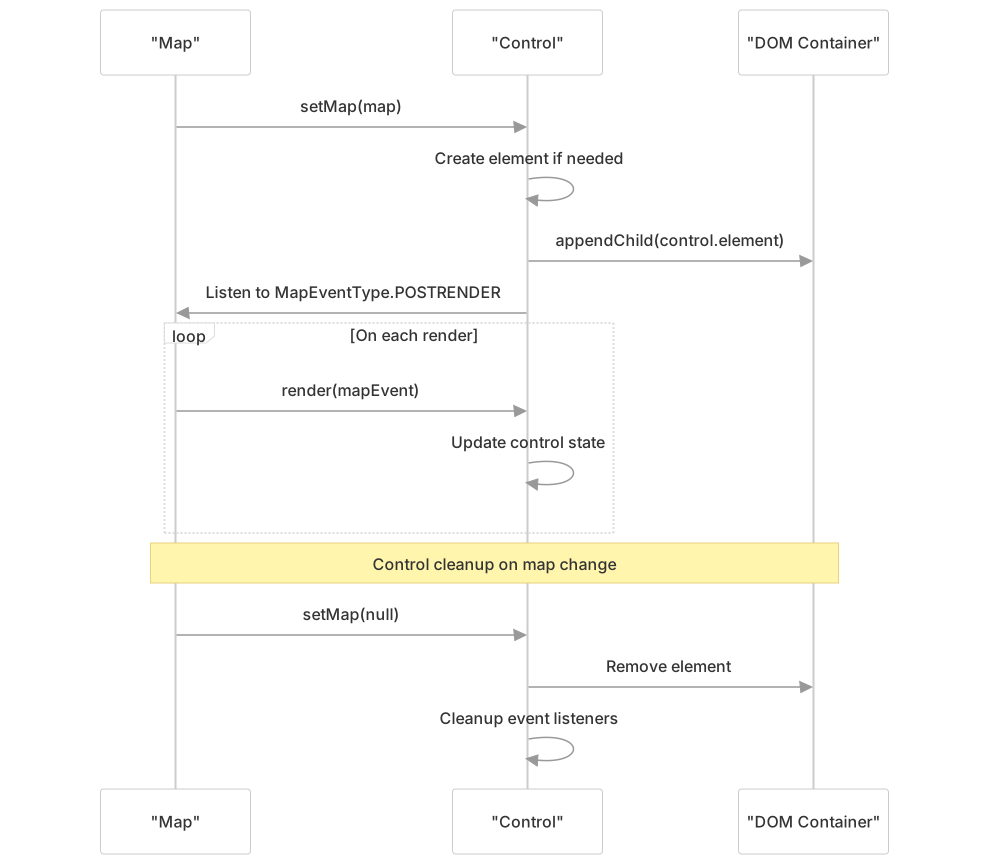
The Control class (src/ol/control/Control.js45-161) provides the foundation for all UI controls:
- Element Management: Controls create and manage their own DOM elements
- Map Integration: Automatic attachment to map overlay containers
- Event Handling: Built-in event listener cleanup and render integration
- Target Support: Optional rendering outside the map viewport
| Control Type | Purpose | Key Methods |
|---|---|---|
Attribution | Display data source attributions | setCollapsible(), setCollapsed() |
FullScreen | Toggle fullscreen map display | handleFullScreen_() |
MousePosition | Show cursor coordinates | setCoordinateFormat(), setProjection() |
OverviewMap | Mini-map with current view indicator | getOverviewMap(), setRotateWithView() |
Rotate | Reset map rotation to north | resetNorth_() |
ScaleLine | Display map scale information | setUnits(), setDpi() |
Zoom | Zoom in/out buttons | zoomByDelta_() |
ZoomSlider | Slider-based zoom control | setThumbPosition_() |
ZoomToExtent | Fit map to specific extent | handleZoomToExtent() |
Control Lifecycle and DOM Integration
Example Control Implementations
Attribution Control Pattern
The Attribution control demonstrates dynamic content updates and collapsible UI patterns:
// Key implementation details from Attribution control
collectSourceAttributions_(frameState) {
  const layers = this.getMap().getAllLayers();
  const visibleAttributions = new Set(
    layers.flatMap((layer) => layer.getAttributions(frameState))
  );
  // Process attributions and update collapsible state
}Scale Line Control Pattern
The ScaleLine control shows dynamic measurement calculation and unit conversion:
// Scale calculation with unit conversion
updateElement_() {
  const pointResolution = getPointResolution(
    projection, viewState.resolution, center, pointResolutionUnits
  );
  // Convert between metric, imperial, nautical units
  // Calculate appropriate scale bar width
}Overlay System
Overlays are DOM elements positioned at specific geographic coordinates that move with the map. Unlike controls, overlays are tied to map coordinates rather than screen positions.
Overlay Positioning System
The Overlay class (src/ol/Overlay.js112-582) provides geographic positioning for DOM elements:

Overlay Configuration Options
| Option | Type | Purpose |
|---|---|---|
position | Coordinate | Geographic location for overlay |
positioning | Positioning | How overlay is positioned relative to coordinate |
offset | Array<number> | Pixel offset from calculated position |
element | HTMLElement | DOM element to position |
stopEvent | boolean | Whether to stop event propagation |
autoPan | PanIntoViewOptions | Automatically pan to keep overlay visible |
Auto-Pan Functionality
Overlays can automatically pan the map to ensure they remain visible:

Collection Management
UI components are often managed in collections using the Collection class, which provides observable array-like functionality for components like controls and overlays.
Collection Event System

Integration Patterns
Default Control Setup
OpenLayers provides a default set of controls through the defaults function, typically including:
Zoom- Zoom in/out buttonsRotate- Rotation reset (when rotation is not 0)Attribution- Data source credits
Custom Control Development
Creating custom controls follows the base Control pattern:
- Extend Control Class: Inherit from
ol/control/Control - Create DOM Element: Build the control's HTML structure
- Implement Event Handlers: Handle user interactions
- Override render(): Update control state based on map changes
- Manage Lifecycle: Clean up resources in
setMap()
Overlay Use Cases
Common overlay applications include:
- Popups: Information displays at specific coordinates
- Markers: HTML-based point representations
- Tooltips: Dynamic information displays
- Custom Widgets: Interactive elements tied to geographic locations