Feature Editing Interactions
Feature editing interactions provide the core functionality for creating, modifying, selecting, and manipulating vector features on OpenLayers maps. This system enables users to draw new geometries, edit existing features, select features for operations, and perform spatial transformations through mouse and touch interactions.
For information about basic event processing and conditions that power these interactions, see Event Processing and Conditions. For map navigation interactions like pan and zoom, see Navigation Interactions.
Architecture Overview
The feature editing system is built around a hierarchy of interaction classes that extend from base interaction types. These interactions work together through event-driven coordination and shared spatial indexing structures.
Core Interaction Hierarchy

Interaction Coordination System

Core Editing Interactions
Draw Interaction
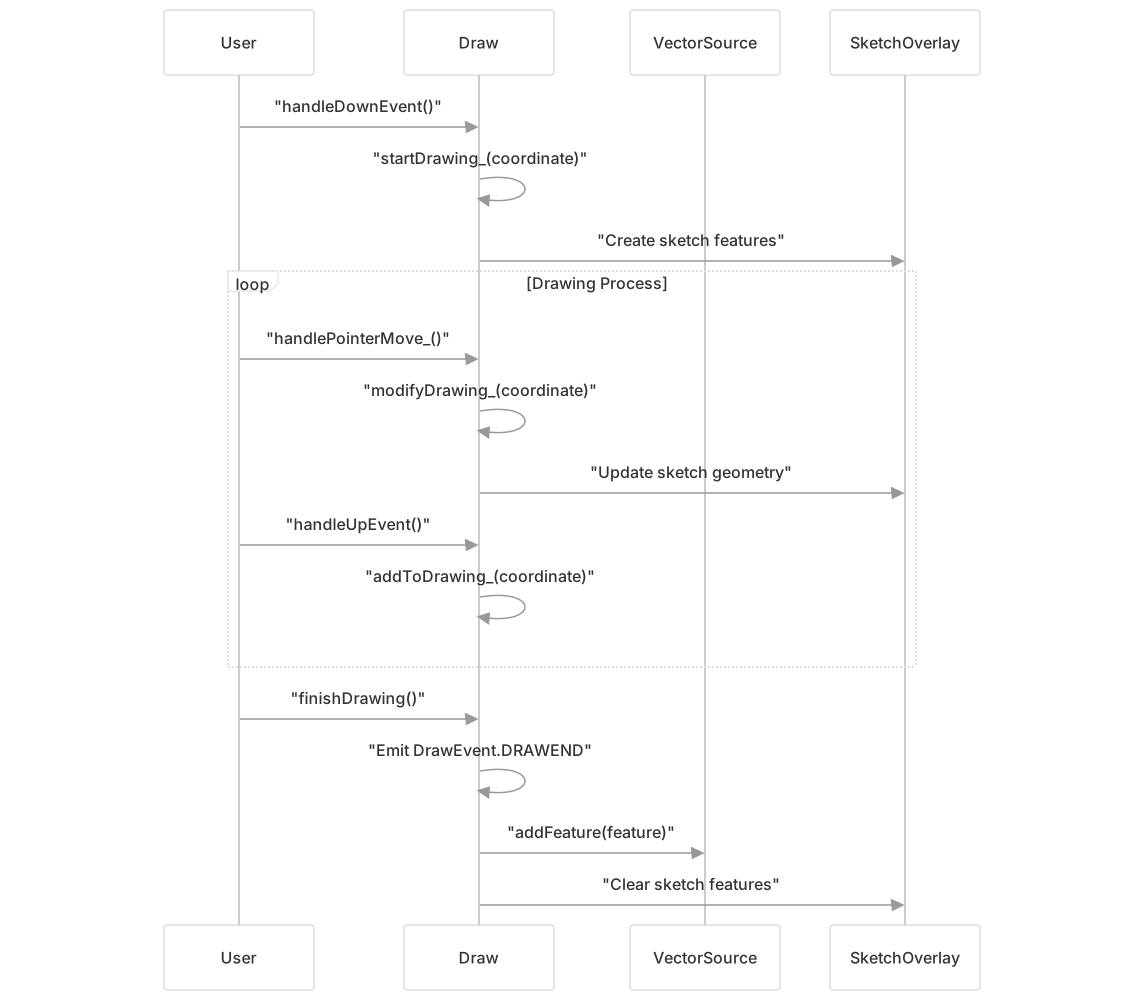
The Draw interaction enables creation of new vector features through user input. It supports multiple geometry types and drawing modes with sophisticated coordinate handling and validation.
Key Features:
- Geometry Types: Point, LineString, Polygon, Circle via
typeoption - Drawing Modes: Click-based vertex placement and freehand drawing
- Tracing: Follow existing geometry edges during drawing
- Coordinate Validation: Minimum/maximum point constraints and finish conditions
Drawing Lifecycle:
Modify Interaction
The Modify interaction provides vertex and edge manipulation capabilities for existing features. It uses spatial indexing for efficient hit detection and supports complex geometry types.
Modification System:

Select Interaction
The Select interaction manages feature selection state and coordinates with other editing interactions. It provides filtering capabilities and maintains feature-layer associations.
Selection Features:
- Condition-based Selection: Configurable event conditions for selection/deselection
- Multi-selection: Support for multiple feature selection with modifier keys
- Layer Filtering: Restrict selection to specific layers
- Feature Filtering: Custom feature filtering functions
- Style Management: Automatic styling of selected features
Translate Interaction
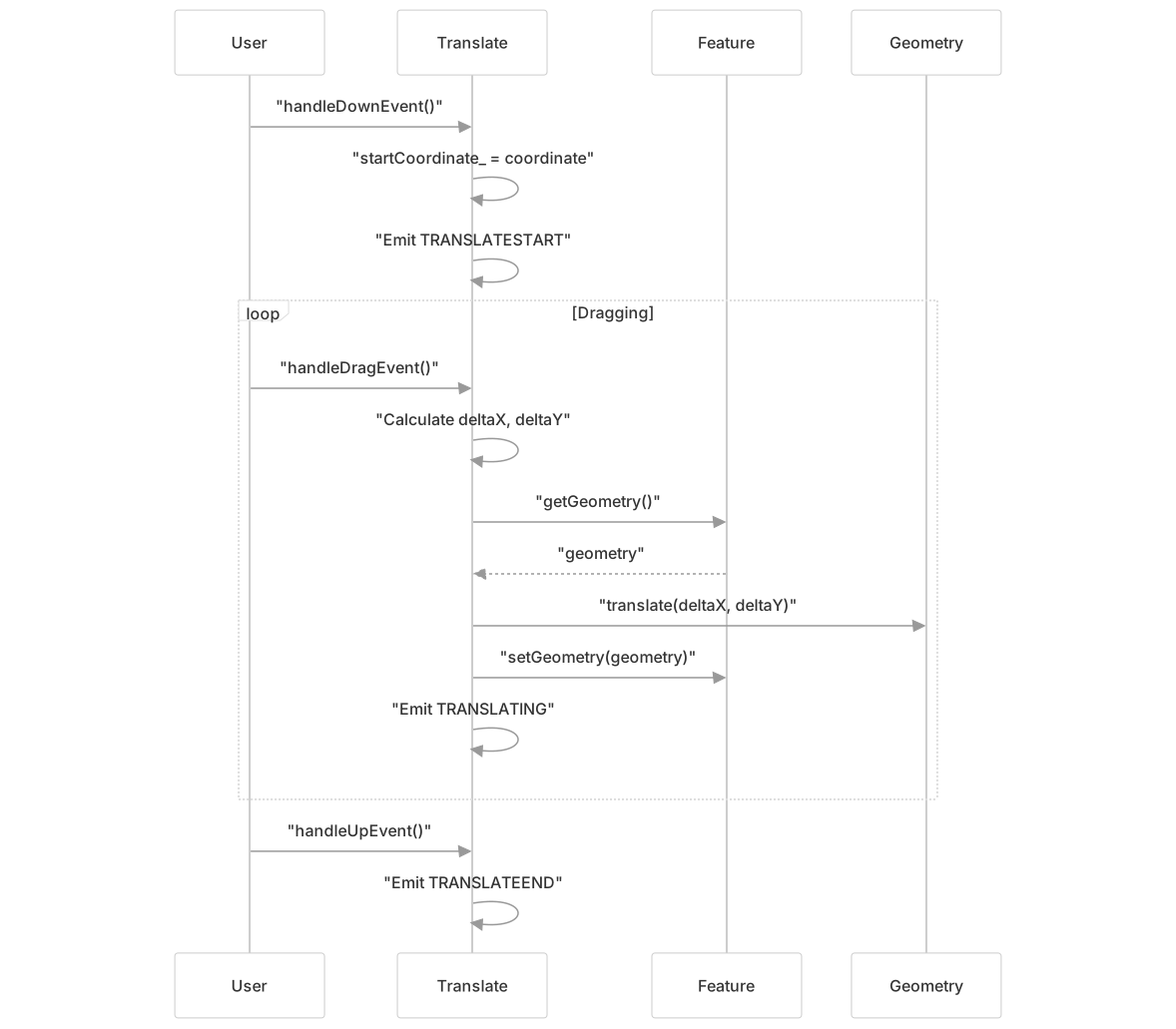
The Translate interaction enables moving features through drag operations. It works with individual features or feature collections and handles coordinate transformations.
Translation Process:
Supporting Interactions
Snap Interaction
The Snap interaction provides snapping assistance to other editing interactions by modifying MapBrowserEvent coordinates and pixels. It maintains a spatial index of snap targets and supports various snapping modes.
Snapping Capabilities:
- Vertex Snapping: Snap to existing feature vertices
- Edge Snapping: Snap to line segment edges
- Intersection Snapping: Snap to calculated segment intersections
- Custom Segmenters: Configurable segment extraction per geometry type
Spatial Indexing:

DragBox and Extent Interactions
DragBox provides rectangular selection area drawing functionality, while Extent offers specialized extent box creation and modification with vertex/edge manipulation capabilities.
Event System and Lifecycle
Event Types and Flow
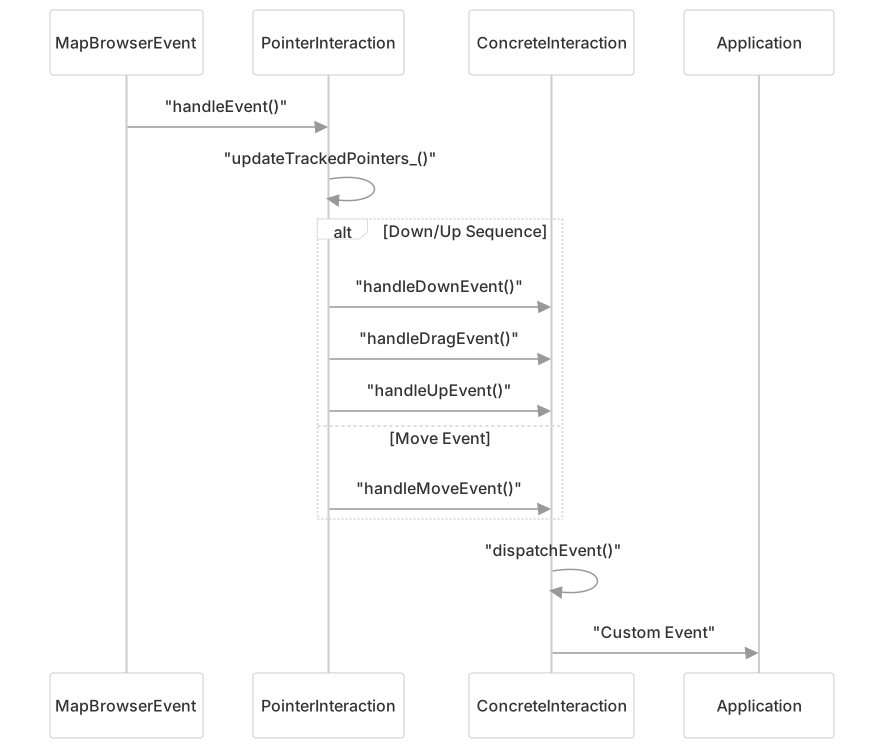
Each editing interaction emits specific events during its operation lifecycle:
| Interaction | Events | Description |
|---|---|---|
| Draw | drawstart, drawend, drawabort | Feature creation lifecycle |
| Modify | modifystart, modifyend | Feature modification lifecycle |
| Select | select | Feature selection changes |
| Translate | translatestart, translating, translateend | Feature movement lifecycle |
| Snap | snap, unsnap | Snapping state changes |
Event Handling Pattern
Integration Patterns
Overlay Management
Editing interactions use VectorLayer overlays to display temporary graphics during editing operations:

Coordinate System Integration
Editing interactions handle coordinate transformations between user and view projections through the projection system:

The feature editing interaction system provides a comprehensive framework for vector feature manipulation in OpenLayers, with each interaction specializing in specific editing tasks while maintaining consistent event handling patterns and coordinate system integration.