Core Architecture
This document describes the foundational architecture patterns that underpin all Leaflet components. It covers the class system, event handling, core utilities, and coordinate abstractions that form the base upon which the map, layers, controls, and handlers are built.
For information about the LeafletMap component itself, see Map Component. For details on event propagation and patterns, see Events System. For helper functions and the Class base, see Utilities and Class System. For coordinate conversion and projections, see Geographic Coordinates and Projections.
Foundational Class Hierarchy
Leaflet's architecture is built on a small set of base classes that provide common functionality through inheritance. The Class base provides the OOP foundation, while Evented extends it to add event capabilities that nearly all Leaflet objects use.
Diagram: Core Class Hierarchy and Inheritance Chain

The Class System
The Class base provides Leaflet's inheritance mechanism and option management. All Leaflet classes extend from Class or one of its subclasses.
Key Mechanisms
| Mechanism | Static Method | Instance Method | Purpose |
|---|---|---|---|
| Options | setDefaultOptions(options) | this.options | Merge default options onto prototype |
| Initialization | addInitHook(fn) | callInitHooks() | Run hooks after construction |
| Mixins | include(props) | - | Add methods to class prototype |
| Merging | mergeOptions(options) | - | Merge additional options into defaults |
Initialization Flow
When a Leaflet object is constructed, the following sequence occurs:
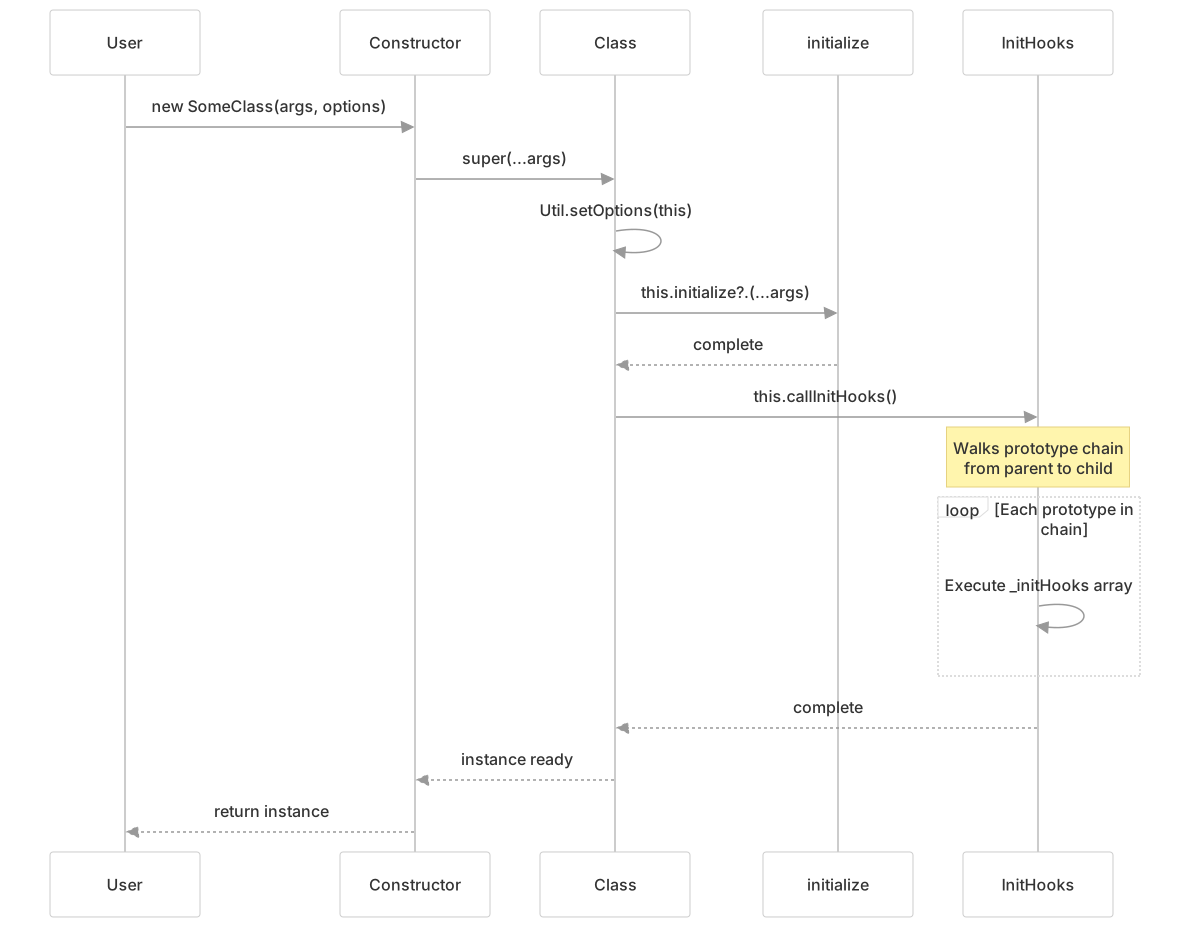
Options Inheritance
Options are inherited through the prototype chain. When setOptions is called, it creates a new options object that inherits from the parent's options:

The Evented System
Evented extends Class to provide a pub-sub event system. Most Leaflet classes inherit from Evented to enable event-driven architecture.
Event Registration and Firing
Diagram: Event Lifecycle

Event Handler Storage
Event handlers are stored in the _events object, keyed by event type. Each event type maps to an array of listener objects:
// Internal structure
this._events = {
    'click': [
        {fn: handlerFn1, ctx: contextObj1, once: false},
        {fn: handlerFn2, ctx: undefined, once: true}
    ],
    'move': [
        {fn: moveHandler, ctx: undefined, once: false}
    ]
}Context Optimization
When a listener is registered with context === this, the context is set to undefined to reduce memory footprint, since the default behavior calls with this anyway:
Event Parents and Propagation
Leaflet supports hierarchical event propagation through event parents. When fire() is called with propagate=true, the event bubbles up through registered parent objects:

Event parents are stored in _eventParents using Util.stamp() to generate unique IDs:
Core Utilities
The Util namespace provides helper functions used throughout Leaflet. These are pure functions with no state.
Essential Utility Functions
| Function | Signature | Purpose |
|---|---|---|
stamp(obj) | Object → Number | Assigns and returns unique ID via _leaflet_id property |
setOptions(obj, options) | Object, Object → Object | Merges options onto obj.options, returns merged options |
throttle(fn, time, context) | Function, Number, Object → Function | Returns throttled function, executes max once per time ms |
template(str, data) | String, Object → String | Evaluates template string 'Hello {name}' with data object |
formatNum(num, precision) | Number, Number → Number | Rounds number to precision decimal places (default 6) |
splitWords(str) | String → String[] | Trims and splits string on whitespace |
wrapNum(num, range, includeMax) | Number, Number[], Boolean → Number | Wraps number within range via modulo |
Diagram: Util.stamp() Usage Pattern

Template System
The template() function enables simple string interpolation used for tile URL generation and other dynamic strings:

Coordinate Systems and Geometry
Leaflet uses distinct coordinate types for different spaces in the rendering pipeline. Understanding these types is fundamental to working with the library.
Coordinate Type Hierarchy

Coordinate Conversion Pipeline
The LeafletMap class provides conversion methods between different coordinate spaces:
| Method | From | To | Description |
|---|---|---|---|
latLngToLayerPoint(latlng) | LatLng | Point | Geographic → Layer point (relative to pixel origin) |
layerPointToLatLng(point) | Point | LatLng | Layer point → Geographic |
latLngToContainerPoint(latlng) | LatLng | Point | Geographic → Container point (relative to map container) |
containerPointToLatLng(point) | Point | LatLng | Container point → Geographic |
project(latlng, zoom) | LatLng | Point | Geographic → Projected point at zoom level |
unproject(point, zoom) | Point | LatLng | Projected point → Geographic |
Diagram: Coordinate Space Conversions

Point and Bounds Operations
The Point and Bounds classes provide vector math and geometric operations:

Architectural Patterns
Initialization Hook Pattern
Leaflet uses initialization hooks to allow subclasses to inject behavior without overriding constructors. This enables clean composition:
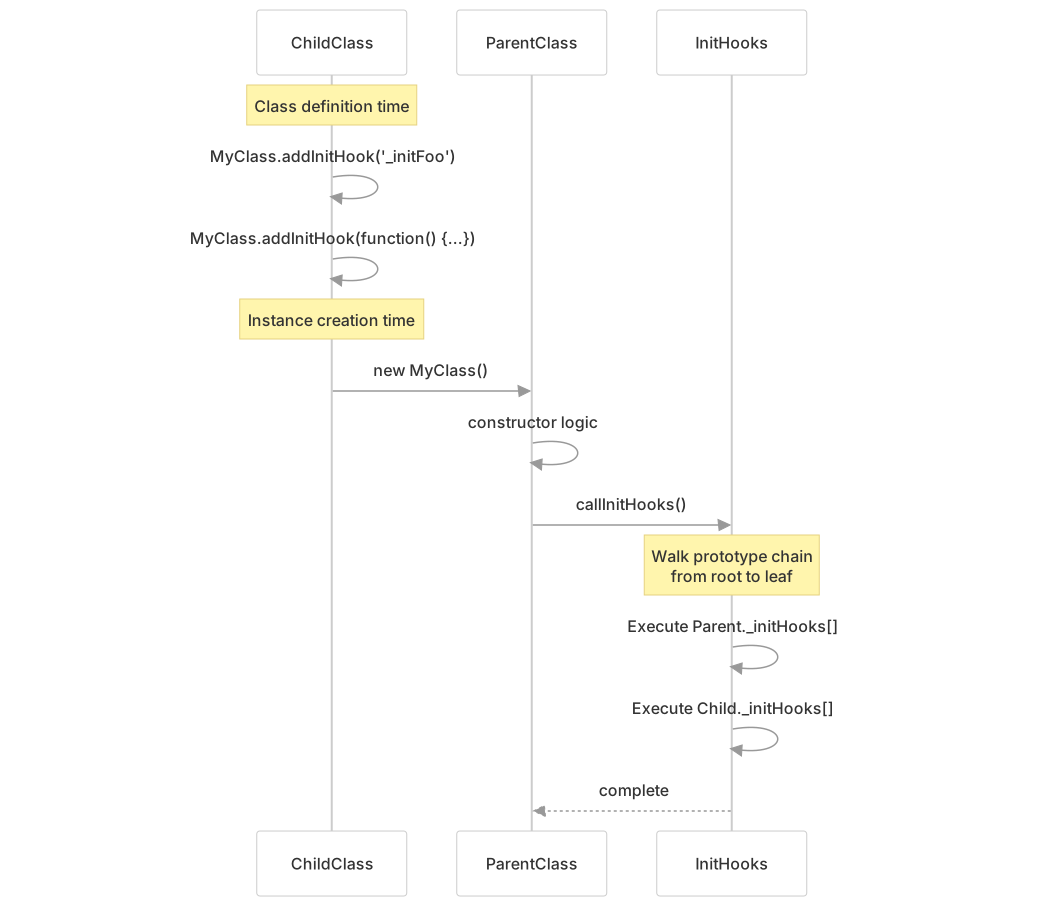
Example Usage:
// In LeafletMap class definition
LeafletMap.addInitHook('_initContainer', id);
LeafletMap.addInitHook('_initLayout');
LeafletMap.addInitHook('_initEvents');

// Alternative function form
LeafletMap.addInitHook(function () {
    if (this.options.maxBounds) {
        this.setMaxBounds(this.options.maxBounds);
    }
});Options Merging Pattern
Leaflet's options system uses prototypal inheritance to allow defaults at each level of the class hierarchy:

Event Parent Pattern
The event parent pattern enables hierarchical event bubbling, commonly used for layers within layer groups:

Integration with LeafletMap
The foundational classes integrate to form the complete mapping system. The LeafletMap class demonstrates this integration:

Key Integration Points:
- Class System: LeafletMap uses
setDefaultOptions()to define default map options andaddInitHook()to register initialization steps - Event System: LeafletMap extends Evented to fire events like
'move','zoom','click'and propagate layer events - Utilities: LeafletMap uses
Util.stamp()for layer IDs,Util.setOptions()for option merging, andUtil.throttle()for performance - Coordinates: LeafletMap provides conversion methods between LatLng and Point spaces using CRS transformations
Testing Patterns
The core architecture is extensively tested to ensure reliability:
| Test Suite | Tests | Key Assertions |
|---|---|---|
ClassSpec.js | Class inheritance, options merging, init hooks | Options inherited correctly, hooks run in order |
EventsSpec.js | Event registration, firing, propagation, context | Listeners called with correct context, propagation works |
UtilSpec.js | Utility functions | stamp() uniqueness, throttle() timing, template() interpolation |
MapSpec.js | Map initialization, view management, coordinate conversion | Map state correct, conversions accurate |