Events System
Purpose and Scope
The Events System provides the publish-subscribe (pub-sub) event architecture that powers all user interactions and component communication in Leaflet. This document covers the Evented base class, event registration (on, once, off), event firing and propagation, listener management, and event parent relationships.
For information about DOM event handling and browser event normalization, see DOM Utilities and Event Handling. For the overall class inheritance system, see Utilities and Class System.
Overview
The Evented class extends Class and provides event-powered functionality to components like Map, Marker, and Layer. The system supports:
- Multiple listeners per event type
- Custom execution contexts
- Space-separated event types (e.g.,
'click dblclick') - Object-based event registration (e.g.,
{click: fn1, move: fn2}) - One-time listeners via
once() - Event propagation through parent objects
- Listener removal during event firing (safe reentrancy)

Figure 1: Evented Class Architecture
Event Registration
Adding Listeners with on()
The on() method registers event listeners with flexible syntax:
Single event type with function:
map.on('click', function(e) {
    console.log(e.latlng);
});Multiple space-separated types:
map.on('click dblclick', handler);Object-based registration:
map.on({
    click: onClickHandler,
    move: onMoveHandler
});With custom context:
map.on('click', this.handleClick, this);The implementation processes input and delegates to _on():
| Input Type | Processing | Example |
|---|---|---|
| Object | Iterates entries, calls _on() for each | {click: fn1, move: fn2} |
| String | Splits on whitespace, calls _on() for each | 'click dblclick' |
| Single string | Direct call to _on() | 'click' |
Core Registration: _on()
The _on() method performs the actual listener registration:
- Validation: Checks for removed mouse events and validates function type
- Duplicate Prevention: Uses
_listens()to prevent duplicate registration - Context Optimization: Sets
context = undefinedifcontext === thisto reduce memory - Listener Object Creation: Creates
{fn, ctx, once?}structure - Storage: Adds to
this._events[type]array

Figure 2: Listener Registration Flow
One-Time Listeners: once()
The once() method registers listeners that auto-remove after first execution:
map.once('load', function() {
    console.log('Map loaded');
});Implementation delegates to _on() with _once = true flag. During fire(), listeners with once: true are removed via this.off() before invocation.
Removing Listeners: off()
The off() method supports multiple removal patterns:
| Pattern | Behavior | Example |
|---|---|---|
| No arguments | Remove all listeners | obj.off() |
| Type only | Remove all listeners for type | obj.off('click') |
| Type + function | Remove specific listener | obj.off('click', fn) |
| Type + function + context | Remove listener with context | obj.off('click', fn, ctx) |
| Object | Remove multiple type/listener pairs | obj.off({click: fn1, move: fn2}) |
Reentrancy Safety: If listeners are removed during fire(), they are replaced with Util.falseFn noops and the array is copied to prevent iterator corruption.

Figure 3: off() Method Decision Tree
Event Firing
Basic Event Firing: fire()
The fire() method triggers registered listeners with an event object:
map.fire('click', {
    latlng: L.latLng(51.5, -0.09),
    originalEvent: domEvent
});Event Object Structure:
| Property | Description | Source |
|---|---|---|
type | Event type string | From fire() argument |
target | Object that fired event | this |
sourceTarget | Original source object | data.sourceTarget or this |
propagatedFrom | Parent that propagated event | Set during propagation |
...data | Custom properties | Spread from data argument |
Firing Process
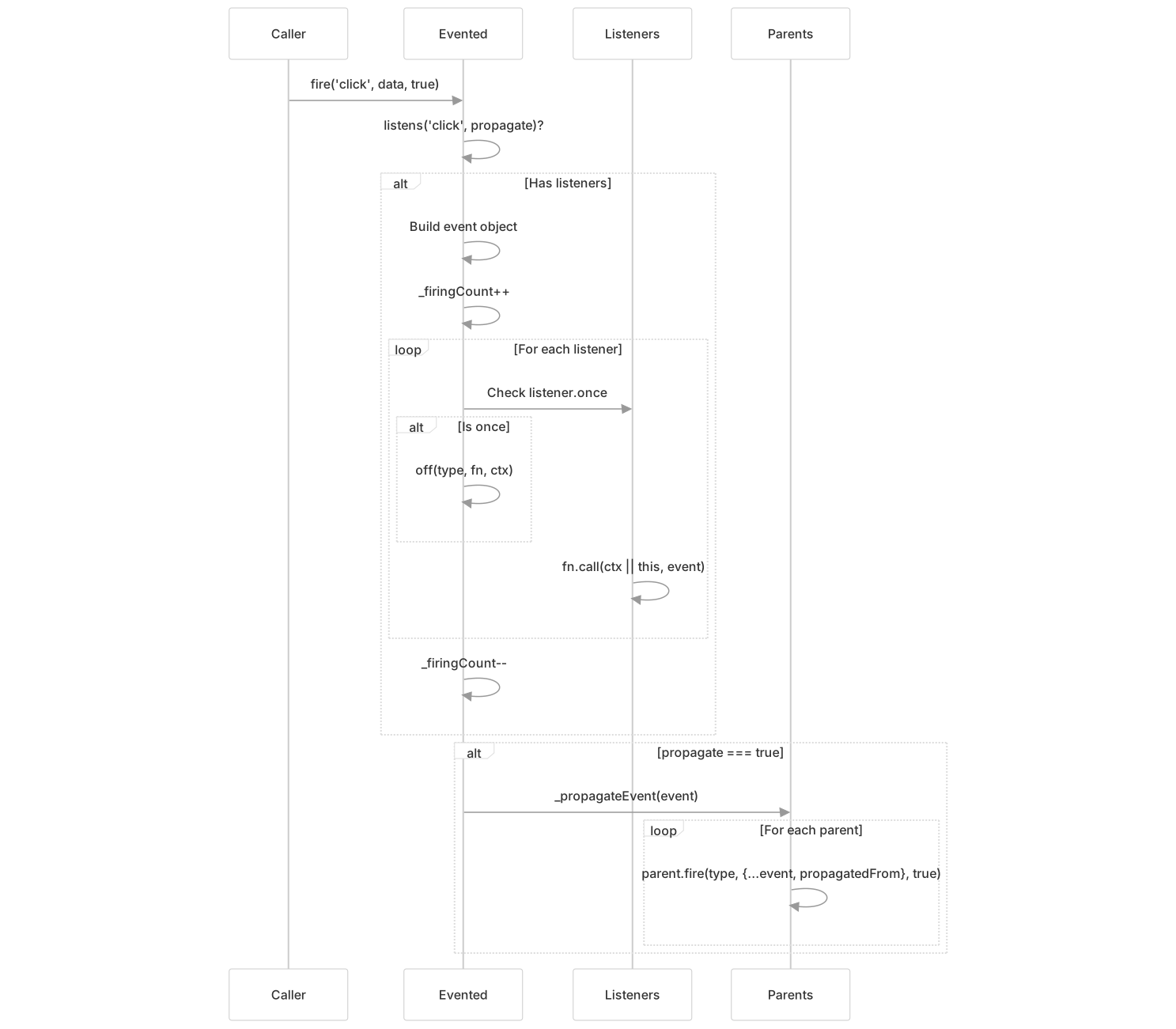
Figure 4: Event Firing Sequence
Reentrancy Protection
The _firingCount property tracks nested fire() calls. When listeners modify the listener array (via off() during fire()):
- Modified listeners have
fnreplaced withUtil.falseFn - The
_events[type]array is copied before splicing - Prevents iterator corruption and ensures predictable execution order
Event Propagation
Event Parent Relationships
Leaflet uses event parents to propagate events up component hierarchies. For example, a Marker can propagate events to its containing FeatureGroup, which propagates to the Map.

Figure 5: Event Propagation Hierarchy
Managing Event Parents
Adding a parent:
marker.addEventParent(featureGroup);Removing a parent:
marker.removeEventParent(featureGroup);Parents are stored in _eventParents using Util.stamp() for unique identification:
this._eventParents[Util.stamp(obj)] = obj;Propagation Implementation
The _propagateEvent() method fires the event on all parents:
- Iterates
Object.values(this._eventParents ?? {}) - For each parent, calls
parent.fire(type, modifiedEvent, true) - Modified event includes:
propagatedFrom: The immediate child that propagated- All original event properties
targetupdates to parent (done infire())

Figure 6: Event Object Transformation During Propagation
Querying Listeners: listens()
The listens() method checks for listener existence with optional propagation:
Basic usage:
if (map.listens('click')) {
    // Has click listeners
}Check specific function:
if (map.listens('click', myHandler)) {
    // myHandler is registered for click
}Check with propagation:
if (marker.listens('click', true)) {
    // Marker or its parents have click listeners
}Method Signatures:
| Signature | Returns | Description |
|---|---|---|
listens(type) | boolean | Has any listeners for type |
listens(type, fn, context) | boolean | Has specific listener |
listens(type, propagate) | boolean | Has listeners (checking parents if true) |
listens(type, fn, context, propagate) | boolean | Full check with propagation |
Implementation Logic

Figure 7: listens() Implementation Flow
Internal Architecture
Data Structures
The Evented class maintains three primary internal properties:
_events Object:
_events = {
    'click': [
        {fn: handler1, ctx: undefined, once: false},
        {fn: handler2, ctx: customObj, once: false},
        {fn: handler3, ctx: undefined, once: true}
    ],
    'move': [
        {fn: moveHandler, ctx: undefined, once: false}
    ]
}_eventParents Object:
_eventParents = {
    123: featureGroupInstance,  // Key is Util.stamp(obj)
    456: mapInstance
}_firingCount Number: Tracks nested fire() calls to handle reentrancy. Incremented on entry, decremented on exit.
Listener Lookup: _listens()
The _listens() method performs the core listener search:
- Returns
falseif no_eventsor no listeners for type - Returns
true(as!!listeners.length) if no specific function requested - Optimizes context: sets
context = undefinedifcontext === this - Uses
Array.findIndex()to locate matching{fn, ctx}pair - Returns index number or
false
This return value (number vs. false) is used by _off() to splice the array.
Context Optimization
To reduce memory footprint, Leaflet treats context === this as context = undefined:
if (context === this) {
    context = undefined;
}This optimization appears in both _on() and _listens(), ensuring consistent matching during registration and lookup.
Common Usage Patterns
Map Event Handling
const map = L.map('map');

map.on('click', function(e) {
    console.log('Clicked at', e.latlng);
});

map.on('zoom', function(e) {
    console.log('Zoom level:', map.getZoom());
});Layer Event Bubbling
Layers automatically set the map as an event parent, enabling propagation:
const marker = L.marker([51.5, -0.09]).addTo(map);

// Listen on map for marker events
map.on('click', function(e) {
    if (e.sourceTarget === marker) {
        console.log('Marker clicked');
    }
});

// Fire propagates: marker → map
marker.fire('click', {}, true);Memory Management
Remove listeners to prevent memory leaks:
function onClick(e) { /* ... */ }

map.on('click', onClick);

// Later, when done:
map.off('click', onClick);

// Or remove all listeners:
map.off();Temporary Listeners
Use once() for one-time events:
map.once('load', function() {
    console.log('Initial load complete');
});

// Or remove within handler:
map.on('click', function handler(e) {
    console.log('First click');
    map.off('click', handler);
});Integration with Class System
Evented extends Class, inheriting the option system and initialization hooks. Classes that need event functionality simply extend Evented:
import {Evented} from './core/Events.js';

class MyComponent extends Evented {
    initialize(options) {
        // Component initialization
    }

    doSomething() {
        this.fire('something', {data: 'value'});
    }
}

const component = new MyComponent();
component.on('something', (e) => {
    console.log(e.data);
});
component.doSomething(); // Fires eventPerformance Considerations
Event Registration Performance
- Object syntax optimization: When using
on({type1: fn1, type2: fn2}), space-separated type processing is skipped for performance - Duplicate prevention:
_listens()is called before every registration to prevent duplicate listeners - Context comparison: Direct
===comparison for context matching (usesUtil.stamp()only for parent tracking)
Firing Performance
- Early exit: Returns immediately if
listens()returns false - Minimal object creation: Event object created once per
fire()call - Array iteration: Direct for-of loop over listeners array (no copying unless modified during firing)
Memory Optimization
- Context as undefined: When
context === this, storesundefinedinstead of object reference - Lazy initialization: Properties like
_eventsand_eventParentsare created only when needed (??=operator) - Stamp-based parent keys: Uses numeric IDs instead of storing objects as keys