DOM Utilities
The DOM Utilities in Leaflet provide a comprehensive set of functions for manipulating DOM elements and handling DOM events in a cross-browser compatible way. These utilities abstract away browser differences and provide a consistent interface for DOM interactions, which is essential for Leaflet's map rendering and user interaction capabilities. This page covers the two main DOM utility modules: DomUtil for element manipulation and DomEvent for event handling.
For information about user interactions with the map, see Draggable Components and Controls.
Overview
DOM Utilities serve as a foundational layer in Leaflet's architecture, enabling higher-level components to interact with the browser DOM in a consistent manner, regardless of the browser or device being used.

DomUtil - Element Manipulation
The DomUtil module provides functions for DOM element creation, manipulation, positioning, and styling. It's designed to handle cross-browser compatibility issues transparently.
Element Selection and Creation

The basic element operations include:
get(id): Retrieves an element by its ID or returns the element if it was passed directlycreate(tagName, className, container): Creates an HTML element with the specified tag and optional class name, then optionally appends it to a container
These functions are fundamental building blocks used throughout Leaflet when components need to create or reference DOM elements.
Element Positioning
Leaflet uses sophisticated positioning utilities to place elements on the map:
| Function | Purpose |
|---|---|
setTransform(el, offset, scale) | Sets the CSS 3D transform with translation and optional scaling |
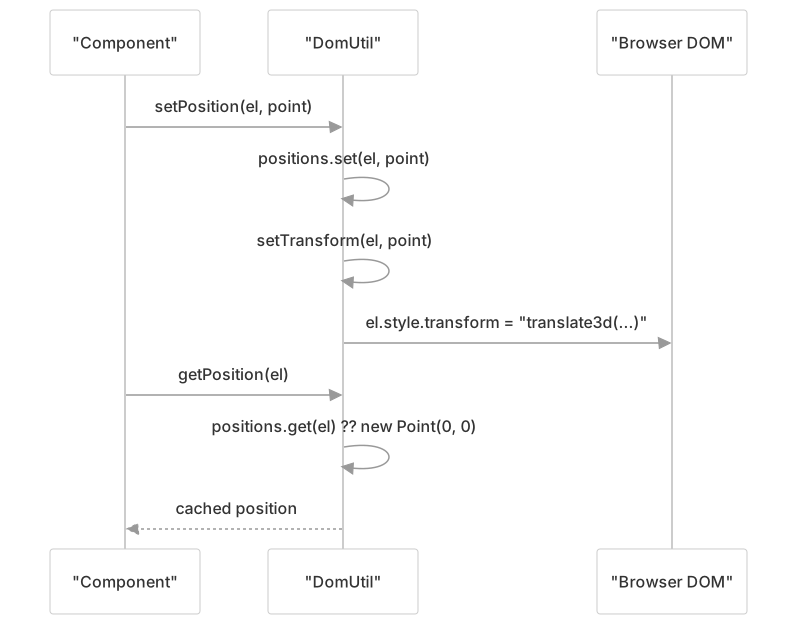
setPosition(el, point) | Positions an element using setTransform for better performance |
getPosition(el) | Returns previously set position of an element |
getScale(el) | Computes the CSS scale currently applied on the element |
The positioning system uses the CSS transform property when available for better performance. Leaflet caches element positions in a WeakMap to avoid unnecessary DOM read operations, as seen in the implementation:
Element Ordering
To control the stacking order of elements (z-index), Leaflet provides:
toFront(el): Makes the element render in front of other siblings by moving it to the end of its parent's childrentoBack(el): Makes the element render behind other siblings by moving it to the beginning of its parent's children
These functions are used to control the visual layering of map elements without relying on z-index CSS properties.
User Interaction Controls
DomUtil includes several functions to control how users can interact with elements:
| Function | Purpose |
|---|---|
disableTextSelection()/enableTextSelection() | Controls text selection on the entire document |
disableImageDrag()/enableImageDrag() | Prevents/allows dragging of images |
preventOutline(el)/restoreOutline() | Removes/restores focus outline for elements during drag operations |
These functions help Leaflet control the user experience during map interactions by preventing browser default behaviors that could interfere with map operation.
Utility Functions
Additional helper functions include:
getSizedParentNode(el): Finds the closest parent element with non-zero dimensionsgetScale(el): Returns an object with x and y scale factors and the element's bounding client rect
These utilities assist with calculations related to element sizing and positioning, which are crucial for accurate placement of map elements.
DomEvent - Event Handling
The DomEvent module provides a unified API for DOM event management across browsers. It handles event listener addition and removal, normalizes event behavior, and offers utilities for controlling event propagation.

Event Listener Management
At the core of DomEvent are functions for managing event listeners:
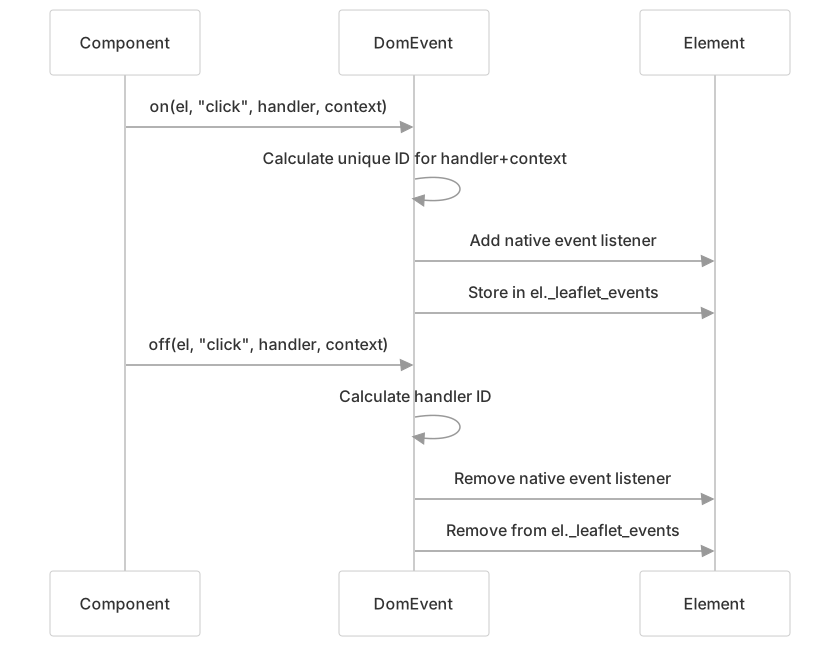
on(el, types, fn, context): Adds event listener(s) with optional contextoff(el, types, fn, context): Removes previously added listener(s)
These functions support:
- Multiple event types using space-separated strings (e.g., "click dblclick")
- Event maps with type/listener pairs (e.g.,
{click: onClick, mousemove: onMove}) - Context binding to control what
thisrefers to inside handlers
DomEvent keeps track of event listeners using a special property (_leaflet_events) on elements:
Event Propagation Control
DomEvent provides functions to control event bubbling and default behaviors:
stopPropagation(e): Prevents event from bubbling up to parent elementspreventDefault(e): Prevents the default action associated with the eventstop(e): Combines both stopPropagation and preventDefault
Specialized versions for common scenarios:
disableScrollPropagation(el): Prevents wheel events from bubbling updisableClickPropagation(el): Prevents click, dblclick, mousedown, touchstart, and contextmenu events from bubbling
These utilities are extensively used in the map component to prevent browser defaults from interfering with map interactions.
Mouse and Touch Position Handling
Getting accurate coordinates for user interactions is crucial for map functionality:
getMousePosition(e, container): Returns normalized mouse position relative to a containergetWheelDelta(e): Normalizes wheel delta values across different browsersisExternalTarget(el, e): Helps determine if an event's related target is outside an element
These functions account for browser differences, CSS transforms, and device pixel ratios to provide consistent values.
Cross-Browser Compatibility
Leaflet's DOM utilities handle numerous browser quirks and differences, particularly for touch and pointer events.
Browser Detection
The Browser module detects browser capabilities that affect DOM operations:
| Property | Purpose |
|---|---|
touch | Whether browser supports touch events |
pointer | Whether browser supports pointer events |
touchNative | Whether browser supports native touch events |
retina | Whether the device has a high-resolution screen |
chrome, safari | Browser-specific detection |
mobile | Whether running on a mobile device |
Touch and Pointer Event Normalization
Leaflet handles touch events uniformly through two specialized modules:
Pointer Event Handling
The DomEvent.Pointer.js module provides touch event simulation based on pointer events:

When a browser supports pointer events but not touch events natively, this module converts pointer events to simulated touch events, maintaining a collection of active pointers to simulate multi-touch.
Double Tap Detection
The DomEvent.DoubleTap.js module provides double-tap/double-click support:
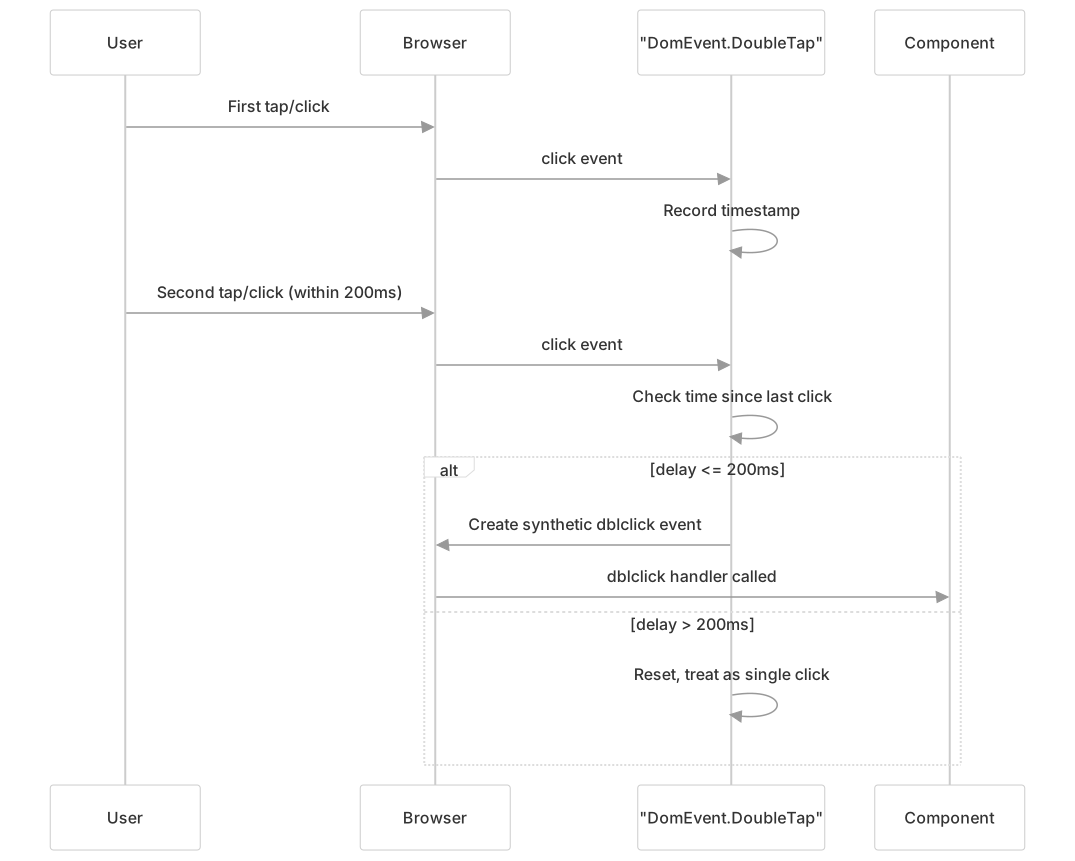
This module extends event handling with double-tap support for mobile browsers that don't provide native double-click events on touch interactions.
Integration with Leaflet Components
The DOM utilities are used extensively throughout Leaflet for UI interactions:

Usage Patterns
Typical usage patterns for DOM utilities include:
Element Creation and Management:
// Creating map containers, controls, or markers var container = DomUtil.create('div', 'leaflet-marker'); DomUtil.create('span', 'leaflet-marker-icon', container);Positioning Elements:
// Positioning a marker or popup on the map DomUtil.setPosition(element, point);Event Handling:
// Adding map interaction events DomEvent.on(element, 'click', handleClick, context); // Preventing click propagation on controls DomEvent.disableClickPropagation(control);Element Ordering:
// Bringing a highlighted path to the front
DomUtil.toFront(pathElement);
Performance Considerations
The DOM utilities implement several optimizations:
- Position Caching: Element positions are cached in a WeakMap for faster retrieval
- CSS Transform: Uses 3D transforms for positioning when available for hardware acceleration
- Event Delegation: Efficiently manages event listeners to minimize DOM overhead
- Browser Feature Detection: Conditionally applies code paths based on browser capabilities
These optimizations help maintain smooth map interactions, especially on mobile devices or when displaying many map elements.
Summary
The DOM Utilities in Leaflet provide a robust abstraction layer over browser DOM APIs, handling cross-browser compatibility issues and providing a consistent interface for DOM manipulation and event handling. These utilities are used extensively throughout the codebase to implement Leaflet's interactive features in a performant and reliable way.
Key components include:
DomUtilfor element manipulation, positioning, and stylingDomEventfor event handling and propagation control- Touch and pointer event normalization
- Cross-browser compatibility handling
These utilities form a foundational layer that enables Leaflet's higher-level components to work consistently across different browsers and devices.