Layer Base Class
Purpose and Scope
This document describes the Layer base class, which provides the foundational architecture for all layer types in Leaflet. The Layer class defines the lifecycle contract that layers must follow, manages layer-map relationships, handles pane assignment for z-ordering, and integrates with the event system.
For information about specific layer implementations (tiles, markers, vectors), see Tile Layers and Grid System, Markers and Icons, and Vector Layers. For information about layer collections, see Layer Groups and Feature Groups.
Class Overview
The Layer class serves as the abstract base class for all layers in Leaflet. It extends Evented to provide event capabilities and defines the contract that all layer implementations must follow.
Class Hierarchy

Sources: src/layer/Layer.js1-29
Default Options
The Layer class defines three default options that all layers inherit:
| Option | Type | Default | Description |
|---|---|---|---|
pane | String | 'overlayPane' | Name of the map pane where the layer will be rendered |
attribution | String | null | Attribution text displayed in the attribution control |
bubblingPointerEvents | Boolean | true | Whether pointer events should bubble up to the map |
Sources: src/layer/Layer.js31-45
Lifecycle Management
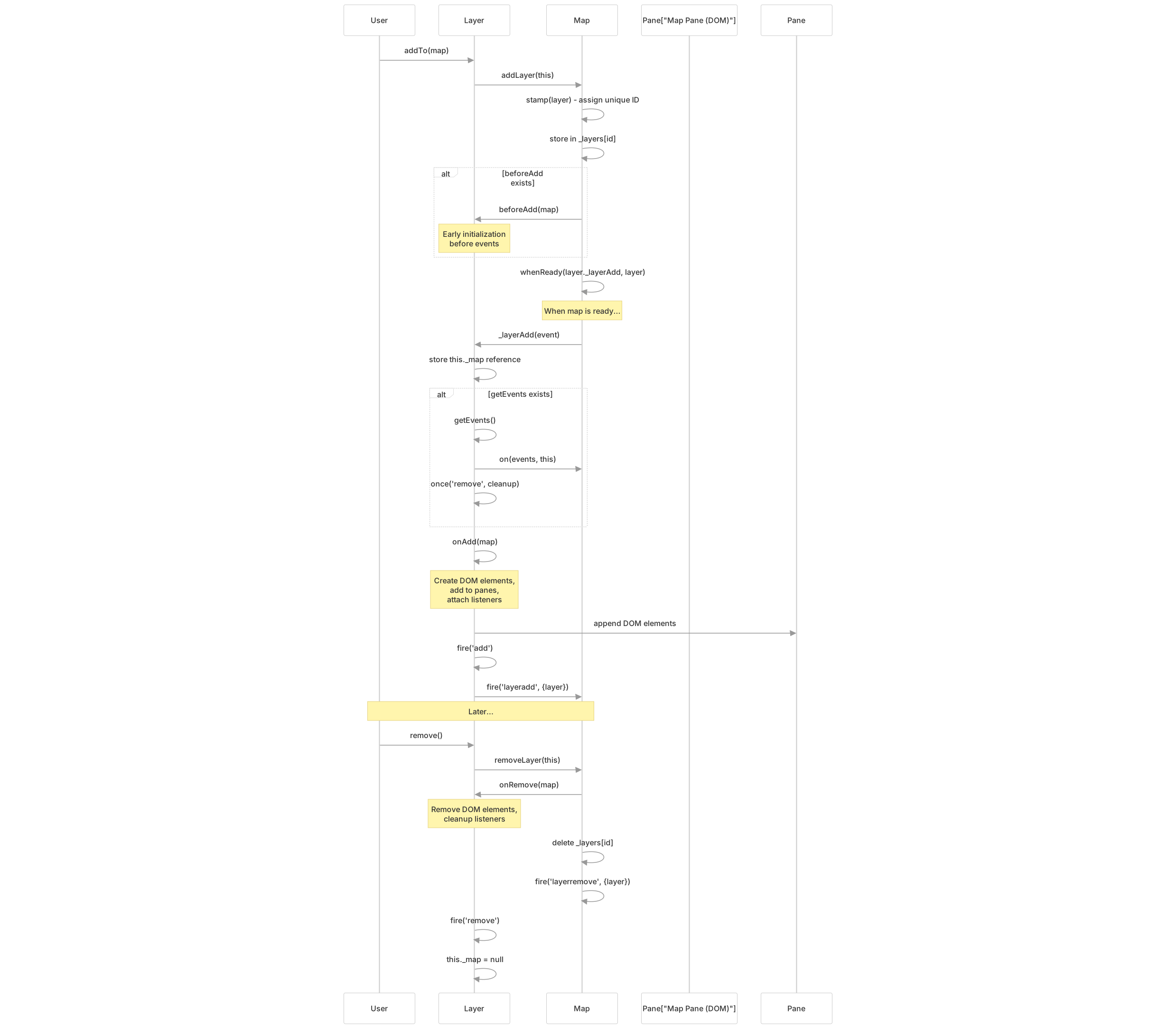
Layers follow a well-defined lifecycle that coordinates their addition to and removal from the map. This lifecycle ensures proper initialization, cleanup, and event handling.
Lifecycle Flow Diagram
Extension Methods
Subclasses must implement the following methods to properly participate in the layer lifecycle:
onAdd(map)
Purpose: Creates the layer's DOM elements and adds them to the appropriate map panes. This method is called when the layer is added to the map and the map is ready.
Responsibilities:
- Create DOM elements for the layer
- Add elements to map panes using
getPane() - Attach event listeners to map events
- Perform any initialization that requires the map to be ready
onRemove(map)
Purpose: Cleans up the layer's DOM elements and removes event listeners. This method is called when the layer is removed from the map.
Responsibilities:
- Remove DOM elements from panes
- Detach event listeners
- Clean up any resources allocated in
onAdd()
getEvents() (Optional)
Purpose: Returns an object mapping map event names to handler methods. The layer system automatically manages adding and removing these listeners.
Return value: Object like { viewreset: this._reset, move: this._update }
beforeAdd(map) (Optional)
Purpose: Called before the layer is added to the map, before events are initialized, and without waiting for the map to be ready. Used for early initialization.
Internal Lifecycle Coordination
The _layerAdd method coordinates the layer's lifecycle when the map becomes ready:

Public API
The Layer class provides several methods for adding, removing, and querying layers.
Layer Management Methods
| Method | Parameters | Returns | Description |
|---|---|---|---|
addTo(map) | map: LeafletMap or LayerGroup | this | Adds the layer to the given map or layer group |
remove() | None | this | Removes the layer from the map it is currently active on |
removeFrom(obj) | obj: LeafletMap or LayerGroup | this | Removes the layer from the given map or layer group |
addTo Method
The addTo method is the primary way users add layers to the map:

Implementation: The method simply delegates to map.addLayer(this) and returns this to enable method chaining.
remove Method
The remove method removes the layer from its current map:
Implementation detail: It calls removeFrom(this._map || this._mapToAdd), using _mapToAdd as a fallback if the layer was added but the map isn't ready yet.
Utility Methods
| Method | Parameters | Returns | Description |
|---|---|---|---|
getPane(name) | name: String (optional) | HTMLElement | Returns the pane element; if name omitted, returns layer's default pane |
getAttribution() | None | String | Returns the attribution text for this layer |
addInteractiveTarget(targetEl) | targetEl: HTMLElement | this | Registers an element as an interactive target |
removeInteractiveTarget(targetEl) | targetEl: HTMLElement | this | Unregisters an interactive target |
Pane System
Leaflet uses a pane system to manage the z-ordering of layers. Each layer is rendered into a specific HTML pane, which determines its stacking order relative to other layers.
Pane Resolution
The getPane method resolves pane references flexibly:

Example usage:
layer.getPane()- Returns the layer's default pane (usually'overlayPane')layer.getPane('shadowPane')- Returns theshadowPaneiflayer.options.shadowPaneis set, otherwise looks up'shadowPane'directly
Common Pane Names
While the Layer class defaults to 'overlayPane', different layer types use different panes:
| Pane Name | Typical Usage | Default z-index |
|---|---|---|
mapPane | Container for all other panes | auto |
tilePane | Tile layers (GridLayer, TileLayer) | 200 |
overlayPane | Vector shapes, image overlays | 400 |
shadowPane | Marker shadows | 500 |
markerPane | Marker icons | 600 |
tooltipPane | Tooltips | 650 |
popupPane | Popups | 700 |
Attribution System
The attribution system allows layers to declare copyright and data source information that appears in the attribution control.
Attribution Flow

Implementation
The getAttribution method simply returns the attribution option:
getAttribution() {
    return this.options.attribution;
}Usage example:
L.tileLayer('https://{s}.tile.openstreetmap.org/{z}/{x}/{y}.png', {
    attribution: '© OpenStreetMap contributors'
});Interactive Targets
The interactive target system allows layers to register DOM elements that should trigger layer events when clicked or interacted with.
Target Registration
Methods
addInteractiveTarget(targetEl): Registers a DOM element as an interactive target by:
- Stamping the element with a unique ID using
Util.stamp() - Storing the layer reference in
map._targets[id]
removeInteractiveTarget(targetEl): Unregisters an interactive target by deleting its entry from map._targets.
Use case: Vector layers use this to register their SVG/Canvas elements so that clicks on those elements trigger events on the layer.
Event Integration
The Layer class integrates with Leaflet's event system through its inheritance from Evented and coordination with the map's lifecycle.
Layer Events
| Event | Fired When | Event Data |
|---|---|---|
add | Layer is added to the map (after onAdd) | Generic Event |
remove | Layer is removed from the map (after onRemove) | Generic Event |
Event Registration Pattern
Layers can use the getEvents method to automatically register and unregister event handlers:

Benefit: This pattern ensures that event listeners are automatically cleaned up when the layer is removed, preventing memory leaks.
Map Integration
The Layer class is tightly integrated with the LeafletMap class through extension methods and the layer registry.
Map Layer Registry
The map maintains a registry of all active layers in _layers:

Map Methods for Layer Management
The Layer.js file extends LeafletMap with methods for managing layers:
| Method | Description |
|---|---|
addLayer(layer) | Validates layer, assigns unique ID, stores in registry, triggers lifecycle |
removeLayer(layer) | Calls onRemove, removes from registry, fires events |
hasLayer(layer) | Checks if layer is in the registry |
eachLayer(fn, context) | Iterates over all registered layers |
addLayer Implementation Details
The addLayer method on the map performs several important steps:
- Validation: Ensures the object has a
_layerAddmethod - Deduplication: Uses
Util.stamp()to check if layer is already added - Early storage: Stores layer in
_mapToAddbefore map is ready - beforeAdd hook: Calls optional
beforeAdd(map)if it exists - Deferred initialization: Uses
whenReady()to defer_layerAdduntil map is ready
Zoom Level Coordination
The map tracks layers that define zoom limits to coordinate the map's effective zoom range:

Layer Event Propagation to Map
When layers are added or removed, both the layer and the map fire events:
| Action | Layer Event | Map Event | Event Data |
|---|---|---|---|
| Layer added | layer.fire('add') | map.fire('layeradd', {layer}) | {layer: Layer} |
| Layer removed | layer.fire('remove') | map.fire('layerremove', {layer}) | {layer: Layer} |
Comparison with Control
While both Layer and Control represent objects that can be added to the map, they serve different purposes:
| Aspect | Layer | Control |
|---|---|---|
| Purpose | Displays geographic data | Provides UI controls |
| Base class | Extends Evented | Extends Class |
| Positioning | Positioned geographically | Positioned in corner containers |
| Lifecycle methods | onAdd, onRemove, beforeAdd, getEvents | onAdd, onRemove |
| Container | Rendered into map panes | Rendered into control corners |
| Event integration | Full event system via getEvents | Manual event handling |
| Examples | TileLayer, Marker, Polygon | Zoom control, Attribution control |
Code Entity Reference
Key Classes and Files
| Entity | File | Purpose |
|---|---|---|
Layer | src/layer/Layer.js29-117 | Base class for all layers |
LeafletMap.addLayer | src/layer/Layer.js155-173 | Adds layer to map |
LeafletMap.removeLayer | src/layer/Layer.js177-196 | Removes layer from map |
LeafletMap.hasLayer | src/layer/Layer.js200-202 | Checks if layer is on map |
LeafletMap.eachLayer | src/layer/Layer.js212-217 | Iterates layers |
Key Properties
| Property | Location | Type | Purpose |
|---|---|---|---|
_map | Layer instance | LeafletMap | Reference to the parent map |
_mapToAdd | Layer instance | LeafletMap | Temporary reference during early initialization |
_zoomAnimated | Layer instance | Boolean | Whether layer participates in zoom animations |
_layers | Map instance | Object | Registry of all layers by stamp ID |
_zoomBoundLayers | Map instance | Object | Layers with zoom constraints |
_targets | Map instance | Object | Map of element IDs to layers for event routing |