Vector Rendering System
Purpose and Scope
This document explains the vector rendering system in Leaflet, which is responsible for drawing vector shapes (polylines, polygons, circles, etc.) to the screen. The system provides two rendering strategies: Canvas-based rendering for pixel manipulation and SVG-based rendering using DOM elements. For information about the vector shape classes themselves (Polyline, Polygon, Circle), see Vector Shapes.
The rendering system is built on three core components:
- Renderer base class: Manages renderer lifecycle and coordinate transformations
- Canvas renderer: Pixel-based rendering with manual hit detection
- SVG renderer: DOM-based rendering with native browser events
Architecture Overview

Renderer Base Class
The Renderer class extends BlanketOverlay and provides the foundation for both Canvas and SVG implementations. It manages a collection of path layers and coordinates their rendering lifecycle.
Core Responsibilities
| Responsibility | Implementation |
|---|---|
| Layer tracking | Maintains _layers object mapping stamped layer IDs to layer instances |
| Coordinate updates | Recalculates layer coordinates on zoom end via _onZoomEnd() |
| Rendering updates | Triggers layer updates via _updatePaths() on 'update' event |
| View resets | Handles view reset by calling _reset() on all layers |
Lifecycle Integration
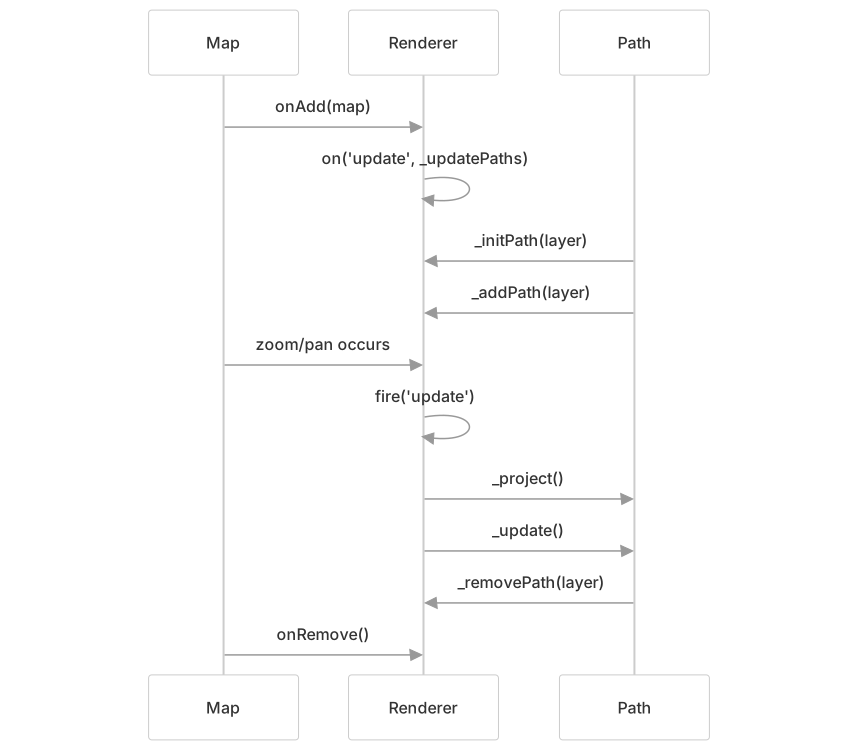
The renderer listens for map events and translates them into coordinate updates. When the map moves or zooms, the renderer ensures all paths recalculate their pixel positions via _project() and redraw via _update().
Canvas Renderer
The Canvas renderer uses HTML5 Canvas 2D context for pixel-based drawing. Unlike SVG, Canvas does not create individual DOM elements for each shape, requiring custom implementations for hit detection and z-ordering.
Container Initialization
The Canvas renderer creates a <canvas> element and attaches pointer event listeners:

The canvas handles retina displays by scaling the internal canvas size by window.devicePixelRatio while maintaining the CSS display size:
Drawing Order Management
Canvas maintains drawing order using a doubly-linked list structure. Each layer receives an _order object containing references to the previous and next layers:

This structure enables efficient reordering operations for bringToFront() and bringToBack():
| Operation | Implementation | Complexity |
|---|---|---|
_initPath() | Append to end of list | O(1) |
_bringToFront() | Move to _drawLast position | O(1) |
_bringToBack() | Move to _drawFirst position | O(1) |
_removePath() | Unlink from list | O(1) |
Rendering Pipeline
The Canvas renderer uses a request-based redraw system with dirty rectangle optimization:
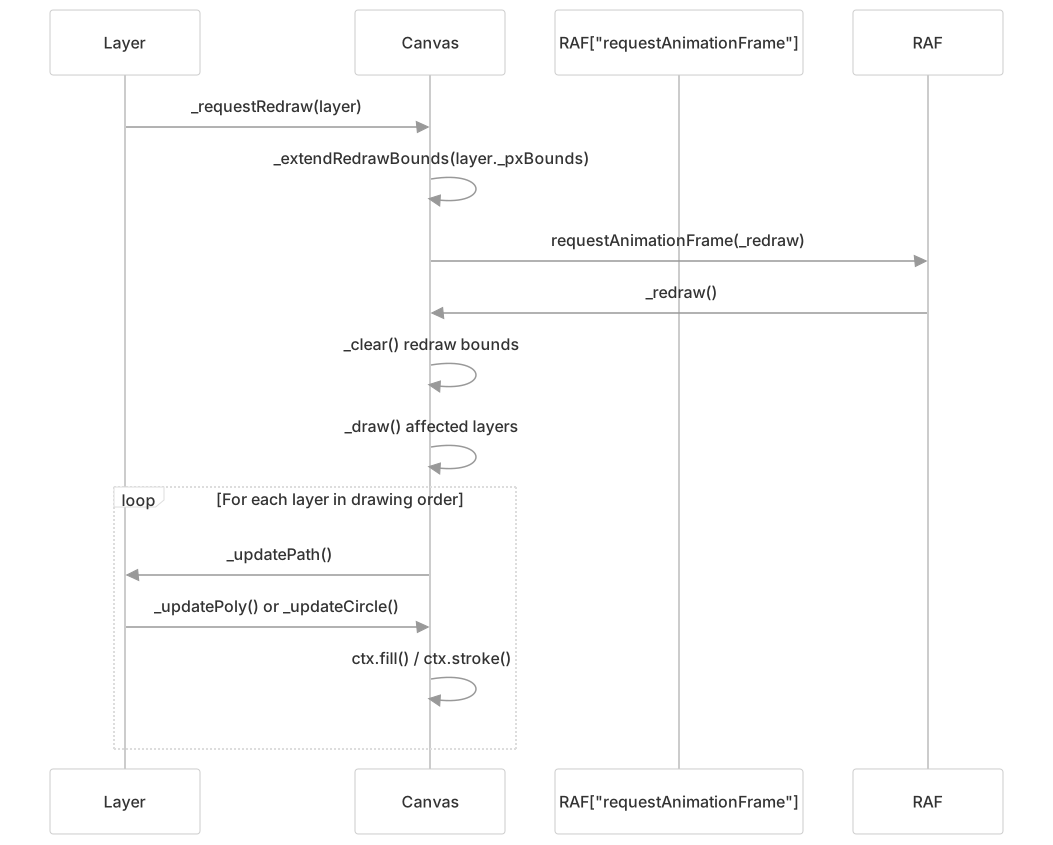
The _redrawBounds optimization only clears and redraws the portion of the canvas that changed, reducing rendering cost for localized updates:
Hit Detection
Canvas requires manual hit detection since drawn pixels have no individual identity. The renderer iterates through layers in drawing order and tests point containment:

The _containsPoint() method is implemented by each Path subclass and includes tolerance for stroke width:
The renderer throttles pointer hover detection to 32ms to avoid performance degradation during rapid mouse movement:
Drawing Primitives
The Canvas renderer provides two core drawing methods:
| Method | Purpose | Key Operations |
|---|---|---|
_updatePoly(layer, closed) | Draw polylines/polygons | ctx.beginPath(), ctx.moveTo(), ctx.lineTo(), optional ctx.closePath() |
_updateCircle(layer) | Draw circles | ctx.arc(), handles elliptical scaling via ctx.scale() |
Both methods delegate to _fillStroke() for applying styles:
SVG Renderer
The SVG renderer creates individual SVG <path> elements for each vector layer, leveraging the browser's native event handling and rendering.
Container Structure

The SVG container uses viewBox to position paths without modifying their coordinates:
Path Element Creation
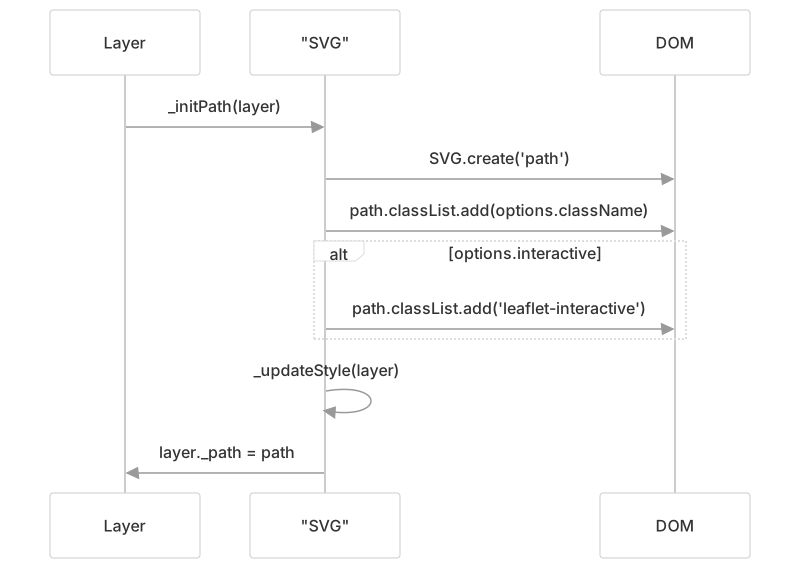
When a layer is initialized, the SVG renderer creates a <path> element with appropriate classes and interactivity:
Style Application
The SVG renderer applies styles by setting SVG attributes directly on the path element:
| Style Category | SVG Attributes |
|---|---|
| Stroke | stroke, stroke-opacity, stroke-width, stroke-linecap, stroke-linejoin |
| Dash pattern | stroke-dasharray, stroke-dashoffset |
| Fill | fill, fill-opacity, fill-rule |
Path Data Generation
The SVG renderer converts coordinates to SVG path data strings:

For circles, the renderer uses SVG arc commands to draw two half-circles:
Z-Index Management
Since SVG does not support z-index, the SVG renderer manages layer order by reordering DOM elements:
| Operation | Implementation |
|---|---|
_bringToFront() | Move path element to end of parent using DomUtil.toFront() |
_bringToBack() | Move path element to start of parent using DomUtil.toBack() |
Event Handling
Unlike Canvas, SVG paths receive native browser events. The SVG renderer marks interactive paths with the leaflet-interactive class and calls addInteractiveTarget() to integrate with Leaflet's event system:
Path-Renderer Integration
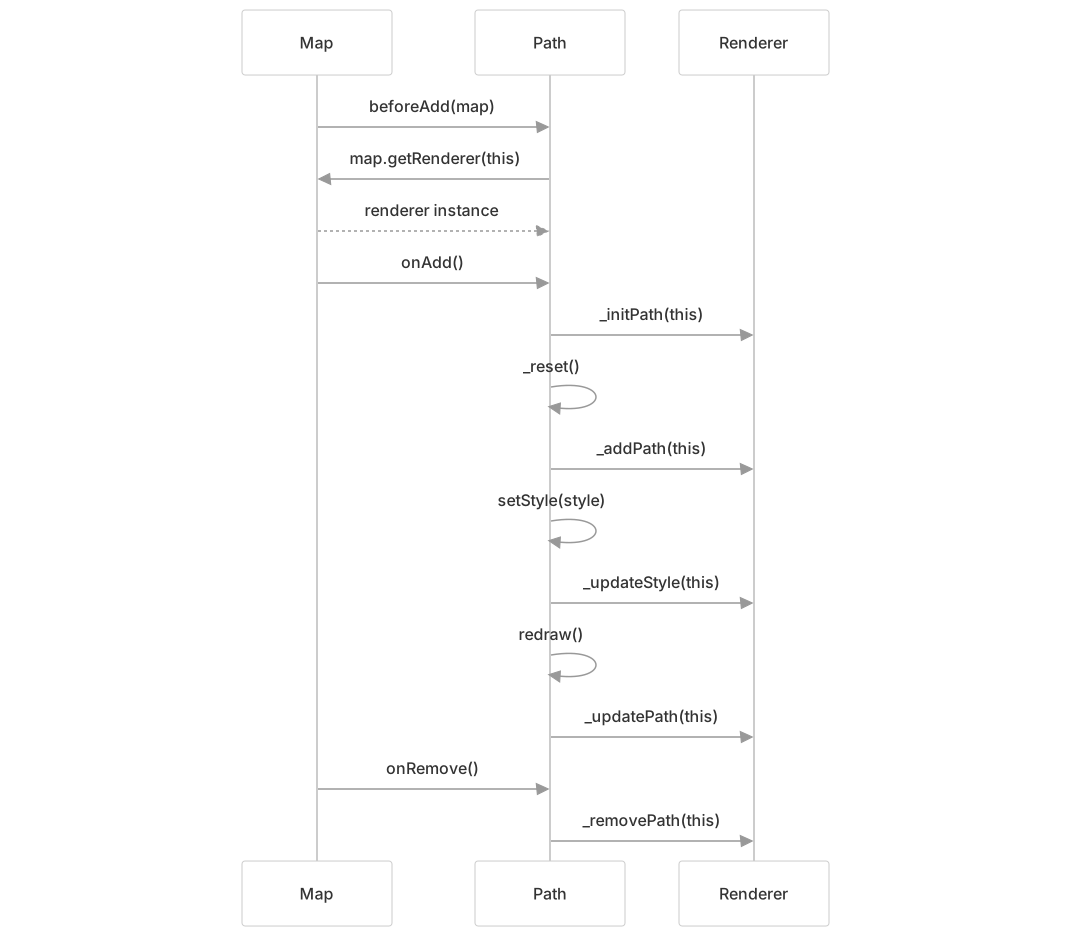
The Path class coordinates with renderers through a well-defined interface:
Renderer Selection
Maps can specify a default renderer, or individual paths can use explicit renderers:
// Map-level default renderer
const map = new LeafletMap('map', {
    renderer: new Canvas()
});

// Path-specific renderer
const myRenderer = new SVG({ padding: 0.5 });
const line = new Polyline(coords, { renderer: myRenderer });Renderer Comparison
| Aspect | Canvas | SVG |
|---|---|---|
| DOM Elements | Single <canvas> element | Individual <path> per layer |
| Event Handling | Manual hit detection via _containsPoint() | Native browser events |
| Drawing Order | Doubly-linked list | DOM element order |
| Z-Index Changes | O(1) list manipulation + redraw | O(1) DOM reordering |
| Rendering | Immediate mode (clear + redraw) | Retained mode (browser manages) |
| Memory | Fixed canvas size | Scales with layer count |
| Hit Detection | O(n) iteration through layers | O(1) browser native |
| Styling Updates | Redraw required | Attribute changes only |
| Partial Updates | Dirty rectangle optimization | Per-element invalidation |
Performance Considerations
Canvas Optimizations
Redraw Bounds: Only clears and redraws the affected rectangle
Request Animation Frame: Batches multiple update requests into single frame
Hover Throttling: Limits pointer move processing to 32ms intervals
Device Pixel Ratio: Renders at device resolution for retina displays
SVG Optimizations
ViewBox Updates: Moves all paths together without coordinate recalculation
Attribute Updates: Changes styles without full re-render
Native Events: Leverages browser's built-in event handling
Common Optimizations
Both renderers:
- Use padding to extend container bounds and reduce edge clipping
- Defer updates during zoom animations
- Batch coordinate updates on zoom end
Coordinate Transformation
The renderer's coordinate system uses pixel coordinates relative to the map's pixel origin. When the map moves, the renderer updates its transform rather than recalculating all layer coordinates:
Canvas Transform:
// Translate canvas context to align with map bounds
this._ctx.setTransform(
    s, 0, 0, s,
    -b.min.x * s,
    -b.min.y * s
);SVG ViewBox:
// Update viewBox to shift all paths together
this._container.setAttribute('viewBox',
    [b.min.x, b.min.y, size.x, size.y].join(' ')
);