Vector Layers
Vector layers provide Leaflet's system for drawing geometric shapes on maps using scalable vector graphics. The vector layer system consists of shape classes (Path, Polyline, Polygon, Circle, CircleMarker, Rectangle), rendering backends (Canvas, SVG), and geometry processing utilities.
This page provides an overview of the vector layer architecture and how the components work together. For detailed information about individual vector shapes, see page 3.4.1 (Vector Shapes). For renderer implementation details and drawing strategies, see page 3.4.2 (Vector Rendering System). For tile-based raster layers, see page 3.2. For point markers with icons, see page 3.3.
Vector Layer Architecture
The vector layer system is built around a hierarchical class structure with Path as the base class for all vector shapes. The architecture separates geometry definition from rendering implementation through the Renderer abstraction.
Vector Layer Class Hierarchy

Key Architectural Components
| Component | File | Purpose |
|---|---|---|
Path | src/layer/vector/Path.js12 | Abstract base class providing common styling and renderer integration |
Renderer | src/layer/vector/Renderer.js26 | Abstract base for rendering backends, extends BlanketOverlay |
Canvas | src/layer/vector/Canvas.js35 | Immediate-mode renderer using <canvas> element |
SVG | src/layer/vector/SVG.js35 | Retained-mode renderer using SVG DOM elements |
Each vector layer defines its geometry and styling options, while the renderer handles coordinate transformation, clipping, and actual drawing operations. This separation allows the same vector layer to be rendered with different backends.
Path Base Class
The Path class (src/layer/vector/Path.js12) serves as the abstract base for all vector overlays. It extends Layer and provides common styling options, renderer coordination, and lifecycle management.
Path Options
| Option | Type | Default | Description |
|---|---|---|---|
stroke | Boolean | true | Whether to draw stroke along the path |
color | String | '#3388ff' | Stroke color |
weight | Number | 3 | Stroke width in pixels |
opacity | Number | 1.0 | Stroke opacity |
lineCap | String | 'round' | Shape at end of stroke |
lineJoin | String | 'round' | Shape at stroke corners |
dashArray | String | null | Stroke dash pattern |
dashOffset | String | null | Distance into dash pattern to start |
fill | Boolean | false | Whether to fill the path with color |
fillColor | String | null | Fill color (defaults to color) |
fillOpacity | Number | 0.2 | Fill opacity |
fillRule | String | 'evenodd' | How inside of shape is determined |
interactive | Boolean | true | Whether path responds to pointer events |
bubblingPointerEvents | Boolean | true | Whether events bubble to map |
Path Lifecycle and Renderer Coordination
The Path class coordinates with the renderer through a well-defined lifecycle:
Path-Renderer Interaction Lifecycle
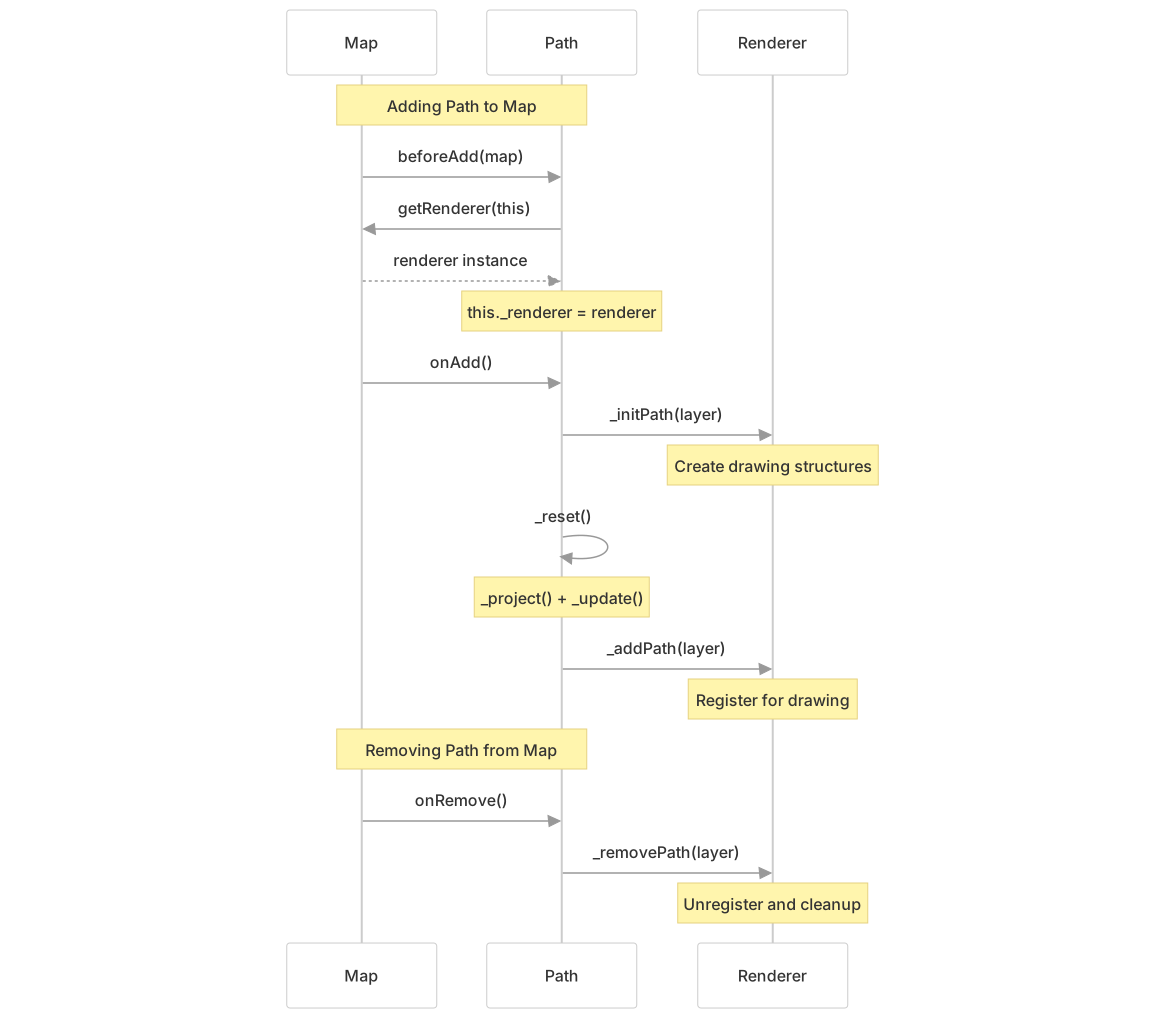
Key methods in the lifecycle:
| Method | Location | Purpose |
|---|---|---|
beforeAdd() | src/layer/vector/Path.js78-82 | Obtains renderer from map via map.getRenderer(this) |
onAdd() | src/layer/vector/Path.js84-88 | Initializes path with renderer and triggers drawing |
onRemove() | src/layer/vector/Path.js90-92 | Removes path from renderer |
_reset() | src/layer/vector/Path.js134-138 | Projects coordinates and updates visualization |
_clickTolerance() | src/layer/vector/Path.js140-144 | Returns hit detection tolerance in pixels |
Vector Shape Types Overview
Leaflet provides five concrete vector shape classes. Each extends Path and adds shape-specific geometry handling.
| Shape Class | File | Extends | Purpose |
|---|---|---|---|
Polyline | src/layer/vector/Polyline.js51 | Path | Connected line segments, supports multi-lines |
Polygon | src/layer/vector/Polygon.js54 | Polyline | Closed filled shapes with hole support |
Rectangle | src/layer/vector/Rectangle.js30 | Polygon | Axis-aligned rectangular bounds |
CircleMarker | src/layer/vector/CircleMarker.js16 | Path | Fixed pixel radius circle |
Circle | src/layer/vector/Circle.js25 | CircleMarker | Geographic radius in meters |
Vector Shape Processing Pipeline

Shape Processing Steps
Each vector shape follows this general processing pipeline:
- Coordinate Conversion - Normalizes input arrays into
LatLnginstances - Projection - Converts geographic coordinates to pixel coordinates using map CRS
- Clipping - Removes portions outside viewport bounds for performance
- Simplification - Reduces point count using Douglas-Peucker algorithm (polylines/polygons)
- Rendering - Delegates to renderer's
_updatePoly()or_updateCircle()
The smoothFactor option (default: 1.0) controls simplification aggressiveness. Higher values improve performance but reduce accuracy.
For detailed information on each shape class's API and geometry handling, see page 3.4.1 (Vector Shapes).
Rendering System Integration
Vector layers delegate all drawing operations to Renderer implementations. The map automatically selects a renderer based on browser capabilities, or developers can specify one explicitly.
Renderer Selection Flow

Renderer Comparison
| Feature | Canvas | SVG |
|---|---|---|
| Drawing Mode | Immediate (all layers to one canvas) | Retained (one DOM element per layer) |
| Performance | Better for many layers (100+) | Better for few interactive layers |
| Hit Detection | Manual via _containsPoint() | Native browser events |
| Memory Usage | Low (single canvas buffer) | Higher (DOM nodes per layer) |
| CSS Styling | Not applicable | Supported via className option |
| DOM Integration | Minimal | Full DOM tree |
| Implementation | src/layer/vector/Canvas.js35 | src/layer/vector/SVG.js35 |
Renderer Interface Methods
Both renderers implement these key methods called by Path:
| Method | Purpose | Canvas Implementation | SVG Implementation |
|---|---|---|---|
_initPath(layer) | Initialize layer structures | Creates drawing order node | Creates <path> element |
_addPath(layer) | Register for rendering | Links to draw list | Appends to SVG container |
_removePath(layer) | Unregister layer | Unlinks from draw list | Removes from DOM |
_updatePath(layer) | Redraw geometry | Triggers redraw request | Updates path d attribute |
_updateStyle(layer) | Apply style changes | Triggers redraw | Updates SVG attributes |
_updatePoly(layer, closed) | Render polyline/polygon | Draws to 2D context | Generates path string |
_updateCircle(layer) | Render circle | Draws arc to context | Generates arc path |
For detailed information on renderer implementations, drawing order management, and hit detection strategies, see page 3.4.2 (Vector Rendering System).
Coordinate System and Projection Flow
Vector layers work with multiple coordinate systems during rendering. Understanding this flow is essential for performance optimization and correct positioning.
Coordinate Transformation Pipeline

Coordinate Systems
| System | Type | Origin | Usage |
|---|---|---|---|
| LatLng | Geographic | Equator/Prime Meridian | Input coordinates from user |
| Layer Point | Pixel | Map pixel origin (zoom dependent) | Internal geometry calculations |
| Container Point | Pixel | Top-left of map container | DOM positioning (panes, overlays) |
The _project() method in each shape class converts geographic coordinates to layer points using the map's CRS (Coordinate Reference System). The renderer then uses these layer points for drawing.
Example Projection Implementation:
// From Polyline._projectLatlngs()
const ring = latlngs.map(latlng => this._map.latLngToLayerPoint(latlng));Styling and Interaction
Vector layers support dynamic styling and user interaction through the path options system and event handling integration.
Dynamic Styling
The setStyle() method allows runtime style changes:
layer.setStyle({
    color: 'red',
    weight: 5,
    opacity: 0.8
});Style updates trigger renderer-specific update methods that efficiently apply visual changes without recreating geometry data.
Layer Ordering
Vector layers support z-order manipulation through bringToFront() and bringToBack() methods. The implementation varies by renderer:
- Canvas: Maintains drawing order list and triggers redraws
- SVG: Reorders DOM elements using
toFront()/toBack()