Tile Layers and Grid System
This document covers Leaflet's tile layer architecture, including the GridLayer base class and TileLayer implementation. It explains the tile coordinate system, URL templating, tile loading mechanisms, and caching strategies that enable efficient display of tiled map data.
For information about other layer types, see Vector Layers. For rendering system details, see Vector Rendering System.
Architecture Overview
Leaflet's tile system is built on a two-tier architecture where GridLayer provides the foundational grid management capabilities, and TileLayer implements the specific logic for loading image tiles from tile servers.

GridLayer Responsibilities:
- Tile coordinate calculations and grid management via
_tileCoordsToKey(),_keyToTileCoords() - Tile lifecycle through
_addTile(),_removeTile(),_tileReady() - Zoom level handling with
_updateLevels(),_setView(),_clampZoom() - Tile caching and pruning via
_pruneTiles(),_retainParent(),_retainChildren()
TileLayer Responsibilities:
- URL template processing with
getTileUrl()andUtil.template() - Image tile creation in
createTile()with async loading callbacks - Subdomain rotation via
_getSubdomain()and retina support throughBrowser.retina - Tile server communication with error handling in
_tileOnError()anderrorTileUrlfallback
GridLayer Base Class
GridLayer serves as the foundation for all tiled layers in Leaflet. It manages a hierarchical structure of zoom levels, each containing a grid of tiles positioned using CSS transforms.
Core Data Structures
Diagram: GridLayer Internal State Structure

The _levels object maps zoom levels to DOM containers with positioning info (origin, zoom). The _tiles object uses _tileCoordsToKey(coords) to generate string keys like '2048:1536:12' that map to tile objects containing the DOM element (el), coordinate info (coords), and state flags (current, loaded, active, retain).
Tile Coordinate System
GridLayer uses a standard web mercator tile coordinate system where each tile is identified by {x, y, z} coordinates:
z: Zoom level (0 = world in single tile)x: Column index (west to east)y: Row index (north to south)
Diagram: Tile Coordinate to Cache Key Mapping

The coordinate-to-key conversion is implemented in _tileCoordsToKey() which creates string keys, while _keyToTileCoords() performs the reverse operation by parsing the key string and returning a Point with a z property.
TileLayer Implementation
TileLayer extends GridLayer to provide image tile loading from tile servers using URL templates.
URL Template System
TileLayer processes URL templates with placeholder substitution:
| Placeholder | Description | Source | Example |
|---|---|---|---|
{z} | Zoom level | this._getZoomForUrl() | 12 |
{x} | Tile X coordinate | coords.x | 2048 |
{y} | Tile Y coordinate | coords.y or inverted | 1536 |
{s} | Subdomain | this._getSubdomain(coords) | a, b, c |
{r} | Retina suffix | Browser.retina ? '@2x' : '' | @2x or `` |
{-y} | Inverted Y coordinate | _globalTileRange.max.y - coords.y | For TMS |
| Custom | Any option key | this.options[key] | User-defined |
Diagram: URL Template Processing Flow

The template system uses Util.template() which replaces {key} placeholders with values from the data object. Custom placeholders can be added via layer options and will be automatically included.
Tile Creation and Loading
TileLayer implements the createTile() method to generate <img> elements with async loading:
Diagram: Tile Creation and Async Loading Sequence
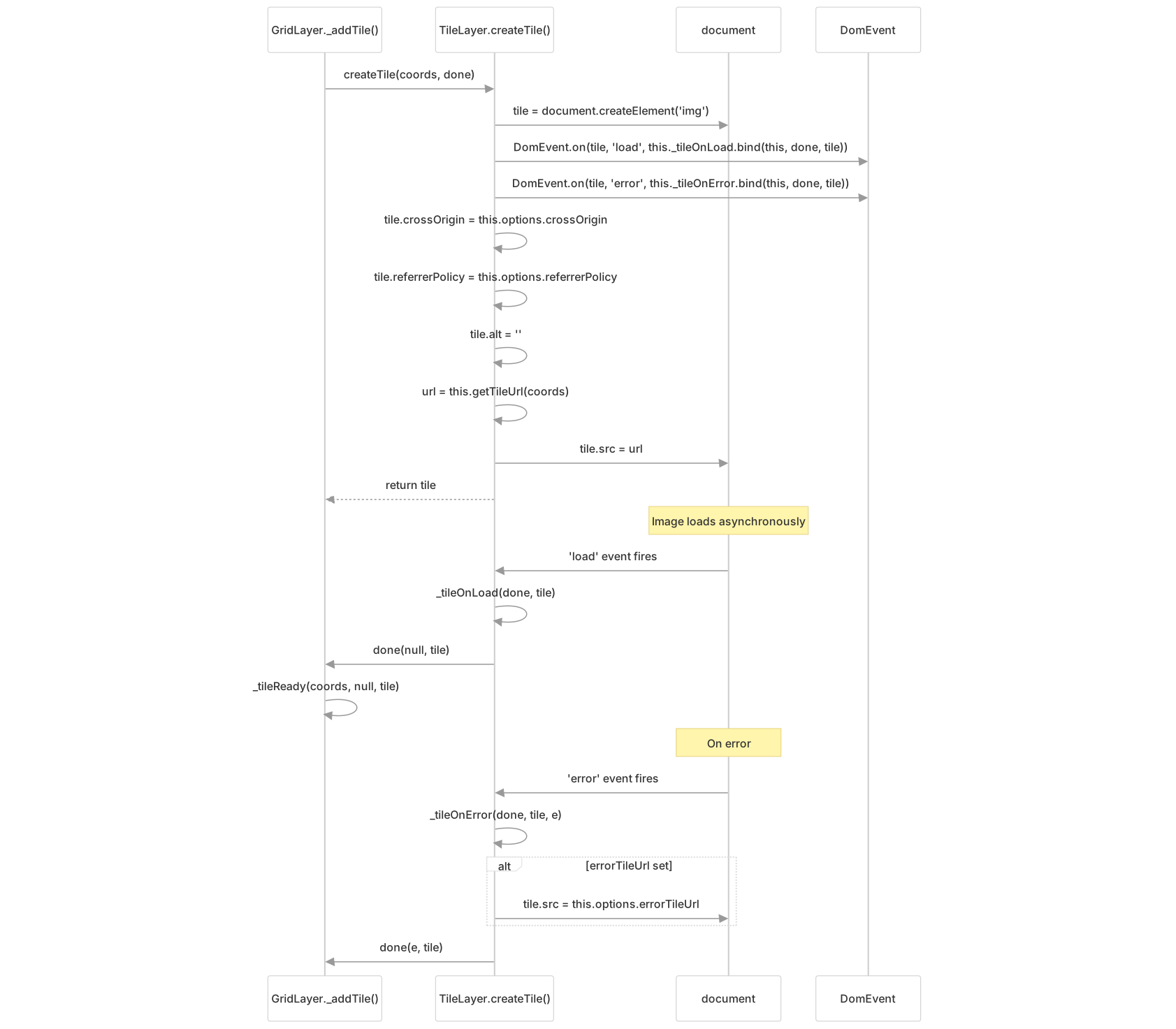
Error handling includes fallback to options.errorTileUrl if set, and the error is passed to the done callback which triggers a tileerror event.
Tile Loading Lifecycle
The tile loading process involves coordinate calculation, tile creation, and progressive loading based on distance from viewport center.
Tile Update Process
Diagram: Tile Update and Loading Flow

Tiles are sorted by distance to viewport center using coords.distanceTo(tileCenter) and loaded in that order to prioritize visible content. The _update() method uses a DocumentFragment to batch DOM insertions for better performance.
Tile Pruning and Retention
GridLayer implements sophisticated tile retention logic to balance memory usage with smooth zoom transitions:
Diagram: Tile Pyramid Retention Strategy

This pyramid-based retention keeps parent tiles (up to 5 zoom levels lower) and child tiles (up to 2 zoom levels higher) for smooth zoom transitions. The retention is based on tile "active" status, which is set after tiles finish their fade-in animation.
Zoom Level Management
GridLayer coordinates with the Map to establish zoom constraints and manage multi-resolution tile display.
Zoom Bounds Integration
Diagram: Map Zoom Bounds Calculation with Layers
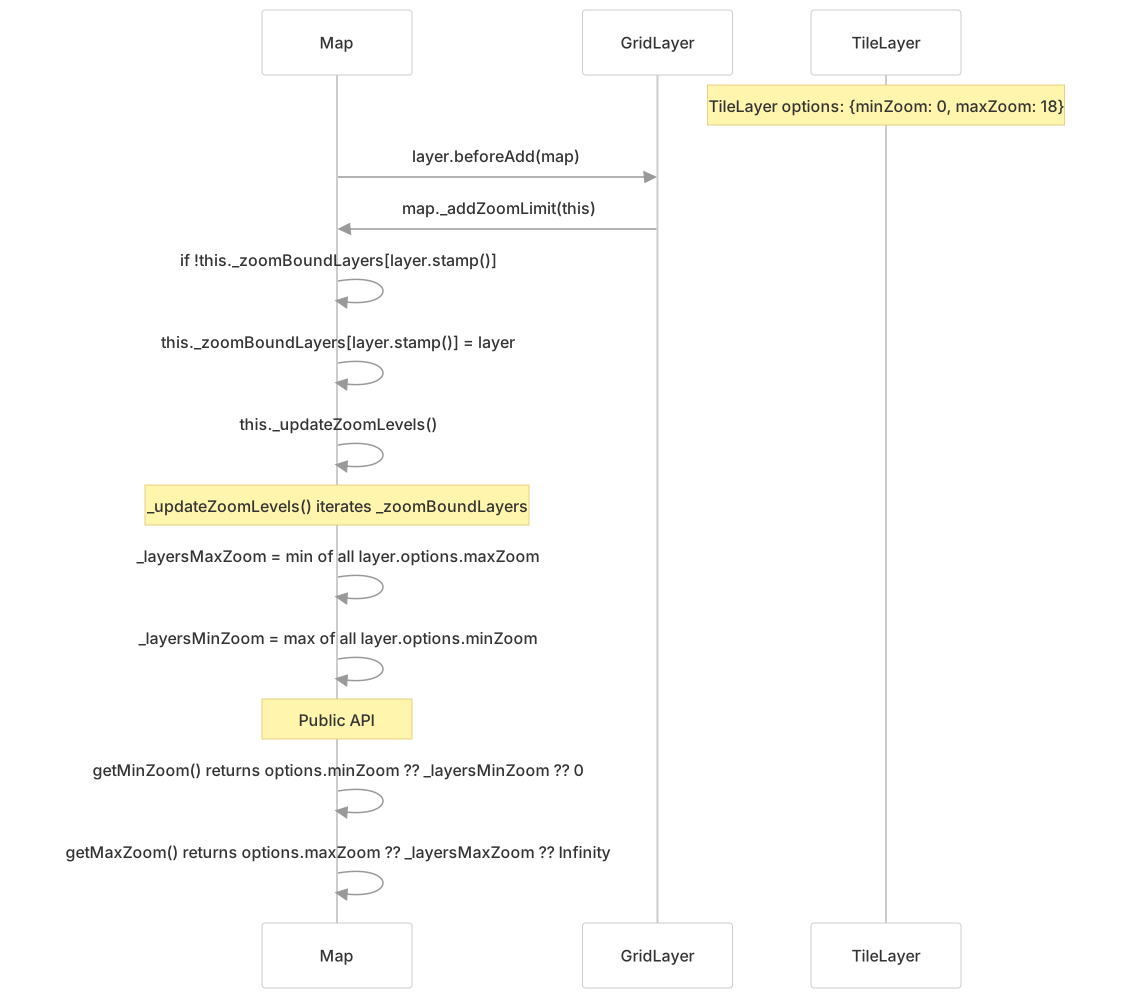
GridLayers register themselves with the map via _addZoomLimit(), which updates _zoomBoundLayers and triggers _updateZoomLevels(). The map's effective zoom bounds combine explicit options.minZoom/maxZoom (if set) with the union of all layer zoom bounds. When a layer is removed, _removeZoomLimit() updates the bounds accordingly.
Native Zoom Clamping
The minNativeZoom and maxNativeZoom options control tile zoom level clamping for tile sources that only provide tiles at certain zoom levels:
Diagram: _clampZoom() Logic for Native Zoom Bounds

For example, if a map is at zoom level 15 but maxNativeZoom: 12, GridLayer will request tiles for zoom 12 and scale them up 2³ = 8× via CSS transforms. This is calculated in _setZoomTransform() using map.getZoomScale(mapZoom, tileZoom).
Performance Considerations
GridLayer includes several optimizations for smooth tile display and efficient memory usage.
Update Throttling
Diagram: Tile Update Throttling During Map Movement

The updateWhenIdle option (default true on mobile via Browser.mobile) determines whether tiles update during panning. When false, the _onMove handler is created as a throttled version of _onMoveEnd() with options.updateInterval (default 200ms) to limit update frequency during continuous map movement.
Tile Fade Animation
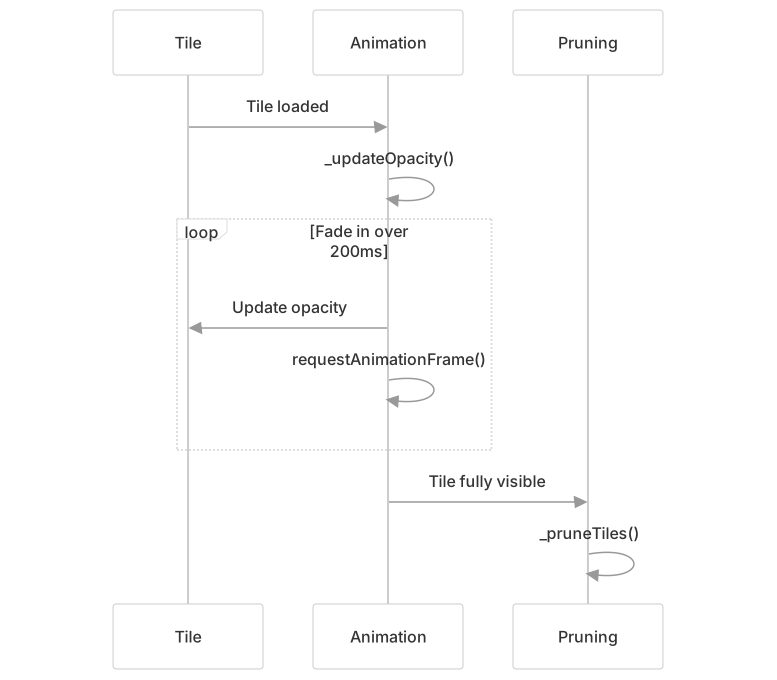
Smooth fade-in animations improve perceived performance while coordinating with tile pruning to optimize memory usage.