Popups and Tooltips
This document covers the popup and tooltip overlay system in Leaflet. Popups and tooltips are HTML-based overlays that display information above map layers at specific geographic positions. Both extend from a common DivOverlay base class and can be bound to layers or displayed standalone.
For information about other overlay types such as image overlays, see Tile Layers and Grid System. For information about layer groups and feature groups that can also have bound popups/tooltips, see Layer Groups and Feature Groups.
Architecture Overview
The overlay system is built on a three-tier class hierarchy where DivOverlay provides the foundation for both Popup and Tooltip.
Class Hierarchy

DivOverlay Base Class
The DivOverlay class provides shared functionality for all HTML-based overlays positioned at geographic coordinates.
| Feature | Description | Implementation |
|---|---|---|
| Content Management | Supports string, HTMLElement, or function content | src/layer/DivOverlay.js158-171 |
| Position Binding | Links overlay to LatLng coordinate | src/layer/DivOverlay.js141-156 |
| Source Tracking | References the layer that opened the overlay | src/layer/DivOverlay.js45-56 |
| Interactive Mode | Optional event listening on overlay container | src/layer/DivOverlay.js120-123 |
| Pane Management | Controls z-index via map pane system | src/layer/DivOverlay.js34-36 |
| FeatureGroup Support | Automatically selects visible layer from group | src/layer/DivOverlay.js232-269 |
Key Methods:
openOn(map)- Adds overlay to map src/layer/DivOverlay.js58-67close()- Removes overlay from map src/layer/DivOverlay.js69-76toggle(layer)- Opens or closes based on current state src/layer/DivOverlay.js78-97setLatLng(latlng)- Updates position and triggers update src/layer/DivOverlay.js149-156setContent(content)- Updates content and triggers update src/layer/DivOverlay.js167-171update()- Refreshes content, layout, and position src/layer/DivOverlay.js181-193
Popup Class
The Popup class implements modal-style overlays with automatic closing behavior and viewport management.
Configuration Options

DOM Structure
The popup creates a layered HTML structure with content wrapper, tip (arrow), and optional close button.

Auto-Pan Mechanism
When autoPan: true, the map automatically pans to ensure the popup is fully visible within the viewport.
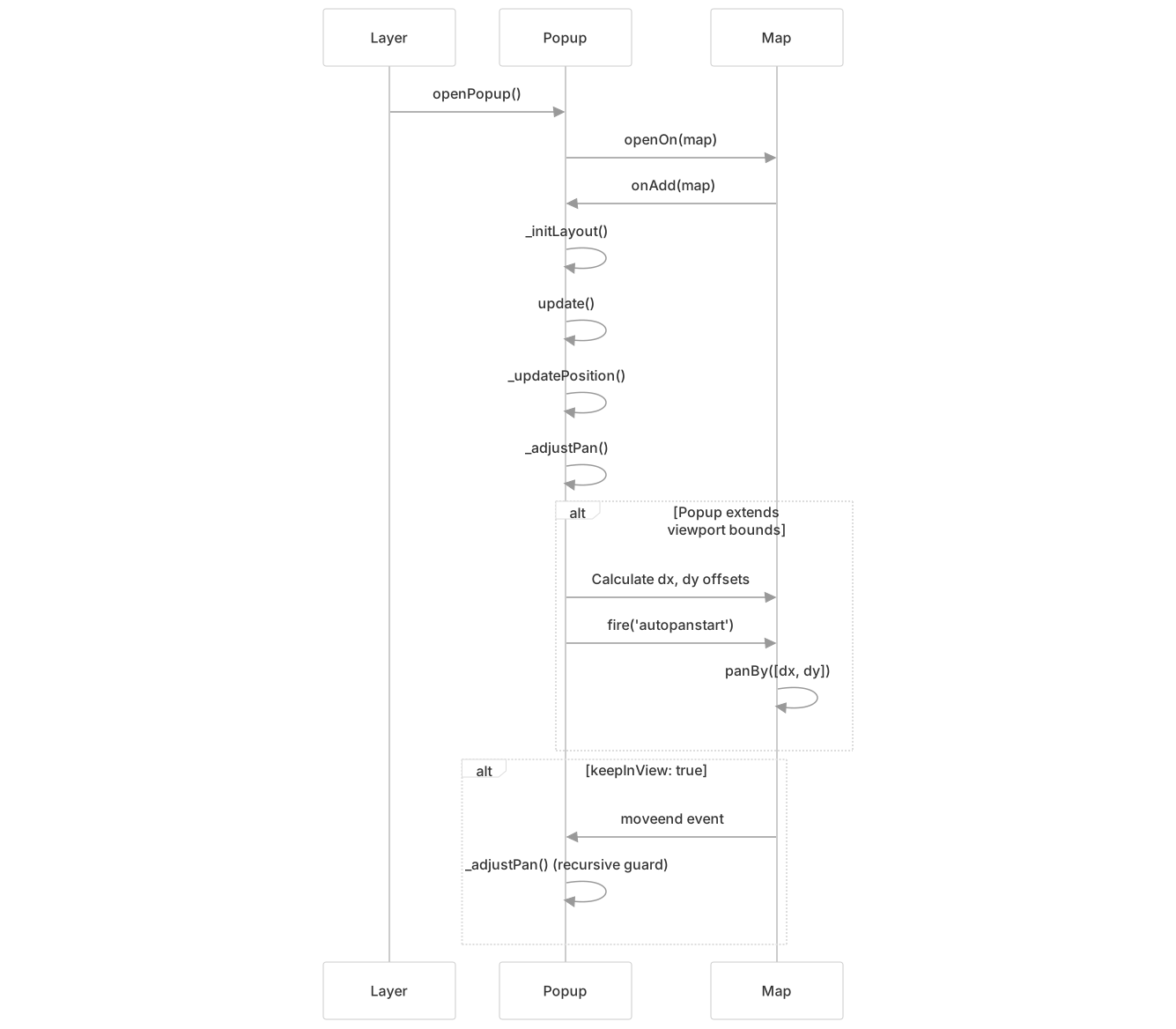
Calculation Logic:
- Convert popup position to container point src/layer/Popup.js298
- Calculate overflow in each direction (right, left, bottom, top) src/layer/Popup.js306-317
- Apply padding offsets src/layer/Popup.js299-302
- Pan by calculated deltas if non-zero src/layer/Popup.js323-332
Auto-Close Behavior
Popups implement singleton-like behavior where opening a new popup automatically closes the previous one.
| Scenario | Behavior | Implementation |
|---|---|---|
Open new popup with autoClose: true | Closes map._popup if it exists | src/layer/Popup.js138-147 |
Open popup with autoClose: false | Multiple popups can coexist | src/layer/Popup.js141 |
Click map with closePopupOnClick: true | Popup closes via preclick event | src/layer/Popup.js193-205 |
Press ESC key with closeOnEscapeKey: true | Popup closes (handled by map) | src/layer/Popup.js114-117 |
Content Tracking with ResizeObserver
Popups use ResizeObserver to detect content size changes (e.g., images loading) and automatically reposition.

Tooltip Class
The Tooltip class implements lightweight, non-modal overlays with directional positioning and pointer-following capabilities.
Configuration Options
| Option | Default | Description |
|---|---|---|
direction | 'auto' | Placement: 'right', 'left', 'top', 'bottom', 'center', 'auto' |
permanent | false | Show permanently instead of on hover |
sticky | false | Follow pointer instead of fixed position |
opacity | 0.9 | Container opacity |
offset | [0, 0] | Position offset in pixels |
pane | 'tooltipPane' | Map pane for rendering |
Directional Positioning
Tooltips calculate position based on direction, automatically switching to 'left' or 'right' when direction is 'auto'.

The positioning algorithm:
- Determine direction (auto or explicit) src/layer/Tooltip.js165-188
- Calculate offset from tooltip dimensions src/layer/Tooltip.js165-188
- Apply CSS class for direction styling src/layer/Tooltip.js192-199
- Set final DOM position src/layer/Tooltip.js199
Sticky Mode
When sticky: true, the tooltip follows the pointer rather than being anchored to a fixed position.
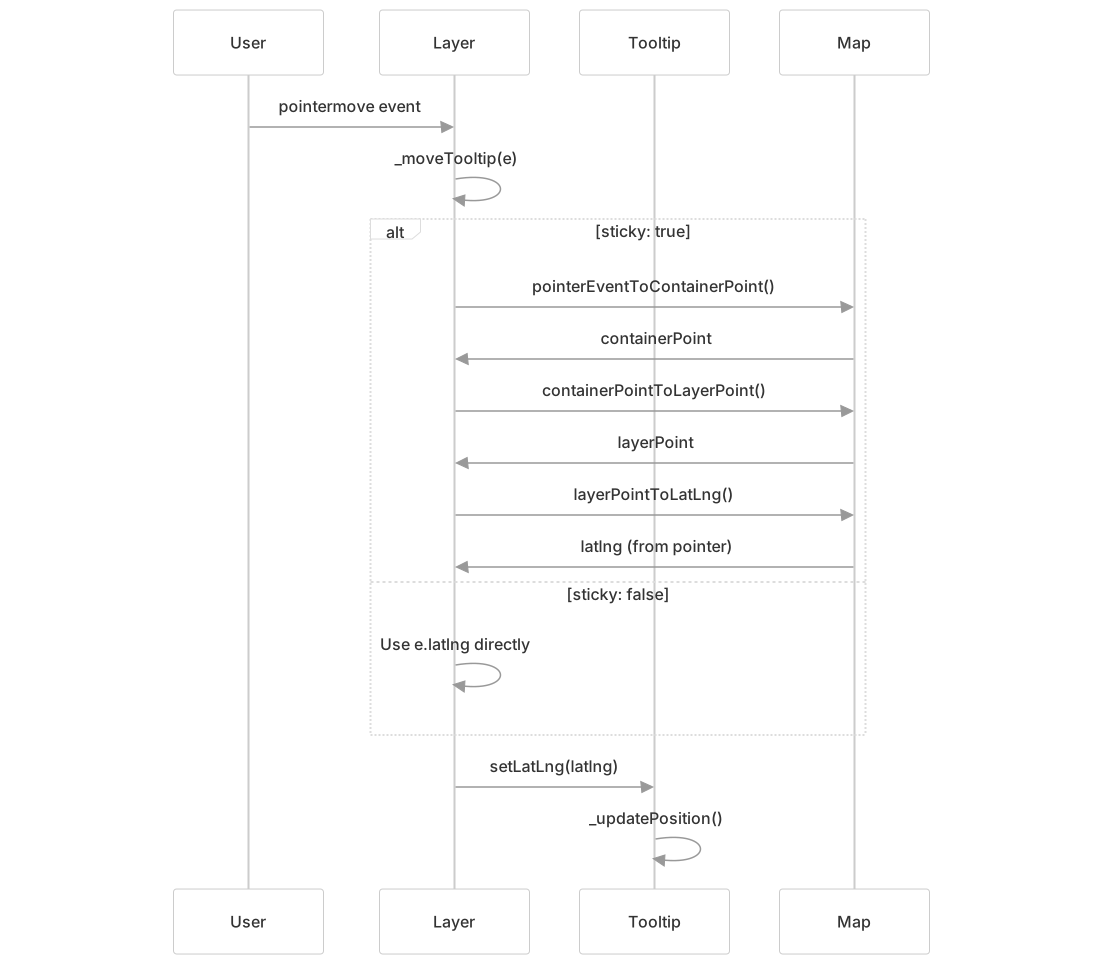
Permanent vs. Temporary Tooltips
Tooltips can be permanent (always visible) or temporary (shown on hover/focus).
| Mode | Triggers | Event Listeners |
|---|---|---|
Permanent (permanent: true) | Shown immediately on layer add | add, remove, move events |
| Temporary (default) | User interaction | pointerover, pointerout, click, focus, blur, move, remove |
Temporary tooltip event binding:
pointerover -> _openTooltip()
pointerout -> closeTooltip()
click -> _openTooltip()
focus -> _openTooltip() (via _addFocusListeners)
blur -> closeTooltip()Accessibility Features
Tooltips implement ARIA attributes for screen reader accessibility:
- Role attribute: Container has
role="tooltip"src/layer/Tooltip.js146 - Unique ID: Each tooltip gets
id="leaflet-tooltip-{stamp}"src/layer/Tooltip.js147 - aria-describedby: Bound layer elements reference tooltip ID src/layer/Tooltip.js414-417
Layer Binding API
Both popups and tooltips extend the Layer class with binding methods that attach overlays to layers and manage interaction events.
Binding Methods

Event Handler Registration
When bindPopup() or bindTooltip() is called, the layer registers event handlers to manage overlay visibility.
Popup Event Handlers:
click -> _openPopup()
keypress -> _onKeyPress() (opens on Enter key)
remove -> closePopup()
move -> _movePopup()Tooltip Event Handlers (non-permanent):
pointerover -> _openTooltip()
pointerout -> closeTooltip()
click -> _openTooltip()
focus -> _openTooltip() (via _addFocusListeners)
blur -> closeTooltip()
pointermove -> _moveTooltip() (if sticky: true)Function-Based Content
Both overlays support function content that receives the source layer as an argument, enabling dynamic content based on layer properties.
// Example from test suite
marker.description = 'I am a marker.';
marker.bindPopup(layer => layer.description);

// FeatureGroup with multiple layers
const group = new FeatureGroup([marker1, marker2]);
group.bindTooltip(layer => \`Tooltip: ${layer.options.description}\`);Implementation:
- Content function called during
_updateContent()src/layer/DivOverlay.js275 - Source layer passed as parameter src/layer/DivOverlay.js275
- Result rendered as HTML or DOM element src/layer/DivOverlay.js277-284
Positioning and Anchoring
Overlays are positioned relative to their geographic coordinates with optional offsets and anchor points from the source layer.
Position Calculation Flow

Anchor Points
Layers provide anchor points that specify where the overlay should be positioned relative to the layer's visual representation.
| Layer Type | Anchor Method | Purpose |
|---|---|---|
Marker | _getPopupAnchor() | Position at icon's popup anchor point |
Marker | _getTooltipAnchor() | Position at icon's tooltip anchor point |
Path | (no anchor method) | Uses default [0, 0] anchor |
Default Behavior:
- Popup anchor from marker:
icon.options.popupAnchorsrc/layer/Popup.js335-338 - Tooltip anchor: Non-sticky uses
icon.options.tooltipAnchorsrc/layer/Tooltip.js220-223 - Fallback:
[0, 0]if layer doesn't provide anchor
Offset System
Both overlays support pixel offsets to fine-tune positioning:
- Popup offset: Default
[0, 7](slightly below anchor) src/layer/Popup.js58-60 - Tooltip offset: Default
[0, 0](at anchor) src/layer/Tooltip.js64-66 - Custom offsets: Passed as
Pointor[x, y]array
Event System
Popups and tooltips fire events on both the map and the source layer when opened or closed.
Event Flow Diagram
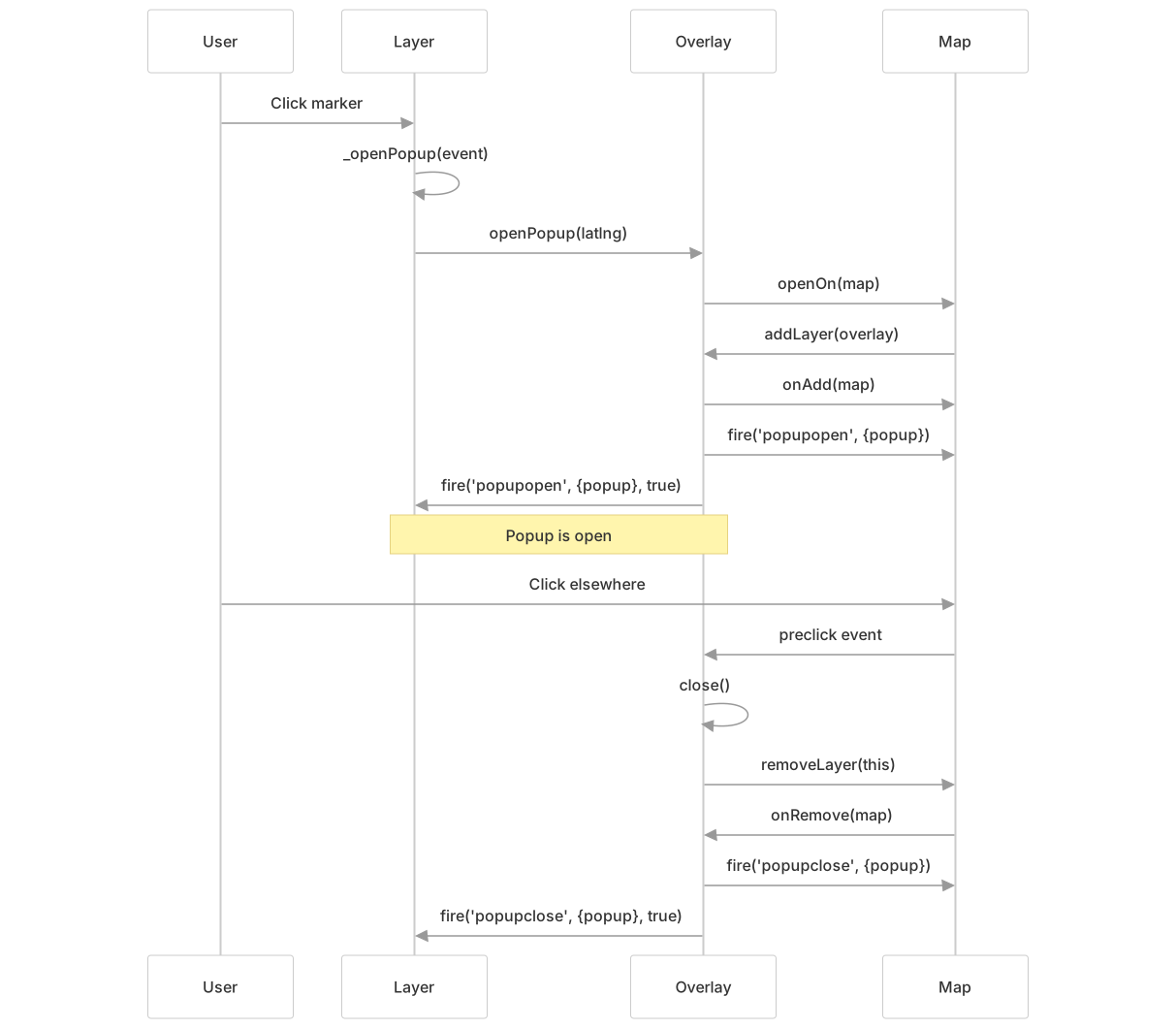
Event Types
| Event | Fired On | Payload | When |
|---|---|---|---|
popupopen | Map, Layer | {popup: Popup} | Popup added to map |
popupclose | Map, Layer | {popup: Popup} | Popup removed from map |
autopanstart | Map | {...} | Auto-pan begins |
tooltipopen | Map, Layer | {tooltip: Tooltip} | Tooltip added to map |
tooltipclose | Map, Layer | {tooltip: Tooltip} | Tooltip removed from map |
contentupdate | DivOverlay | {...} | Content updated |
Event Propagation
Layer events propagate up through event parents:
- Overlay fires event on itself
- Event fires on source layer with
propagate: truesrc/layer/Popup.js163 src/layer/Tooltip.js106 - Event bubbles to layer's event parent (if set)
- Map also receives event directly src/layer/Popup.js156 src/layer/Tooltip.js97
Map API Methods
The LeafletMap class provides convenience methods for working with popups and tooltips.
Map Extensions

Implementation:
map.openPopup()creates popup if needed via_initOverlay()src/layer/Popup.js361-366- Auto-close handled by
popup.openOn()src/layer/Popup.js138-147 - Current popup stored in
map._popupsrc/layer/Popup.js144 - Map option
closePopupOnClickdefaults totruesrc/layer/Popup.js348-350
Usage Patterns
Standalone Overlays
Create and position overlays independently of layers:
// Popup with position and options
const popup = new Popup(latlng, {content: 'Hello world!'})
    .openOn(map);

// Tooltip with fluent API
const tooltip = new Tooltip()
    .setLatLng(latlng)
    .setContent('Tooltip text')
.addTo(map);Bound to Markers
The most common pattern binds overlays to markers with automatic positioning:
// Bind popup to marker
marker.bindPopup('Popup content').openPopup();

// Bind tooltip with options
marker.bindTooltip('Tooltip text', {
    direction: 'top',
    permanent: true
});Toggle behavior: Clicking a marker with bound popup toggles it open/closed src/layer/Popup.js478-498
Bound to Vector Layers
Paths (polylines, polygons) support popups/tooltips that position at the click point or path center:
const polygon = new Polygon(coordinates);
polygon.bindPopup('Polygon info');
polygon.bindTooltip('Hover tooltip');Vector layers do not toggle popups on click - they open the popup and prevent map click propagation src/layer/Popup.js282-299
Bound to FeatureGroups
FeatureGroups share a single popup/tooltip across multiple layers, with dynamic content based on the interacted layer:
const group = new FeatureGroup([marker1, marker2]);
group.bindTooltip(layer => \`Info for ${layer.options.name}\`);When a layer in the group is clicked/hovered, the overlay's _source is set to that specific layer src/layer/DivOverlay.js236-248
Preventing Map Drag Interference
Tooltips check if map is dragging before opening to avoid flickering when pointer moves faster than map:
// Internal logic in _openTooltip
if (this._map.dragging?.moving()) {
    // Defer opening until moveend if layer just added
    if (e.type === 'add' && !this._moveEndOpensTooltip) {
        this._moveEndOpensTooltip = true;
        this._map.once('moveend', () => {
            this._moveEndOpensTooltip = false;
            this._openTooltip(e);
        });
    }
    return;
}Dynamic Content Updates
Content can be updated after binding using setContent() or by rebinding:
// Update content on existing popup
layer.setPopupContent('New content');

// Update via popup instance
const popup = layer.getPopup();
popup.setContent('Updated');

// Force re-render
popup.update();The update() method recalculates content, layout, and position src/layer/DivOverlay.js181-193