Layer System
Purpose and Scope
The Layer System provides the foundational architecture for displaying geographic and non-geographic data on a Leaflet map. This document covers the base Layer class, the layer lifecycle, map integration, and the pane system that controls rendering order.
For specific layer implementations, see:
- Layer Base Class - Detailed lifecycle and attribution management
- Tile Layers and Grid System - Raster tile rendering
- Markers and Icons - Point features
- Vector Layers - Path-based rendering
- Layer Groups and Feature Groups - Layer collections
- Popups and Tooltips - UI overlays bound to layers
- GeoJSON Support - GeoJSON parsing and rendering
Architecture Overview
The layer system follows a hierarchical architecture where all layers extend from a common base class and integrate with the map through a standardized lifecycle.
Layer System Architecture

Layer Base Class
The Layer class in src/layer/Layer.js29-117 serves as the abstract base for all layer types. It extends Evented to provide event handling capabilities.
Core Layer Structure

Default Options
Layers have default options set at src/layer/Layer.js31-45:
| Option | Default | Description |
|---|---|---|
pane | 'overlayPane' | The map pane where the layer will be rendered |
attribution | null | Attribution text for the layer |
bubblingPointerEvents | true | Whether pointer events bubble to the map |
Key Methods
addTo(map)src/layer/Layer.js53-56 - Adds the layer to a map or layer groupremove()src/layer/Layer.js60-62 - Removes the layer from its current mapremoveFrom(obj)src/layer/Layer.js70-73 - Removes from a specific map or layer groupgetPane(name)src/layer/Layer.js77-79 - Returns the HTMLElement for a named panegetAttribution()src/layer/Layer.js93-95 - Returns attribution text
Layer Lifecycle
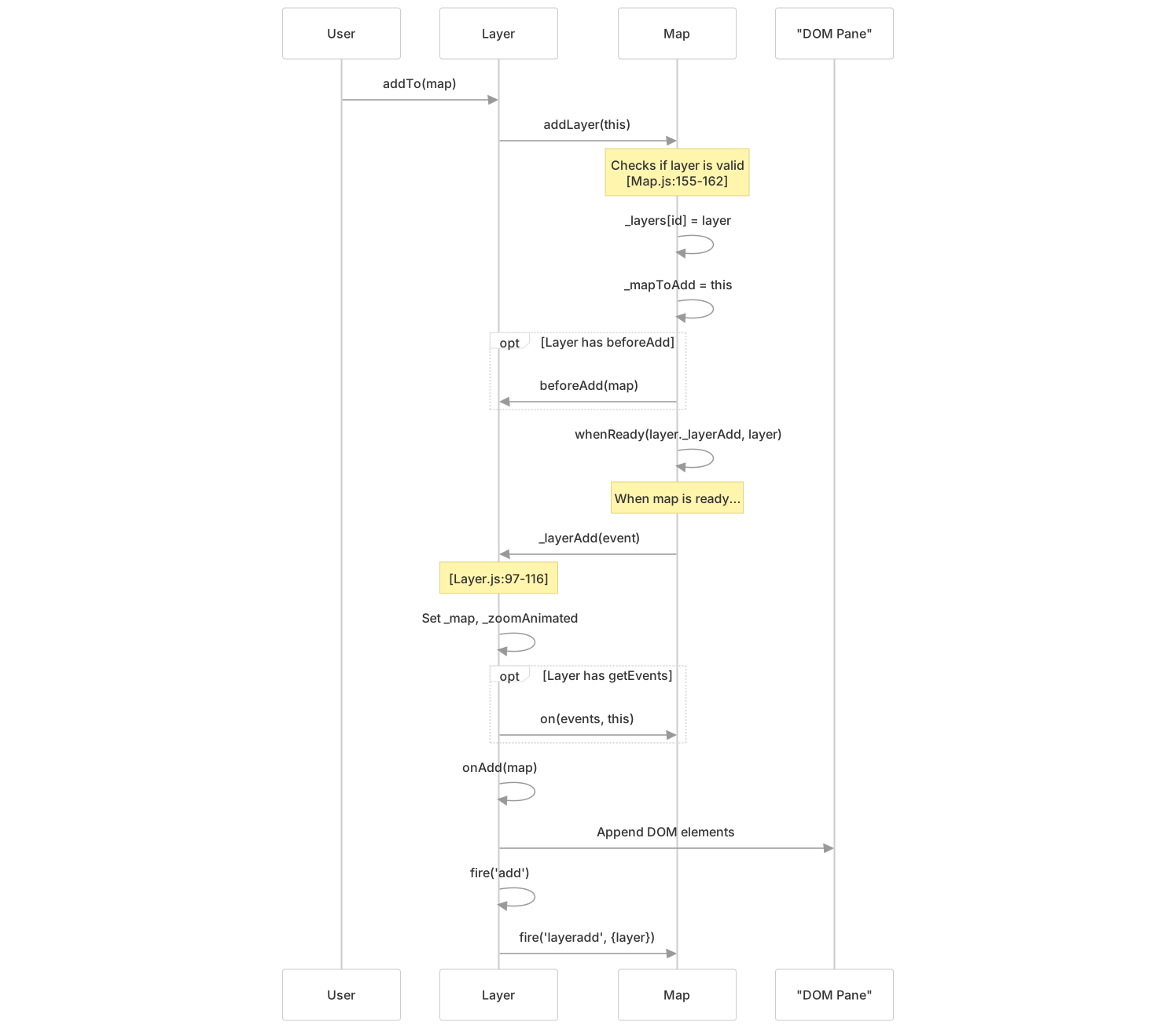
Layers follow a strict lifecycle managed through hooks that subclasses implement. The lifecycle ensures proper integration with the map's rendering and event systems.
Layer Lifecycle Flow
Lifecycle Hooks
Subclasses must or may implement these methods:
beforeAdd(map)- Optional early initialization src/layer/Layer.js136-137- Called before the layer is added to
_layers - No events are initialized yet
- Use for setup that doesn't require a ready map
- Called before the layer is added to
getEvents()- Optional event registration src/layer/Layer.js130-131- Returns an object like
{viewreset: this._reset, zoom: this._update} - Events are automatically bound when layer is added
- Events are automatically removed when layer is removed
- Returns an object like
onAdd(map)- Required implementation src/layer/Layer.js124-125- Create and append DOM elements
- Add event listeners
- Initialize layer state
- Return
thisfor method chaining
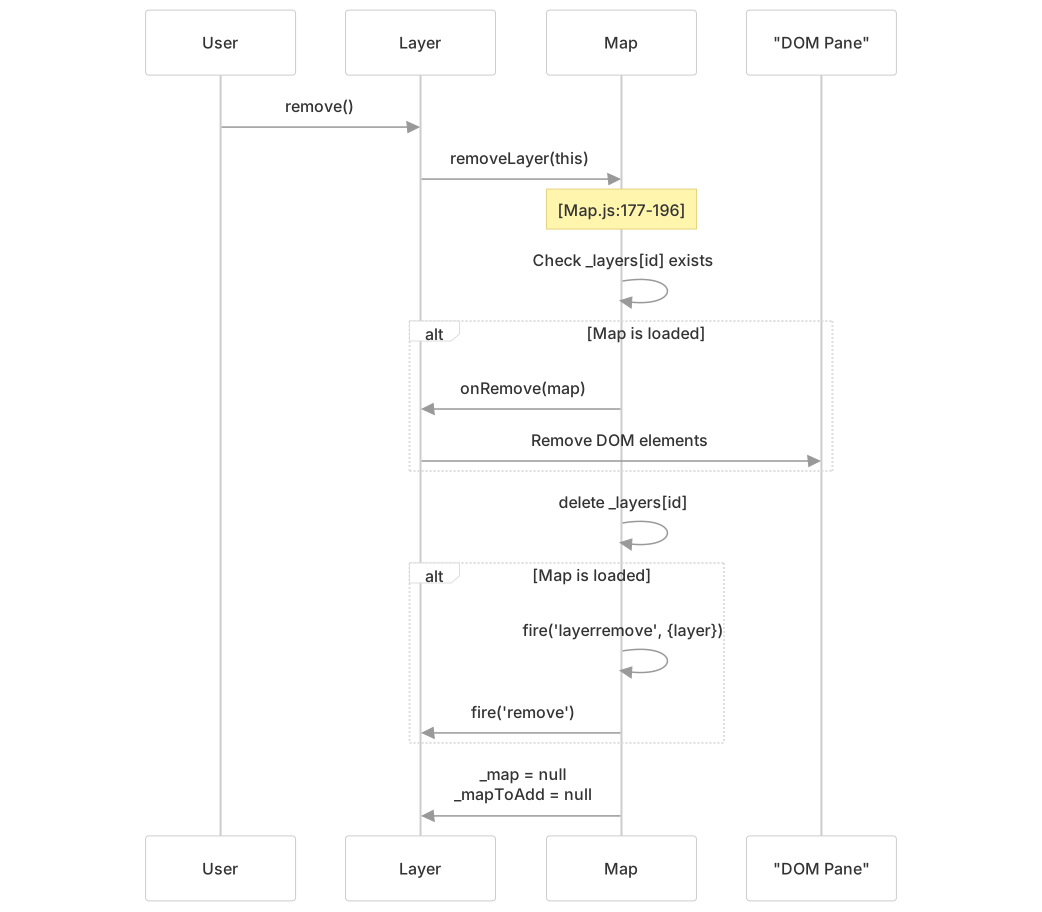
onRemove(map)- Optional cleanup src/layer/Layer.js127-128- Remove DOM elements
- Clean up event listeners
- Release resources
Layer Removal
Layer Removal Flow
Layer-Map Integration
The map maintains internal registries to track layers and their properties. Understanding this integration is crucial for implementing custom layers.
Layer Registry
The map stores layers in _layers using a unique stamp src/map/Map.js153-162:
// Internal structure (conceptual)
map._layers = {
  [stamp(layer)]: layer,
  // e.g., "42": tileLayer,
  //       "43": marker,
  //       "44": polygon
}The Util.stamp() function assigns a unique ID to each layer object, ensuring efficient lookups.
Zoom Bounds Tracking
Layers with minZoom or maxZoom options are tracked separately in _zoomBoundLayers src/map/Map.js227-241:
Zoom Bounds Management

Layer Iteration
The map provides eachLayer() for iterating over all layers src/map/Map.js212-217:
map.eachLayer(function(layer) {
    layer.bindPopup('Hello');
});This iterates over Object.values(this._layers), providing a clean API without exposing internal structure.
Pane System
The pane system controls the z-ordering and rendering hierarchy of layers. Each pane is a DOM element that contains layers of a specific type.
Default Pane Hierarchy

Pane Creation
Panes are created during map initialization src/map/Map.js1256-1286:
// Default panes created in _initPanes()
this._panes = {};
this._paneRenderers = {};

this._mapPane = this.createPane('mapPane', this._container);
DomUtil.setPosition(this._mapPane, new Point(0, 0));

this.createPane('tilePane');
this.createPane('overlayPane');
this.createPane('shadowPane');
this.createPane('markerPane');
this.createPane('tooltipPane');
this.createPane('popupPane');Custom Panes
Layers can use custom panes for specific z-ordering needs src/map/Map.js821-829:
// Create a custom pane
map.createPane('customPane');

// Use it in a layer
const layer = L.marker([0, 0], {
    pane: 'customPane'
});The createPane() method at src/map/Map.js821-829:
- Creates a
<div>with classleaflet-pane - Adds it to
_panesregistry - Appends it to the specified container (or
mapPaneby default)
Accessing Panes
Layers access their pane through getPane() src/layer/Layer.js77-79:
getPane(name) {
    return this._map.getPane(name ? (this.options[name] || name) : this.options.pane);
}This allows flexible pane specification:
layer.getPane()- Returns the layer's default panelayer.getPane('customPane')- Returns a specific pane by namelayer.getPane('tooltipPane')- Returns pane from options property
Attribution System
Layers can provide attribution text that is displayed in the map's attribution control. This is commonly used for tile layer credits and data source acknowledgments.
Attribution Flow

Setting Attribution
Attribution is set via the attribution option src/layer/Layer.js39-40:
const layer = L.tileLayer('https://tile.example.com/{z}/{x}/{y}.png', {
    attribution: '© OpenStreetMap contributors'
});Retrieving Attribution
The getAttribution() method src/layer/Layer.js93-95 returns the attribution string:
getAttribution() {
    return this.options.attribution;
}Subclasses can override this to provide dynamic attribution or aggregate attribution from multiple sources (as LayerGroup does).
Interactive Target Registration
Layers can register DOM elements as interactive targets, allowing the map to route events to the correct layer even when the event originates from a child element.
Registration Methods
addInteractiveTarget(targetEl) src/layer/Layer.js81-84
addInteractiveTarget(targetEl) {
    this._map._targets[Util.stamp(targetEl)] = this;
    return this;
}removeInteractiveTarget(targetEl) src/layer/Layer.js86-89
removeInteractiveTarget(targetEl) {
    delete this._map._targets[Util.stamp(targetEl)];
    return this;
}This mechanism allows the map to:
- Receive a DOM event on an element
- Look up the element's stamp in
_targets - Route the event to the owning layer
- Fire layer-specific events (e.g.,
click,pointerover)
Interactive Target Lookup

Layer Events
Layers fire and listen to various events throughout their lifecycle.
Layer-Specific Events
Defined in src/layer/Layer.js21-26:
add- Fired after the layer is added to a mapremove- Fired after the layer is removed from a map
Map Layer Events
The map fires events when layers are added or removed src/layer/Layer.js143-148:
layeradd- Fired when a new layer is added, includes{layer: Layer}layerremove- Fired when a layer is removed, includes{layer: Layer}
Example Event Usage
// Listen to layer addition
map.on('layeradd', function(e) {
    console.log('Layer added:', e.layer);
});

// Listen to layer's own add event
layer.on('add', function() {
    console.log('I was added to the map');
});

// Layer registers for map events
getEvents() {
    return {
        viewreset: this._reset,
        zoom: this._onZoom,
        moveend: this._update
    };
}Layer Type Categories
The layer system supports multiple categories of layers, each with specialized behavior:
| Category | Base Class | Purpose | Subsection |
|---|---|---|---|
| Raster Tiles | GridLayer, TileLayer | Load tiled images from URLs | 3.2 |
| Vector Shapes | Path, Polyline, Polygon, Circle | Draw geometric shapes | 3.4 |
| Markers | Marker | Display point locations with icons | 3.3 |
| Layer Collections | LayerGroup, FeatureGroup | Group multiple layers | 3.5 |
| HTML Overlays | DivOverlay, Popup, Tooltip | Display HTML content | 3.6 |
| GeoJSON | GeoJSON | Parse and render GeoJSON data | 3.7 |
Each category extends the base Layer class and implements the lifecycle hooks appropriate for its rendering strategy.
Layer Type Hierarchy (Simplified)

Implementation Guidelines
When implementing a custom layer, follow these guidelines:
Minimum Implementation
Extend
Layerclass CustomLayer extends Layer { // Implementation }Implement
onAdd(map)src/layer/Layer.js124-125- Create DOM elements
- Append to appropriate pane
- Initialize state
- Add event listeners
Implement
onRemove(map)src/layer/Layer.js127-128- Remove DOM elements
- Clean up listeners
- Release resources
Optional Enhancements
- Implement
getEvents()- Auto-register map event handlers - Implement
beforeAdd(map)- Early initialization - Override
getAttribution()- Provide attribution - Register interactive targets - Enable event routing
- Set default options - Use
setDefaultOptions()static method
Example Custom Layer
class CustomLayer extends Layer {
    static {
        this.setDefaultOptions({
            pane: 'overlayPane',
            attribution: '© Custom Layer'
        });
    }

    getEvents() {
        return {
            zoom: this._update,
            viewreset: this._reset
        };
    }

    onAdd(map) {
        this._container = L.DomUtil.create('div', 'custom-layer');
        this.getPane().appendChild(this._container);
        this._update();
        return this;
    }

    onRemove(map) {
        this._container.remove();
        return this;
    }

    _update() {
        // Update layer based on map state
        const zoom = this._map.getZoom();
        const center = this._map.getCenter();
        // ... update logic
    }

    _reset() {
        // Reset layer state on view reset
    }
}Testing Considerations
When testing custom layers, verify:
- Lifecycle Events -
addandremoveevents fire correctly spec/suites/map/MapSpec.js989-1011 - DOM Integration - Elements are added to correct pane spec/suites/map/MapSpec.js734-786
- Memory Cleanup -
onRemovecleans up properly spec/suites/map/MapSpec.js61-81 - Event Registration - Map events are bound/unbound src/layer/Layer.js106-110
- Attribution -
getAttribution()returns expected value - Layer Registry - Layer appears in
_layerswhen added src/map/Map.js160-162 - Zoom Bounds - Layers with min/max zoom update map limits spec/suites/map/MapSpec.js616-674