Map Interaction Handlers
Relevant source files
Purpose and Scope
This document describes the Handler system in Leaflet, which provides modular, enable/disable-able interaction behaviors for maps and layers. Handlers translate raw user input (mouse, touch, keyboard) into meaningful map operations like dragging, zooming, and selection.
For information about the underlying DOM event normalization and the Draggable utility class, see DOM Utilities and Event Handling. For UI controls like zoom buttons and layer switchers, see Controls.
Handler Base Class Pattern
All interaction handlers in Leaflet extend from the Handler base class, which provides a consistent interface for managing interactive behaviors. The base class is located at src/core/Handler.js
Core Handler Interface

Handler Lifecycle
| Method | Purpose | When Called |
|---|---|---|
initialize(map) | Constructor, stores map reference | Handler creation |
enable() | Activates handler, calls addHooks() | User enables feature or default initialization |
disable() | Deactivates handler, calls removeHooks() | User disables feature or cleanup |
enabled() | Returns activation state | Status check |
addHooks() | Attaches event listeners, creates DOM elements | Inside enable() |
removeHooks() | Detaches event listeners, cleans up | Inside disable() |
Map-Level Handlers
The LeafletMap class instantiates and manages several handlers for core map interactions. These handlers are exposed as properties on the map instance, allowing runtime control.
Handler Properties on Map

Usage Pattern
// Disable dragging
map.dragging.disable();

// Check if scroll wheel zoom is enabled
if (map.scrollWheelZoom.enabled()) {
    // ...
}

// Re-enable box zoom
map.boxZoom.enable();Individual Handler Implementations
DragHandler
File: src/map/handler/DragHandler.js
Property: map.dragging
Purpose: Enables panning the map by clicking and dragging
Behavior:
- Listens for pointer down events on the map container
- Creates a
Draggableinstance to handle drag lifecycle - Translates pixel movement into map panning
- Supports inertia (continued movement after release)
- Fires
movestart,move,moveendevents on the map
Key Implementation Details:
- Uses the
Draggableclass for low-level drag mechanics (see DOM Utilities and Event Handling) - Calculates new map center based on pixel offset
- Handles inertial deceleration with configurable easing
DoubleClickZoomHandler
File: src/map/handler/DoubleClickZoomHandler.js
Property: map.doubleClickZoom
Purpose: Zooms in one level on double-click
Behavior:
- Listens for
dblclickevents on the map - Zooms in by one level (or zooms out if shift key is held)
- Centers zoom on the clicked point
- Can be configured with animation options
ScrollWheelZoomHandler
File: src/map/handler/ScrollWheelZoomHandler.js
Property: map.scrollWheelZoom
Purpose: Zooms the map using mouse wheel or trackpad
Behavior:
- Listens for
wheelevents (normalized across browsers) - Accumulates delta values to determine zoom direction and magnitude
- Supports smooth zooming (fractional zoom levels during animation)
- Centers zoom on cursor position
- Includes throttling to prevent excessive zoom events
Configuration Options:
wheelDebounceTime: Delay before processing accumulated wheel eventswheelPxPerZoomLevel: Sensitivity of wheel input
BoxZoomHandler
File: src/map/handler/BoxZoomHandler.js
Property: map.boxZoom
Purpose: Enables zoom-to-selection by shift+dragging
Behavior:
- Activates when shift key is held during mouse down
- Draws a visual selection rectangle on the map
- On release, zooms to fit the selected bounds
- Temporarily disables the
DragHandlerwhile active
Implementation:
- Creates a temporary DOM element for the selection box
- Uses CSS transforms for positioning
- Calculates
LatLngBoundsfrom pixel coordinates - Calls
map.fitBounds()on completion
KeyboardHandler
File: src/map/handler/KeyboardHandler.js
Property: map.keyboard
Purpose: Enables keyboard navigation and zoom
Behavior:
- Listens for
keydownevents on the map container - Arrow keys: Pan the map
+/-keys: Zoom in/out- Requires map container to have focus
Key Bindings:
| Key | Action |
|---|---|
| ← → ↑ ↓ | Pan map in direction |
+ or = | Zoom in |
- or _ | Zoom out |
Accessibility Considerations:
- Map container must be focusable (tabindex attribute)
- Essential for keyboard-only users
PinchZoomHandler (TouchZoom)
File: src/map/handler/PinchZoomHandler.js
Property: map.touchZoom
Purpose: Enables pinch-to-zoom on touch devices
Behavior:
- Detects two-finger touch events
- Calculates distance change between touch points
- Translates to zoom level change
- Centers zoom between the two touch points
- Works in conjunction with touch drag for panning
Implementation Details:
- Tracks
touchstart,touchmove,touchendevents - Calculates pinch center point as midpoint between fingers
- Uses distance ratio to determine zoom delta
- Prevents default browser zoom behavior
TapHoldHandler
File: src/map/handler/TapHoldHandler.js
Property: map.tap
Purpose: Handles tap and long-press events on touch devices
Behavior:
- Distinguishes between tap, double-tap, and long-press
- Fires
clickanddblclickevents for taps - Fires
contextmenuevent for long-press - Provides touch-friendly alternatives to mouse events
Timing Thresholds:
- Tap duration: < 300ms
- Long press duration: > 500ms (configurable)
- Double tap window: 300ms between taps
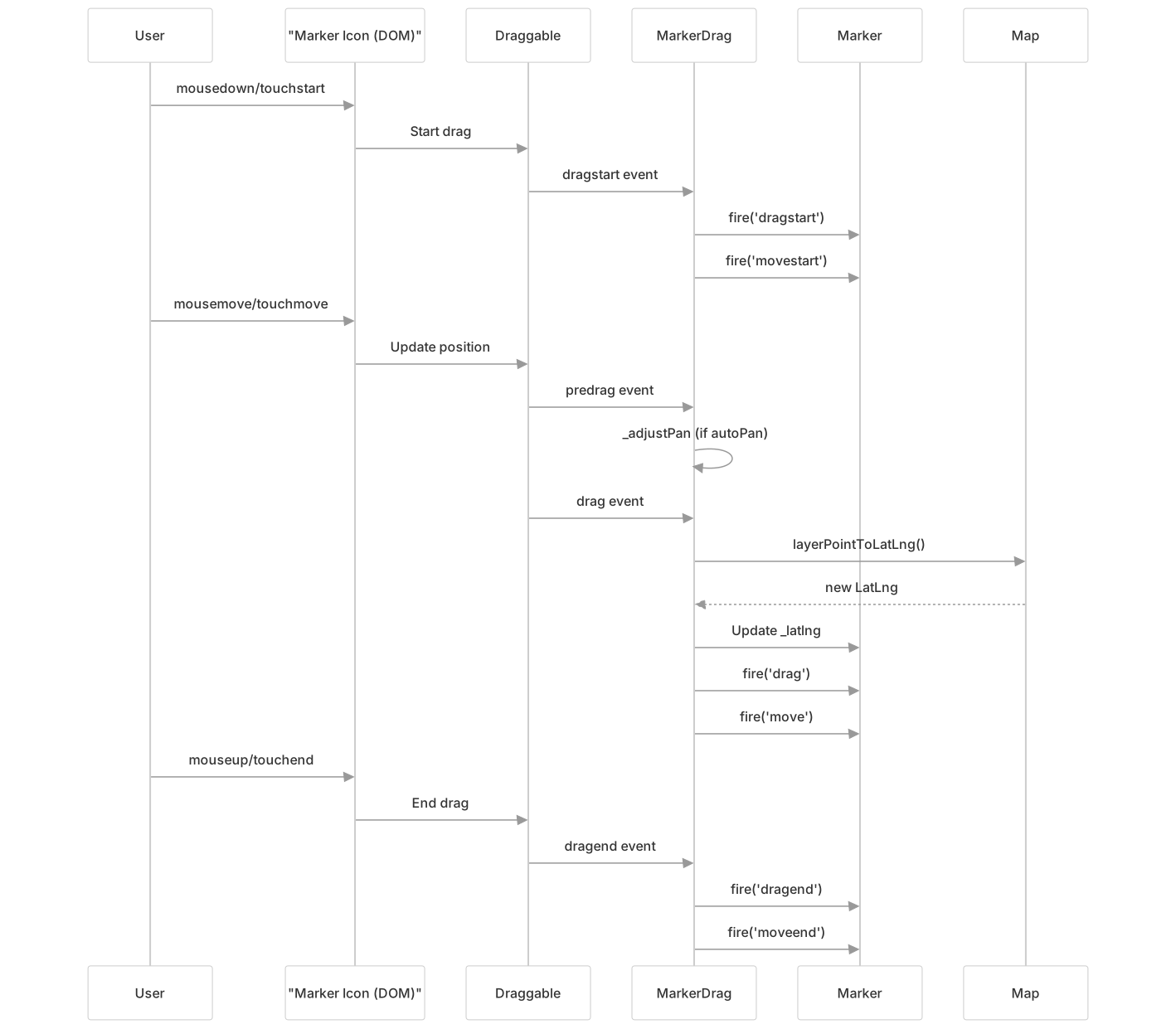
Layer-Level Handlers: MarkerDrag
While most handlers are attached to the map, some layers have their own handlers. The MarkerDrag handler enables dragging individual markers.
MarkerDrag Architecture

Sources: src/layer/marker/Marker.Drag.js1-159
MarkerDrag Implementation
Initialization: src/layer/marker/Marker.Drag.js26-29
// MarkerDrag stores reference to both marker and map
initialize(marker) {
    super.initialize(marker._map);
    this._marker = marker;
}Adding Hooks: src/layer/marker/Marker.Drag.js31-46
- Creates a
Draggableinstance for the marker icon - Attaches listeners for drag lifecycle events
- Adds
leaflet-marker-draggableCSS class to icon
Removing Hooks: src/layer/marker/Marker.Drag.js48-57
- Detaches all event listeners
- Disables the
Draggableinstance - Removes CSS class
Auto-Pan Behavior
When dragging a marker near the map edge, MarkerDrag automatically pans the map to keep the marker visible.
Auto-Pan Implementation: src/layer/marker/Marker.Drag.js63-97

Configuration:
autoPan: Boolean option to enable/disableautoPanPadding: Pixel buffer from edge (default: Point(50, 50))autoPanSpeed: Pixels per frame
Drag Event Flow
Handler Registration and Initialization
Map handlers are typically registered during map initialization. The map constructor instantiates each handler and stores it as a property.
Handler Initialization Pattern

Default Handler States
Map options control which handlers are enabled by default:
| Option | Handler | Default |
|---|---|---|
dragging | DragHandler | true (desktop), true (mobile) |
touchZoom | PinchZoomHandler | true (mobile) |
scrollWheelZoom | ScrollWheelZoomHandler | true (desktop) |
doubleClickZoom | DoubleClickZoomHandler | true |
boxZoom | BoxZoomHandler | true (desktop) |
keyboard | KeyboardHandler | true |
tap | TapHoldHandler | true (mobile) |
Handler Coordination and Interaction
Handlers may need to coordinate with each other to prevent conflicting interactions.
Handler Interaction Examples
Box Zoom and Drag:
BoxZoomHandlerdisablesDragHandlerwhen shift is held- Prevents simultaneous box selection and map panning
- Re-enables
DragHandleron completion
Scroll Wheel and Keyboard:
- Both handlers can zoom independently
- No conflict as they respond to different input sources
Touch Handlers:
PinchZoomHandler,TapHoldHandler, and touch drag coordinate- Touch event handling requires careful touch point tracking
- Prevents unintended gestures during pinch zoom
Event Flow Integration

Custom Handler Development
Developers can create custom handlers by extending the Handler base class.
Custom Handler Template
import {Handler} from './core/Handler.js';

class CustomHandler extends Handler {
    addHooks() {
        // Attach event listeners
        this._map.on('click', this._onClick, this);
    }

    removeHooks() {
        // Clean up event listeners
        this._map.off('click', this._onClick, this);
    }

    _onClick(e) {
        // Handle the event
        console.log('Custom handler clicked at', e.latlng);
    }
}

// Add to map
map.customHandler = new CustomHandler(map);
map.customHandler.enable();Best Practices
- Always clean up in
removeHooks(): Remove all event listeners and DOM elements - Store map reference: Access via
this._map - Fire appropriate events: Let users listen to handler actions
- Respect other handlers: Check if interaction conflicts with existing handlers
- Use DomEvent for cross-browser compatibility: Don't attach listeners directly
Summary
The Handler system provides a modular, consistent architecture for map interactions:
| Component | Purpose |
|---|---|
Handler base class | Defines enable/disable interface |
| Map handlers | Pan, zoom, select via mouse/keyboard |
| Touch handlers | Pinch, tap, long-press for mobile |
| Layer handlers | Drag markers and other interactive layers |
DomEvent integration | Cross-browser event normalization (see #4.1) |
Draggable integration | Low-level drag mechanics (see #4.1) |
All handlers follow the same lifecycle pattern (addHooks/removeHooks) and can be controlled at runtime via enable()/disable() methods, providing fine-grained control over map behavior.