Layer Groups and Feature Groups
Purpose and Scope
This document covers the LayerGroup and FeatureGroup classes, which enable managing collections of layers as single units. These classes provide mechanisms for adding, removing, and iterating over multiple layers collectively, and integrating them with the map's lifecycle.
For information about the base Layer class that these extend, see Layer Base Class. For details on specific layer types (markers, vectors, etc.) that can be grouped, see their respective sections (Markers, Vector Layers). For GeoJSON integration with FeatureGroup, see GeoJSON Support.
Overview
LayerGroup and FeatureGroup provide hierarchical layer management in Leaflet. Both classes extend the base Layer class and manage collections of child layers, but differ in their event handling and collective operations capabilities.

LayerGroup Class
Architecture and Layer Storage
LayerGroup stores child layers in an internal _layers object, indexed by unique numeric IDs generated using Util.stamp(). This approach enables efficient layer lookup by ID and supports both layer objects and IDs in method calls.

The initialize method sets up the layer storage and adds any initial layers provided in the constructor:
| Constructor Parameter | Type | Description |
|---|---|---|
layers | Layer[] (optional) | Initial set of layers to add to the group |
options | Object (optional) | Options object merged via Util.setOptions |
Core Methods
Layer Management
The LayerGroup provides methods for adding, removing, and querying layers:

| Method | Parameters | Return | Description |
|---|---|---|---|
addLayer | layer: Layer | this | Adds layer to group; adds to map if group is on map |
removeLayer | layer: Layer or id: Number | this | Removes layer from group and map |
hasLayer | layer: Layer or id: Number | Boolean | Checks if layer is in group |
clearLayers | none | this | Removes all layers from group |
getLayer | id: Number | Layer | Returns layer with given ID |
getLayers | none | Layer[] | Returns array of all layers |
getLayerId | layer: Layer | Number | Returns internal ID for a layer |
Iteration
The eachLayer method provides a functional approach to layer iteration:
// Signature from src/layer/LayerGroup.js:94-98
eachLayer(method, context)This method iterates over all layers in the group, calling the provided function for each layer. The context parameter sets the this value in the callback.
Map Lifecycle Integration
LayerGroup integrates with the map's layer lifecycle through the onAdd and onRemove methods inherited from the base Layer class:
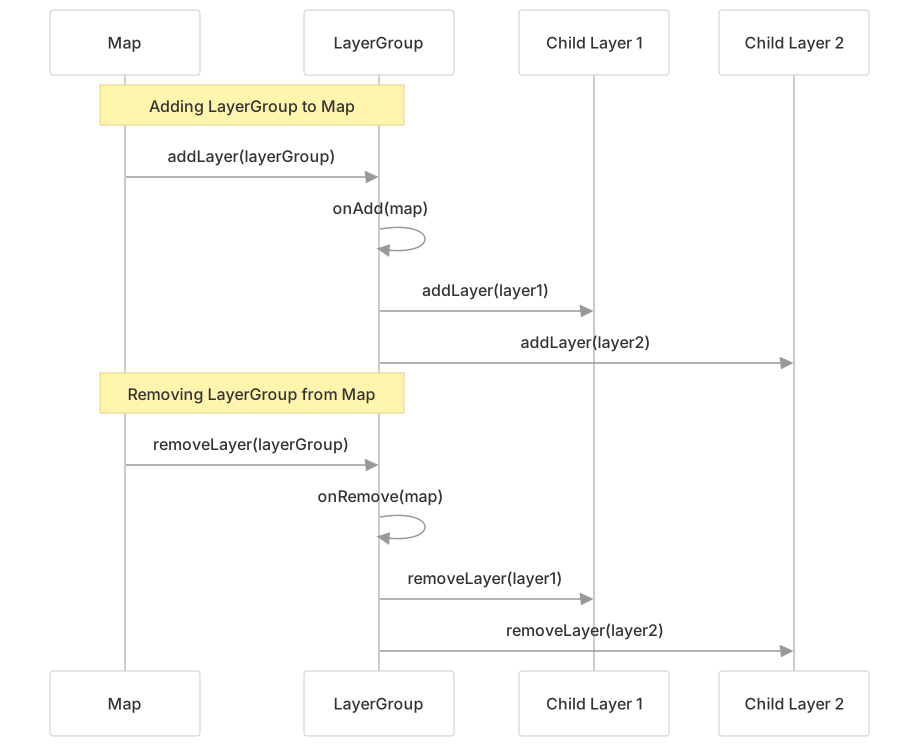
When a LayerGroup is added to or removed from a map, it automatically adds or removes all its child layers by iterating through them with eachLayer.
Collective Operations
LayerGroup provides a setZIndex method that applies to all child layers:
// From src/layer/LayerGroup.js:117-119
setZIndex(zIndex) {
    return this.eachLayer(l => l.setZIndex?.(zIndex));
}This method uses optional chaining (?.) to safely call setZIndex only on layers that support it.
FeatureGroup Class
Extension of LayerGroup
FeatureGroup extends LayerGroup with event propagation and additional collective operations. The class is designed for interactive feature collections where events from individual layers should bubble up to the group level.

Event Propagation
FeatureGroup establishes itself as an event parent for all child layers, enabling event bubbling from children to the group:
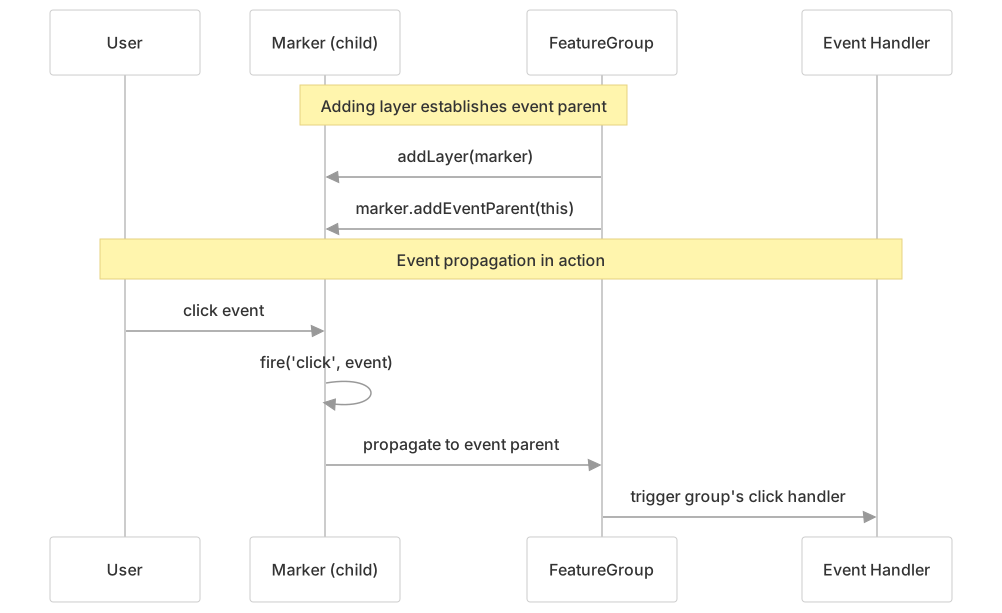
The event parent relationship is managed in the overridden addLayer and removeLayer methods:
| Method | Event Parent Action | Layer Event Fired |
|---|---|---|
addLayer | layer.addEventParent(this) | layeradd |
removeLayer | layer.removeEventParent(this) | layerremove |
Layer Events
FeatureGroup fires layeradd and layerremove events when layers are added or removed:
// From addLayer method, src/layer/FeatureGroup.js:38-40
// @event layeradd: LayerEvent
// Fired when a layer is added to this \`FeatureGroup\`
return this.fire('layeradd', {layer});

// From removeLayer method, src/layer/FeatureGroup.js:55-57
// @event layerremove: LayerEvent
// Fired when a layer is removed from this \`FeatureGroup\`
return this.fire('layerremove', {layer});Collective Operations
FeatureGroup provides methods to apply operations to all child layers that support them:
| Method | Description | Implementation Strategy |
|---|---|---|
setStyle(style) | Applies path styling to all vector layers | Calls setStyle on layers that have the method |
bringToFront() | Moves all layers to the top of the rendering order | Calls bringToFront on supporting layers |
bringToBack() | Moves all layers to the bottom of the rendering order | Calls bringToBack on supporting layers |
Each method uses optional chaining to safely handle layers that may not support the operation:
// From src/layer/FeatureGroup.js:62-76
setStyle(style) {
    return this.eachLayer(l => l.setStyle?.(style));
}

bringToFront() {
    return this.eachLayer(l => l.bringToFront?.());
}

bringToBack() {
    return this.eachLayer(l => l.bringToBack?.());
}Bounds Calculation
The getBounds() method computes the geographic bounding box encompassing all child layers:

The implementation handles both layers with bounds (polygons, polylines) and point layers (markers):
// From src/layer/FeatureGroup.js:80-87
getBounds() {
    const bounds = new LatLngBounds();

    for (const layer of Object.values(this._layers)) {
        bounds.extend(layer.getBounds ? layer.getBounds() : layer.getLatLng());
    }
    return bounds;
}Comparison: LayerGroup vs FeatureGroup
| Feature | LayerGroup | FeatureGroup |
|---|---|---|
| Base Class | Layer | LayerGroup |
| Layer Management | ✓ (add, remove, iterate) | ✓ (inherited) |
| Event Propagation | ✗ | ✓ (addEventParent) |
| Layer Events | ✗ | ✓ (layeradd, layerremove) |
| Collective Styling | ✗ | ✓ (setStyle) |
| Z-Order Management | setZIndex only | setZIndex, bringToFront, bringToBack |
| Bounds Calculation | ✗ | ✓ (getBounds) |
| Typical Use Case | Simple grouping | Interactive feature collections |
Usage Patterns
Basic LayerGroup Usage
// Example from src/layer/LayerGroup.js:14-19
const group = new LayerGroup([marker1, marker2])
    .addLayer(polyline)
    .addTo(map);

// Remove all layers
group.clearLayers();

// Iterate over layers
group.eachLayer(layer => {
    console.log(layer);
});FeatureGroup with Event Handling
// Example from src/layer/FeatureGroup.js:17-22
new FeatureGroup([marker1, marker2, polyline])
    .bindPopup('Hello world!')
    .on('click', function() {
        alert('Clicked on a member of the group!');
    })
.addTo(map);The event handler receives events from any child layer due to event propagation.
Collective Styling
// Apply styling to all vector layers in the group
featureGroup.setStyle({
    color: 'red',
    weight: 5
});

// Reorder all layers
featureGroup.bringToFront();Implementation Details
Layer ID Generation
Both classes use Util.stamp(layer) to generate unique numeric IDs for layers. This function assigns and returns a unique identifier that remains consistent for the layer's lifetime:
// From src/layer/LayerGroup.js:123-125
getLayerId(layer) {
    return Util.stamp(layer);
}Automatic Map Synchronization
When a LayerGroup is added to a map, the _map property is set (by the base Layer class), and onAdd is called. This triggers automatic addition of all child layers:
// From src/layer/LayerGroup.js:81-87
onAdd(map) {
    this.eachLayer(map.addLayer, map);
}

onRemove(map) {
    this.eachLayer(map.removeLayer, map);
}Similarly, when new layers are added to a group that's already on a map, they're immediately added to the map:
// From src/layer/LayerGroup.js:38-46
addLayer(layer) {
    const id = this.getLayerId(layer);
    this._layers[id] = layer;
    this._map?.addLayer(layer);  // Optional chaining: only if _map exists
    return this;
}Optional Method Calls
FeatureGroup uses optional chaining (?.) extensively to safely call methods that may not exist on all layer types:
// From src/layer/FeatureGroup.js:62-76
setStyle(style) {
    return this.eachLayer(l => l.setStyle?.(style));  // Only calls if method exists
}

bringToFront() {
    return this.eachLayer(l => l.bringToFront?.());
}

bringToBack() {
    return this.eachLayer(l => l.bringToBack?.());
}This pattern allows mixed layer types (e.g., markers and polygons) in the same FeatureGroup without errors.
Bounds Extension Strategy
The getBounds() method in FeatureGroup handles two types of layers:
- Layers with bounds (polygons, polylines, circles): Uses
layer.getBounds()which returns aLatLngBoundsobject - Point layers (markers): Uses
layer.getLatLng()which returns a singleLatLngcoordinate
The LatLngBounds.extend() method accepts both types, expanding the bounds to include the new geometry:
// From src/layer/FeatureGroup.js:80-87
getBounds() {
    const bounds = new LatLngBounds();
    for (const layer of Object.values(this._layers)) {
        bounds.extend(layer.getBounds ? layer.getBounds() : layer.getLatLng());
    }
    return bounds;
}Testing Coverage
The LayerGroup test suite validates core functionality:
| Test Category | Verified Behavior |
|---|---|
hasLayer | Throws on invalid arguments; correctly identifies layer membership |
addLayer | Adds layers and returns the group instance |
removeLayer | Removes layers and returns the group instance |
clearLayers | Removes all layers at once |
getLayers | Returns accurate array of all layers |
eachLayer | Iterates with correct layer and context |
toGeoJSON | Generates valid GeoJSON for grouped layers |