Controls
This document covers the Control system in Leaflet, which provides UI widgets positioned at the corners of the map. It explains the Control base class, the positioning system, lifecycle management, and patterns for creating custom controls. For information about map interaction handlers (drag, zoom, keyboard), see Map Interaction Handlers.
Control Architecture
The Control class provides a base implementation for UI widgets that are positioned at fixed locations on the map (typically in the corners). Unlike layers, controls are not part of the geographic coordinate system but are anchored to the map container's edges.

Key Distinction: Controls extend Class, not Layer. They do not participate in the layer system and are always visible regardless of zoom level or pane configuration.
Positioning System
Controls are positioned in one of four corner containers on the map. The positioning system is initialized when the map is created and provides dedicated DOM containers for each corner.
Corner Positions
| Position String | Location | Default Controls |
|---|---|---|
'topleft' | Upper left corner | Zoom control |
'topright' | Upper right corner | (default position if not specified) |
'bottomleft' | Lower left corner | Scale control |
'bottomright' | Lower right corner | Attribution control |

Implementation Details: The map creates four corner containers during initialization via _initControlPos(). Each corner is a <div> element with CSS classes that handle positioning through flexbox or absolute positioning.
Control Base Class
The Control class provides core functionality for positioning and lifecycle management. All controls must implement the onAdd method and optionally onRemove.
Constructor and Options
// Default options
{
  position: 'topright'  // Initial corner position
}The constructor accepts an options object that is merged with defaults using Util.setOptions().
Core Methods
| Method | Description | Returns |
|---|---|---|
getPosition() | Returns the current position string | string |
setPosition(position) | Changes the control's position | this |
getContainer() | Returns the control's DOM element | HTMLElement |
addTo(map) | Adds the control to a map | this |
remove() | Removes the control from its map | this |
Position Change Behavior: When setPosition() is called, the control is removed from its current corner (if on a map) and re-added to the new corner. This ensures proper DOM ordering and CSS application.
Control Lifecycle
Controls follow a specific lifecycle pattern when being added to or removed from a map.
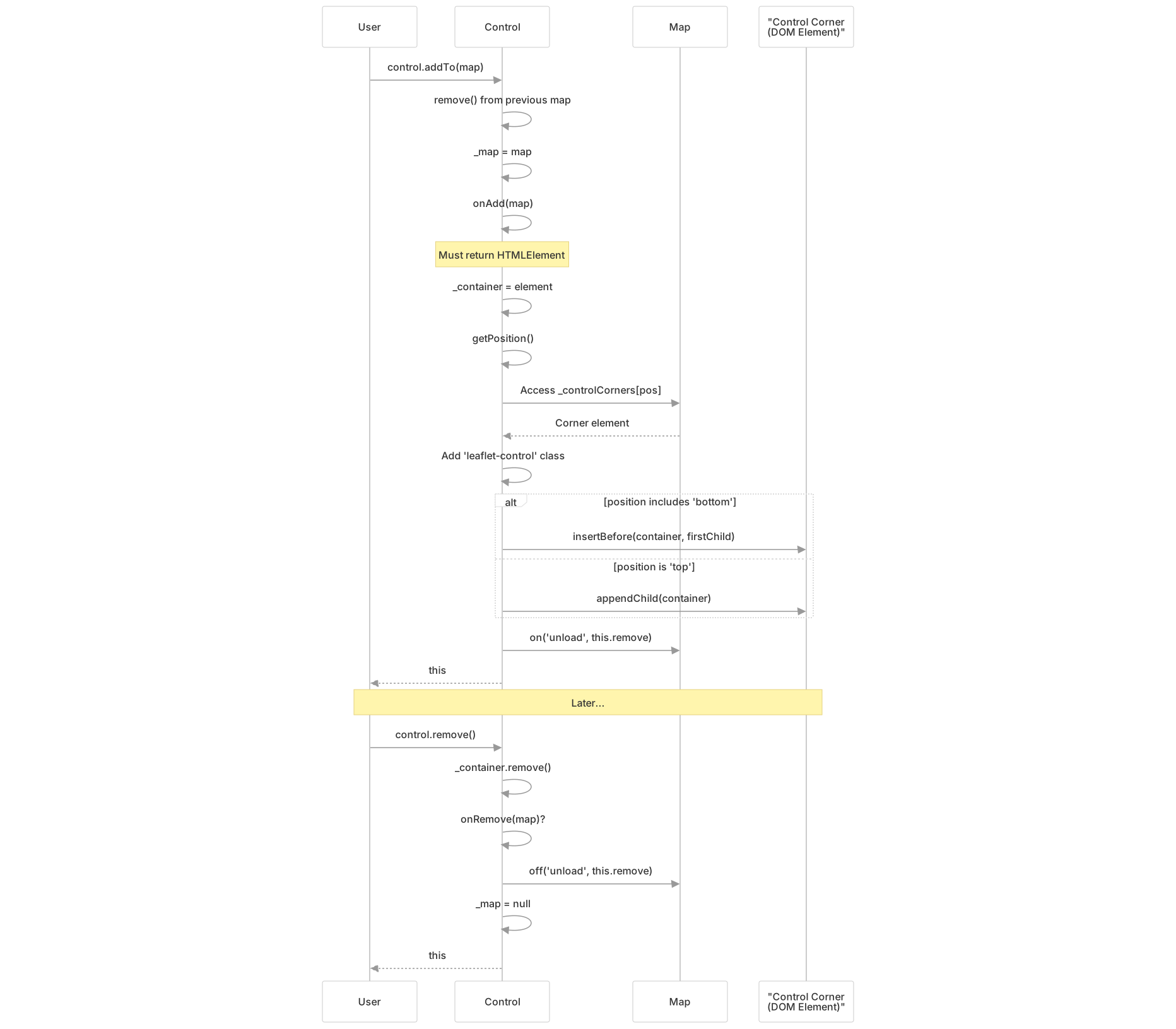
Lifecycle Methods
onAdd(map: LeafletMap): HTMLElement (required)
- Must be implemented by subclasses
- Should create and return the control's container DOM element
- Should add event listeners to map or DOM elements as needed
- Called when the control is added to the map
onRemove(map: LeafletMap): void (optional)
- Should clean up event listeners and resources
- Called when the control is removed from the map
- Not required if the control doesn't need cleanup
Insertion Order: Controls with 'bottom' positions are inserted at the beginning of their corner container (via insertBefore), while 'top' positions are appended to the end. This ensures proper visual stacking order.
Map Integration
The map provides infrastructure for hosting controls through dedicated methods and DOM structures.
Map Methods

Control Container Structure: The map creates a single control container (_controlContainer) during initialization, which holds all four corner containers (_controlCorners). This structure is created by _initControlPos() and cleaned up by _clearControlPos() when the map is destroyed.
Corner Container Creation
The _initControlPos() method creates the corner infrastructure:
- Creates the main control container with class
'leaflet-control-container' - Creates four corner divs, each with two CSS classes for positioning:
- Vertical:
'leaflet-top'or'leaflet-bottom' - Horizontal:
'leaflet-left'or'leaflet-right'
- Vertical:
- Stores references in
_controlCornersobject with keys:'topleft','topright','bottomleft','bottomright'
Built-in Controls
Leaflet includes several built-in control implementations that extend the Control base class:
| Control | Purpose | Default Position |
|---|---|---|
Control.Zoom | Zoom in/out buttons | 'topleft' |
Control.Attribution | Copyright and data attribution | 'bottomright' |
Control.Layers | Layer switcher for base and overlay layers | 'topright' |
Control.Scale | Scale bar showing map scale | 'bottomleft' |
Note: The implementation files for these built-in controls are not included in the provided sources, but they all follow the same pattern of extending Control and implementing onAdd() and optionally onRemove().
Creating Custom Controls
Custom controls follow a consistent pattern based on the Control base class.
Basic Pattern

Implementation Requirements
Required Method: onAdd(map)
- Must return an
HTMLElementthat represents the control - Should create DOM elements for the control's UI
- Should attach event listeners to the map or DOM elements
- Receives the map instance as a parameter
Optional Method: onRemove(map)
- Should remove event listeners added in
onAdd - Should clean up any resources or timers
- Receives the map instance as a parameter
Accessibility Helper: _refocusOnMap(e)
- Available to shift focus back to the map after control interaction
- Excludes keyboard-initiated clicks (position 0,0) to maintain focus on the control for accessibility
- Can be used in control event handlers
Example Structure
A custom control typically follows this structure:
- Class Definition: Extend
Controlclass - Default Options: Set via static block with
setDefaultOptions() - Initialization: Optional
initialize()method for constructor logic - DOM Creation:
onAdd()creates and returns the control's container - Event Binding: Attach listeners to map events or control UI
- Cleanup:
onRemove()removes listeners and cleans up resources
Position Option: Custom controls inherit the position option from the base class, allowing users to place them in any corner.
Control vs Layer Comparison
Understanding the differences between Controls and Layers is important for choosing the right abstraction:
| Aspect | Control | Layer |
|---|---|---|
| Base Class | Control extends Class | Layer extends Evented |
| Positioning | Fixed to map corners | Geographic coordinates |
| DOM Location | Control corners in control container | Panes (tilePane, overlayPane, etc.) |
| Zoom Behavior | Always visible at same size | May scale or have zoom limits |
| Primary Use | UI widgets and tools | Map data and geographic features |
| Integration | map.addControl() / control.addTo() | map.addLayer() / layer.addTo() |
| Required Method | onAdd(map): HTMLElement | onAdd(map): void |
| Attribution | N/A | getAttribution() for attribution control |
Key Insight: Controls are UI elements for interacting with the map itself, while layers represent geographic data to be displayed on the map. Choose Control for tools and widgets, Layer for data visualization.
Technical Details
DOM Structure
When controls are added to the map, they create a specific DOM hierarchy:
map._container (map container)
└── map._controlContainer (class: leaflet-control-container)
    ├── map._controlCorners['topleft'] (class: leaflet-top leaflet-left)
    │   └── control._container (class: leaflet-control)
    ├── map._controlCorners['topright'] (class: leaflet-top leaflet-right)
    ├── map._controlCorners['bottomleft'] (class: leaflet-bottom leaflet-left)
    └── map._controlCorners['bottomright'] (class: leaflet-bottom leaflet-right)
└── control._container (class: leaflet-control)Class Assignment
Every control's container element automatically receives the CSS class 'leaflet-control', which provides default styling for controls (typically including background, border, and padding).
Automatic Cleanup
Controls automatically register for cleanup when the map fires an 'unload' event. This ensures that controls are properly removed when the map is destroyed, preventing memory leaks.